
1. Arahan Keselamatan Penting
To reduce the risk of fire, electric shock, or injury, always follow these basic safety precautions when using your Arctic-Pro Portable Digital Ice Maker Machine:
- Baca semua arahan sebelum digunakan.
- Jangan sentuh permukaan panas. Gunakan pemegang atau tombol.
- To protect against electrical hazards, do not immerse cord, plug, or any part of the appliance in water or other liquids.
- Pengawasan rapi diperlukan apabila sebarang perkakas digunakan oleh atau berhampiran kanak-kanak.
- Cabut plag dari soket apabila tidak digunakan dan sebelum membersihkan. Biarkan sejuk sebelum memakai atau menanggalkan bahagian, dan sebelum membersihkan perkakas.
- Jangan kendalikan sebarang perkakas dengan kord atau palam yang rosak, atau selepas perkakas tidak berfungsi atau rosak dalam apa jua cara. Hubungi perkhidmatan pelanggan untuk pemeriksaan, pembaikan atau pelarasan.
- Penggunaan lampiran aksesori yang tidak disyorkan oleh pengilang perkakas boleh menyebabkan bahaya.
- Jangan gunakan di luar rumah.
- Jangan biarkan kord tergantung di tepi meja atau kaunter, atau menyentuh permukaan panas.
- Jangan letakkan pada atau berhampiran gas panas atau penunu elektrik, atau dalam ketuhar yang dipanaskan.
- Sentiasa pasangkan plag pada perkakas terlebih dahulu, kemudian pasangkan kord ke dalam salur keluar dinding. Untuk memutuskan sambungan, matikan mana-mana kawalan kepada "mati", kemudian tanggalkan palam dari alur keluar dinding.
- Jangan gunakan perkakas untuk kegunaan rumah selain daripada yang dimaksudkan.
- Perkakas ini adalah untuk kegunaan rumah sahaja.
- Jangan gunakan bahan kimia atau wap yang menghakis dalam perkakas ini.
- This ice maker must be grounded.
- Jangan tusukan tiub penyejuk.
2. Produk Lebihview
The Arctic-Pro Portable Digital Ice Maker Machine is designed to produce ice quickly and efficiently. It features a compact design suitable for various settings.
2.1 Komponen
- Unit Pembuat Ais
- Bakul Ais Boleh Ditanggalkan
- Skop Ais
- Power Cord (3-prong plug)
2.2 Ciri-ciri
- Skrin Digital: An easy-to-read LCD control panel for selecting ice size, setting timers, and controlling cleaning functions.
- Jelas View Window Lid: Allows observation of the ice making process.
- Fill Sensor: Detects water level to ensure proper operation.
- Penderia Pintar: Prevents the ice basket from overfilling.
- Two Ice Cube Sizes: Choose between small (0.75 x 0.75 inches) and large (1 x 0.75 inches) ice cubes.
- Fast Ice Production: Produces first batch of ice in 6-8 minutes.
- Kapasiti Harian: Mampu menghasilkan sehingga 26 paun ais setiap hari.
- Enhanced Cooling System: Features a fan for efficient heat dissipation.

Figure 1: Key features and components of the ice maker.
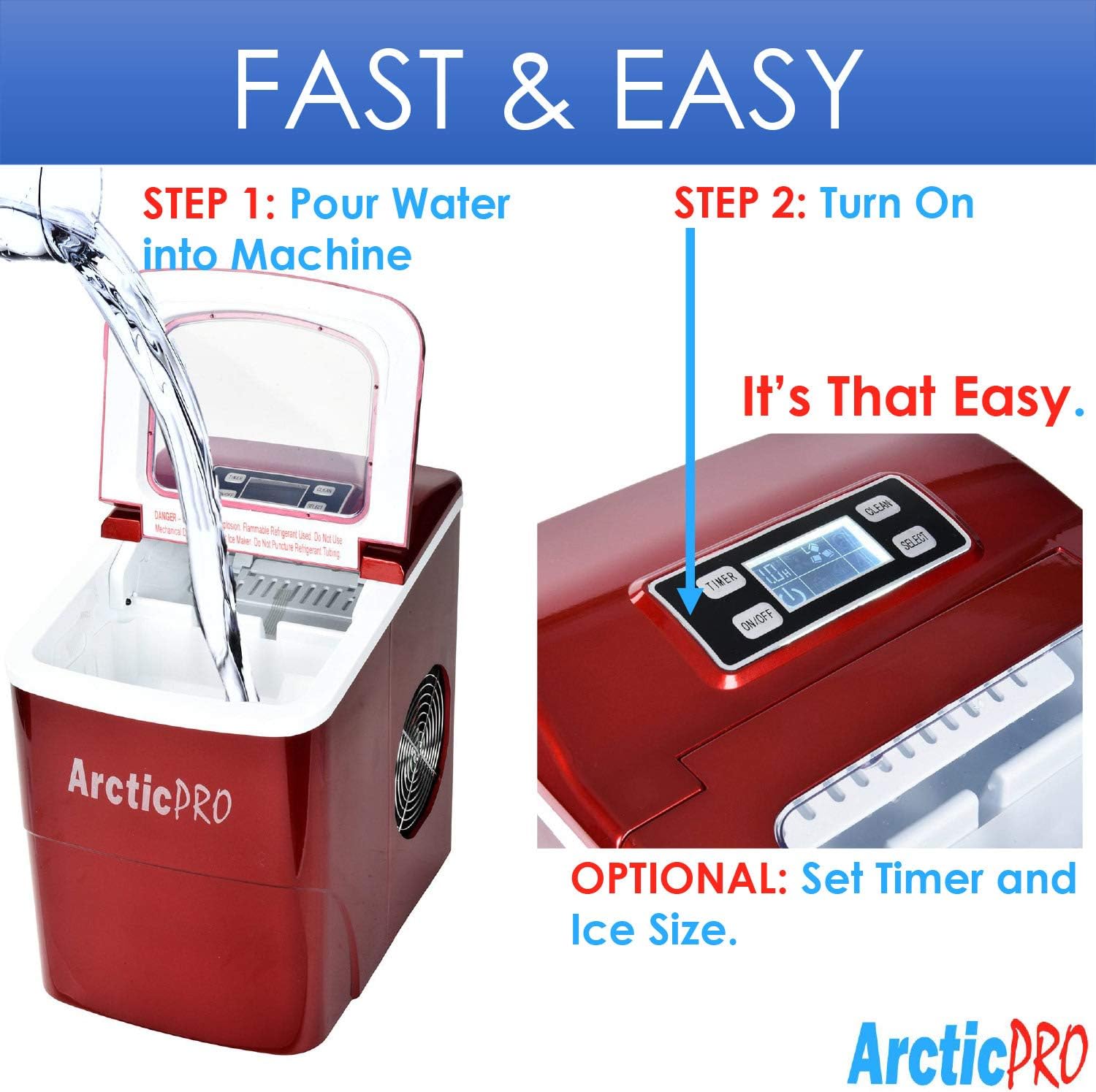
Figure 2: Ice production capabilities.
3. Arahan Persediaan
3.1 Membongkar
- Keluarkan semua bahan pembungkusan dari unit.
- Inspect the ice maker for any damage. If damaged, do not operate and contact customer service.
- Remove the ice basket and ice scoop from inside the unit.
3.2 Pembersihan Awal
Before first use, clean the interior of the ice maker:
- Wash the ice basket and ice scoop with warm water and mild detergent. Rinse thoroughly.
- Bersihkan bahagian dalam pembuat ais dengan kain lembut dampened with warm water and a small amount of vinegar or mild detergent. Rinse with clean water and drain.
- Pastikan semua bahagian kering sebelum dipasang semula.
3.3 Penempatan
- Letakkan pembuat ais di atas permukaan yang stabil dan rata, jauh daripada cahaya matahari langsung dan sumber haba.
- Ensure there is adequate ventilation around the unit, especially at the back and sides where the cooling fan is located.
- Benarkan sekurang-kurangnya 4 inci ruang di sekeliling unit untuk peredaran udara yang betul.
3.4 Sambungan Kuasa
- Plug the 3-prong power cord into a grounded electrical outlet (115V, 60Hz).
- Allow the unit to rest for at least one hour before adding water and operating, especially if it was tilted during transport.
4. Arahan Operasi
Operating your Arctic-Pro ice maker is a simple two-step process:

Figure 3: Simple operating steps.
4.1 Menambah Air
- Buka penutup pembuat ais.
- Pour potable water into the water reservoir. Do not exceed the 'MAX FILL LINE' indicated inside the reservoir.
- Tutup penutup.

Video 1: Demonstrates adding water to the ice maker. Note: This video is a customer-generated preview and may not represent official instructions.
4.2 Starting Ice Production
- Tekan ke HIDUP/MATI button on the digital control panel to turn on the unit.
- Gunakan PILIH button to choose your desired ice cube size: Small (S) or Large (L). The selected size will be indicated on the digital screen.
- The ice maker will begin its cycle. The first batch of ice cubes will typically be ready in 6-8 minutes.
4.3 Petunjuk
- PENUH AIS: An indicator light or message on the digital screen will illuminate when the ice basket is full. The unit will automatically pause ice production. Remove ice from the basket to resume production.
- TAMBAH AIR: An indicator light or message will illuminate when the water reservoir is low. Add water to the reservoir to resume ice production.
4.4 Timer Function (Optional)
The digital screen allows you to set a timer for operation. Refer to the specific instructions in your product packaging for detailed timer setup.
5. Penyelenggaraan dan Pembersihan
Regular cleaning and maintenance ensure optimal performance and longevity of your ice maker.
5.1 Pembersihan Harian
- After each use, unplug the unit.
- Remove the ice basket and empty any remaining ice.
- Toskan sebarang baki air dari takungan menggunakan palam saliran yang terletak di bahagian bawah unit.
- Wipe the interior with a soft cloth.
5.2 Pembersihan Mingguan
- Lakukan langkah pembersihan harian.
- Prepare a solution of warm water and a small amount of white vinegar or a food-grade ice maker cleaner.
- Pour the solution into the water reservoir and allow it to sit for 10-15 minutes.
- Toskan larutan sepenuhnya.
- Rinse the reservoir thoroughly with clean water multiple times to remove any residue.
- Lap bahagian luar dengan lembut, damp kain.
5.3 Penyimpanan
If storing the ice maker for an extended period:
- Ensure the unit is thoroughly cleaned and completely dry.
- Leave the lid slightly ajar to prevent mold and mildew growth.
- Simpan di tempat yang sejuk dan kering.
6. Penyelesaian masalah
Review the following common issues and solutions before contacting customer service.
| Masalah | Kemungkinan Punca | Penyelesaian |
|---|---|---|
| Pembuat ais tidak dihidupkan | Tiada bekalan kuasa | Check if the power cord is securely plugged into a grounded outlet. Test the outlet with another appliance. |
| Tiada pengeluaran ais | Lack of water in reservoir | Add water to the reservoir up to the MAX FILL LINE. |
| Suhu persekitaran terlalu tinggi | Ensure the ice maker is in a cool environment and not exposed to direct sunlight or heat sources. | |
| Air circulation blocked | Ensure adequate space around the unit for ventilation. Clean any dust from the fan vents. | |
| Ice cubes are too small or cloudy | Suhu air terlalu tinggi | Use colder water when filling the reservoir. |
| Pengumpulan mineral | Perform a thorough cleaning and descaling as per maintenance instructions. Use filtered water. | |
| "ICE FULL" indicator is on, but basket is not full | Ice blocking sensor | Rearrange ice in the basket or remove some ice to clear the sensor path. |
| Bunyi luar biasa semasa operasi | Bunyi operasi biasa | Some gurgling or fan noise is normal. If the noise is excessive or unusual, contact customer service. |
7. Spesifikasi
| Ciri | Spesifikasi |
|---|---|
| Nama Model | Mesin Pembuat Ais Mudah Alih |
| Nombor Model | 21738 |
| Dimensi (D x W x H) | 11.5" x 8.75" x 12.5" |
| Kapasiti Pengeluaran Ais Harian | Sehingga 26 paun |
| First Ice Production Time | 6-8 Minit |
| Saiz Kiub Ais | Small (0.75"x0.75"), Large (1"x0.75") |
| Wattage | 100 watt |
| Voltage | 115 Volt |
| Tahap Kebisingan | 45 Desibel |
| bahan | plastik |
| Komponen yang Disertakan | Ice Maker, Ice Basket, Small Ice Scoop |

Rajah 4: Dimensi produk.
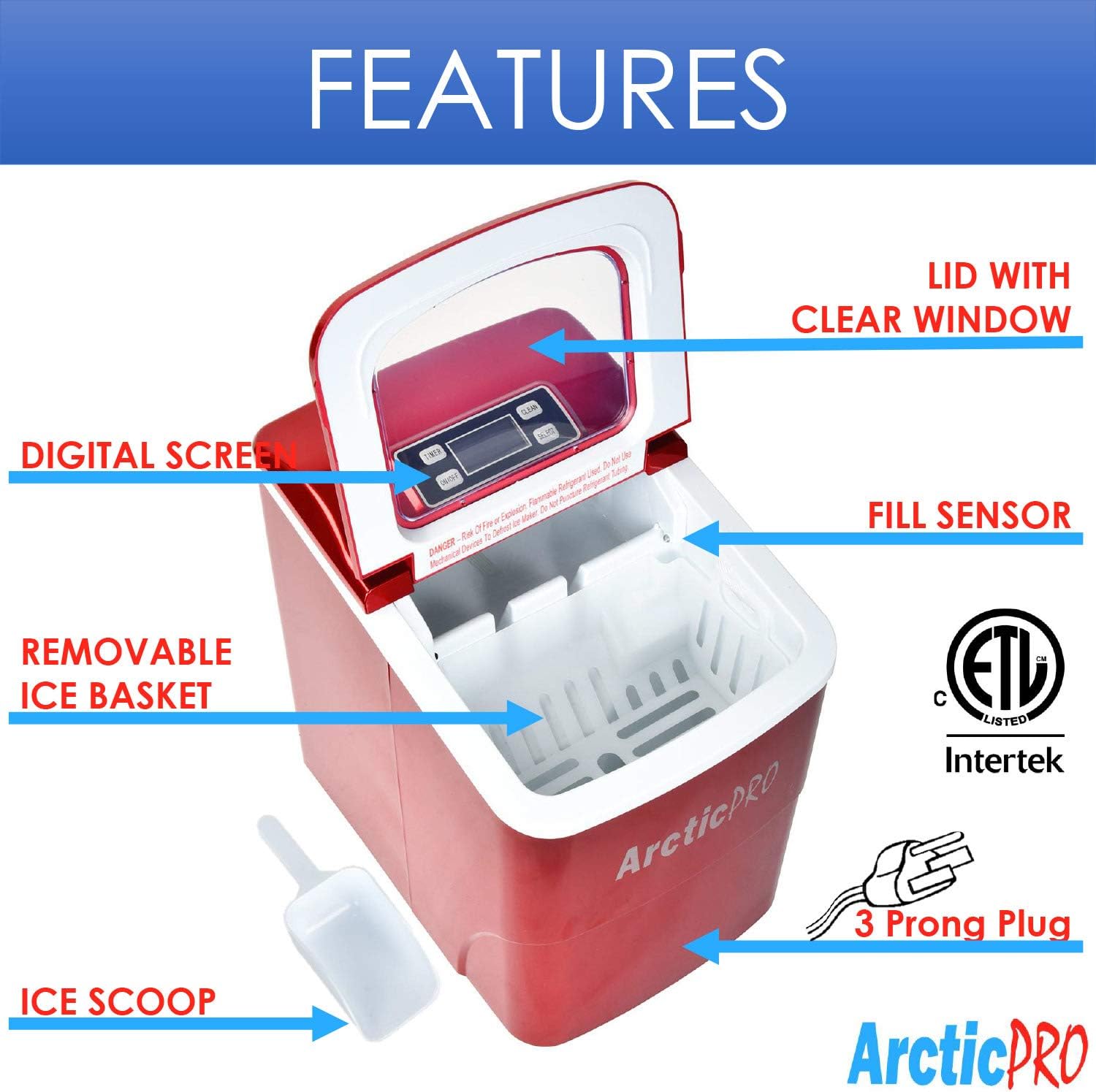
Figure 5: Ice cube size comparison.
8. Waranti dan Sokongan Pelanggan
Arctic-Pro products are manufactured to high-quality standards. For warranty information, product registration, or technical assistance, please refer to the warranty card included with your purchase or visit the official Arctic-Pro webtapak.
If you encounter any issues not covered in this manual, please contact Arctic-Pro customer support for further assistance.