
1. Pengenalan
The Zerone Sport Action DV Camera is a compact and portable device designed for capturing high-definition video during various outdoor activities. Featuring 1080P and 720P recording options, a 120-degree wide-angle lens, and an IPX-4 waterproof aluminum alloy shell, this camera is built for durability and ease of use. It includes a built-in microphone for audio recording and provides vibration feedback for operational status.
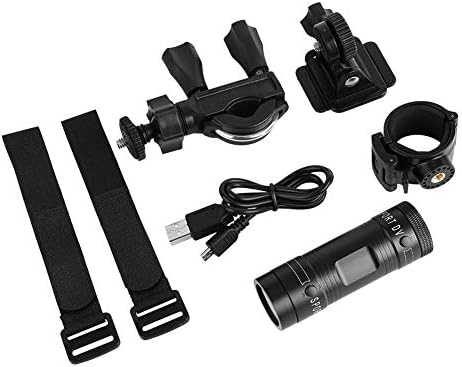
Image 1.1: The Zerone Sport Action DV Camera unit.
2. Maklumat Keselamatan
- Jangan dedahkan kamera kepada suhu yang melampau atau cahaya matahari langsung untuk tempoh yang lama.
- While the camera features an IPX-4 waterproof rating, it is designed to withstand splashes and light rain. Do not submerge or soak the camera in water.
- Jauhkan peranti daripada medan magnet yang kuat.
- Use only the specified charging cable and power adapter to prevent damage.
- Jangan cuba membuka atau mengubah suai kamera, kerana ini akan membatalkan jaminan dan boleh menyebabkan kerosakan.
- Simpan kamera di tempat yang kering dan sejuk apabila tidak digunakan.
3. Kandungan Pakej
Sila semak pakej untuk memastikan semua item ada:
- Zerone Sport Action DV Camera Unit
- Kabel Pengecas USB
- Mounting Accessories (e.g., bike mount, helmet mount, strap mounts)
- Rechargeable Battery (may be pre-installed)
- Manual Pengguna (dokumen ini)
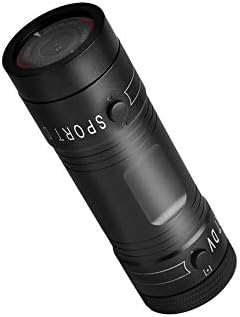
Image 3.1: Contents of the Zerone Sport Action DV Camera package, showing the camera, USB cable, and various mounting options.
4. Kamera Lebihview
Biasakan diri anda dengan komponen dan kawalan kamera.
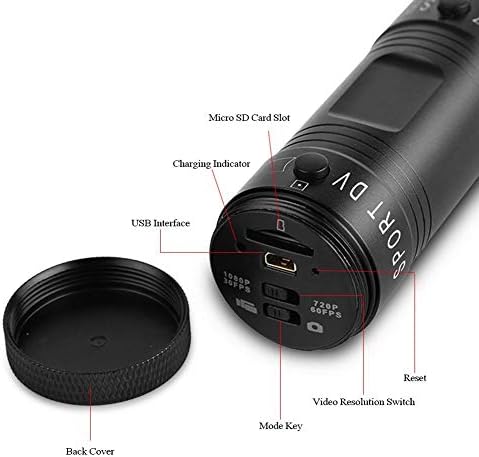
Imej 4.1: Terperinci view of the camera's rear end, highlighting the Micro SD card slot, USB interface, charging indicator, mode key, video resolution switch (1080P 30fps / 720P 60fps), and reset button.
- Slot Kad Mikro SD: Insert your Micro SD card here. A card is required for operation.
- Penunjuk Pengecasan: Displays charging status. A red light indicates charging; it turns off when fully charged.
- Antaramuka USB: Untuk mengecas dan menyambung ke komputer.
- Kunci Mod: Used to switch between recording modes (e.g., video, photo).
- Video Resolution Switch: Selects between 1080P 30fps and 720P 60fps recording resolutions.
- Butang Tetapkan Semula: Digunakan untuk menetapkan semula peranti jika ia menjadi tidak responsif.
- Power Button (Front): Located on the front side of the camera.
- Record/Stop Button (Back): Located on the back side of the camera.
5. Persediaan
5.1 Mengecas Bateri
- Sambungkan kamera ke sumber kuasa USB (cth., komputer, penyesuai dinding) menggunakan kabel USB yang disediakan.
- The lampu merah on the back of the camera will illuminate, indicating that it is charging.
- Setelah dicas sepenuhnya, lampu merah akan padam.
- Note: If the camera blinks red and blue when plugged in, it indicates that an SD card is not inserted. This is not a charging indicator.
5.2 Memasukkan Kad SD Mikro
A Micro SD card (not included) is required for recording video and photos. The camera supports Micro SD cards up to a certain capacity (check product packaging for maximum supported size, typically 32GB or 64GB for similar devices).
- Tanggalkan penutup belakang kamera.
- Locate the Micro SD card slot (refer to Image 4.1).
- Masukkan kad Micro SD dengan perlahan ke dalam slot sehingga ia berbunyi klik pada tempatnya. Pastikan kad diletakkan dengan betul.
- Replace the back cover, ensuring it is securely tightened to maintain water resistance.
5.3 Memasang Kamera
The camera comes with various mounting accessories for different applications.
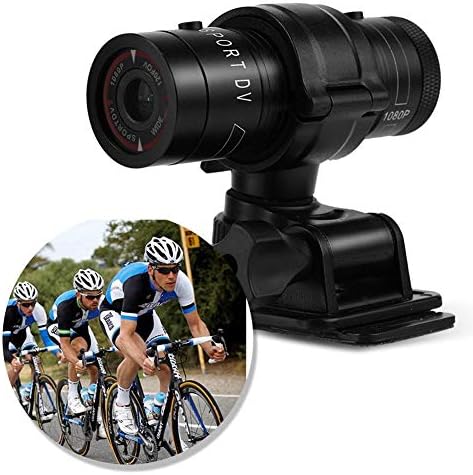
Image 5.1: The camera attached to a bicycle handlebar, demonstrating one of its mounting options.
- Bike Mount: Gunakan clamp mount to attach the camera securely to bicycle handlebars or other tubular structures.
- Pelekap topi keledar: Utilize the adhesive or strap mounts to fix the camera to a helmet.
- Strap Mounts: For attaching to various gear or body parts.
Ensure all mounts are securely fastened before engaging in activities to prevent the camera from falling.
6. Mengendalikan Kamera
6.1 Hidupkan/Mati Kuasa
- Untuk menghidupkan, tekan dan tahan Butang Kuasa (front switch) until the camera vibrates.
- Untuk mematikan, tekan dan tahan Butang Kuasa again until the camera vibrates once.
6.2 Selecting Video Resolution
Before recording, select your desired video resolution using the switch on the back of the camera (refer to Image 4.1).
- Luncurkan suis ke "1080P 30fps" for Full HD video at 30 frames per second.
- Luncurkan suis ke "720P 60fps" for HD video at 60 frames per second.
6.3 Merakam Video
- Pastikan kamera dihidupkan.
- Tekan ke Butang Rekod/Berhenti (back switch) to start recording. The camera will vibrate three times to indicate recording has started.
- Untuk berhenti merakam, tekan Butang Rekod/Berhenti again. The camera will vibrate once to indicate recording has stopped.
6.4 Menyambung ke Komputer
Untuk memindahkan files or access recorded content:
- Pastikan kamera dimatikan.
- Sambungkan kamera ke komputer anda menggunakan kabel USB yang disediakan.
- The camera will be recognized as a removable storage device.
- You can then access and transfer your video files.
7. Penyelenggaraan
- Pembersihan: Gunakan kain lembut dan kering untuk membersihkan badan kamera. Untuk kanta, gunakan kain dan larutan pembersih kanta khusus. Elakkan bahan yang melelas.
- Storan: When not in use for extended periods, store the camera in a cool, dry place. Ensure the battery is partially charged (around 50%) to prolong its lifespan.
- Tahan Air: Regularly check that the back cover is securely tightened to maintain the IPX-4 water resistance. Avoid exposing the USB port or SD card slot to moisture when the cover is open.
- Penjagaan Bateri: Avoid fully discharging the battery frequently. Recharge it when the low battery indicator appears.
8. Penyelesaian masalah
| Masalah | Kemungkinan Punca | Penyelesaian |
|---|---|---|
| Kamera tidak dihidupkan. | Bateri habis. | Charge the camera fully. |
| Camera blinks red and blue, then turns off. | No Micro SD card inserted or card is faulty. | Insert a functional Micro SD card. Ensure it is properly seated. |
| Tidak boleh merakam video. | No Micro SD card, card full, or card error. | Insert a Micro SD card, delete old files, atau formatkan kad (ini akan memadamkan semua data). |
| Kualiti video yang teruk. | Lens is dirty; low light conditions; incorrect resolution setting. | Clean the lens. Ensure adequate lighting. Select 1080P resolution for higher detail. |
| Kamera tidak bertindak balas. | Gangguan perisian. | Use a thin object (like a paperclip) to press the Butang Tetapkan Semula (refer to Image 4.1). |
9. Spesifikasi
| Ciri | Perincian |
|---|---|
| Jenama | Zerone |
| Nombor Model | Zeronefg3h149y2s |
| Resolusi Tangkapan Video | 1080p (30fps), 720p (60fps) |
| Sudut Kanta | 120-degree A+ grade wide-angle |
| Penilaian Kalis Air | IPX-4 (splash-proof) |
| Bahan Cangkang | Aloi Aluminium |
| Teknologi Penderia Foto | CMOS |
| Apertur Maksimum | 1.8 Milimeter |
| Jenis Memori Denyar | Micro SD (card not included) |
| Format Tangkapan Video | AVI |
| Format Audio yang Disokong | AAC, MP3, PCM, FLAC, or Dolby Digital/AC-3 |
| Teknologi Ketersambungan | USB |
| Berat Barang | 10.8 auns (lebih kurang 306 gram) |
| Dimensi Produk | 11.81 x 6.3 x 5.91 inci (lebih kurang 30 x 16 x 15 cm) |
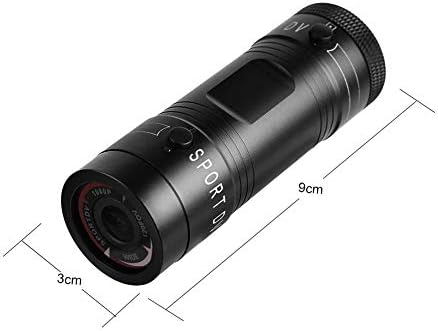
Image 9.1: Physical dimensions of the camera, showing a length of 9cm and a diameter of 3cm.
10. Waranti dan Sokongan
Untuk maklumat jaminan dan sokongan teknikal, sila rujuk dokumentasi yang disediakan bersama pembelian anda atau hubungi peruncit/pengilang secara langsung. Simpan bukti pembelian anda untuk tuntutan jaminan.
Manufacturer: Zerone
For further assistance, you may visit the Zerone Store on Amazon: Zerone Store