
1. Pengenalan
Thank you for choosing the Easytry123 Replacement Remote Control. This remote is designed to operate various Sanyo LED HDTV TV models, offering a convenient solution for controlling your television. Please note that as a replacement unit, it may not support all advanced functions present on your original remote control. This manual provides essential information for setup, operation, and maintenance.
2. Persediaan: Pemasangan Bateri
Before using your new remote control, you must install batteries. The remote requires two (2) AA batteries (not included).
- Cari petak bateri di belakang alat kawalan jauh.
- Tekan ke bawah pada selak dan luncurkan penutup bateri ke bawah untuk membukanya.
- Masukkan dua bateri AA, pastikan terminal positif (+) dan negatif (-) sejajar dengan betul dengan tanda di dalam petak.
- Luncurkan penutup bateri ke tempat semula sehingga ia berbunyi dengan selamat.
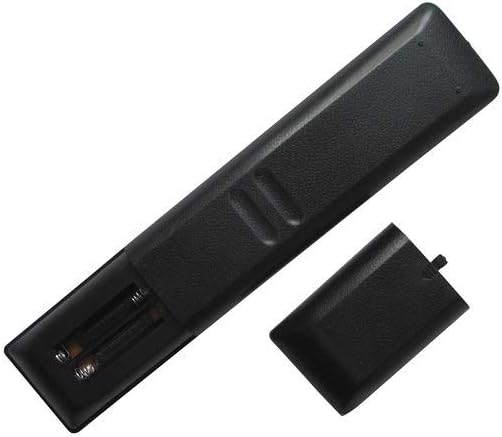
Rajah 2.1: belakang view of the remote control with the battery compartment open, illustrating the correct orientation for AA battery insertion.
Penting: Sentiasa gunakan bateri baharu dan gantikan kedua-dua bateri pada masa yang sama. Jangan campurkan bateri lama dan baharu atau jenis bateri yang berbeza.
3. Arahan Operasi
The Easytry123 remote control uses infrared (IR) technology. Ensure there is a clear line of sight between the remote control and your television's IR receiver for optimal performance.

Rajah 3.1: Depan view of the Easytry123 remote control, displaying the layout of its 25 buttons.
Fungsi Asas:
- KUASA: Menghidupkan atau mematikan TV.
- VOL +/-: Menambah atau mengurangkan tahap kelantangan.
- CH +/- (or PRESET +/-): Menukar saluran televisyen.
- MATI: Mendiamkan audio TV.
- INPUT/SUMBER: Selects the input source (e.g., HDMI, AV).
- MENU: Mengakses menu utama TV.
- Butang Navigasi (Atas, Bawah, Kiri, Kanan, ENTER): Used to navigate through menus and confirm selections.
- RUMAH: Returns to the TV's home screen or main menu.
- BACK/RETURN: Kembali ke skrin atau menu sebelumnya.
- Playback Controls (PLAY, PAUSE, STOP, SKIP): Controls media playback if supported by the TV.
For specific advanced functions, refer to your Sanyo TV's original user manual, as this replacement remote focuses on primary operational controls.
4. Penyelenggaraan
Proper care will extend the life of your remote control.
- Pembersihan: Lap alat kawalan jauh dengan kain lembut dan kering. Jangan gunakan pembersih cecair atau bahan yang melelas.
- Penggantian Bateri: Gantikan bateri apabila tindak balas alat kawalan jauh menjadi perlahan atau berhenti berfungsi. Tanggalkan bateri jika alat kawalan jauh tidak akan digunakan untuk tempoh yang lama bagi mengelakkan kebocoran.
- Storan: Simpan alat kawalan jauh di tempat yang sejuk dan kering jauh dari cahaya matahari langsung dan suhu yang melampau.
5. Penyelesaian masalah
If you experience issues with your remote control, try the following steps:
- Jauh tidak bertindak balas:
- Pastikan bateri dipasang dengan betul dengan kekutuban yang betul.
- Gantikan bateri lama dengan yang baru.
- Periksa sebarang halangan antara alat kawalan jauh dan penerima IR TV.
- Ensure you are within the maximum operating range (approximately 10 meters).
- Some functions do not work:
- As a replacement remote, it may not support all functions of your original TV remote. Verify that the function you are trying to use is a basic TV control.
- Ensure your TV model is listed as compatible in the product description.
6. Spesifikasi
| Jenama | Easytry123 |
| Nombor Model | Easytry4397 |
| Peranti Serasi | Television (Sanyo LED HDTV) |
| Teknologi Ketersambungan | Inframerah (IR) |
| Bilangan Butang | 25 |
| Julat Maksimum | 10 Meter (lebih kurang 33 kaki) |
| Jenis Bateri | 2 x bateri AA (tidak termasuk) |
| warna | Hitam |
| Ciri Khas | Reka bentuk ergonomik |
7. Waranti dan Sokongan
For any questions or support regarding your Easytry123 Replacement Remote Control, please contact the seller directly through your purchase platform. Please retain your proof of purchase for any warranty claims, if applicable.