
pengenalan
This manual provides detailed instructions for the setup, operation, and maintenance of your TFA Dostmann Digital Radio-Controlled Alarm Clock, model 60.2547.54. Please read this manual thoroughly before using the device to ensure proper function and to understand all features.
Produk Selesaiview & Komponen
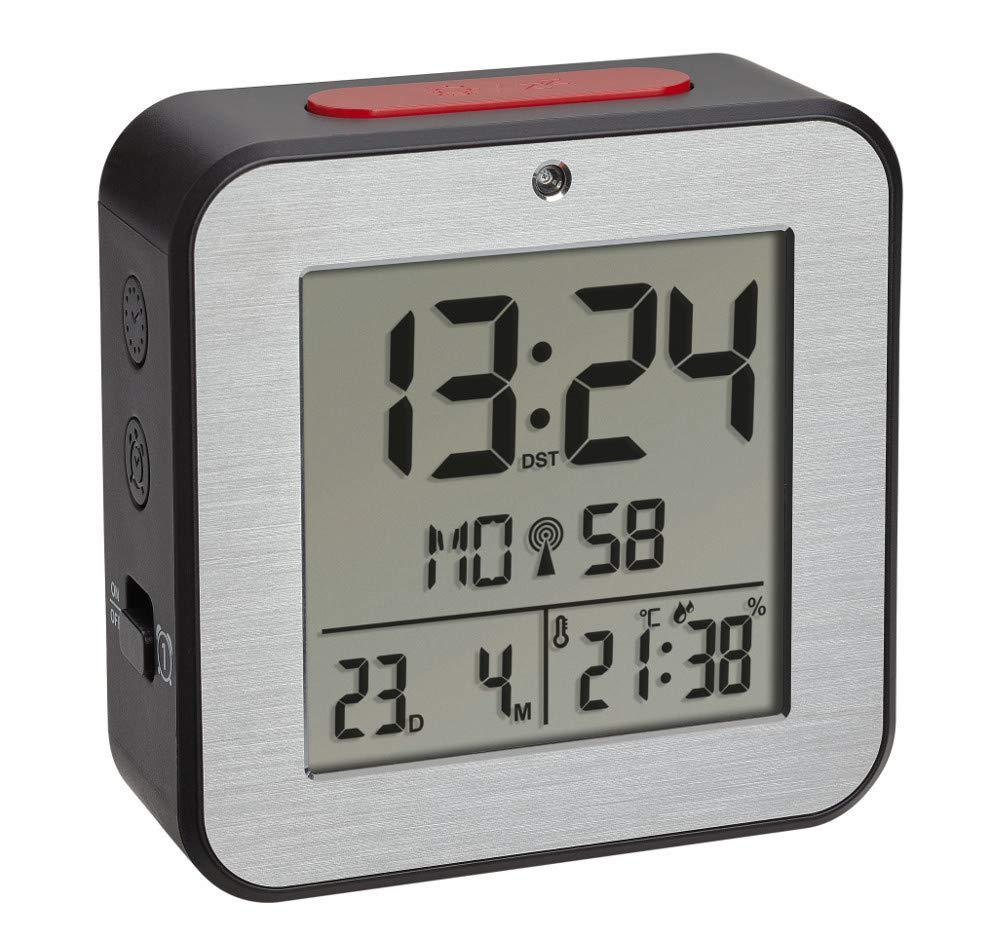
The TFA Dostmann Digital Radio-Controlled Alarm Clock is designed to provide accurate time, date, and indoor climate information. It features a highly precise radio-controlled clock, two independent alarm times, and an automatic night light function.


Pemasangan Bateri
- Cari penutup petak bateri di belakang jam penggera.
- Tanggalkan penutup dengan menggeser atau mengangkatnya.
- Insert two (2) 1.5 V AA batteries, ensuring correct polarity (+/-). Batteries are not included and must be purchased separately.
- Gantikan penutup petak bateri dengan selamat.
- The device will power on and begin searching for the radio-controlled time signal.
Persediaan Awal
Upon battery installation, the clock will automatically attempt to receive the radio-controlled time signal. This process may take several minutes. If the signal is not received or for manual adjustments, follow these steps:
Tetapan Masa dan Tarikh Manual
- Press and hold the 'SET' button (location may vary, refer to device diagram if available) to enter setup mode.
- Use the '+' or '-' buttons to adjust the flashing value (e.g., hour, minute, year, month, day).
- Press 'SET' again to confirm the setting and move to the next parameter.
- Repeat until all desired settings (time, date, year) are configured.
Pemilihan Bahasa
The display supports 7 languages for the day of the week: French, Spanish, Italian, Dutch, Danish, and English. During initial setup or in settings mode, select your preferred language using the '+' or '-' buttons.
Pelarasan Zon Masa
If you are in a region where the radio signal's standard time differs from your local time, you can adjust the time zone by +/- 12 hours. Access this setting in the setup mode and use the '+' or '-' buttons to set the offset.
Arahan Operasi
Menetapkan Penggera (Penggera 1 & Penggera 2)
- Press the 'ALARM 1' or 'ALARM 2' button to display the current alarm time.
- Press and hold the respective 'ALARM' button until the alarm time flashes.
- Use the '+' or '-' buttons to adjust the hour, then press the 'ALARM' button to confirm and move to minutes.
- Adjust minutes with '+' or '-' and press 'ALARM' to confirm.
- To activate or deactivate an alarm, press the 'ALARM 1 ON/OFF' or 'ALARM 2 ON/OFF' switch (typically located on the side or back). An alarm icon will appear on the display when active.
Fungsi Tunda
When an alarm sounds, press the 'SNOOZE/LIGHT' button (usually a large button on top) to temporarily silence the alarm. The alarm will sound again after a few minutes (default snooze duration). To stop the alarm completely, press any other button or switch the alarm off using its dedicated ON/OFF switch.
Automatic Backlight and Light Sensor
The alarm clock features an automatic backlight that activates in low-light conditions. This function is controlled by a light sensor. To enable or disable the automatic backlight, locate the 'AUTO LIGHT' switch or setting (refer to your device's specific button layout).
Indoor Climate Display
The display continuously shows the indoor temperature in Celsius (°C) or Fahrenheit (°F) and the relative humidity (%). To switch between °C and °F, press the '°C/°F' button (if available) or cycle through display modes in the setup menu.
Penyelenggaraan
- Pembersihan: Bersihkan peranti dengan kain lembut dan kering. Jangan gunakan pembersih atau pelarut yang melelas.
- Penggantian Bateri: Replace batteries when the display dims or the device stops functioning. Always replace both batteries simultaneously with new ones of the same type. Dispose of used batteries responsibly.
- Storan: Jika menyimpan peranti untuk tempoh yang lama, tanggalkan bateri untuk mengelakkan kebocoran.
Menyelesaikan masalah
| Masalah | Kemungkinan Punca | Penyelesaian |
|---|---|---|
| Paparan kosong atau malap. | Bateri hampir habis atau tidak dimasukkan dengan betul. | Replace batteries with new 1.5 V AA batteries, ensuring correct polarity. |
| Masa tidak betul atau tidak ditetapkan secara automatik. | Poor radio signal reception; device is out of range or obstructed. | Move the alarm clock to a location with better signal reception, away from electronic devices or metal objects. Perform manual time setting if necessary. |
| Penggera tidak berbunyi. | Penggera tidak diaktifkan atau kelantangan terlalu rendah. | Ensure the alarm's ON/OFF switch is in the 'ON' position. Check alarm time settings. |
| Bacaan Suhu/Kelembapan kelihatan tidak tepat. | Device is exposed to direct sunlight, heat sources, or drafts. | Place the alarm clock in a stable indoor environment, away from extreme temperature fluctuations. |
Spesifikasi
- model: 60.2547.54
- Jenama: TFA Dostmann
- Jenis Paparan: digital
- Sumber Kuasa: 2 x 1.5 V AA bateri (tidak termasuk)
- Dimensi (L x W x H): 82 x 33 x 82 mm
- Berat: 110 Gram
- Bahan: Aluminium, Plastik
- Julat Pengukuran Suhu: -9°C hingga +50°C (+14°F hingga +122°F)
- Julat Pengukuran Kelembapan: 20% hingga 95% RH
- Ciri Khas: Radio-controlled time, Dual alarms, Snooze function, Automatic backlight, Indoor temperature and humidity display, 7-language weekday display, Time zone adjustment.
Maklumat Waranti
TFA Dostmann products are manufactured with quality and care. For specific warranty terms and conditions, please refer to the warranty card included in your product packaging or visit the official TFA Dostmann webtapak. Simpan bukti pembelian anda untuk sebarang tuntutan waranti.
Sokongan
If you encounter any issues not covered in this manual or require further assistance, please contact TFA Dostmann customer support. Contact details can typically be found on the official TFA Dostmann webtapak atau pada pembungkusan produk.