
1. Pengenalan
The VEROVAL Duo Control Digital Arm Blood Pressure Monitor is designed for accurate and reliable blood pressure measurement. It is particularly suitable for individuals who require daily monitoring, including those with cardiac arrhythmias. This device utilizes advanced DUO SENSOR technology, which combines two professional measurement methods: the oscillometric method and the Korotkoff method, ensuring high precision even in the presence of irregular heart rhythms.
This manual provides essential information for the safe and effective use of your VEROVAL Duo Control monitor. Please read it thoroughly before first use and keep it for future reference.
2. Maklumat Keselamatan
- Consult your physician before using this device if you have any medical conditions, especially cardiac arrhythmias.
- Jangan mendiagnosis sendiri atau mengubati sendiri berdasarkan keputusan pengukuran. Sentiasa berunding dengan profesional penjagaan kesihatan.
- Jauhkan peranti daripada capaian kanak-kanak.
- Use only the original cuff provided with the device.
- Avoid taking measurements in stressful environments or immediately after physical activity.
3. Kandungan Pakej
Sahkan bahawa semua item terdapat dalam pakej:
- VEROVAL Duo Control Blood Pressure Monitor
- Medium Arm Cuff (22-32 cm)
- Beg Simpanan
- 4 x Bateri AA 1.5V
- Manual Arahan

Image: VEROVAL Duo Control Blood Pressure Monitor, arm cuff, and storage bag.
4. Komponen Peranti
Familiarize yourself with the main parts of your blood pressure monitor:
- paparan: Large, illuminated screen for easy reading of values.
- Butang Mula / Berhenti: Initiates and ends measurements.
- User 1 Button: Selects user profile 1.
- User 2 Button: Selects user profile 2.
- Cuff Connector: Port untuk menyambungkan manset lengan.
- manset: Ergonomically designed for correct and secure application.

Image: Close-up of the VEROVAL Duo Control monitor, showing the display and control buttons.
5. Persediaan
5.1. Pemasangan Bateri
- Buka penutup petak bateri di belakang peranti.
- Insert the four AA 1.5V batteries, ensuring correct polarity (+/-).
- Tutup penutup petak bateri dengan selamat.
5.2. Menetapkan Tarikh dan Masa
Upon first use or after battery replacement, the device will prompt you to set the date and time. Follow the on-screen instructions using the user buttons to adjust values and the Start/Stop button to confirm.
5.3. Pengguna Profile Pemilihan
The device supports two user profiles, each with 100 memory slots, plus a guest mode. Select your desired user profile (User 1 or User 2) before taking a measurement to ensure results are stored correctly.
6. Arahan Operasi
6.1. Cuff Application
- Ensure the cuff size is appropriate for your arm circumference (Medium: 22-32 cm).
- Sit comfortably with your arm resting on a flat surface, palm facing up.
- Luncurkan lengan anda melalui gelung cuff. Tiub udara harus mengalir ke bahagian dalam lengan anda.
- Position the cuff so its lower edge is approximately 2 cm above your elbow joint.
- Tighten the cuff securely but not too tightly. The ergonomic design and pull-up system facilitate correct placement.
- Connect the cuff tube to the monitor's cuff connector.

Image: Correct application of the VEROVAL Duo Control arm cuff, highlighting its ergonomic design.
6.2. Prosedur Pengukuran
Before measuring, rest for at least 5 minutes. Avoid talking or moving during the measurement.
- Pilih pro pengguna andafile (User 1 or User 2).
- Tekan ke Mula/Berhenti button to begin the measurement. The cuff will inflate automatically.
- The device will perform the measurement using DUO SENSOR technology.
- Once complete, your systolic, diastolic, and pulse values will be displayed.

Image: A user performing a blood pressure measurement with the VEROVAL Duo Control monitor, illustrating the DUO SENSOR technology.
6.3. Understanding Results
The large, illuminated display shows your measurement values. A color traffic light system on the side of the display provides an immediate categorization of your blood pressure reading according to WHO guidelines.
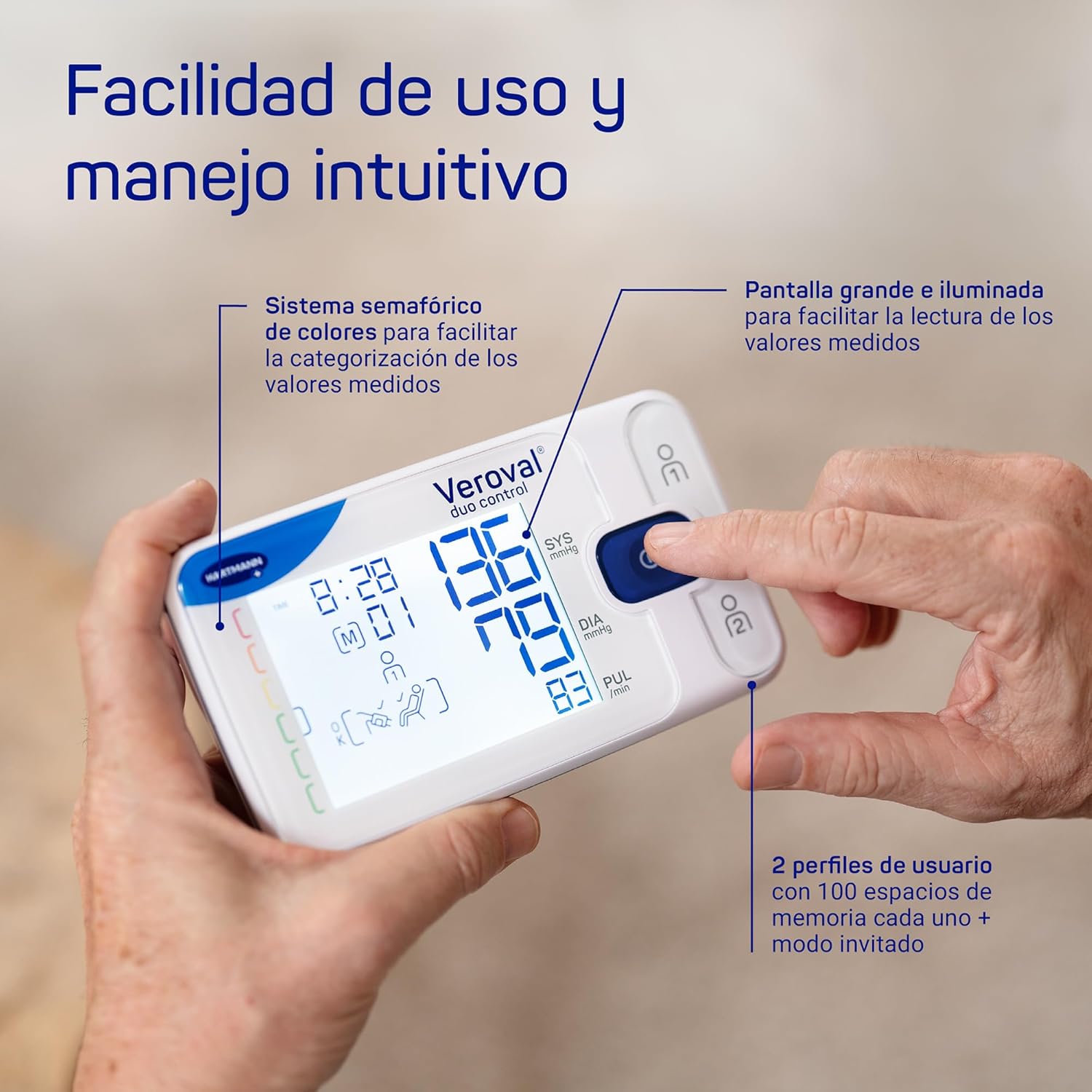
Imej: Terperinci view of the VEROVAL Duo Control display, showing measurement values and the color-coded indicator for easy interpretation.
7. Pengurusan Data
7.1. Veroval medi.connect App
The VEROVAL Duo Control monitor features simple Bluetooth connectivity for transferring your measurement data to the Veroval medi.connect application. This app is available for Android and iOS devices, including tablets, and allows for long-term data storage and analysis.
- Download the Veroval medi.connect app from your device's app store.
- Follow the in-app instructions to pair your monitor via Bluetooth.
- Once connected, your measurement data will be transferred for storage and analysis.

Image: A user interacting with the Veroval medi.connect application on a smartphone, demonstrating Bluetooth data transfer from the monitor.
8. Penyelenggaraan dan Penjagaan
- Clean the device and cuff with a soft, dry cloth. Do not use abrasive cleaners or immerse in water.
- Simpan peranti dan manset di dalam beg simpanan yang disediakan di tempat yang sejuk dan kering, jauh daripada cahaya matahari langsung dan suhu yang melampau.
- Gantikan bateri apabila penunjuk bateri lemah muncul pada paparan.
9. Penyelesaian masalah
Jika anda menghadapi masalah dengan peranti anda, rujuk penyelesaian biasa berikut:
- Peranti tidak dihidupkan: Periksa pemasangan bateri dan pastikan bateri tidak habis. Gantikan jika perlu.
- Mesej ralat pada paparan: Refer to the specific error code in the full user manual for detailed instructions. Often, this indicates incorrect cuff placement or movement during measurement.
- Bacaan tidak konsisten: Ensure proper cuff placement, rest adequately before measurement, and avoid talking or moving. Consult a physician if readings remain inconsistent.
- Isu sambungan Bluetooth: Ensure Bluetooth is enabled on your smartphone/tablet and the device is within range. Restart both the monitor and your mobile device.
10. Spesifikasi Teknikal
| Ciri | Spesifikasi |
|---|---|
| Nombor Model | 1622044 |
| Kaedah Pengukuran | DUO SENSOR Technology (Oscillometric and Korotkoff) |
| Saiz Cuff | Medium (22-32 cm) |
| Kapasiti Memori | 200 readings (100 for each of 2 users) |
| Sumber Kuasa | 4 x Bateri AA 1.5V |
| Jenis Paparan | Digital, LCD Bercahaya |
| Ketersambungan | Bluetooth |
| Berat Produk | 1 Grams (device only, approximate) |
| Dimensi (Pakej) | 24.2 x 17.3 x 8.3 cm |
11. Waranti dan Sokongan
The VEROVAL Duo Control Blood Pressure Monitor comes with a Waranti 5 tahun dari tarikh pembelian. Sila simpan bukti pembelian anda untuk tuntutan waranti.
For technical support, warranty service, or further inquiries, please contact VEROVAL customer service through the official HARTMANN website or your local distributor. Contact information can typically be found in the full user manual or on the product packaging.