
1. Pengenalan
This manual provides detailed instructions for the operation and maintenance of your AUNA Worldwide Internet Radio. Please read this manual thoroughly before using the device to ensure proper function and to prevent damage. Keep this manual for future reference.
The AUNA Worldwide Internet Radio is a versatile audio system featuring Internet Radio, DAB/DAB+ and FM tuners, a CD player, Bluetooth connectivity, USB playback, and AUX input. It offers a wide range of listening options and convenient control features.
2. Arahan Keselamatan
- Baca semua arahan sebelum mengendalikan peranti.
- Jangan dedahkan peranti kepada hujan atau lembapan untuk mengelakkan kebakaran atau kejutan elektrik.
- Pastikan pengudaraan yang betul. Jangan sekat sebarang bukaan pengudaraan.
- Letakkan peranti pada permukaan yang stabil dan rata.
- Gunakan hanya penyesuai kuasa yang dibekalkan bersama peranti.
- Cabut plag peranti semasa ribut petir atau apabila tidak digunakan untuk tempoh yang lama.
- Jangan cuba membaiki peranti ini sendiri. Rujuk semua servis kepada kakitangan yang berkelayakan.
3. Kandungan Pakej
Sila pastikan semua item ada dan dalam keadaan baik:
- 1 x AUNA Worldwide Internet Radio Unit
- 1 x Penyesuai Kuasa
- 1 x Alat Kawalan Jauh
- 1 x User Manual (German, English, French)
4. Produk Lebihview
The AUNA Worldwide Internet Radio features a sleek design with intuitive controls and a clear LCD display.

Imej 4.1: Depan view of the AUNA Worldwide Internet Radio, showcasing the central LCD display, control knobs, buttons for various functions (USB, Audio In, Mode, Scan, Stop, Tuning, Back), and the CD slot. Two speaker grilles are visible on either side.

Imej 4.2: A close-up of the radio's LCD display, showing 'Internet Radio' mode with 'Burn FM' and 'AIM - Wicked Game' displayed. The volume knob and 'SELECT' button are prominent, along with power and mode buttons.
4.1 Kawalan Panel Hadapan
- Butang Kuasa: Turns the unit on/off or into standby mode.
- Paparan LCD: Shows current mode, station information, time, and date.
- Tombol Kelantangan: Melaraskan tahap output audio.
- Select Knob/Button: Menavigasi menu dan mengesahkan pilihan.
- USB Port (5V 1A): For connecting USB storage devices and charging.
- AUDIO IN (3.5mm AUX): Untuk menyambungkan sumber audio luaran.
- Butang Mod: Switches between different operating modes (Internet Radio, DAB, FM, CD, Bluetooth, USB, AUX).
- Butang Imbas: Initiates station scanning in radio modes.
- Stop/Play/Pause Buttons: Mengawal main balik untuk CD, USB dan Bluetooth.
- Tuning/Skip Buttons: Navigates through stations or tracks.
- Butang Belakang: Kembali ke menu atau skrin sebelumnya.
- Butang Maklumat: Displays additional information about the current track or station.
- Butang Menu: Accesses the main system menu.
4.2 Sambungan Panel Belakang
- DC DALAM: Sambungan penyesuai kuasa.
- Antena Teleskopik: For DAB/DAB+ and FM reception.
5. Persediaan
5.1 Sambungan Kuasa
- Sambungkan penyesuai kuasa yang dibekalkan ke port DC IN di bahagian belakang radio.
- Plug the power adapter into a standard wall outlet (220-240V ~ | 50/60Hz).
- Press the Power button on the front panel to turn on the device.
5.2 Persediaan Antena
Extend the telescopic antenna fully for optimal DAB/DAB+ and FM radio reception. Adjust its position to improve signal strength if needed.
5.3 Sambungan Rangkaian (Wi-Fi)
To access Internet Radio and Spotify Connect, the device requires a Wi-Fi connection.
- Setelah dihidupkan pertama, radio akan membimbing anda melalui persediaan awal, termasuk konfigurasi Wi-Fi.
- Alternatively, navigate to Menu > System Settings > Network > Wi-Fi Setup.
- Radio akan mengimbas rangkaian Wi-Fi yang tersedia. Pilih rangkaian anda daripada senarai.
- Enter your Wi-Fi password using the Select knob and buttons.
- Setelah disambungkan, ikon Wi-Fi akan muncul pada paparan.

Imej 5.1: A hand holding a smartphone with a Wi-Fi symbol, illustrating the wireless connectivity feature of the AUNA radio, which allows for remote control via an app.
6. Arahan Operasi
6.1 Kawalan Asas
- Hidupkan/Mati Kuasa: Tekan butang Kuasa.
- Pelarasan Kelantangan: Rotate the Volume knob.
- Pemilihan Mod: Press the Mode button repeatedly to cycle through available sources (Internet Radio, DAB, FM, CD, Bluetooth, USB, AUX).
- Navigasi Menu: Use the Select knob to scroll and press to confirm. Use the Back button to return.
6.2 Radio Internet
Akses beribu-ribu stesen radio dari seluruh dunia melalui sambungan Wi-Fi anda.
- Select 'Internet Radio' mode using the Mode button.
- Navigate through categories (e.g., Location, Genre, Popular) using the Select knob.
- Pilih stesen untuk memulakan main balik.
6.3 Radio DAB/DAB+
Enjoy digital radio broadcasts with clear sound quality.
- Select 'DAB' mode.
- The radio will automatically scan for available DAB/DAB+ stations on first use or if you initiate a scan via the Menu.
- Use the Tuning/Skip buttons to browse through the station list.
6.4 Radio FM
Ikuti siaran FM analog tradisional.
- Select 'FM' mode.
- Press the Scan button to automatically search for and store available stations.
- Use the Tuning/Skip buttons for manual tuning or to navigate stored stations.
- The RDS function provides additional information like station name and program details.
6.5 Pemain CD
Play your favorite audio CDs and MP3 CDs.

Imej 6.1: A close-up of the AUNA Worldwide Internet Radio, showing a CD being inserted into the slot-loading CD player, highlighting its capability to play physical media.
- Select 'CD' mode.
- Insert an audio CD or MP3 CD into the slot. The disc will be loaded automatically.
- Playback will start automatically. Use the Play/Pause, Stop, and Skip buttons to control playback.
6.6 Kesambungan Bluetooth
Strim audio secara wayarles daripada peranti anda yang didayakan Bluetooth.
- Pilih mod 'Bluetooth'. Radio akan memasuki mod berpasangan, seperti yang ditunjukkan pada paparan.
- On your smartphone, tablet, or other Bluetooth device, enable Bluetooth and search for 'AUNA Worldwide'.
- Select the radio from your device's list to pair. Once connected, you can stream audio.
6.7 Main Semula USB
Mainkan MP3 dan WMA files daripada peranti storan USB.
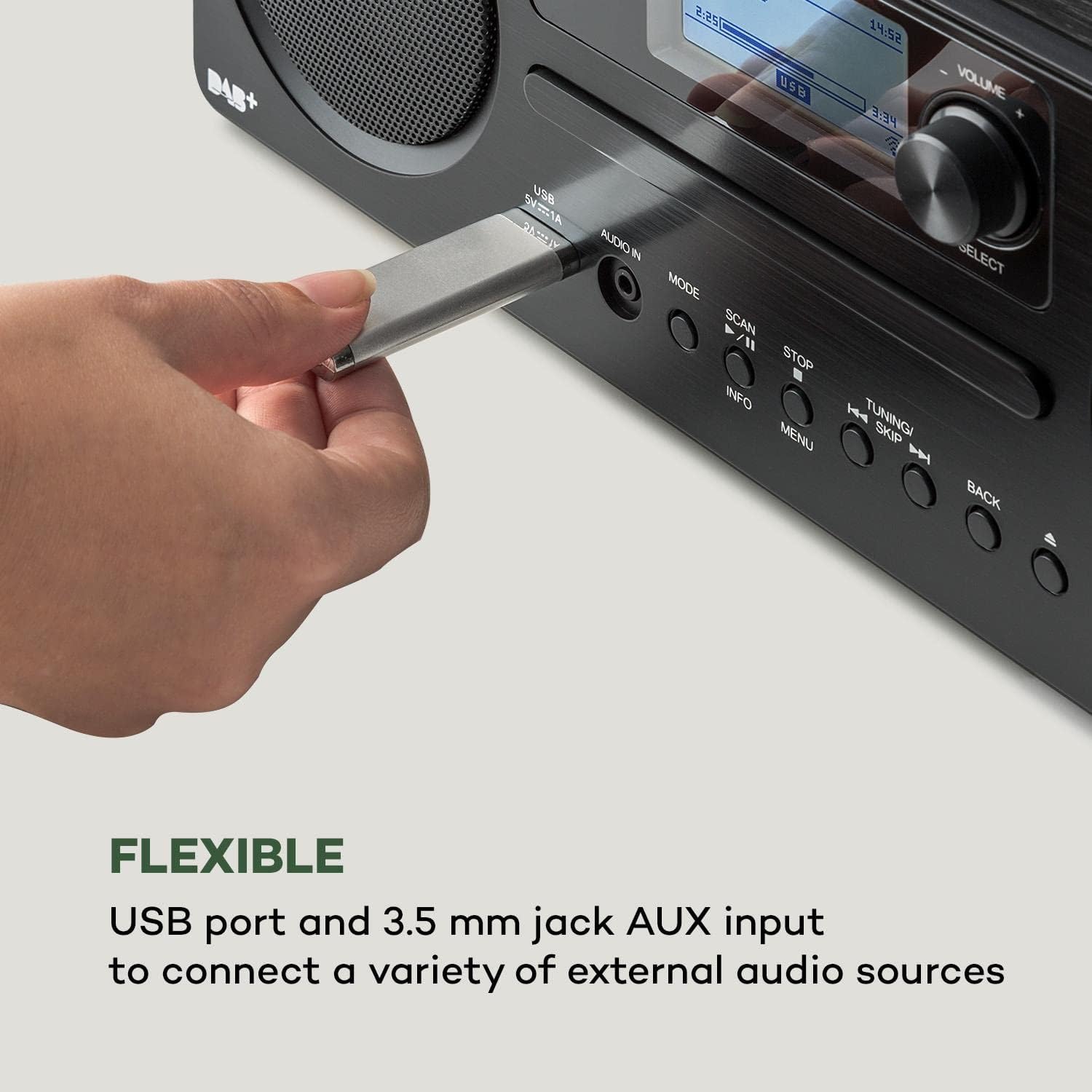
Imej 6.2: Satu jarak dekat view of a USB stick inserted into the USB port on the front panel of the AUNA Worldwide Internet Radio, demonstrating its capability for playing media from external storage.
- Insert a USB storage device into the USB port on the front panel.
- Select 'USB' mode. The radio will automatically detect and display the content.
- Navigasi melalui folder dan files using the Select knob and buttons. Use playback controls as needed.
6.8 Input AUX
Sambungkan peranti audio luaran menggunakan kabel audio 3.5mm.
- Connect your external audio device to the 'AUDIO IN' (3.5mm AUX) port on the front panel.
- Select 'AUX' mode.
- Kawal main balik daripada peranti luaran anda yang disambungkan.
6.9 Sambungan Spotify
Stream music directly from your Spotify account.

Imej 6.3: A person relaxing on a couch, using a smartphone with the Spotify logo visible, illustrating the convenience of Spotify Connect for streaming music directly to the AUNA radio.
- Ensure your radio is connected to the same Wi-Fi network as your smartphone or tablet running the Spotify app.
- Buka apl Spotify pada peranti anda.
- Play a song and select the 'Devices Available' icon.
- Choose your AUNA Worldwide radio from the list to start streaming.
6.10 UNDOK App Control
Control your radio remotely using the UNDOK app on your smartphone or tablet.

Imej 6.4: A screenshot of the UNDOK app interface on a smartphone, displayed next to the physical remote control for the AUNA radio, demonstrating the dual control options available to the user.
- Download the 'UNDOK' app from your device's app store.
- Ensure your radio and smartphone/tablet are connected to the same Wi-Fi network.
- Open the UNDOK app. It will automatically detect your AUNA radio.
- Select your radio within the app to gain full control over modes, stations, volume, and settings.
6.11 Fungsi Penggera
The radio includes dual alarm, sleep timer, and snooze functions.
- Navigasi ke Menu > Alarms to set up dual alarms with customizable sources (buzzer, radio) and schedules.
- Set a Pemasa Tidur via the Menu to automatically turn off the radio after a set period.
- Apabila penggera berbunyi, tekan butang Tunda button (often the Select knob) to temporarily silence it.
7. Penyelenggaraan
- Pembersihan: Gunakan kain lembut dan kering untuk membersihkan bahagian luar unit. Jangan gunakan pembersih atau pelarut yang melelas.
- Pemain CD: Keep the CD slot free from dust and debris. Do not insert damaged or dirty CDs.
- Storan: Jika menyimpan unit untuk tempoh yang lama, cabut palamnya dari salur keluar kuasa dan simpan di tempat yang sejuk dan kering.
8. Penyelesaian masalah
| Masalah | Kemungkinan Punca | Penyelesaian |
|---|---|---|
| Tiada kuasa | Penyesuai kuasa tidak disambungkan; soket tidak berfungsi. | Periksa sambungan penyesuai kuasa; cuba soket yang berbeza. |
| Tiada bunyi | Volume too low; incorrect source selected. | Increase volume; ensure correct mode (e.g., Internet Radio, CD) is selected. |
| Radio Internet tidak bersambung | Wi-Fi connection issue; incorrect password. | Check Wi-Fi settings and password; ensure router is working; restart radio and router. |
| Penerimaan DAB/FM yang lemah | Antena tidak dilanjutkan; isyarat lemah. | Fully extend and adjust the telescopic antenna; try repositioning the unit. |
| CD tidak dimainkan | CD inserted incorrectly; CD is dirty or scratched. | Re-insert CD correctly; clean or try a different CD. |
| Bluetooth tidak berpasangan | Radio not in pairing mode; device too far. | Ensure radio is in Bluetooth mode; bring devices closer; restart Bluetooth on both devices. |
9. Spesifikasi
- model: MG2-2200-gfvd
- Bekalan Kuasa: 220-240 V ~ | 50/60 Hz (via power adapter)
- Kuasa Output: 2 x 5 W RMS
- Supported Playback Formats: MP3, WMA, WAV, AAC, FLAC
- Sambungan: 1 x USB port (5 V, 1 A charging function), 1 x 3.5 mm jack AUX input, Bluetooth, Wi-Fi
- Penala Radio: Internet Radio, DAB/DAB+, FM/AM
- Ciri Khas: Spotify Connect, UNDOK App Control, LCD Display, Time and Date Display, Standby Function, Alarm Functions (Dual Alarm, Sleep Timer, Snooze), RDS Function
- Dimensi (W x H x D): 35 x 12 x 20 cm
- Berat: lebih kurang 2.6 kg
- warna: Hitam
10. Waranti dan Sokongan
AUNA products are designed and manufactured to the highest quality standards. In the unlikely event of a problem with your device, please refer to the troubleshooting section of this manual. If the issue persists, please contact your retailer or authorized service center for assistance.
Please retain your proof of purchase for warranty claims. Information regarding spare parts availability and software updates is not available at this time.