
1. Produk Lebihview
The Comfee MDDE-10DEN3 Dehumidifier is designed to efficiently remove excess moisture from indoor air, creating a more comfortable and healthier environment. It is suitable for rooms up to approximately 40 cubic meters. This unit features a clearly designed control panel for easy operation, a 2-liter water tank, and includes essential protections such as frost and overflow protection. It utilizes R290 refrigerant for effective dehumidification.
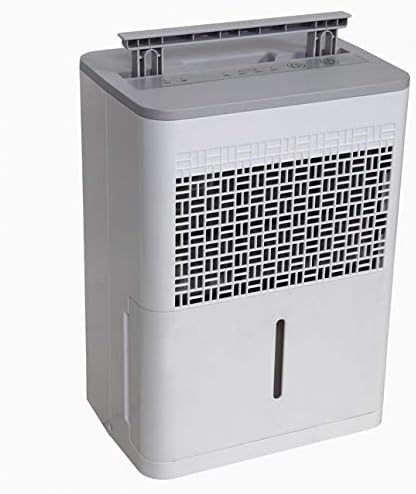
Rajah 1: Depan view of the Comfee MDDE-10DEN3 Dehumidifier. This image shows the compact design of the unit, with the air intake grille visible on the front and the water level indicator on the side.
2. Arahan Keselamatan
Please read all safety instructions carefully before operating the dehumidifier to prevent injury or damage. Keep this manual for future reference.
- Pastikan bekalan kuasa sepadan dengan voltage dinyatakan pada label penarafan unit.
- Jangan kendalikan penyahlembap dengan kord atau palam yang rosak.
- Do not block the air inlet or outlet. Maintain at least 20 cm (8 inches) clearance around the unit.
- Jangan gunakan perkakas dalam keadaan basah atau damp environments, such as bathrooms or laundry rooms, where it may come into contact with water.
- Sentiasa cabut plag unit sebelum membersihkan atau melakukan sebarang penyelenggaraan.
- Pastikan unit tegak semasa pengangkutan dan pengendalian.
- This appliance uses R290 refrigerant, which is flammable. Do not puncture the refrigerant circuit.
- Jangan cuba membaiki atau mengubah suai unit sendiri. Hubungi kakitangan perkhidmatan yang berkelayakan untuk pembaikan.
- Jauhkan daripada kanak-kanak dan haiwan peliharaan.
3. Komponen Produk
Familiarize yourself with the main parts of your Comfee MDDE-10DEN3 Dehumidifier:
- Panel Kawalan: Located on the top of the unit, used for setting operation modes and humidity levels.
- Gril Masuk Udara: Where air is drawn into the unit for dehumidification.
- Saluran Udara: Di mana udara kering dibuang.
- Tangki Air: Collects condensed water. Features a water level indicator.
- pemegang: Untuk mudah dibawa.
- Kord Kuasa: Menyambungkan unit ke soket elektrik.

Rajah 2: jarak dekat view of the Comfee MDDE-10DEN3 Dehumidifier control panel. This image displays the various buttons and indicator lights, including power, humidity settings (40%, 50%, 60%), and defrost indicators.
4. Persediaan
- Membongkar: Tanggalkan penyahlembap daripada pembungkusannya dengan berhati-hati. Simpan pembungkusan untuk penyimpanan atau pengangkutan pada masa hadapan.
- penempatan: Place the unit on a firm, level surface in the desired room. Ensure there is at least 20 cm (8 inches) of free space around all sides of the unit for proper air circulation. Do not place it near heat sources or in direct sunlight.
- Sambungan Kuasa: Pasangkan kord kuasa ke soket elektrik yang dibumikan. Pastikan soket tersebut memenuhi keperluan kuasa unit.
- Tangki Air: Pastikan tangki air dimasukkan dengan betul ke dalam unit.
5. Arahan Operasi
The control panel allows you to manage the dehumidifier's functions.
Rajah 3: Terperinci view of the control panel for operation reference.
- Butang kuasa (①): Tekan untuk menghidupkan atau MATI unit.
- Humidity Setting Button (②): Press to cycle through desired humidity levels: 40%, 50%, 60%. The corresponding indicator light will illuminate. The unit will operate until the set humidity level is reached.
- Operasi Berterusan: If no specific humidity level is set, the unit may operate continuously.
- Penunjuk Nyahbeku (③): Illuminates when the unit is in defrost mode, which occurs automatically when coil temperatures are too low. The dehumidification process will pause during defrosting.
- Full Water Tank Indicator (④): Illuminates when the water tank is full or incorrectly inserted. The unit will stop operating until the tank is emptied and reinserted correctly.
- Fungsi Mulakan Semula Auto: Sekiranya berlaku kuasa outage, the unit will automatically restart with the previously set humidity level once power is restored.
Continuous Drainage (Optional)
For continuous operation without needing to empty the water tank, a drainage hose (not included) can be connected to the continuous drainage port on the back of the unit. Ensure the hose is sloped downwards to allow gravity drainage into a suitable receptacle.
6. Penyelenggaraan
Penyelenggaraan tetap memastikan prestasi optimum dan memanjangkan jangka hayat penyahlembap anda.
- Mengosongkan Tangki Air: When the "Full Water Tank" indicator illuminates, carefully pull out the water tank, empty the collected water, and reinsert it firmly until it clicks into place.
- Membersihkan Penapis Udara: Penapis udara perlu dibersihkan setiap dua minggu atau lebih kerap bergantung pada penggunaan.
- Matikan unit dan cabut palamnya daripada salur keluar kuasa.
- Remove the air filter from the back or side of the unit (refer to diagram in full manual if available).
- Basuh penapis dengan air suam dan sabun. Bilas dengan teliti dan biarkan ia kering sepenuhnya sebelum dimasukkan semula.
- Jangan kendalikan dehumidifier tanpa penapis.
- Membersihkan Bahagian Luar Unit: Lap bahagian luar dengan lembut, damp kain. Jangan gunakan bahan kimia yang keras atau pembersih yang kasar.
- Storan: If storing the unit for an extended period, ensure the water tank is empty and clean, and the filter is clean and dry. Store the unit upright in a cool, dry place.
7. Penyelesaian masalah
Rujuk jadual berikut untuk isu biasa dan penyelesaiannya.
| Masalah | Kemungkinan Punca | Penyelesaian |
|---|---|---|
| Unit tidak dihidupkan. | No power; power cord loose; water tank full or not properly inserted. | Check power outlet and cord connection. Empty and reinsert water tank correctly. |
| Tiada air yang dikutip. | Humidity level set too high; room temperature too low; air filter clogged; continuous drainage hose connected and draining. | Lower desired humidity setting. Ensure room temperature is above 5°C (41°F). Clean air filter. Check continuous drainage setup. |
| Unit berjalan secara berterusan. | Humidity level not reached; unit set to continuous operation. | Allow more time for dehumidification. Set a specific humidity level if continuous operation is not desired. |
| Penunjuk nyahbeku menyala. | Coils are frosting up due to low ambient temperature. | This is normal operation. The unit will automatically defrost and resume dehumidification. |
If the problem persists after trying these solutions, please contact Comfee customer support.
8. Spesifikasi
| Ciri | Spesifikasi |
|---|---|
| Nama Model | MDDE-10DEN3 |
| Jenama | Comfee |
| Kapasiti Dehumidifikasi | 10 Liter/24 jam |
| Kapasiti Tangki Air | 2 Liter |
| Saiz Bilik yang Disyorkan | Up to approximately 40 m³ |
| Bahan penyejuk | R290 |
| Dimensi (Pakej) | 44.8 x 36.3 x 34 cm |
| Berat Barang | 11 Kilogram |
| warna | Putih/Kelabu |
| Mod Pengendalian | Automatik |
9. Waranti dan Sokongan
Specific warranty information for your Comfee MDDE-10DEN3 Dehumidifier is typically provided with your purchase documentation or on the manufacturer's official webtapak. Sila rujuk sumber ini untuk butiran mengenai perlindungan waranti, terma dan syarat.
For technical support, service, or inquiries about replacement parts, please contact Comfee customer service. Contact information can usually be found on the Comfee webtapak atau pada pembungkusan produk anda.
You can visit the official Comfee store for more information: Comfee Store