
AWEI T5
AWEI T5 True Wireless Earbuds User Manual
pengenalan
This manual provides detailed instructions for the AWEI T5 True Wireless Earbuds. Please read this guide carefully before using the product to ensure proper operation and to maximize your listening experience.
Kandungan Pakej
Sahkan bahawa semua item yang disenaraikan di bawah terdapat dalam pakej anda:
- AWEI T5 True Wireless Earbuds (Left and Right)
- Kes Pengecasan
- Kabel Pengecas USB
- Manual Pengguna
- Pelbagai saiz hujung telinga

Image: AWEI T5 True Wireless Earbuds retail packaging, showing the brand logo and product model.
Produk Selesaiview
Familiarize yourself with the components of your AWEI T5 True Wireless Earbuds and charging case.

Image: The AWEI T5 True Wireless Earbuds inside their charging case, with an additional image showing an earbud being worn by a user.

Imej: Dari dekat view of the AWEI T5 True Wireless Earbuds and their charging case resting on a laptop keyboard.
The earbuds are designed for a secure and comfortable fit, and the charging case provides both protection and power on the go.
Persediaan
1. Pengecasan Awal
Sebelum penggunaan pertama, cas sepenuhnya fon telinga dan bekas pengecas.
- Letakkan kedua earbud ke dalam cas pengecasan.
- Sambungkan kabel pengecas USB ke bekas pengecas dan sumber kuasa.
- The indicator lights on the case and earbuds will show charging status.
- Setelah dicas sepenuhnya, cabut kabel.
2. Berpasangan dengan Peranti
To connect your AWEI T5 earbuds to a Bluetooth-enabled device:
- Pastikan fon telinga dicas.
- Buka bekas pengecasan dan keluarkan kedua-dua fon telinga. Mereka secara automatik akan memasuki mod berpasangan.
- Pada peranti anda (telefon pintar, tablet, dll.), pergi ke tetapan Bluetooth dan dayakan Bluetooth.
- Cari untuk peranti yang tersedia dan pilih "AWEI T5" daripada senarai.
- Once connected, you will hear a confirmation tone, and the indicator lights on the earbuds will change.
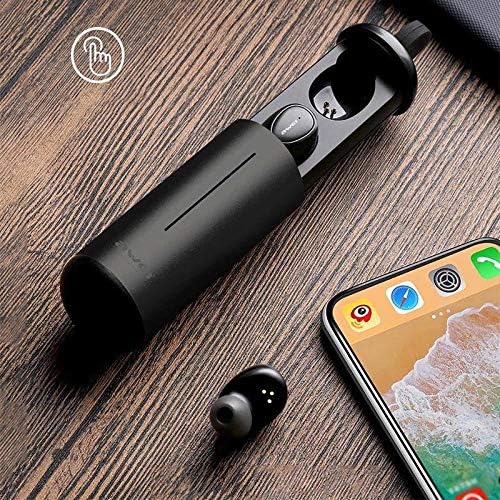
Image: AWEI T5 Earbuds in their charging case, positioned next to a smartphone, illustrating the pairing process.
Arahan Operasi
Kawalan Asas
The AWEI T5 earbuds feature touch controls for various functions:
- Main/Jeda: Ketik sekali pada mana-mana earbud.
- Lagu Seterusnya: Ketik dua kali pada fon telinga kanan.
- Trek Sebelumnya: Ketik dua kali pada fon telinga kiri.
- Jawab/Tamatkan Panggilan: Ketik sekali pada mana-mana fon telinga semasa panggilan masuk.
- Tolak Panggilan: Tekan dan tahan salah satu fon telinga selama 2 saat semasa panggilan masuk.
- Aktifkan Pembantu Suara: Ketik tiga kali sama ada fon telinga.
Mod Earbud Tunggal
You can use either the left or right earbud independently:
- Remove one earbud from the charging case. It will automatically connect to the last paired device.
- The other earbud can remain in the case or be turned off.
Mod Dwi Earbud
For a stereo audio experience, use both earbuds:
- Remove both earbuds from the charging case. They will automatically connect to each other and then to the last paired device.
Penyelenggaraan dan Penjagaan
To ensure the longevity and optimal performance of your AWEI T5 earbuds:
- Pembersihan: Bersihkan fon telinga dan bekas pengecas dengan kerap menggunakan kain yang lembut, kering dan tidak berbulu. Jangan gunakan bahan kimia yang keras atau bahan yang melelas.
- Storan: Apabila tidak digunakan, simpan fon telinga dalam bekas pengecasnya untuk melindunginya daripada habuk dan kerosakan.
- Penjagaan Bateri: Avoid fully discharging the battery frequently. Charge the earbuds and case regularly, even if not used for extended periods.
- Tahan Air: The earbuds are rated IPX4, meaning they are resistant to splashing water from any direction. Do not submerge them in water or expose them to heavy rain.

Image: AWEI T5 Earbuds with water droplets, indicating their IPX4 splash-resistant rating.
Menyelesaikan masalah
Jika anda menghadapi masalah dengan fon telinga AWEI T5 anda, rujuk masalah dan penyelesaian biasa berikut:
| Masalah | Penyelesaian |
|---|---|
| Fon telinga tidak berpasangan dengan peranti. | Pastikan fon telinga dicas. Matikan dan hidupkan Bluetooth pada peranti anda. Lupakan "AWEI T5" daripada senarai Bluetooth peranti anda dan pasangkan semula. |
| Hanya satu fon telinga berfungsi. | Place both earbuds back into the charging case, close the lid, then open and remove them together. Ensure both are charged. |
| Tiada bunyi atau kelantangan rendah. | Periksa tahap kelantangan pada peranti anda dan fon telinga. Pastikan fon telinga disambungkan dengan betul. |
| Kes pengecas tidak dicas. | Verify the USB cable is securely connected to both the case and the power source. Try a different cable or power adapter. |
Spesifikasi
Technical details for the AWEI T5 True Wireless Earbuds:
| Ciri | Perincian |
|---|---|
| Nombor Model | T5 |
| Ketersambungan | Bluetooth |
| Faktor Bentuk | Dalam Telinga |
| bahan | plastik |
| warna | Hitam |
| Dimensi (Produk) | 4 x 10 x 16.5 cm |
| Berat (Produk) | 4.54 g |
| Jenis Bateri | 1 Lithium Ion (per earbud, typically) |
| Penilaian Ketahanan Air | IPX4 (kalis percikan) |
Waranti dan Sokongan
Untuk maklumat jaminan dan sokongan pelanggan, sila rujuk dokumentasi yang disediakan bersama pembelian anda atau hubungi peruncit. Simpan bukti pembelian anda untuk sebarang tuntutan jaminan.
Ask a question about this manual
Ask about setup, troubleshooting, compatibility, parts, safety, or missing instructions. Manuals+ will review the question and use this page’s manual context to help answer it.