
1. Pengenalan
Terima kasih kerana membeliasing the auna V-20 Vertical Stereo System. This manual provides essential information for the safe and efficient operation of your device. Please read it thoroughly before use and keep it for future reference.
2. Arahan Keselamatan
- Baca semua arahan dengan teliti sebelum mengendalikan peranti.
- Jauhkan peranti daripada air, kelembapan dan suhu yang melampau.
- Jangan sekat sebarang bukaan pengudaraan.
- Gunakan hanya lampiran/aksesori yang ditentukan oleh pengilang.
- Cabut plag peranti semasa ribut petir atau apabila tidak digunakan untuk tempoh yang lama.
- Rujuk semua servis kepada kakitangan perkhidmatan yang berkelayakan.
- Jangan buka casing; tiada bahagian yang boleh diservis pengguna di dalamnya.
3. Kandungan Pakej
Sila pastikan semua item ada:
- 1 x auna V-20 Vertical Stereo System
- 1 x Remote Control (including 2 x 1.5V AAA batteries)
- 1 x Penyesuai Kuasa
- 1 x Removable Stand Base
- 1 x Wire Antenna
- User Manual (English and German)
4. Produk Lebihview
The auna V-20 is a versatile micro stereo system featuring a vertical design. It includes a CD player, DAB+ and FM radio, Bluetooth, NFC, USB, and AUX connectivity. The system can be used with its stand or mounted on a wall.

Figure 4.1: The auna V-20 Vertical Stereo System shown with its remote control in a modern living room environment.
Kawalan dan Paparan Panel Hadapan
The front panel features a sleek design with a motorized CD drive cover and an LED display that shows time and operational information. Control buttons are located on the top edge of the unit.
Sambungan Panel Belakang
The rear panel provides various connection ports for external devices and power.
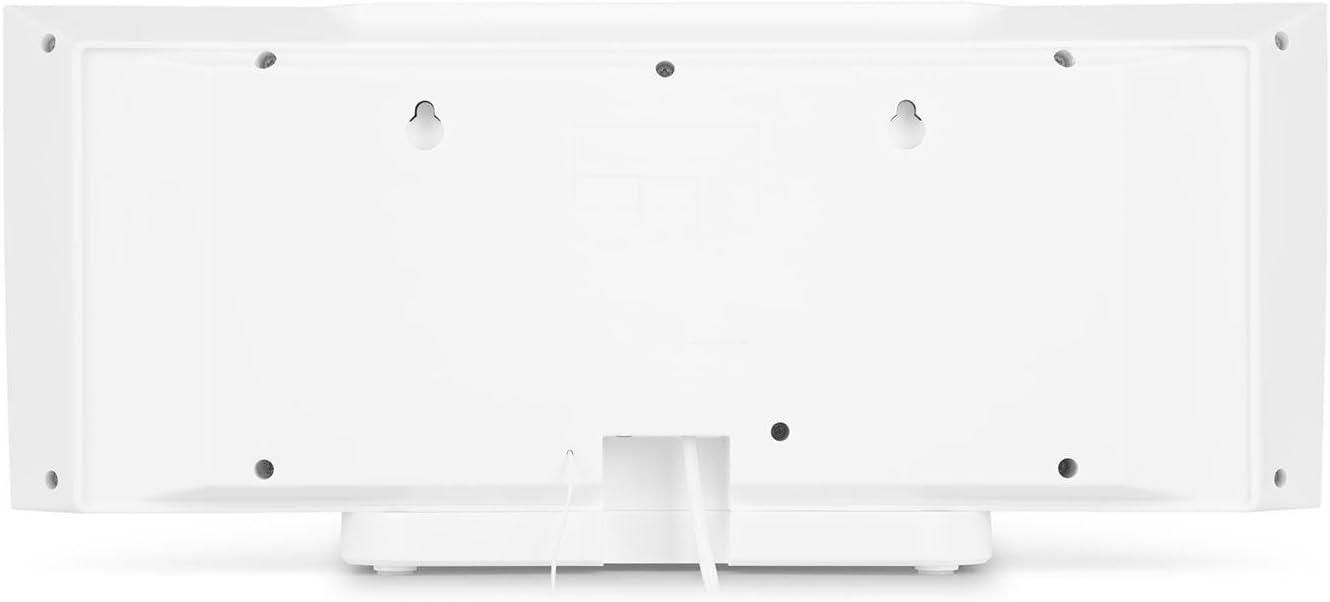
Rajah 4.2: Belakang view of the auna V-20, highlighting the USB port and AUX input.
Alat Kawalan Jauh
The included remote control allows for convenient operation of all functions from a distance.

Rajah 4.3: Terperinci view of the remote control for the auna V-20 stereo system.
5. Persediaan
5.1 Pilihan Penempatan
The auna V-20 offers flexible placement:
- Pemasangan Berdiri: Attach the removable stand base for desktop or shelf placement. Ensure the unit is stable on a flat surface.
- Pemasangan Dinding: The unit can be mounted on a wall to save space. Use appropriate wall mounting hardware (not included) and ensure the wall can support the unit's weight.

Rajah 5.1: Belakang view illustrating the wall mounting points and the stand attachment area.
5.2 Sambungan Kuasa
Connect the provided power adapter to the DC IN port on the rear of the unit, then plug it into a standard wall outlet (AC 230V, 50 Hz).
5.3 Sambungan Antena
Extend the wire antenna for optimal DAB+ and FM radio reception. Adjust its position for the best signal quality.
6. Arahan Operasi
6.1 Power On/Off and Standby
Tekan ke BERSIAP SEDIA button on the unit or remote control to switch the system on or put it into standby mode.
6.2 Pemilihan Mod
Tekan ke FUNGSI button on the unit or the dedicated mode buttons (FM/DAB, USB, CD, AUDIO IN, BLUETOOTH) on the remote control to switch between different audio sources.
6.3 Kawalan Kelantangan
Laraskan kelantangan menggunakan VOL+ dan vol- buttons on the unit or remote control. The LED display will show the current volume level.
6.4 Tetapan Penyama
The system features a 2-band equalizer and equalizer presets. Use the EQ button on the remote control to cycle through presets or adjust bass/treble. The X-BASS function can be activated for enhanced bass.
7. Kesambungan Bluetooth dan NFC
7.1 Berpasangan Bluetooth
To stream music wirelessly from your smartphone, tablet, or laptop:
- Switch the stereo system to Bluetooth mode. The LED display will indicate pairing mode.
- Dayakan Bluetooth pada peranti mudah alih anda dan cari peranti yang tersedia.
- Select "auna V-20" from the list to pair. Once connected, you can play audio from your device.

Figure 7.1: A smartphone being used to connect to the auna V-20 via Bluetooth.
7.2 Sambungan NFC
For intuitive pairing with NFC-enabled devices:
- Pastikan NFC didayakan pada peranti mudah alih anda.
- Gently swipe your NFC-enabled device over the NFC sensor on the auna V-20.
- The devices will automatically pair via Bluetooth.

Rajah 7.2: Jarak dekat view of the NFC sensor for quick device pairing.
8. Operasi Pemain CD
The auna V-20 features an MP3-compatible CD player with a motorized drive.

Figure 8.1: The motorized CD player mechanism with a disc inserted.
8.1 Memuatkan CD
- Tekan ke BUKA/TUTUP button to open the motorized CD cover.
- Carefully place a CD (CD, CD-R/RW, MP3-CD) onto the spindle with the label side facing you.
- Tekan BUKA/TUTUP again to close the cover. The system will automatically switch to CD mode and begin playback.
8.2 Kawalan Main Semula
- Main/Jeda: Tekan MAIN/JEDA untuk memulakan atau menjeda main semula.
- Langkau Trek: Gunakan Langkau ke Hadapan or SKIP KE BELAKANG butang untuk menavigasi antara trek.
- Berhenti: Tekan ke BERHENTI butang untuk menamatkan main balik.
- Repeat/Random: Gunakan ULIKAN dan RANDOM buttons on the remote for playback options.
- Programmable Playback: The system supports programmable title display for custom playlists.
9. Radio Operation (DAB+/FM)
The auna V-20 features both DAB+ digital radio and analog FM radio with RDS function.
9.1 Selecting Radio Mode
Tekan ke FM/DAB button on the remote control to switch between FM and DAB+ modes.
9.2 Imbasan Stesen Automatik
In either FM or DAB+ mode, press the IMBAS button on the remote control to automatically scan and store available stations. The system can store up to 20 presets per reception type.
9.3 Manual Tuning and Presets
- Penalaan Manual: Gunakan TULA +/- buttons on the remote control for fine-tuning.
- Menyimpan Pratetap: Once a station is found, press the PRESET button, then use the number buttons (0-9, 10+) to assign a preset number. Press MASUK untuk mengesahkan.
- Pratetap Mengingat: Press the corresponding number button on the remote control to quickly access a saved station.
- Butang Maklumat: Dalam mod DAB+, tekan butang INFO button to display additional information such as artist, title, album, or news.
10. Main semula USB
The auna V-20 allows playback of MP3 audio files terus daripada batang USB.
10.1 Menyambung Peranti USB
- Insert your USB stick into the USB port on the rear of the unit.
- Switch the stereo system to USB mode using the USB butang pada alat kawalan jauh.
- The system will automatically detect and begin playing MP3 files.
10.2 USB Playback Controls
Playback controls (Play/Pause, Skip, Stop, Repeat, Random) are similar to CD player operation. Use the FOLDER button on the remote to navigate through folders on the USB device.
11. Input AUX
Connect external audio devices such as MP3 players, CD players, or computers using the AUX input.
11.1 Menyambungkan Peranti Luaran
- Connect a 3.5mm audio cable (not included) from the headphone jack or audio output of your external device to the AUX IN port on the rear of the auna V-20.
- Switch the stereo system to AUDIO IN mode using the AUDIO DALAM butang pada alat kawalan jauh.
- Play audio from your external device. The sound will be output through the auna V-20 speakers.
12. Penyelenggaraan
12.1 Pembersihan
- Sentiasa cabut plag peranti daripada salur keluar kuasa sebelum membersihkan.
- Gunakan kain lembut dan kering untuk membersihkan permukaan luar.
- Jangan gunakan pembersih, lilin atau pelarut yang melelas kerana ia boleh merosakkan kemasan.
- Untuk kanta CD, gunakan pembersih kanta CD khusus jika perlu.
12.2 Penjagaan Am
- Elakkan meletakkan objek berat pada unit.
- Jauhkan unit daripada cahaya matahari langsung dan sumber haba.
- Pastikan pengudaraan yang betul di sekeliling unit untuk mengelakkan terlalu panas.
13. Penyelesaian masalah
| Masalah | Kemungkinan Punca | Penyelesaian |
|---|---|---|
| Tiada kuasa | Kabel kuasa tidak disambungkan; soket kuasa rosak | Periksa sambungan kabel kuasa; cuba soket yang berbeza |
| Tiada bunyi | Volume too low; incorrect source selected; mute activated | Increase volume; select correct source; deactivate mute |
| CD tidak dimainkan | CD inserted incorrectly; CD dirty/scratched; unsupported format | Reinsert CD correctly; clean or replace CD; ensure CD is compatible (CD, CD-R/RW, MP3-CD) |
| Penerimaan radio yang lemah | Antenna not extended; weak signal | Extend and adjust antenna position; try moving the unit to a different location |
| Penggandingan Bluetooth gagal | Device too far; Bluetooth not enabled; incorrect pairing procedure | Ensure devices are close; enable Bluetooth on mobile device; follow pairing instructions (Section 7.1) |
14. Spesifikasi
| Ciri | Perincian |
|---|---|
| Jenama | auna |
| Model | V-20 |
| Nombor Bahagian | AUVZ-1100-ghfr |
| Dimensi Produk | 51 x 25 x 16 cm |
| Berat badan | 2.6 kg |
| Sumber Kuasa | Elektrik |
| Wattage | 27 watt |
| Mod Keluaran Audio | Stereo |
| Konfigurasi Pembesar Suara | 2.0 |
| Format Audio yang Disokong | MP3 |
| Jenis Media | CD, MP3 |
| Jenis Penyambung | Bluetooth, NFC, USB, AUX |
| Serasi Bluetooth | ya |
| Versi Bluetooth | 2.1+EDR |
| Bluetooth Profile | A2DP |
| Peranti Serasi | Smartphone, tablet, MP3 player |
| Ciri Khas | Mudah digunakan |
| Bateri Kawalan Jauh | 2 x 1.5V AAA (termasuk) |
| Julat Kekerapan DAB+ | 174 - 240 MHz (Band III) |
15. Waranti dan Sokongan
This product is covered by a manufacturer's warranty. For detailed warranty information, please refer to the documentation provided at the time of purchase or contact auna customer support.
If you encounter any issues not covered in the troubleshooting section, or require further assistance, please contact auna customer service through their official weblaman web atau peruncit anda.