
pengenalan
This manual provides essential instructions for the safe and efficient use of your Maxcom MM134 2G Senior Mobile Phone. Please read this manual thoroughly before operating the device and keep it for future reference.
1. Persediaan
1.1 Kandungan Pakej
Pastikan semua item ada di dalam kotak:
- Maxcom MM134 Mobile Phone
- Bateri (Litium-ion)
- Pengecas
- Kabel USB
- Alat dengar
- Manual Pengguna
1.2 Memasukkan Kad SIM dan Bateri
- Tanggalkan penutup belakang telefon.
- Insert your SIM card into the designated slot. The MM134 supports a single SIM card.
- If using, insert a Micro SD card (up to 32GB) into its slot.
- Insert the Lithium-ion battery, ensuring the contacts align correctly.
- Pasang semula penutup belakang sehingga ia klik pada tempatnya.
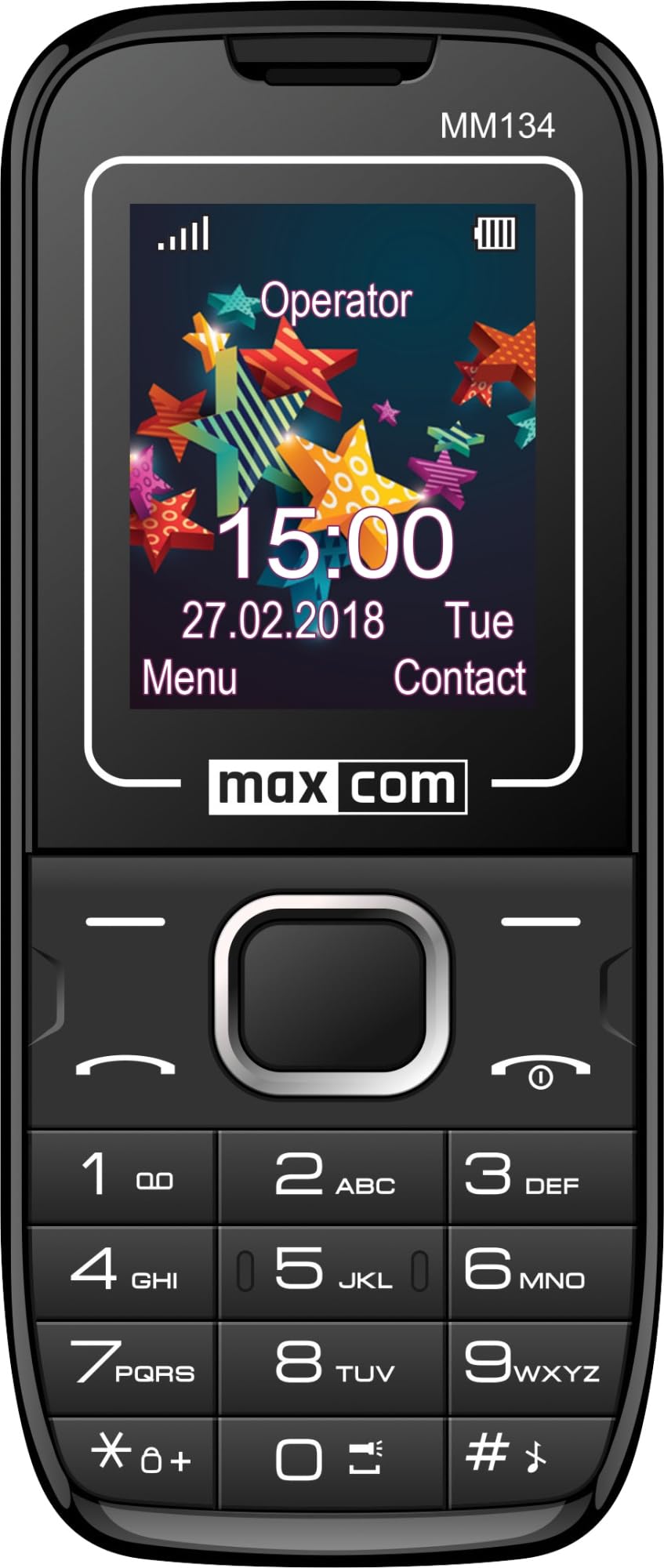
Image 1: Maxcom MM134 2G Senior Mobile Phone. This image shows the front of the phone, highlighting its compact design, screen, and large, easy-to-use buttons.
1.3 Mengecas Telefon
Connect the charger to the phone's charging port and plug it into a power outlet. The battery indicator on the screen will show charging status. Fully charge the phone before first use. The battery capacity is 800 mAh.
1.4 Menghidupkan/Mematikan
- Untuk menghidupkan: Tekan dan tahan butang Kuasa/Tamatkan Panggilan butang sehingga skrin menyala.
- Untuk mematikan kuasa: Tekan dan tahan butang Kuasa/Tamatkan Panggilan button, then confirm shutdown.
2. Arahan Operasi
2.1 Membuat dan Menerima Panggilan
- To make a call: Enter the phone number using the keypad and press the Panggil butang.
- To answer a call: Press the Panggil butang apabila telefon berdering.
- Untuk menamatkan panggilan: Tekan Kuasa/Tamatkan Panggilan butang.
2.2 Contacts (Phonebook)
The phonebook can store up to 500 entries. Navigate to the "Contacts" menu to add, edit, or delete entries.
2.3 Menghantar dan Menerima Mesej SMS
The phone can store up to 200 SMS messages. Access the "Messages" menu to compose new messages or view received ones.
2.4 Kesambungan Bluetooth
To enable Bluetooth, go to the "Settings" menu, then "Connectivity" or "Bluetooth". You can pair with other Bluetooth-enabled devices for hands-free communication or file pemindahan.
2.5 Radio FM
Plug in the headset (which acts as an antenna) to use the FM Radio function. Navigate to the "FM Radio" application in the menu to scan for stations.
2.6 Lampu suluh
The phone features a built-in flashlight. Typically, this can be activated by a dedicated button or through a quick access menu option.
Kamera 2.7
The phone is equipped with a rear camera (0.08 MP). Access the "Camera" application from the main menu to take photos. Photos will be saved to the phone's memory or the inserted Micro SD card.
3. Penyelenggaraan
3.1 Penjagaan Bateri
- Elakkan daripada mendedahkan bateri kepada suhu yang melampau.
- Jangan tebuk atau rosakkan bateri.
- Use only the original charger provided with the phone.
- If the phone will not be used for an extended period, charge it partially before storage and recharge every few months.
3.2 Pembersihan
Wipe the phone with a soft, dry cloth. Do not use liquid cleaners or aerosols. The phone is not water-resistant.
4. Penyelesaian masalah
| Masalah | Penyelesaian |
|---|---|
| Telefon tidak dihidupkan | Pastikan bateri dimasukkan dan dicas dengan betul. Sambungkan pengecas dan cuba lagi. |
| Tiada isyarat rangkaian | Check if the SIM card is properly inserted. Move to an area with better network coverage. Contact your service provider if the issue persists. |
| Tidak boleh membuat atau menerima panggilan | Sahkan bahawa kad SIM anda aktif dan mempunyai kredit/pelan yang mencukupi. Periksa kekuatan isyarat rangkaian. |
| Bateri cepat habis | Reduce screen brightness. Close unused applications. Limit background data usage. Ensure the battery is not old or damaged. The phone has a talk time of approximately 6 hours. |
5. Spesifikasi
| Nama Model | Classic MM134 |
| Jenama | Maxcom |
| Sistem Operasi | Symbian |
| Teknologi Selular | 2G (GSM 900/1800 MHz) |
| Teknologi Ketersambungan | Bluetooth, USB |
| Saiz Skrin | 1.77 Inci (LCD) |
| Model CPU | Cortex (1.8 GHz) |
| Penerangan Kamera | Rear (0.08 MP) |
| Jenis Bateri | Litium-ion |
| Kapasiti Bateri | 800 mAh |
| Masa Berbual | Sehingga 6 Jam |
| SMS Memory | Sehingga 200 mesej |
| Kapasiti Buku Telefon | Sehingga 500 penyertaan |
| Sokongan Kad SD Mikro | Sehingga 32 GB |
| Slot Kad SIM | SIM tunggal |
| Dimensi | 13 x 52 x 111 mm |
| Bicu Fon Kepala | Jack 3.5 mm |
| Tahan Air | Tidak |
6. Waranti dan Sokongan
For warranty information and technical support, please refer to the warranty card included in your product package or visit the official Maxcom webtapak. Simpan bukti pembelian anda untuk tuntutan waranti.