
pengenalan
Welcome to the user manual for your Maxcom MM135 2G Mobile Phone. This guide provides comprehensive instructions to help you get started, operate, and maintain your device. The Maxcom MM135 is a simple and elegant mobile phone, designed for straightforward communication with essential features.
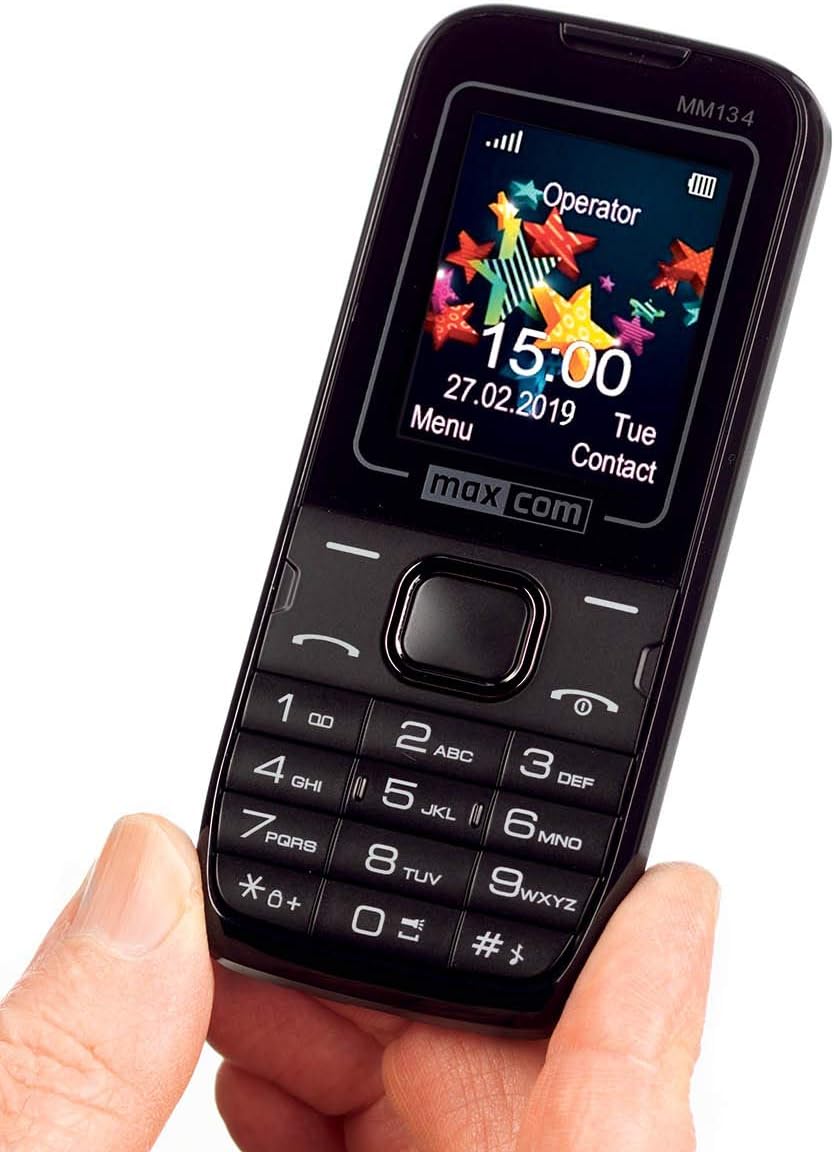
Imej: Depan view of the Maxcom MM135 mobile phone, showing the display, keypad, and navigation buttons. The screen displays "Operator", time, date, and menu options.
Apa yang ada dalam Kotak
Please check the contents of your Maxcom MM135 package. It should include:
- Maxcom MM135 Mobile Phone
- Bateri (Litium-ion)
- Pengecas
- Kabel USB
- Alat dengar
- Manual Pengguna
Persediaan
1. Memasang Kad SIM dan Bateri
- Tanggalkan penutup belakang telefon dengan lembut.
- Insert your SIM card(s) into the designated slot(s). The Maxcom MM135 supports Dual SIM.
- If using a microSD card (up to 32 GB), insert it into the memory card slot.
- Insert the Lithium-ion battery into its compartment, ensuring the contacts align.
- Pasang semula penutup belakang sehingga ia terpasang dengan selamat di tempatnya.

Imej: jarak dekat view of the top or bottom edge of the Maxcom MM135, showing the 3.5mm audio jack and the USB charging port.
2. Mengecas Bateri
- Sambungkan kabel USB ke penyesuai pengecas.
- Plug the small end of the USB cable into the charging port on your phone (3.5mm Jack).
- Palamkan pengecas ke salur keluar kuasa.
- Biarkan telefon dicas sepenuhnya sebelum penggunaan pertama. Penunjuk bateri pada skrin akan menunjukkan status pengecasan.
Arahan Operasi
Hidupkan/Mati Kuasa
- Untuk menghidupkan: Tekan dan tahan butang Kuasa/Tamatkan Panggilan butang sehingga skrin menyala.
- Untuk mematikan kuasa: Tekan dan tahan butang Kuasa/Tamatkan Panggilan button, then select "Power off" from the options.
Membuat Panggilan
- Dari skrin utama, dail nombor telefon menggunakan pad kekunci.
- Tekan ke Panggil butang (biasanya hijau) untuk memulakan panggilan.
- Untuk menamatkan panggilan, tekan butang Tamatkan Panggilan butang (biasanya merah).
- Untuk menjawab panggilan masuk, tekan Panggil butang.
Menghantar Mesej SMS
- Pergi ke Menu > Mesej > Tulis Mesej.
- Masukkan mesej anda menggunakan pad kekunci.
- Masukkan nombor telefon penerima atau pilih daripada kenalan.
- Tekan Hantar. The phone can store up to 200 messages.
Contacts (Phonebook)
- Access contacts via Menu > Kenalan.
- You can store up to 500 entries.
- To add a new contact, select Tambah Baru and enter the details.
Ciri Khas
- Bluetooth: Untuk mendayakan Bluetooth, pergi ke Menu > tetapan > Ketersambungan > Bluetooth. You can pair with other Bluetooth-enabled devices for hands-free communication.
- Radio FM: Plug in the headset (which acts as an antenna) and go to Menu > Radio FM to listen to radio stations.
- Lampu suluh: The phone includes a built-in flashlight. Typically, this can be activated by a dedicated button or a long press on a specific key (e.g., '0' or a side button). Refer to your phone's quick start guide for exact activation.
- kamera: The phone features a 0.08 MP camera. Access it via Menu > Kamera untuk mengambil gambar.
Penyelenggaraan
- Pastikan telefon kering. Kelembapan boleh merosakkan litar elektronik.
- Jangan dedahkan telefon kepada suhu yang melampau.
- Bersihkan telefon dengan kain lembut dan kering. Elakkan menggunakan bahan kimia yang keras.
- Handle the phone with care to prevent physical damage.
- Ensure the charging port and headphone jack are free from dust and debris.
Menyelesaikan masalah
| Masalah | Penyelesaian yang Mungkin |
|---|---|
| Telefon tidak dihidupkan | Ensure the battery is correctly inserted and fully charged. Try charging the phone for at least 30 minutes. |
| Tidak boleh membuat atau menerima panggilan | Check if the SIM card is properly inserted and activated. Verify network signal strength. Ensure airplane mode is off. |
| Kualiti bunyi yang buruk semasa panggilan | Check network signal. Ensure the speaker/earpiece is not blocked. Adjust call volume. |
| Bateri cepat habis | Reduce screen brightness. Close unused applications. Limit background data usage. Ensure the battery is not old or damaged. |
| Bluetooth tidak bersambung | Ensure Bluetooth is enabled on both devices. Make sure devices are within range. Try restarting both devices. |
Spesifikasi
| Ciri | Perincian |
|---|---|
| Nombor Model | MM135 |
| Teknologi Rangkaian | 2G (GSM 900/1800 MHz) |
| Saiz Paparan | 1.77 Inci |
| Resolusi Paparan | 160 x 128 piksel |
| Slot Kad SIM | Dual SIM |
| Ketersambungan | Bluetooth, USB |
| Bicu Fon Kepala | 3.5 mm |
| Kamera | 0.08 MP (Rear) |
| Flash Memory Support | microSD sehingga 32 GB |
| Kapasiti Buku Telefon | Sehingga 500 penyertaan |
| SMS Memory | Sehingga 200 mesej |
| Jenis Bateri | Litium-ion |
| Kapasiti Bateri | 800 mAh (estimated) |
| Masa Berbual | Sehingga 6 Jam |
| Berat badan | 68 Gram |
| Dimensi | 111 x 47 x 13 mm (L x W x T) |
| Sistem Operasi | Symbian |
| Ciri Khas | FM Radio, Flashlight, Hands-free function |
Waranti dan Sokongan
For warranty information and customer support, please refer to the warranty card included in your product package or visit the official Maxcom webtapak. Simpan bukti pembelian anda untuk sebarang tuntutan waranti.
Note: Information regarding spare parts availability and software updates is not available at this time.