
FERMAX 1431
Manual Pengguna Interkom Pintu Video FERMAX 1431
Model: 1431 | Brand: FERMAX
pengenalan
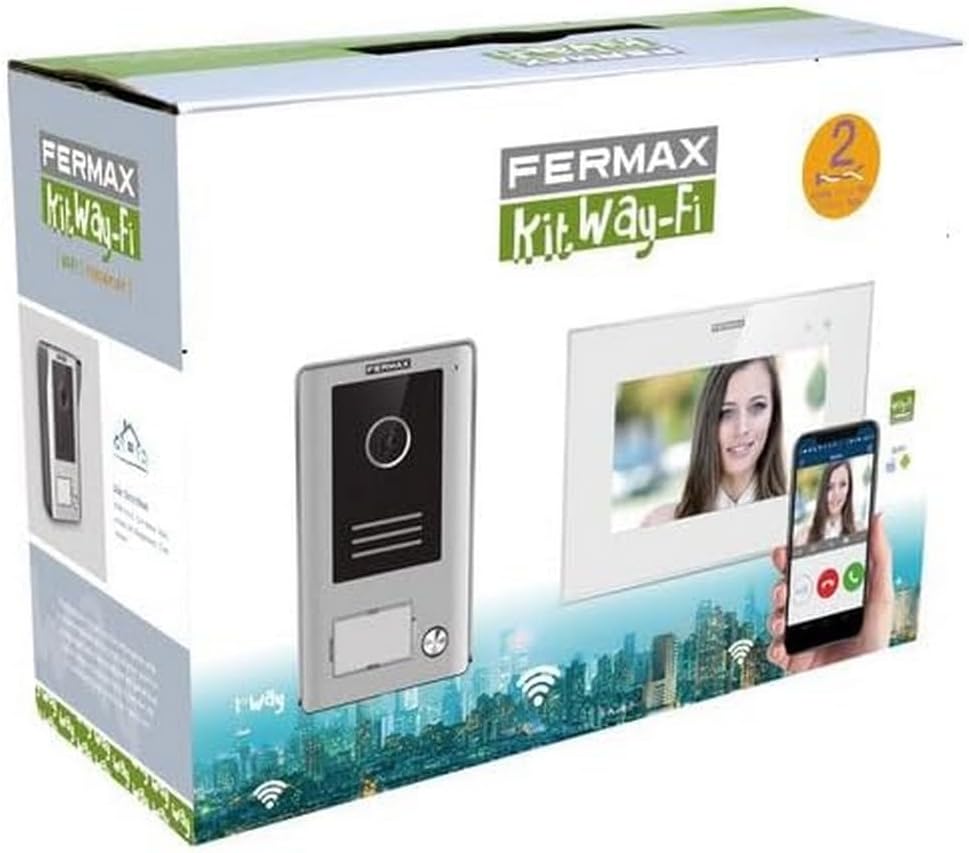
The FERMAX 1431 Video Door Intercom is a comprehensive security solution designed to enhance the safety and convenience of your home or property. This system features a 7-inch video monitor and an outdoor door entry panel, allowing for clear visual and audio communication with visitors. With Wi-Fi connectivity, you can manage your intercom system remotely via a smartphone, ensuring you never miss a visitor, even when you're away.
Ciri-ciri utama termasuk:
- WAY-FI Video Kit with 7-inch monitor.
- Robust outdoor door entry panel.
- Wi-Fi connectivity for smartphone integration.
- Compact dimensions for easy installation.
Persediaan dan Pemasangan
Proper installation is crucial for the optimal performance of your FERMAX 1431 Video Door Intercom. It is recommended that installation be performed by a qualified professional. Always ensure power is disconnected before beginning any wiring.
1. Unboxing dan Pengenalan Komponen
Carefully unpack all components and verify that all parts are present according to the packing list. The kit typically includes the indoor monitor, outdoor panel, power supply, and mounting accessories.
2. Memasang Panel Luar
Select a suitable location for the outdoor panel, typically near your main entrance, at a height that allows for clear viewing of visitors. Ensure the location is protected from direct heavy rain if possible, although the unit has an IP44 rating for protection against splashing water.

3. Memasang Monitor Dalaman
Mount the indoor monitor in a convenient location within your home, such as a hallway or living area, where it is easily accessible. Ensure there is access to a power outlet and sufficient space for wiring.

4. Sambungan Pendawaian
Connect the outdoor panel to the indoor monitor using the provided wiring. The system uses a 2-wire non-polarized connection, simplifying installation. Connect the power supply to the indoor monitor. Refer to the detailed wiring diagram in the official Manual Pemasangan (PDF) for precise instructions.
5. Konfigurasi Kuasa Awal dan Wi-Fi
Once all connections are secure, connect the system to power. Follow the on-screen prompts on the indoor monitor to configure Wi-Fi settings and connect the system to your home network. This step is essential for enabling smartphone app functionality.
Arahan Operasi
The FERMAX 1431 Video Door Intercom is designed for intuitive operation, both from the indoor monitor and via the smartphone application.
1. Menjawab Panggilan
When a visitor presses the call button on the outdoor panel, the indoor monitor will ring and display the visitor's video feed. To answer the call, press the designated answer button on the monitor. You can then communicate with the visitor.
2. Membuka Pintu
During a call, or when viewing the outdoor panel, you can activate an electronic door lock (if connected) by pressing the door release button on the indoor monitor.
3. Monitoring the Entrance
You can manually activate the camera on the outdoor panel at any time from the indoor monitor to view your entrance area without a visitor initiating a call.
4. Smartphone App Integration
Download the official FERMAX WAY-FI app from your smartphone's app store. Once installed and configured with your system, you can receive calls, view pelawat, dan buka pintu dari jauh dari mana-mana sahaja dengan sambungan internet.

Penyelenggaraan
Regular maintenance ensures the longevity and optimal performance of your FERMAX 1431 Video Door Intercom.
Pembersihan
- Gunakan yang lembut, damp cloth to clean the surfaces of both the indoor monitor and outdoor panel.
- Avoid abrasive cleaners, solvents, or harsh chemicals, as these can damage the finish and electronic components.
- For the camera lens on the outdoor panel, gently wipe with a microfiber cloth to ensure clear image quality.
Pertimbangan Alam Sekitar
- While the outdoor panel is designed for outdoor use (IP44), extreme weather conditions can affect performance. Ensure it is securely mounted and free from obstructions.
- Keep the indoor monitor away from direct sunlight, excessive heat, or moisture.
Menyelesaikan masalah
If you encounter issues with your FERMAX 1431 Video Door Intercom, refer to the following common problems and solutions:
| Masalah | Kemungkinan Punca | Penyelesaian |
|---|---|---|
| No video on indoor monitor. | Loose wiring, camera malfunction, power issue. | Check all wiring connections. Ensure the outdoor panel has power. Contact support if the issue persists. |
| Tiada audio semasa panggilan. | Isu mikrofon/pembesar suara, masalah pendawaian. | Verify audio settings on the monitor. Check wiring for secure connections. |
| Apl telefon pintar tidak bersambung. | Incorrect Wi-Fi settings, internet connectivity issues, app not configured. | Ensure the monitor is connected to Wi-Fi. Check your home internet connection. Reconfigure the app if necessary. |
| Pelepasan pintu tidak berfungsi. | Incorrect wiring to door lock, faulty lock, power issue. | Verify wiring to the electronic lock. Ensure the lock receives power. Test the lock independently. |
If these steps do not resolve the issue, please refer to the full installation manual or contact FERMAX customer support.
Spesifikasi
Below are the key technical specifications for the FERMAX 1431 Video Door Intercom:
| Ciri | Perincian |
|---|---|
| Nama Model | 1431 |
| Penggunaan Dalaman/Luar | Outdoor (Panel) |
| Peranti Serasi | Telefon pintar |
| Sumber Kuasa | AC |
| Protokol Ketersambungan | Wi-Fi |
| Resolusi Tangkapan Video | 480p |
| Bilangan Saluran | 4 |
| bahan | Plastik, Logam |
| Voltage | 230 Volt |
| Wattage | 1 watt |
| Dimensi Item (L x W x H) | 8.27 x 11.42 x 4.72 inci |
| Berat Barang | 3.34 paun (1.52 Kilogram) |
| Jenis Makluman | Gerak Sahaja |
| Penilaian Perlindungan Antarabangsa | IP44 |
Waranti dan Sokongan
FERMAX products are manufactured to high-quality standards and come with a manufacturer's warranty. For specific warranty terms and conditions, please refer to the documentation included with your product or visit the official FERMAX webtapak.
For technical support, troubleshooting assistance, or inquiries regarding your FERMAX 1431 Video Door Intercom, please contact FERMAX customer service. You can also visit the FERMAX Store on Amazon untuk lebih banyak maklumat produk dan sumber.
Ask a question about this manual
Ask about setup, troubleshooting, compatibility, parts, safety, or missing instructions. Manuals+ will review the question and use this page’s manual context to help answer it.