
Casio MX-12B
Casio MX-12 Desk Calculator User Manual
Model: MX-12B
pengenalan
This manual provides detailed instructions for the proper use and maintenance of your Casio MX-12 Desk Calculator. Please read this manual thoroughly before using the calculator to ensure optimal performance and longevity.
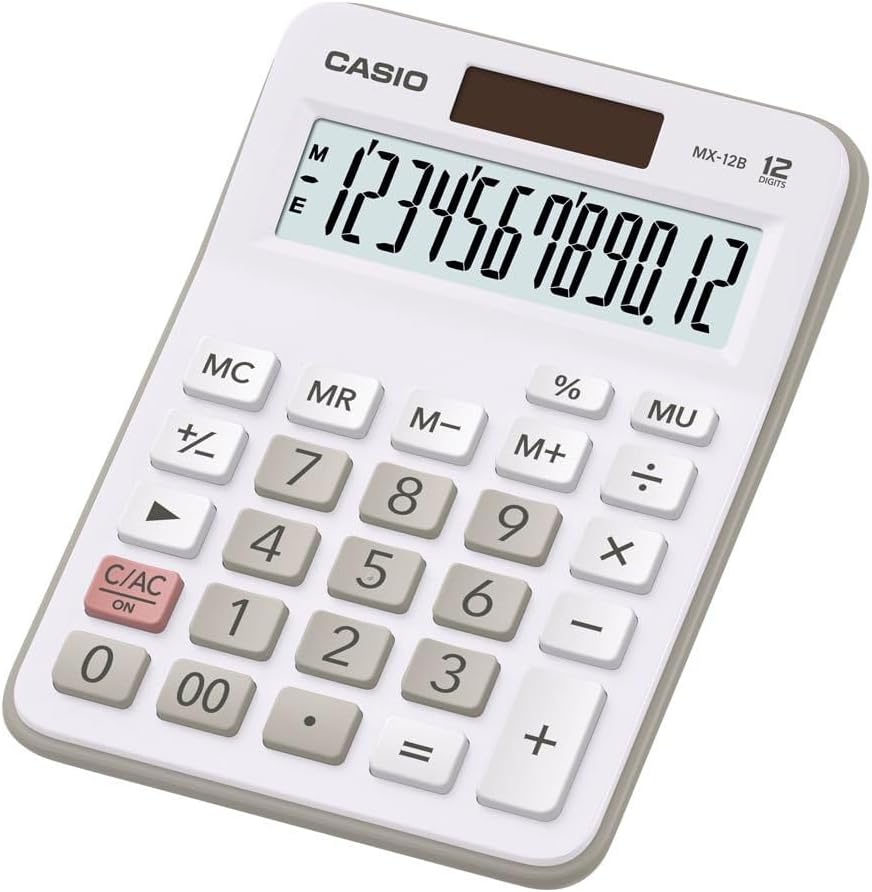
Image: The Casio MX-12 Desk Calculator, featuring a clear 12-digit display and a standard key layout for basic and advanced calculations.
Persediaan
Sumber Kuasa
The Casio MX-12 calculator is dual-powered, operating on both solar energy and a battery backup. For optimal performance, use the calculator in a well-lit environment. The solar panel, located above the display, will power the unit and charge the internal battery.
Pemasangan/Penggantian Bateri
The calculator requires one AAA battery (included) for backup power. If the display becomes dim or unresponsive in low light conditions, the battery may need replacement.
- Balikkan kalkulator itu.
- Cari penutup petak bateri.
- Remove the screw (if present) and slide the cover off.
- Insert a new AAA battery, ensuring the correct polarity (+/-).
- Gantikan penutup petak bateri dan selamatkannya.
Arahan Operasi
The Casio MX-12 features a large, clear 12-digit display and a user-friendly key layout for various calculations.
Operasi Aritmetik Asas
- Tambahan (+): Masukkan nombor pertama, tekan +, masukkan nombor kedua, kemudian tekan =.
- Tolak (-): Masukkan nombor pertama, tekan -, masukkan nombor kedua, kemudian tekan =.
- Pendaraban (×): Masukkan nombor pertama, tekan ×, masukkan nombor kedua, kemudian tekan =.
- Pembahagian (÷): Masukkan nombor pertama, tekan ÷, masukkan nombor kedua, kemudian tekan =.
Fungsi Khas
- Clear/All Clear (C/AC): Tekan C/AC once to clear the last entry. Press it twice to clear all entries and reset the calculator.
- Peratustage (%): To calculate a percentage, enter the number, press ×, enter the percentage value, then press %. Untuk example, to find 15% of 200: 200 × 15 %.
- Change Sign (+/-): Tekan +/- untuk menukar tanda nombor yang dipaparkan daripada positif kepada negatif atau sebaliknya.
- Mark-up (MU): The MU key is used for profit margin calculations. For example, to calculate the selling price with a 25% profit margin on a cost of 80: 80 ÷ 25 MU.
- Double Zero (00): Gunakan 00 key for quick entry of two zeros.
Fungsi Memori
The calculator includes a 4-key memory function:
- Memori Plus (M+): Menambah nilai yang dipaparkan pada memori.
- Memori Tolak (M-): Menolak nilai yang dipaparkan daripada memori.
- Ingatan Ingatan (MR): Mengingat semula nilai yang disimpan dalam memori ke paparan.
- Kosongkan Memori (MC): Mengosongkan nilai yang disimpan dalam memori.
Penyelenggaraan
Pembersihan
To clean the calculator, wipe it gently with a soft, dry cloth. Do not use abrasive cleaners, solvents, or excessive moisture, as these can damage the display or internal components.
Penyimpanan
Store the calculator in a cool, dry place away from direct sunlight and extreme temperatures. Prolonged exposure to direct sunlight can affect the solar panel's efficiency and the display's longevity.
Menyelesaikan masalah
- Paparan kosong atau malap:
- Ensure the calculator is in a well-lit area for the solar panel to function.
- Check the AAA battery. Replace it if necessary (refer to "Battery Installation/Replacement" in the Setup section).
- Keputusan pengiraan yang salah:
- Tekan C/AC twice to clear all previous entries and memory.
- Re-enter the calculation carefully.
- Ensure you are using the correct function keys for your desired operation.
- Kekunci tidak responsif:
- Clean the calculator surface and keys to remove any debris.
- Ensure the calculator is adequately powered (solar or battery).
Spesifikasi
| Nombor Model | MX-12B-WE-W-EC |
| Paparan | 12 Digits, Large LCD |
| Sumber Kuasa | Dual Powered (Solar with Battery Backup) |
| Jenis Bateri | 1 x AAA (termasuk) |
| Dimensi (L x W x H) | 5.79 x 4.21 x 1.14 inci (14.7 x 10.7 x 2.9 cm) |
| Berat badan | 4.9 auns (139 gram) |
| Fungsi | Basic Arithmetic, Percentage, Mark-up (MU), Change Sign, 4-Key Memory |
Waranti dan Sokongan
Casio products are manufactured to high-quality standards. For information regarding warranty coverage, service, or technical support, please refer to the warranty card included with your product or visit the official Casio webtapak. Simpan resit pembelian anda sebagai bukti pembelian.
Untuk bantuan lanjut, anda boleh melawati Kedai Casio di Amazon or contact Casio customer service directly.
Ask a question about this manual
Ask about setup, troubleshooting, compatibility, parts, safety, or missing instructions. Manuals+ will review the question and use this page’s manual context to help answer it.