
1. Pengenalan
This manual provides essential information for the safe and efficient operation of your Zerone 10.8V-12V Lithium Battery Charger. This charger is designed for use with 10.8V to 12V Lithium-Ion batteries, offering quick and reliable charging. Please read this manual thoroughly before first use and retain it for future reference.

Image 1: The Zerone 10.8V-12V Lithium Battery Charger, showing its compact design and universal compatibility label.
2. Arahan Keselamatan
Always observe the following safety precautions to reduce the risk of electric shock, fire, or serious injury:
- Baca semua arahan: Sebelum menggunakan pengecas, baca semua arahan dan tanda amaran pada pengecas, bateri dan produk yang menggunakan bateri.
- Penggunaan dalaman sahaja: Jangan dedahkan pengecas kepada keadaan hujan atau basah.
- Vol yang betultage: Pastikan bekalan kuasa voltage sepadan dengan voltage dinyatakan pada plat penarafan pengecas.
- Elakkan kerosakan: Do not operate the charger if it has received a sharp blow, been dropped, or otherwise damaged. Take it to a qualified service person.
- Pengudaraan: Do not block any ventilation openings. Ensure adequate airflow around the charger during operation.
- Cabut plag apabila tidak digunakan: Sentiasa tanggalkan pengecas daripada soket kuasa sebelum mencuba sebarang penyelenggaraan atau pembersihan, dan apabila tidak digunakan.
- Use specified batteries: Only charge batteries specifically designed for this charger. Charging other battery types may cause them to burst, leading to personal injury and damage.
- Jangan litar pintas: Jangan sekali-kali litar pintas terminal bateri.
- Jauhi daripada kanak-kanak: Perkakas ini tidak dimaksudkan untuk digunakan oleh orang (termasuk kanak-kanak) yang kurang keupayaan fizikal, deria atau mental, atau kurang pengalaman dan pengetahuan, melainkan mereka telah diberi pengawasan atau arahan mengenai penggunaan perkakas oleh orang yang bertanggungjawab untuk keselamatan mereka.
3. Kandungan Pakej
Pastikan semua barang ada dan dalam keadaan baik:
- 1 x Zerone 10.8V-12V Lithium Battery Charger
- 1 x Manual Pengguna
4. Ciri-ciri Produk
The Zerone 10.8V-12V Lithium Battery Charger offers the following key features:
- Keserasian Universal: Specifically designed for 10.8V to 12V Lithium-Ion batteries.
- Penunjuk LED: Built-in LED display provides intuitive monitoring of battery status.
- Pengurusan Pengecasan Pintar: Utilizes a 'first in, first charged' system and protects against overload.
- Pengecasan Pantas: Capable of charging a 12V Lithium-Ion 1.5Ah battery in approximately 50 minutes.
- Wide Model Compatibility: Compatible with models such as DC10WD, DC10SB, DC10WC, BL1015, BL1016, BL1021B, and BL1041B.

Image 2: The charger displaying its compatibility with various battery models, including DC10WD, DC10SB, DC10WC, BL1015, BL1016, BL1021B, and BL1041B.
5. Persediaan
Follow these steps to set up your battery charger:
- Buka Pembungkusan Pengecas: Carefully remove the charger and all components from the packaging.
- Sambung ke Kuasa: Plug the charger's power cord into a standard 100V-260V AC electrical outlet. The charger's LED indicator will flash green once to confirm power connection.
- Prepare Battery: Ensure the battery to be charged is clean and free from debris.
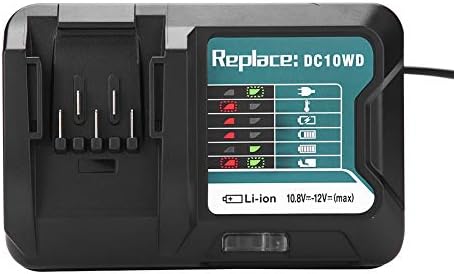
Image 3: The Zerone charger with its integrated power cord, ready for connection to an electrical outlet.
6. Arahan Operasi
Untuk mengecas bateri:
- Masukkan Bateri: Sejajarkan bateri dengan slot pengecas dan luncurkannya ke dalam sehingga ia klik dengan selamat di tempatnya.
- Pengecasan Monitor: The LED indicator will show the charging status. Refer to the "LED Indicator Guide" section for detailed explanations of the light patterns.
- Pengecasan Selesai: Once the battery is fully charged, the LED indicator will show a solid green light.
- Keluarkan Bateri: Press the release button on the battery (if applicable) and slide it out of the charger.
- Cabut Pengecas: Putuskan sambungan pengecas daripada salur keluar kuasa apabila tidak digunakan.

Image 4: The Zerone charger with a compatible lithium-ion battery inserted, ready for charging.
7. Petunjuk Petunjuk LED
The charger features an LED display to communicate the battery's status:
| Lampu Penunjuk | Status |
|---|---|
| Berkelip Hijau | Charger is plugged in and ready. |
| Merah Berkelip | Battery is in cooling mode. Charging will begin once the battery temperature is within the optimal range. |
| Red Sustained Light | Battery is currently charging (0-100%). |
| Green Sustained Light | Charging is completed. The battery is fully charged. |
| Red and Green Flashing | Indicates a defective battery pack or charger. |

Imej 5: Gambar jarak dekat view of the charger's LED indicator panel, detailing the meaning of each light pattern for battery status.
8. Penyelenggaraan
Proper maintenance ensures the longevity and performance of your charger:
- Pembersihan: Putuskan sambungan pengecas daripada bekalan kuasa sebelum membersihkan. Gunakan kain kering dan lembut untuk mengelap bahagian luar pengecas. Jangan gunakan air atau pembersih kimia.
- Storan: Simpan pengecas di tempat yang kering dan sejuk, jauh dari cahaya matahari langsung dan kelembapan.
- Periksa dengan kerap: Periodically inspect the charger and its cord for any signs of damage. If damage is found, discontinue use and seek professional repair.
9. Penyelesaian masalah
Jika anda menghadapi masalah dengan pengecas anda, rujuk kepada masalah dan penyelesaian biasa berikut:
- Pengecas tidak dihidupkan:
- Ensure the power cord is securely plugged into both the charger and a working electrical outlet.
- Periksa salur keluar kuasa dengan peranti lain untuk mengesahkan ia berfungsi.
- Battery not charging (Red Flashing LED):
- The battery may be too hot or too cold. Allow the battery to reach room temperature before attempting to charge again. Charging will automatically resume once the temperature is optimal.
- Battery not charging (Red and Green Flashing LED):
- This indicates a defective battery or charger. Try charging a different, known-good battery. If the issue persists, the charger may be faulty. If only the original battery causes this, the battery is likely defective.
- Pengecasan perlahan:
- Ensure the battery is fully seated in the charger.
- Verify that the battery is compatible with this charger.
Jika langkah ini tidak menyelesaikan isu, sila hubungi sokongan pelanggan.
10. Spesifikasi
| Spesifikasi | Perincian |
|---|---|
| Nombor Model | Zeronegfvetp6dn8-01 |
| Input Voltage | 100V-260V AC, 50-60Hz |
| Keluaran Voltage | 10.8V-12V (DC) |
| Dimensi Produk | 4.72 x 1.97 x 5.91 inci |
| Berat Barang | 11.6 auns (0.33 Kilogram) |
| Pengeluar | Zerone |
| Jenis Bateri yang Serasi | 10.8V-12V Lithium-Ion (e.g., BL1015, BL1016, BL1021B, BL1041B) |
| Model Pengecas yang Serasi | DC10WD, DC10SB, DC10WC |

Imej 6: Bahagian bawah view of the Zerone charger, showing its input/output specifications and model number.
11. Waranti dan Sokongan
For warranty information or technical support, please refer to the documentation provided with your purchase or contact Zerone customer service through the retailer where the product was purchased. Keep your purchase receipt as proof of purchase.