
pengenalan
Thank you for choosing the LENRUE A38S Computer Speakers. This manual provides essential information for setting up, operating, and maintaining your speakers to ensure optimal performance. The A38S speakers are designed to deliver clear audio for your desktop, laptop, and tablet, featuring a plug-and-play design with USB power and 3.5mm auxiliary audio input, complemented by dynamic RGB lighting.
Persediaan
Follow these steps to connect your LENRUE A38S speakers to your device.
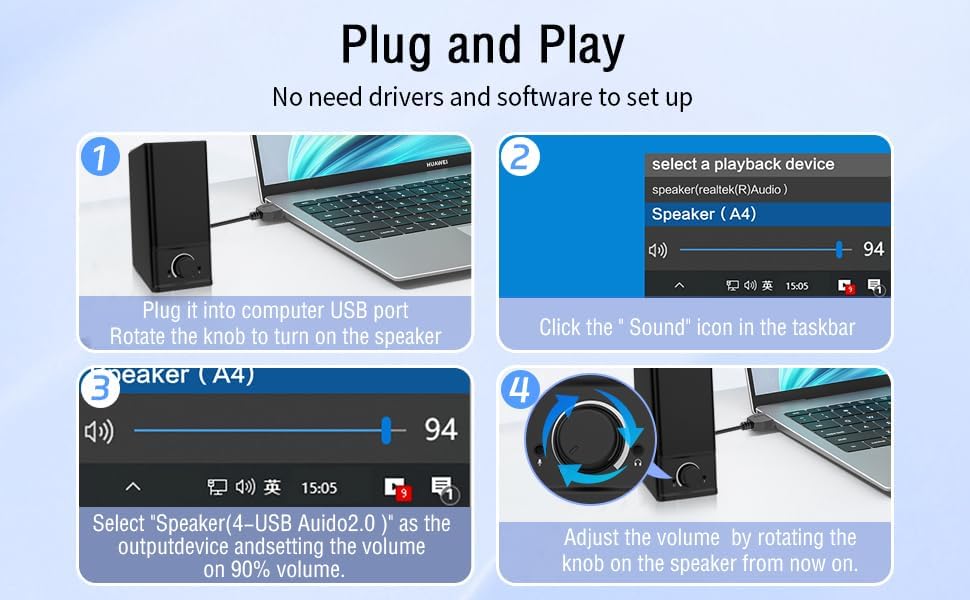
- Sambungkan Kuasa: Insert the USB-A plug into an available USB port on your computer or a USB power adapter. If your device has a USB-C port, use the provided USB-A to Type-C adapter. The speakers are powered via USB and contain an internal battery for portable use.
- Sambung Audio: Plug the 3.5mm audio jack into the headphone or audio output port of your computer, laptop, or tablet.
- Hidupkan kuasa: Rotate the main knob on the speaker clockwise to turn it on. The RGB lights will illuminate.
- Select Playback Device: On your computer, navigate to your sound settings and select "Speaker (4-USB Audio 2.0)" or a similar option as the output device. Adjust the volume to approximately 90% on your computer for optimal control via the speaker knob.
Operasi
The LENRUE A38S speakers feature a multi-function knob for easy control.
- Hidupkan/Mati Kuasa: Rotate the knob clockwise to turn on the speakers. Rotate counter-clockwise until it clicks to turn off.
- Kawalan Kelantangan: Rotate the knob clockwise to increase volume and counter-clockwise to decrease volume.
- Mod Pencahayaan RGB: Double-click the knob to cycle through the three dynamic RGB lighting modes.
- Turn Off RGB Lights: Triple-click the knob to turn off all RGB lighting.

Penyelenggaraan
Proper care ensures the longevity of your speakers.
- Pembersihan: Use a soft, dry cloth to wipe the speaker's surface. Do not use liquid cleaners or abrasive materials.
- Storan: Simpan pembesar suara di tempat yang sejuk dan kering, jauh daripada cahaya matahari langsung dan suhu yang melampau.
- Tahan Air: The speakers are waterproof. However, avoid prolonged submersion or exposure to high-pressure water jets to prevent damage. Ensure all ports are dry before connecting cables.
Menyelesaikan masalah
Jika anda menghadapi masalah, rujuk kepada penyelesaian biasa berikut:
| Masalah | Penyelesaian |
|---|---|
| Tiada suara dari pembesar suara |
|
| Lampu RGB tidak berfungsi |
|
| Audio yang diputarbelitkan |
|
Spesifikasi
Detailed technical specifications for the LENRUE A38S Computer Speakers.
- Nama Model: A38S
- Jenis pembesar suara: sepaksi
- Output Audio: Dual 5W drivers (10W RMS total), 18W Max Output
- Konfigurasi Saluran Bunyi Sekeliling: 2.0 Stereo
- Ketersambungan: USB (for power), 3.5mm Aux-in (for audio)
- Sumber Kuasa: USB Powered with internal Lithium Ion Battery
- Peranti Serasi: Desktops, PCs, Laptops, Mac, Tablets, Phones, Projectors, PS4, MP3 players
- ciri-ciri: Dynamic RGB Lighting, Plug-n-Play, Waterproof
- Dimensi Produk: 2.1" (D) x 16" (W) x 2.5" (H)
- Berat Barang: 286 Gram (10.1 auns)
- Panjang kabel: Approximately 47.3 inches (USB and 3.5mm audio)
- Komponen yang Disertakan: LENRUE A38S Speaker Unit, USB-A to Type-C Adapter, USB Power Cable, 3.5mm Audio Cable


Waranti dan Sokongan
LENRUE is committed to providing quality products and customer satisfaction.
- Waranti: Your LENRUE A38S speakers come with a 12-month worry-free replacement service from the date of purchase. This limited warranty covers manufacturing defects.
- Perkhidmatan Pelanggan: We offer lifetime customer service for any questions or issues you may encounter. For support, please refer to the contact information provided with your purchase or visit the official LENRUE webtapak.