
UMLIFE W3001
UMLIFE XH-W3001 Digital LED Temperature Controller Module User Manual
Model: XH-W3001
Jenama: UMLIFE
Produk Selesaiview
The UMLIFE XH-W3001 Digital LED Temperature Controller Module is a versatile thermostat switch designed for precise temperature control in various applications. It features a clear digital display and a waterproof NTC10K probe, making it suitable for both heating and cooling modes. Its robust ABS flame retardant housing ensures safety and durability.

Figure 1: UMLIFE XH-W3001 Digital LED Temperature Controller Module with probe and wiring.
Ciri-ciri Utama
- Lampu Penunjuk LED: Displays the current output status for easy monitoring.
- Digital Display Tube: Shows measuring temperature with high accuracy.
- Dua Mod Kerja: Supports both heating (start temperature < stop temperature) and cooling (start temperature > stop temperature) operations.
- Julat Suhu Luas: Operates from -50℃ to 110℃ with a control precision of 0.1℃.
- Perumahan Tahan Lama: Constructed with ABS flame retardant material for high safety, aging resistance, and durability.
- Kuar Kalis Air: Equipped with a 1-meter NTC10K stainless steel probe that is waterproof and rust-resistant.
Persediaan dan Pendawaian
Proper wiring is crucial for the safe and correct operation of the XH-W3001 module. Ensure all connections are secure before applying power.

Figure 2: Wiring diagram for the 12V XH-W3001 model. Connect the 12V input (red/black wires) to your power source. The output (yellow/black wires) connects to your load (e.g., a light bulb or fan). The sensor probe connects to the designated port.
Arahan pendawaian:
- Input Kuasa: Connect the red wire to the positive (+) terminal of your 12V DC power supply and the black wire to the negative (-) terminal.
- Muatkan Output: Connect the yellow wire to the positive (+) terminal of your heating or cooling device (load) and the black wire to the negative (-) terminal of the load. Ensure the load's voltage sepadan dengan volum input pengawaltage (12V).
- Probe Suhu: Insert the NTC10K waterproof probe into the designated two-pin connector on the module.
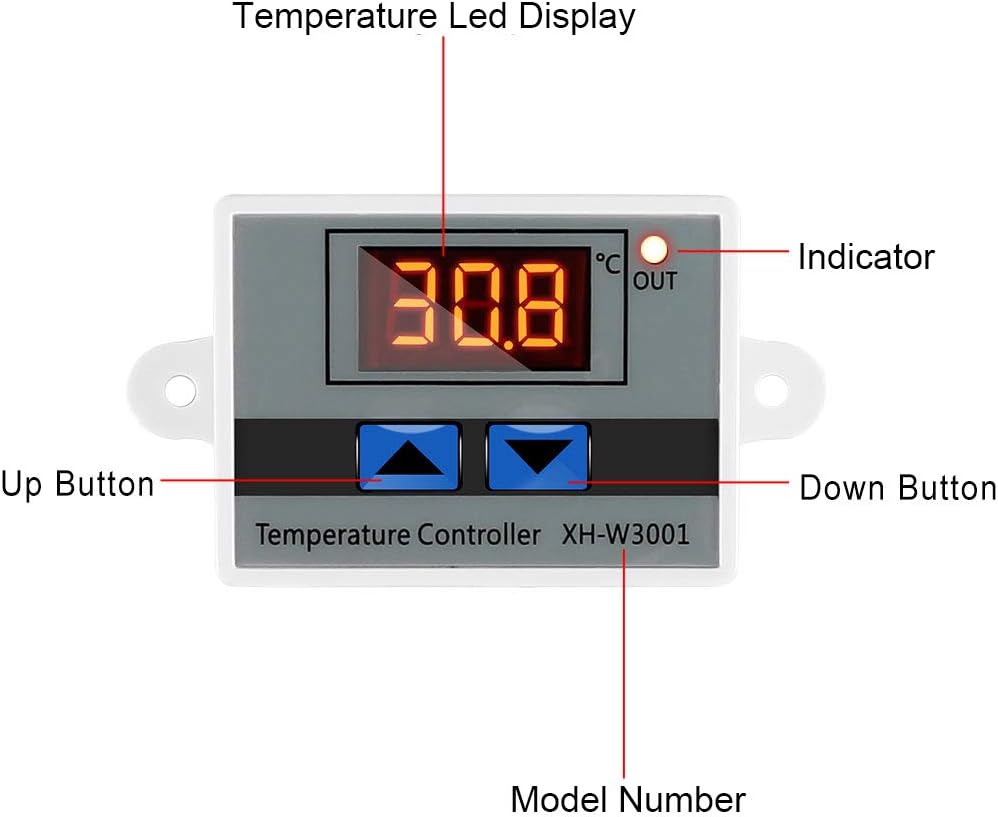
Figure 3: Labeled components of the XH-W3001 module, showing the temperature LED display, indicator light, up button, down button, and model number.
Arahan Operasi
The XH-W3001 has two main parameters to set: the start temperature and the stop temperature.
Setting Start Temperature:
- Tekan dan tahan butang Butang Naik (left button) for approximately 3 seconds. The display will start flashing, indicating it's in setting mode.
- Gunakan Up dan Butang Bawah to adjust the desired start temperature.
- Tekan ke Butang Naik again or wait for 3 seconds for the setting to be saved automatically.
Setting Stop Temperature:
- Tekan dan tahan butang Butang Bawah (right button) for approximately 3 seconds. The display will start flashing.
- Gunakan Up dan Butang Bawah to adjust the desired stop temperature.
- Tekan ke Butang Bawah again or wait for 3 seconds for the setting to be saved automatically.
Mod Pengendalian:
- Mod Pemanasan: If the Start Temperature is set lebih rendah than the Stop Temperature, the module will operate in heating mode. The output will turn ON when the temperature drops below the Start Temperature and turn OFF when it reaches the Stop Temperature.
- Mod Penyejukan: If the Start Temperature is set lebih tinggi than the Stop Temperature, the module will operate in cooling mode. The output will turn ON when the temperature rises above the Start Temperature and turn OFF when it drops to the Stop Temperature.
Note: The display shows temperature in Celsius only. There is no option to change to Fahrenheit.
Penyelenggaraan
The XH-W3001 module is designed for low maintenance. Regular checks can ensure its longevity and accurate performance.
- Pembersihan: Keep the module and probe clean. Use a soft, dry cloth to wipe the display and housing. For the probe, ensure it is free from debris that might affect temperature readings.
- Sambungan: Periodically check all wiring connections to ensure they are secure and free from corrosion. Loose connections can lead to intermittent operation or damage.
- Keadaan Probe: Inspect the temperature probe for any signs of damage to the cable or the sensor tip. Replace if damaged to maintain accuracy.
- Persekitaran: Ensure the module is installed in an environment within its specified operating temperature and humidity ranges to prevent premature failure.
Menyelesaikan masalah
If you encounter issues with your XH-W3001 module, refer to the following common problems and solutions:
| Masalah | Kemungkinan Punca | Penyelesaian |
|---|---|---|
| Display not lighting up. | No power, incorrect wiring, or faulty unit. | Check power supply connections. Ensure correct polarity. Verify power source is active. |
| Bacaan suhu tidak tepat. | Damaged probe, probe not properly connected, or environmental interference. | Ensure probe is securely connected. Inspect probe for physical damage. Test with another known accurate thermometer if possible. |
| Output not switching ON/OFF as expected. | Incorrect start/stop temperature settings, load not connected, or faulty relay. | Review and re-set start/stop temperatures. Verify load connections. Ensure the load's power requirements are within the module's specifications (10A 120W for 12V model). |
| Display shows "LLL" or "HHH". | "LLL" indicates open circuit or probe not connected. "HHH" indicates short circuit or temperature exceeding range. | Check probe connection. Replace probe if damaged. Ensure temperature is within -50℃ to 110℃ range. |
Spesifikasi
| Ciri | Spesifikasi |
|---|---|
| Nombor Model | XH-W3001 |
| Voltage | 12 Volts (for this specific model) |
| Arus Keluaran | Maks 10A |
| Kuasa Keluaran | Max 120W (for 12V model) |
| Julat Kawalan Suhu | -50 ℃ hingga 110 ℃ |
| Ketepatan Pengukuran Suhu | ±0.2 ℃ |
| Ketepatan Kawalan Suhu | ±0.1 ℃ |
| Jenis Probe | NTC10K (Waterproof) |
| Jenis Paparan | Paparan Digital LED |
| Bahan Perumahan | ABS Kalis Api |
| Dimensi Produk | 3.3 x 1.8 x 1.1 inci |
| Berat Barang | 1.76 auns (50 Gram) |
Waranti dan Sokongan
For warranty information or technical support regarding your UMLIFE XH-W3001 Digital LED Temperature Controller Module, please refer to the product packaging or contact UMLIFE customer service directly. Contact details are typically provided with your purchase or can be found on the manufacturer's official webtapak.
Ask a question about this manual
Ask about setup, troubleshooting, compatibility, parts, safety, or missing instructions. Manuals+ will review the question and use this page’s manual context to help answer it.