
pengenalan
This manual provides essential instructions for the safe and efficient use of your OttLite 13 Watt Magnifier Task Lamp. Please read this manual thoroughly before operating the lamp dan simpan untuk rujukan masa hadapan.

Figure 1: OttLite 13 Watt Magnifier Task Lamp (Pirus)
The OttLite 13 Watt Magnifier Task Lamp is designed to provide clear, natural daylight illumination for various tasks requiring detailed vision, such as crafting, reading, and fine work. It features a 2X magnification lens and an adjustable design for optimal positioning.
Persediaan
- Membongkar: Keluarkan semua komponen dari pembungkusan dengan berhati-hati. Pastikan semua bahagian ada: lamp unit, power cord, and pre-installed bulb.
- penempatan: Letakkan lamp on a stable, flat surface. The swivel base allows for easy rotation to direct light as needed.
- Sambungan Kuasa: Masukkan kord kuasa ke dalam lamp's power input, then plug the other end into a standard 120V AC electrical outlet.
- Menyelaraskan Tinggi: Lamp's height can be adjusted from 11.5 inches (29.2 cm) to 19.5 inches (49.6 cm) by extending the arm. Ensure the arm is securely locked in place after adjustment.

Rajah 2: Lamp Height Adjustment and Swivel Base
Arahan Operasi
- Menghidupkan/Mematikan: Untuk menghidupkan lamp on, gently lift the light head from its folded position. The light will illuminate automatically. To turn it off, fold the light head back down into its compact position.
- Melaraskan Arah Cahaya: Lamp head can be swiveled and tilted to direct the light precisely onto your workspace. The base also swivels for broader coverage.
- Menggunakan Pembesar: Lamp includes a built-in 2X magnification lens. To use it, open the clear cover located on the underside of the light head. Position your work directly beneath the magnifier for enhanced detail.
Video 1: Demonstration of the OttLite Magnifier Task Lamp's features, including opening, light activation, and magnifier use.
Video 2: Selesaiview of the OttLite lamp, highlighting its brightness, adjustable head, and integrated magnifier for detailed tasks.

Rajah 3: Lamp in folded, compact position.

Rajah 4: Lamp in use with magnifier for crafting.

Figure 5: Comparison of OttLite illumination versus standard light.
Penyelenggaraan
- Pembersihan: Untuk membersihkan lamp, ensure it is unplugged. Use a soft, dry cloth to wipe down the exterior surfaces. For the magnifier lens, use a soft, lint-free cloth and a mild glass cleaner if necessary. Avoid abrasive cleaners.
- Penggantian mentol: Lamp uses a 13-watt bulb, type 'E'. To replace the bulb, ensure the lamp is unplugged and cool. Carefully open the light head cover and remove the old bulb. Insert the new bulb, ensuring it is seated correctly. Close the cover securely.
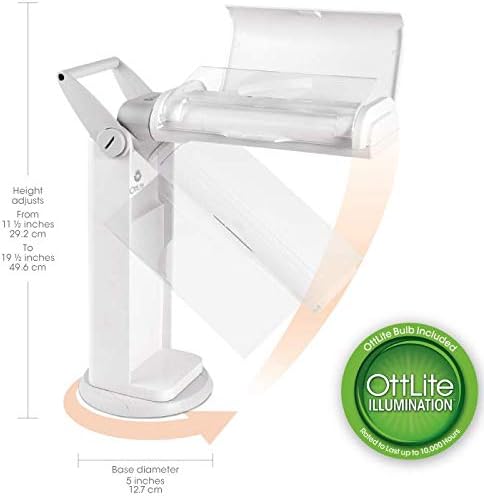
Figure 6: Replacement Bulb Type E

Figure 7: Lighting Facts for the included bulb.
Menyelesaikan masalah
| Masalah | Kemungkinan Punca | Penyelesaian |
|---|---|---|
| Lamp tidak menyala. | Not plugged in, power outlet issue, or bulb needs replacement. | Ensure power cord is securely plugged into both the lamp and a working outlet. Check the bulb and replace if necessary. |
| Cahaya berkelip-kelip. | Loose bulb or nearing end of bulb life. | Ensure the bulb is securely seated. If flickering persists, replace the bulb. |
| Magnifier is blurry. | Lens is dirty or positioned incorrectly. | Clean the magnifier lens with a soft, lint-free cloth. Ensure your work is at the optimal focal distance from the lens. |
Spesifikasi
- Jenama: OttLite
- Nombor Model: OTL13MAGTU-SHPR
- warna: Pirus
- Berat Barang: 3.19 paun
- Dimensi Produk: 10 x 5 x 11.5 inci (dilipat)
- Tinggi Dikumpul: 11.5 hingga 19.5 inci (boleh laras)
- Bahan Kanta: Akrilik
- Kekuatan Pembesaran: 2X
- Jenis Mentol: 13 Watt LED (Type E)
- Voltage: 120 Volt
- Sumber Kuasa: Elektrik Bertali
- Ciri Khas: Adjustable, Full Spectrum, Magnifying
- Komponen yang Disertakan: Mentol
Waranti dan Sokongan
For warranty information and customer support, please refer to the documentation included with your product or visit the official OttLite website. Contact details for support are typically provided on the product packaging or within the warranty card.