
1. Pengenalan
This manual provides detailed instructions for the safe and effective operation of your MICTUNING 18 LED UV Black Light. Please read this manual thoroughly before use and retain it for future reference.
2. Produk Lebihview
The MICTUNING 18 LED UV Black Light is designed to produce an iridescent violet light source, enhancing various environments. It features multiple lighting modes and can be controlled via a remote or manual panel.
2.1 Komponen
- 18 UV LED Black Light Unit
- RF Remote Control (battery not included)
- Pendakap Pemasangan Boleh Laras
- Kabel Kuasa
- Manual Pengguna

Image: The MICTUNING 18 LED UV Black Light unit, its remote control, power cable, and mounting bracket.
2.2 Ciri-ciri Utama
- High-Quality UV LEDs: Equipped with 18 high-quality UV LEDs for efficient light output.
- Pelbagai Mod Pencahayaan: Includes Auto, Jump, Color Gradient, Flash, Pulse, and Sound-activated modes.
- Kawalan Jauh: Convenient RF remote control for mode selection and speed adjustment.
- Kawalan DMX-512: Standard DMX-512 compatibility for professional setups.
- Pembinaan Teguh: Aluminum alloy housing with an integrated fan for heat dissipation.
- Sudut boleh laras: Features an adjustable mounting bracket for flexible positioning.
3. Arahan Persediaan
- Bongkar: Keluarkan semua komponen dari pembungkusan dengan berhati-hati.
- Pemasangan:
- Attach the adjustable bracket to the light unit using the provided screws.
- The unit can be placed on a flat surface or mounted to a wall/ceiling using appropriate hardware (not included).
- Adjust the lighting angle as needed using the knobs on the side of the bracket.

Image: The adjustable bracket allows for 360-degree rotation to direct the light.
- Sambungan Kuasa: Connect the power cable to the light unit and then plug it into a standard AC 100-240V power outlet.
- Bateri Kawalan Jauh: Insert the required battery into the RF remote control (battery not included).
- Sambungan DMX (Pilihan): For DMX control, connect a DMX cable from your DMX controller to the "DMX IN" port on the light unit. If chaining multiple units, connect from "DMX OUT" of the first unit to "DMX IN" of the next.
4. Arahan Operasi
The MICTUNING UV Black Light can be operated using the included RF remote control or the manual control panel on the back of the unit.
4.1 Panel Kawalan Manual
The manual control panel features an LCD screen and buttons for mode selection and adjustment.

Image: The back panel of the light unit showing DMX IN/OUT, LCD display, and control buttons. The remote control layout is also shown.
- Use the buttons next to the LCD screen to navigate through modes and settings.
- The LCD screen will display the currently selected mode (e.g., "A 1.05" for Auto mode).
4.2 Operasi Kawalan Jauh
The RF remote control provides convenient access to all lighting modes and adjustments.
- Hidupkan/Mati Kuasa: Tekan ke red power button untuk menghidupkan atau mematikan unit.
- Pemilihan Mod:
- AUTO: Automatic mode cycling through various effects.
- BUNYI: Light reacts to sound/music.
- STROB: Flashing effect.
- SEMUA DIHIDUPKAN: All LEDs are continuously lit.
- PUDAR: Gradual transition between effects.
- LOMPAT: Abrupt changes between effects.
- nadi: Pulsating light effect.
- WARNA +/-: Adjusts color-related settings or selects specific effects within certain modes.
- KELAJUAN +/-: Adjusts the speed of effects in modes like Auto, Jump, Fade, and Pulse.
5. Penyelenggaraan
Regular maintenance ensures optimal performance and longevity of your UV Black Light.
- Pembersihan: Bersihkan kanta dan perumah secara berkala dengan kain lembut dan kering. Jangan gunakan pembersih atau pelarut yang kasar.
- Pengudaraan: Ensure the integrated fan and ventilation openings are free from dust and obstructions to prevent overheating.
- Storan: Apabila tidak digunakan untuk tempoh yang lama, simpan unit di tempat yang sejuk dan kering, jauh dari cahaya matahari langsung dan suhu yang melampau.
- Pemutusan Kuasa: Always disconnect the power before cleaning or performing any maintenance.
6. Penyelesaian masalah
| Masalah | Kemungkinan Punca | Penyelesaian |
|---|---|---|
| Cahaya tidak menyala. | No power supply; faulty power cable; unit off. | Check power connection and outlet. Ensure power button is pressed. Try a different power cable if available. |
| Alat kawalan jauh tidak berfungsi. | Battery depleted or incorrectly inserted; remote out of range; obstruction. | Replace remote battery. Ensure battery is inserted correctly. Operate remote within close range and without obstructions. |
| Light effects are not changing. | Stuck in a single mode; DMX conflict. | Try selecting a different mode using the remote or manual panel. If using DMX, ensure DMX settings are correct and no conflicts exist. |
| Unit terlalu panas. | Poor ventilation; fan obstruction. | Ensure adequate airflow around the unit. Clean any dust or debris from the fan and vents. |
7. Spesifikasi
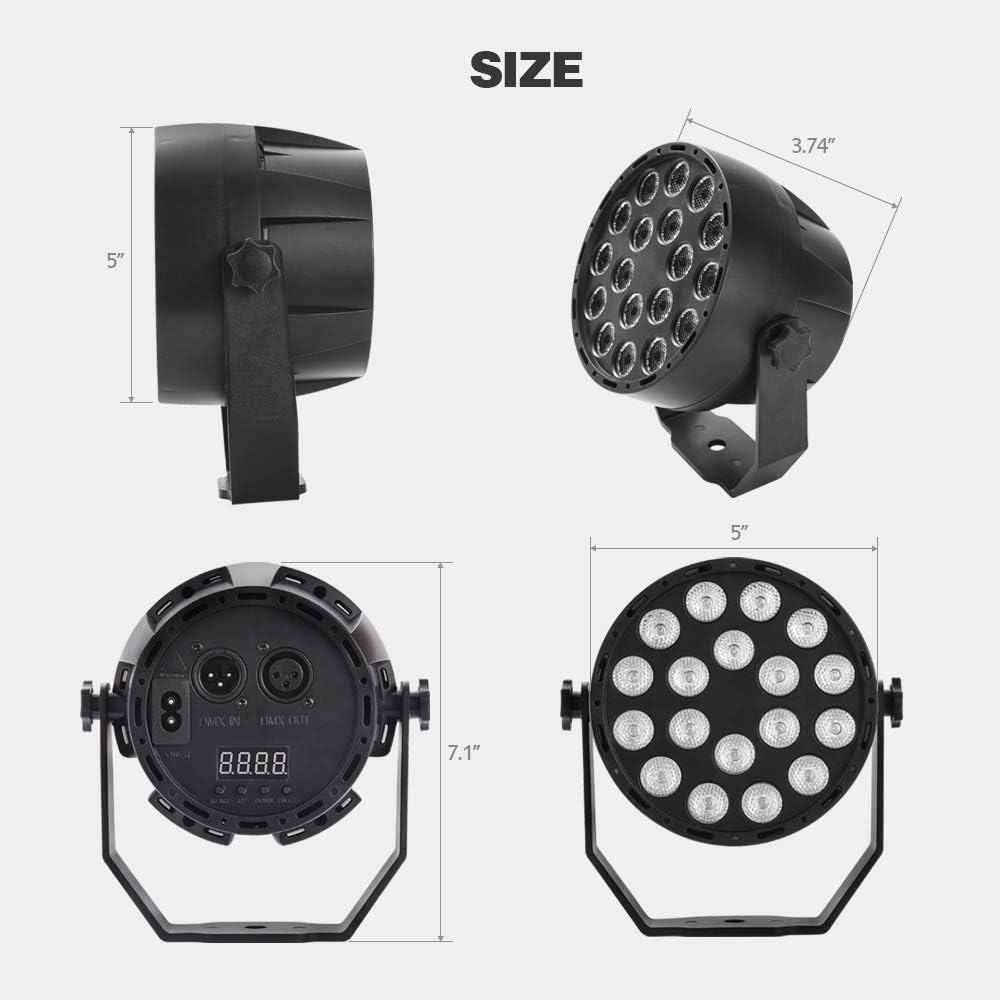
Image: Dimensions of the MICTUNING 18 LED UV Black Light.
| Ciri | Perincian |
|---|---|
| Jenama | MICTUNING |
| Nombor Model | MIC-UBL-207D |
| Dimensi Produk (L x W x H) | 9.5 x 9.5 x 12.7 cm (3.74 x 3.74 x 5 inci) |
| Berat badan | 490 gram (1.08 lbs) |
| bahan | Aloi Aluminium |
| kuasa | 18 Watt |
| Voltage | AC 100-240 Volt |
| Mod Kawalan | Auto, Jump, Color Gradient, Flash, Pulse, Sound, DMX-512 |
| Alat Kawalan Jauh | RF Remote (battery not included) |
8. Maklumat Keselamatan
- Do not look directly into the UV light source. Prolonged exposure can be harmful to eyes.
- Ensure the unit is securely mounted or placed on a stable surface to prevent falling.
- Jauhkan unit daripada air atau cecair lain.
- Do not operate the unit if the power cable is damaged.
- Produk ini adalah untuk kegunaan dalaman sahaja.
- Jauhkan daripada kanak-kanak.
9. Waranti dan Sokongan
For warranty information or technical support, please contact MICTUNING customer service. Details regarding spare parts availability are not provided in this manual.
Please refer to the product packaging or the official MICTUNING weblaman web untuk maklumat hubungan sokongan terkini.