
1. Pengenalan
Thank you for choosing the Bagotte SH020 3MP 1296P FHD Wireless IP Camera. This manual provides detailed instructions for setting up, operating, and maintaining your camera to ensure optimal performance and security. Please read this manual carefully before use and keep it for future reference.
2. Kandungan Pakej
Pastikan semua item ada dalam pakej:
- 1 x Bagotte SH020 IP Camera
- 1 x Penyesuai Kuasa
- 1 x Kabel USB
- 1 x Kurungan Pemasangan
- 2 x Skru
- 1 x Manual Pengguna
3. Produk Lebihview
The Bagotte SH020 is a 3MP 1296P Full HD wireless IP camera designed for indoor surveillance. It features pan and tilt functionality, infrared night vision, two-way audio, motion detection, and local storage via a MicroSD card.

Imej 1: Depan view of the Bagotte SH020 3MP 1296P FHD Wireless IP Camera.

Image 2: Diagram illustrating the components of the Bagotte SH020 camera, including the IR sensor, lens, MicroSD card slot, antenna, network interface, power input, and reset button.
4. Persediaan
4.1. Menghidupkan
- Connect the USB cable to the camera's power input port.
- Palamkan penyesuai kuasa ke soket elektrik standard.
- The camera will power on and initiate its startup sequence. Wait for the indicator light to flash, indicating it's ready for setup.
4.2. Pemasangan Apl
Download the recommended mobile application (e.g., SriHome or MIPC, as mentioned in product reviews) from your device's app store (Google Play Store for Android or Apple App Store for iOS). Cari untuk 'SriHome' or 'MIPC' and install the application.
4.3. Menyambung ke Wi-Fi
- Open the installed application and create an account or log in.
- Follow the in-app instructions to add a new device. This usually involves scanning a QR code located on the camera or manually entering the device ID.
- Ensure your mobile device is connected to a 2.4GHz Wi-Fi network. The camera does not support 5GHz Wi-Fi.
- Enter your Wi-Fi network password when prompted by the app.
- The camera will attempt to connect to your Wi-Fi network. Once connected, the indicator light will typically turn solid blue or green, and the app will confirm successful pairing.
4.4. Memasang Kamera
The camera can be placed on a flat surface or mounted to a wall or ceiling using the provided bracket and screws.
- Choose a suitable location for optimal surveillance coverage.
- Attach the mounting bracket to the desired surface using the screws.
- Pasangkan kamera dengan kukuh pada pendakap pelekap. Pastikan ia terpasang dengan kukuh di tempatnya.
5. Mengendalikan Kamera
5.1. Hidup View dan Kawalan
Access the live video feed through the mobile application. You can remotely control the camera's pan (355°) and tilt (90°) movements to adjust the viewing angle. The app also supports 4x digital zoom.
Video 1: Seller's operation video demonstrating the camera's pan, tilt, auto-tracking, mobile phone view, two-way audio, MicroSD card slot, and infrared night vision features.
5.2. Audio Dua Hala
The camera features a built-in microphone and speaker, enabling two-way audio communication. Use the microphone icon in the app to speak through the camera and listen to audio from the camera's location.
5.3. Penglihatan Malam
Equipped with 10 IR LEDs, the camera provides clear infrared night vision up to 10 meters, ensuring surveillance even in complete darkness. The IR-Cut filter automatically switches between day and night modes.
5.4. Motion Detection and Alarms
The camera supports motion detection with adjustable sensitivity. When motion is detected, the camera can trigger an alarm, send push notifications to your phone, and initiate recording. Advanced AI features include auto motion tracking and humanoid detection.
5.5. Rakaman dan Penyimpanan
The camera supports MicroSD cards up to 128GB for local storage of recordings. Recording modes include motion-activated, timed, and manual recording. You can playback recorded footage terus daripada aplikasi.
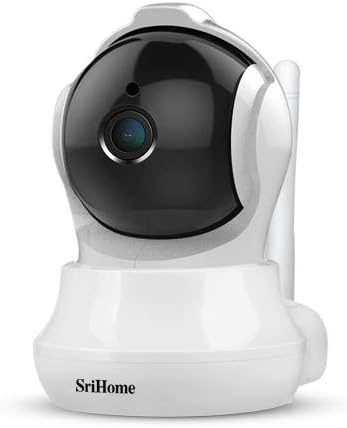
Image 3: The Bagotte SH020 camera positioned in a room, demonstrating its discreet design and wide viewsudut ing.
6. Penyelenggaraan
- Pembersihan: Use a soft, dry cloth to clean the camera lens and body. Avoid harsh chemicals or abrasive materials.
- Kemas kini Firmware: Regularly check the mobile application for available firmware updates to ensure your camera has the latest features and security enhancements.
- Kad MicroSD: If using a MicroSD card, periodically check its status and ensure sufficient storage space. Back up important recordings as needed.
7. Penyelesaian masalah
- Kamera tidak bersambung ke Wi-Fi: Ensure your Wi-Fi network is 2.4GHz. Verify the Wi-Fi password is correct. Move the camera closer to the router. Reset the camera using the reset button and try again.
- Kualiti video yang lemah: Check your internet connection speed. Ensure the camera lens is clean. Adjust video resolution settings in the app.
- Pengesanan gerakan tidak berfungsi: Verify motion detection is enabled in the app settings. Adjust sensitivity levels and detection zones.
- Tiada audio: Check volume settings in the app. Ensure the microphone and speaker are not obstructed.
8. Spesifikasi
| Ciri | Spesifikasi |
|---|---|
| Resolusi Video | 3MP, 1296P (2304*1296), H.264 |
| Julat Pan/Sendeng | Kuali: 355°, Condongkan: 90° |
| Lensa | 3.6 mm |
| Julat Penglihatan Malam | Up to 10 meters (10 IR LEDs) |
| Audio | Audio dua hala (mikrofon dan pembesar suara terbina dalam) |
| Penyimpanan | Kad MicroSD (sehingga 128GB) |
| Kesambungan Wayarles | Wi-Fi (2.4GHz sahaja) |
| Pengesanan Pergerakan | Yes, with AI Auto Motion Tracking and AI Humanoid Detection |
| Bekalan Kuasa | DC 5V, 1A |
| Dimensi | 7.3 x 7.6 x 10 cm |
| Berat badan | 380 g |
9. Waranti dan Sokongan
For warranty information and technical support, please refer to the documentation included with your product or visit the official Bagotte webtapak. Simpan resit pembelian anda sebagai bukti pembelian untuk tuntutan waranti.