
Monarch Specialties I 7412
Manual Arahan
Monarch Specialties Computer Desk
Model: I 7412
Brand: Monarch Specialties
pengenalan
This manual provides detailed instructions for the assembly, operation, and maintenance of your Monarch Specialties Computer Desk, Model I 7412. Please read all instructions carefully before beginning assembly and retain this manual for future reference.
Maklumat Keselamatan
Always follow the safety guidelines provided in the instruction manual. Ensure all components are securely fastened before use. Do not overload the desk. Keep small parts away from children during assembly.
Kandungan Pakej
Before assembly, verify that all parts and hardware are present and undamaged. Refer to the parts list included in your product packaging. If any parts are missing or damaged, contact Monarch Specialties customer support.

Imej 1: Depan view of the assembled Monarch Specialties Computer Desk. This desk features a brown reclaimed wood-look finish with black metal legs and three drawers.
Persediaan dan Perhimpunan
Assembly typically requires two adults. Ensure you have adequate space and the necessary tools (e.g., screwdriver, Allen wrench, if not provided). Follow the steps below in sequence.
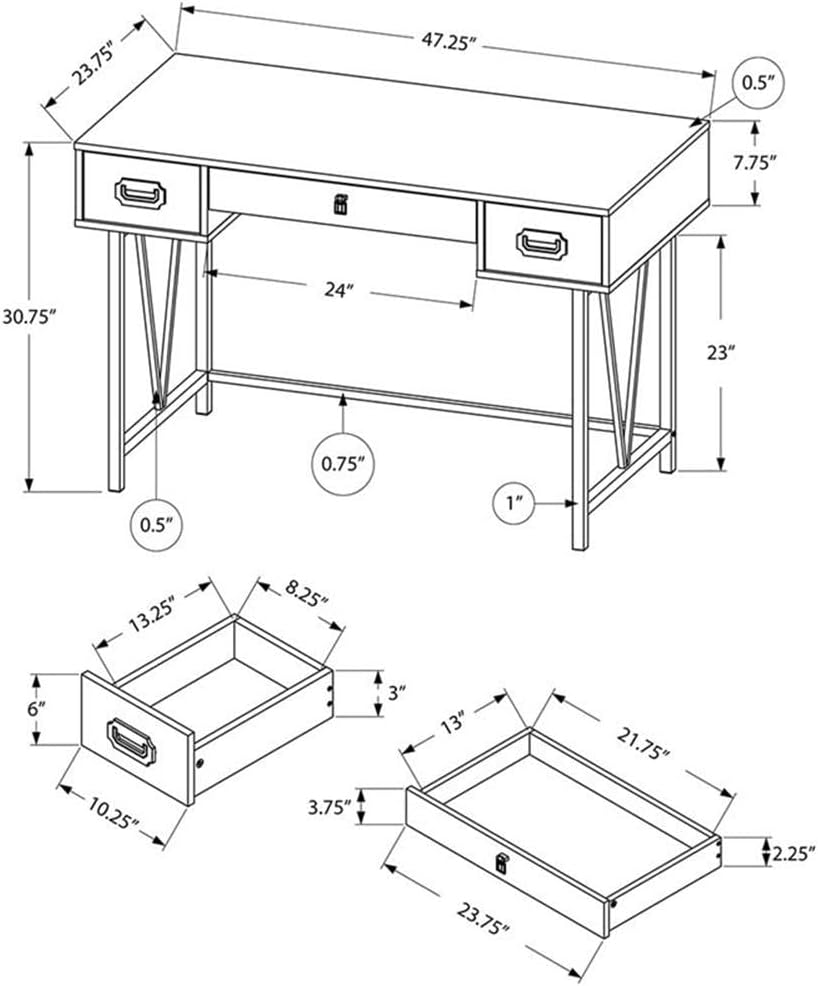
Image 2: Dimensional drawing of the Monarch Specialties Computer Desk, showing overall dimensions and an exploded view of the drawer components. This diagram is essential for identifying parts and understanding assembly.
- Buka Pembungkusan Komponen: Keluarkan semua bahagian dari bungkusan dengan berhati-hati. Letakkannya di atas permukaan yang lembut dan bersih untuk mengelakkan calar.
- Pasang Laci: Construct the two side drawers and the one wide middle drawer according to the detailed instructions in your physical assembly guide. Note the different pull types for the side drawers (black metal) and the middle drawer (black leather).
- Attach Drawer Glides: Secure the metal drawer glides to the desk frame and the drawers themselves, ensuring smooth operation.
- Assemble Metal Legs: Attach the black metal legs to the underside of the desk top. Ensure all screws are tightened securely. The legs feature a distinctive V-shape design.
- Pasang Palang Palang: Connect the horizontal metal crossbar between the two leg frames for added stability.
- Sisipkan Laci: Carefully slide the assembled drawers into their respective compartments. Test their movement to ensure they open and close smoothly.
- Semakan Akhir: Verify that all connections are tight and the desk is stable.
Arahan Operasi
The Monarch Specialties Computer Desk is designed for general office and home use. Its features include:
- Fungsi Laci: The desk includes two side drawers with smooth metal glides and black metal pulls, and one wide middle drawer with metal glides and a black leather pull. These drawers are suitable for storing office supplies, documents, and personal items.
- Kapasiti Berat: Distribute weight evenly across the desk surface. Avoid placing excessively heavy items on the desk or in the drawers to prevent damage.
- Penggunaan Permukaan: The thick paneled top with a brown reclaimed wood-look finish provides a durable work surface. Consider using coasters for beverages and protective mats for hot items to preserve the finish.

Image 3: The Monarch Specialties Computer Desk positioned in a room, showcasing its use as a workstation with a laptop and office accessories. This image illustrates the desk's functional design in a typical setting.
Penyelenggaraan
- Pembersihan: Wipe the desk surface and metal legs with a soft, damp kain. Elakkan pembersih yang kasar atau bahan kimia yang keras, kerana ini boleh merosakkan kemasan.
- Tumpahan: Clean spills immediately to prevent staining, especially on the wood-look laminate surface.
- Pemeriksaan perkakasan: Periksa semua skru dan pengikat secara berkala untuk memastikan ia kekal ketat. Ketatkan semula jika perlu untuk mengekalkan kestabilan.
- Penjagaan Laci: If drawers become stiff, a small amount of silicone lubricant can be applied to the metal glides.
Menyelesaikan masalah
- Meja goyah: Ensure all leg connections and the crossbar are securely tightened. Check that the desk is on a level surface.
- Laci Tidak Meluncur dengan Lancar: Verify that the drawer glides are correctly aligned and free of obstructions. Ensure the drawers are assembled correctly. Lubricate glides if needed.
- Calar atau Penyok: Minor scratches on the laminate surface may be touched up with a furniture repair marker matching the finish. Deep dents may require professional repair or replacement of the affected component.
Spesifikasi
| Nombor Model | saya 7412 |
| Jenama | Keistimewaan Monarch |
| Dimensi Produk (L x W x H) | 120.02 sm x 60.33 sm x 78.11 sm (47.25" P x 23.75" L x 30.75" T) |
| Berat badan | 27.67 kg (61 lbs) |
| bahan | Wood (top material type), Metal (base material) |
| Jenis Selesai | Laminated (brown reclaimed wood-look) |
| warna | Brown (reclaimed wood-look) / Black (metal legs) |
| Ciri Khas | Compact design, 3 drawers (2 side, 1 middle) |
Waranti dan Sokongan
Warranty information for the Monarch Specialties Computer Desk, Model I 7412, is typically included with the product packaging or available directly from the manufacturer. Please refer to these resources for details regarding coverage and terms.
For technical support, missing parts, or warranty claims, please contact the retailer where the product was purchased or visit the official Monarch Specialties webtapak untuk maklumat hubungan perkhidmatan pelanggan.