
pengenalan
This manual provides instructions for the installation, operation, and maintenance of your Audiovox ELEAUDAX80EXT Wireless Extension. This device is designed to expand the functionality of compatible Audiovox phone models, specifically the AX8001, AX8001E, and AX8101AM, by providing an additional wireless handset.
Kandungan Pakej
Please verify that all items are present in the package before proceeding with the setup.
- Audiovox ELEAUDAX80EXT Wireless Extension Unit
- Penyesuai Kuasa (jika berkenaan)
- Bateri Boleh Dicas semula (dipasang atau berasingan)
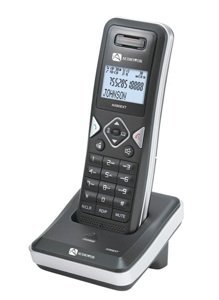
Image: The Audiovox ELEAUDAX80EXT Wireless Extension Unit. This image displays the compact design of the extension handset.
Persediaan
- Cas Bateri: If the battery is not pre-installed, insert it into the extension unit according to the markings. Place the extension unit on its charging cradle (if included) or connect the power adapter directly to the unit and a power outlet. Allow the unit to charge for at least 12-16 hours before initial use.
- Register the Extension:
- Ensure your main Audiovox phone base (AX8001, AX8001E, or AX8101AM) is powered on.
- On the main phone base, locate and press the "Register" or "Page" button. Hold it until the indicator light on the base begins to flash (refer to your main phone's manual for exact instructions).
- While the base is in registration mode, on the ELEAUDAX80EXT extension unit, navigate to the "Menu" and select "Register Handset" or a similar option. Follow the on-screen prompts.
- Once registration is successful, the extension unit will display a confirmation message, and the indicator light on the base will stop flashing.
- Sambungan Ujian: Make a test call from the extension unit to ensure proper functionality.
Arahan Operasi
Membuat Panggilan
- Angkat telefon bimbit atau tekan CAKAP butang.
- Dail nombor telefon yang dikehendaki.
- Tekan ke CAKAP button again or place the handset back on the cradle to end the call.
Menjawab Panggilan
- Apabila telefon berdering, angkat telefon bimbit atau tekan butang CAKAP butang.
- Untuk menamatkan panggilan, tekan butang TAMAT button or place the handset back on the cradle.
Intercom Function (if supported by base unit)
- Tekan ke INTERKOM butang.
- Dial the number of the extension you wish to call (e.g., "2" for the second handset).
- Tekan CAKAP to initiate the intercom call.
Penyelenggaraan
- Pembersihan: Lap unit dengan lembut, damp kain. Jangan gunakan bahan kimia yang keras atau pembersih yang kasar.
- Penjagaan Bateri: For optimal battery life, avoid fully discharging the battery frequently. Keep the unit on its charger when not in use.
- Storan: If storing the unit for an extended period, remove the battery and store it in a cool, dry place.
Menyelesaikan masalah
| Masalah | Penyelesaian |
|---|---|
| Tiada nada dail / Tidak boleh membuat panggilan |
|
| Telefon bimbit tidak dicas |
|
| Kualiti panggilan lemah / Statik |
|
Spesifikasi
- Nombor Model: ELEAUDAX80EXT
- Compatible Base Units: Audiovox AX8001, AX8001E, AX8101AM
- Dimensi (L x W x H): 20 x 40 x 30 milimeter
- Berat: 20 Gram
- UPC: 044476082719
Waranti dan Sokongan
For specific warranty information and technical support, please refer to the documentation included with your original Audiovox phone system or visit the official Audiovox webtapak. Simpan resit pembelian anda sebagai bukti pembelian untuk tuntutan waranti.
For further assistance, please contact Audiovox customer service.