
pengenalan
This manual provides essential instructions for setting up, operating, and maintaining your Optoma W335 WXGA DLP Professional Projector. Designed for business presentations, classrooms, and home use, this projector delivers bright, clear images with a long lamp life. Please read this manual thoroughly before use to ensure optimal performance and safety.
Persediaan
Membongkar dan Pemeriksaan Awal
Carefully remove the projector and all accessories from the packaging. Verify that all components listed in the 'What's in the Box' section are present and undamaged.
- W335 projector
- Kord Kuasa
- Jauh
- Bateri
Penempatan
The Optoma W335 is portable, weighing less than 7 pounds, making it easy to move between rooms. For optimal viewing, place the projector on a stable, flat surface. Ensure adequate ventilation around the unit to prevent overheating.

Image: The Optoma W335 projector showing its compact size and dimensions (12.44" width, 9.2" depth, 4.27" height).
The projector features adjustable legs for easy height and angle adjustments, allowing you to find the perfect screen area for projection. This helps in achieving a level and properly aligned image.
Ketersambungan
The W335 offers a variety of input options for connecting to different devices:
- HDMI: Untuk video dan audio digital definisi tinggi.
- VGA: For analog video connections, commonly used with computers.
- Video Komposit: Untuk video definisi standard.
- Audio Masuk/Keluar: For connecting external audio sources or speakers.
- USB Power Out (5V/1.0A): Untuk menguasakan peranti luaran seperti penstriman stick.
- RS232: Untuk penyepaduan sistem kawalan.
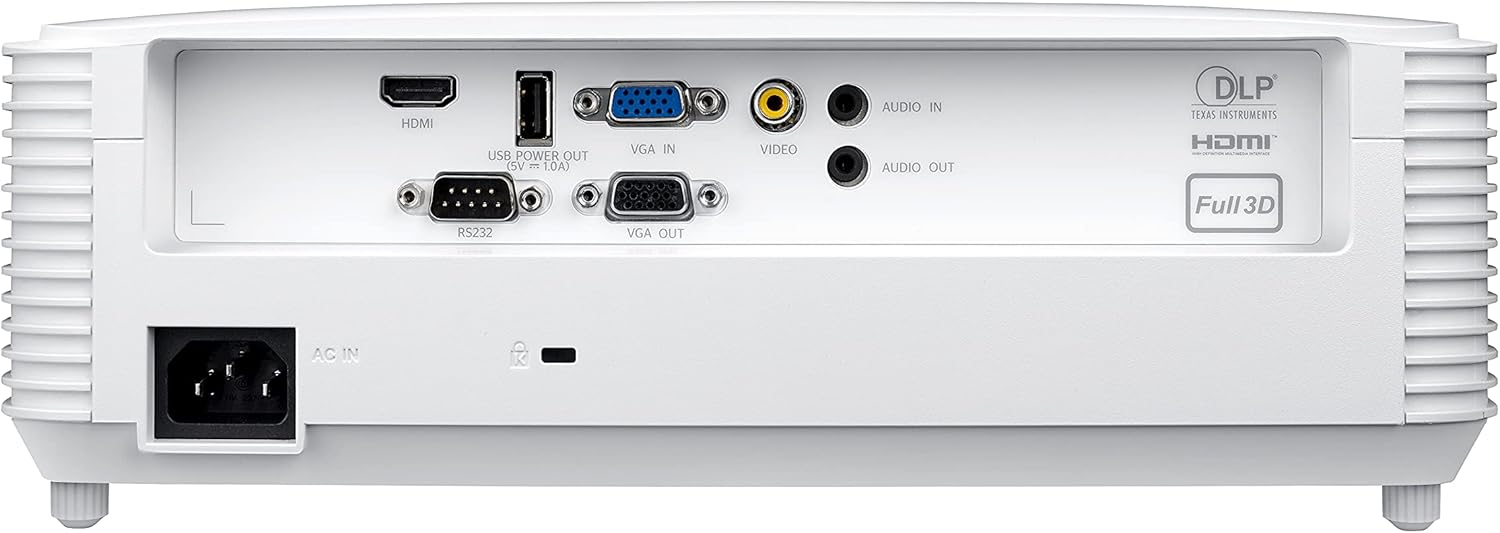
Image: Rear panel of the Optoma W335 projector, clearly showing the HDMI, VGA In, VGA Out, Video, Audio In, Audio Out, RS232, and USB Service Only ports.
Connect your source device (e.g., laptop, Blu-ray player) to the appropriate input port on the projector. Ensure the power cord is securely connected to the projector and a power outlet.
Arahan Operasi
Menghidupkan/Mematikan
Tekan butang kuasa pada panel kawalan projektor atau alat kawalan jauh untuk menghidupkan atau mematikan unit. Biarkan beberapa saat untuk projektor menjadi panas atau sejuk.

Imej: Atas view of the Optoma W335 projector, highlighting the control panel with power, menu, and navigation buttons, along with focus and zoom rings.
Melaraskan Imej
- Fokus: Rotate the focus ring on the lens to sharpen the image.
- Zum: Use the zoom ring to adjust the image size without moving the projector.
- Pembetulan Keystone: The W335 supports vertical keystone correction to square the image if the projector is not perfectly perpendicular to the screen. This can be adjusted via the on-screen menu.
The projector delivers vibrant and sharp WXGA resolution (1280 x 800) images with a 22,000:1 contrast ratio, suitable for various environments including well-lit rooms due to its 3,800 lumens brightness.
Audio
An integrated 10-watt speaker provides room-filling audio. For enhanced sound, connect external speakers to the Audio Out port.
Penyelenggaraan
Lamp kehidupan
Projektor lamp has a life of up to 15,000 hours, providing many years of use with minimal maintenance. When the lamp reaches the end of its life, a warning indicator will appear, and the lamp will need to be replaced. Refer to the full user manual for detailed lamp arahan penggantian.
Pembersihan
- Kanta: Use a soft, lint-free cloth and lens cleaning solution to gently clean the projector lens.
- Luaran: Lap bahagian luar casing dengan kain lembut dan kering. Elakkan pembersih atau pelarut yang melelas.
- Bolong Udara: Regularly check and clean the air vents to ensure proper airflow and prevent overheating. Use a soft brush or compressed air to remove dust.
Menyelesaikan masalah
- Tiada gambar:
- Ensure the projector is powered on and the source device is connected and active.
- Check the input source selection on the projector.
- Sahkan semua kabel disambungkan dengan selamat.
- Imej Kabur:
- Laraskan cincin fokus pada lensa.
- Pastikan projektor berada pada jarak yang betul dari skrin.
- Use keystone correction if the image is distorted.
- Tiada Bunyi:
- Periksa tetapan kelantangan pada kedua-dua projektor dan peranti sumber.
- Pastikan pembesar suara luaran (jika digunakan) disambungkan dan dikuasakan dengan betul.
- Verify the audio cable connection.
- Projektor Terlalu Panas:
- Pastikan lubang udara bersih dan tidak tersumbat.
- Kendalikan projektor di kawasan yang mempunyai pengudaraan yang baik.
- If the issue persists, power off the projector and allow it to cool down before restarting.
Spesifikasi
| Ciri | Perincian |
|---|---|
| Dimensi Produk | 9.6 x 12.4 x 3.9 inci |
| Berat Barang | 6.61 paun |
| Nombor Model Item | W335 |
| Jenama | Optoma |
| Penggunaan yang Disyorkan | Business, Education |
| Ciri Khas | Lontaran Pendek |
| Teknologi Ketersambungan | HDMI, VGA |
| Resolusi Paparan | 1280 x 800 (WXGA) |
| Kecerahan | 3800 Lumen |
| Nisbah Kontras | 22,000:1 |
| Lamp kehidupan | Sehingga 15,000 jam |
| Penceramah Bersepadu | 10-watt |
| Nisbah Lemparan | 1.55 – 1.73:1 |
Waranti & Sokongan
For detailed warranty information and technical support, please refer to the official Optoma website or the documentation included with your product. You can also contact Optoma customer service directly for assistance.
Lawati Optoma Store on Amazon untuk maklumat lanjut produk.