
1. Pengenalan
Thank you for choosing the iTouchless 13 Gallon Automatic Sensor Trash Can. This innovative product is designed to provide a hygienic and convenient waste disposal solution for your home or kitchen. Featuring a touchless motion sensor lid, an AbsorbX odor filter, and durable stainless steel construction, this trash can simplifies your daily routine. Please read this manual thoroughly before use to ensure proper setup, operation, and maintenance.
2. Kandungan Pakej
Sila sahkan bahawa semua item yang disenaraikan di bawah disertakan dalam pakej anda:
- iTouchless 13 Gallon Automatic Sensor Trash Can (Main Unit)
- Lid Assembly with Motion Sensor
- AbsorbX Odor Filter (pre-installed or separate)
- 10 Premium Trash Bags
- Manual Pengguna (dokumen ini)

Image: Included iTouchless Premium Trash Bags.
3. Panduan Persediaan
3.1 Pemasangan Bateri
- Cari petak bateri di bahagian bawah penutup.
- Buka penutup petak bateri.
- Insert four (4) D-size alkaline batteries (not included) according to the polarity indicators (+/-).
- Tutup penutup petak bateri dengan selamat.
3.2 Odor Filter Installation
The AbsorbX Odor Filter helps neutralize trash odors.
- Locate the filter compartment on the underside of the lid.
- If not already installed, insert the AbsorbX Odor Filter into the designated slot. Ensure it is seated properly.
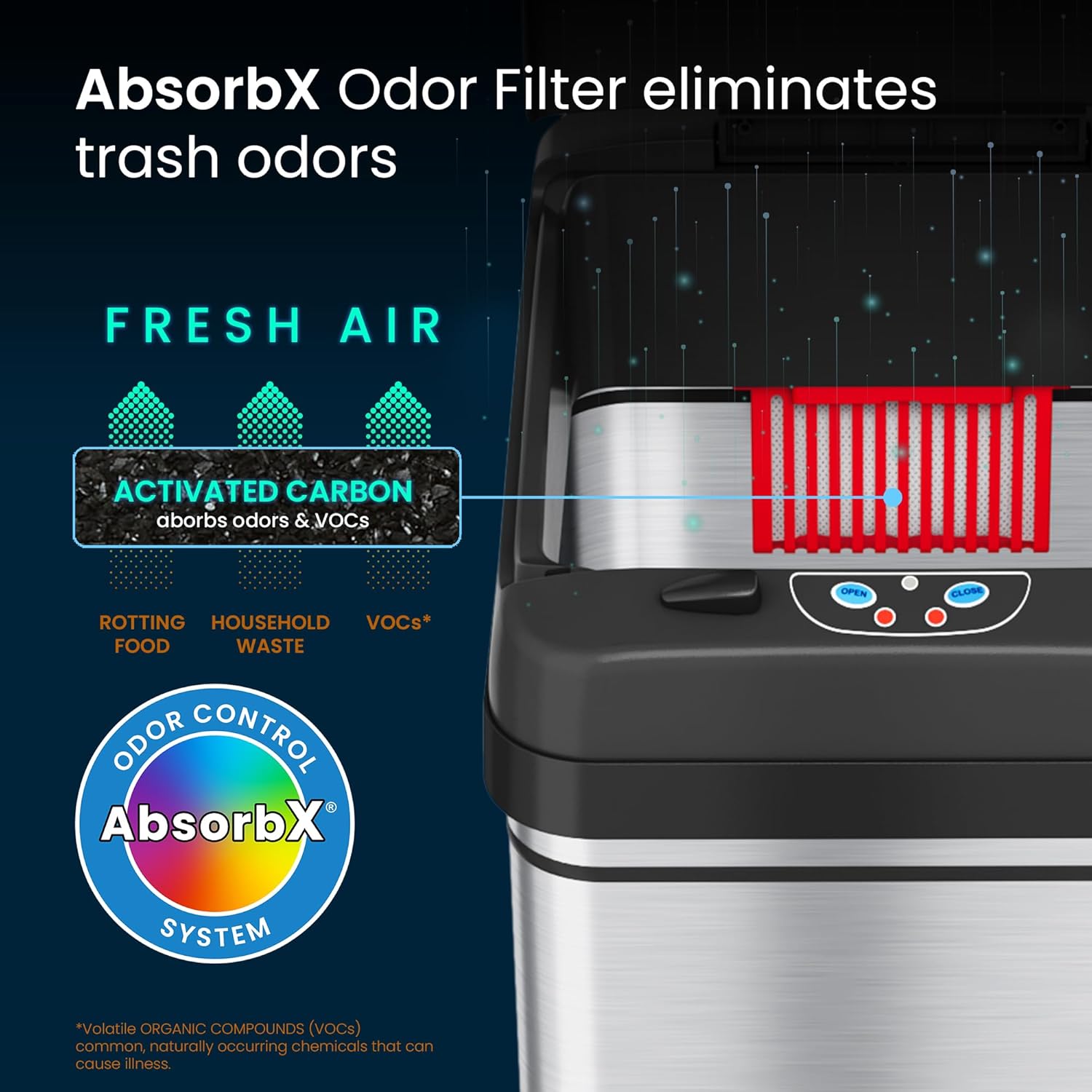
Image: AbsorbX Odor Filter location within the lid.
3.3 Trash Bag Installation
- Lift the lid of the trash can.
- Place a 13-gallon trash bag into the inner bucket, ensuring the top edge of the bag is folded over the rim of the bucket.
- Lower the lid back onto the trash can.
3.4 Penempatan Awal
Place the trash can in your desired location. Ensure there is clear space above the sensor for optimal operation.
Video: Jeneral berakhirview of the iTouchless automatic trash can, demonstrating its features and setup.
4. Arahan Operasi
4.1 Operasi Penderia Automatik
The iTouchless trash can features a motion sensor for hands-free operation.
- To open the lid, simply place your hand or an object within 6 inches (15 cm) of the sensor located on the front of the lid. The lid will open automatically.
- The lid will remain open as long as the sensor detects an object. Once the object is removed, the lid will close automatically after approximately 5 seconds.

Image: Demonstrating the automatic lid opening via motion sensor.
4.2 Manual Open/Close Buttons
For extended opening or manual control, use the buttons on the lid:
- Tekan ke TERBUKA button to keep the lid open for a longer duration.
- Tekan ke TUTUP button to close the lid manually.
- The sensor will reactivate once the lid is closed manually or after a period of inactivity if left open with the OPEN button.

Image: User interacting with the iTouchless automatic trash can in a kitchen setting.
4.3 Pilihan Kuasa
The trash can can be powered by batteries or an optional AC adapter.
- Kuasa Bateri: Uses 4 D-size batteries (not included). Provides up to 1.5 years of battery life.
- AC Adapter (Sold Separately): For continuous, battery-free operation, an optional iTouchless AC adapter can be purchased and connected to the power port on the lid.

Image: Visual representation of battery and AC adapter power options.
5. Penyelenggaraan
5.1 Membersihkan Bahagian Luar
The stainless steel exterior is fingerprint-proof and easy to clean.
- Lap bahagian luar dengan lembut, damp kain dan detergen lembut.
- Avoid abrasive cleaners or scouring pads, as these can damage the finish.
- Do not submerge the lid in water or spray water directly onto the sensor area.

Image: Cleaning the stainless steel exterior of the trash can.
5.2 Replacing the Odor Filter
The AbsorbX Odor Filter should be replaced every 3 months for optimal odor control.
- Open the filter compartment on the underside of the lid.
- Remove the old filter and dispose of it.
- Insert a new AbsorbX Odor Filter (sold separately) into the compartment.
- Tutup penutup petak.
5.3 Mengganti Bateri
When the lid operation becomes slow or inconsistent, it's time to replace the batteries.
- Follow the steps in Section 3.1 Battery Installation to replace all four D-size batteries.
- Always replace all batteries at once with new ones for best performance.
6. Penyelesaian masalah
If you encounter issues with your iTouchless Automatic Sensor Trash Can, please refer to the following common problems and solutions:
| Masalah | Kemungkinan Punca | Penyelesaian |
|---|---|---|
| Tudung tidak terbuka secara automatik. | 1. Bateri lemah atau dipasang dengan salah. 2. Sensor is obstructed or dirty. 3. Suis kuasa dimatikan. | 1. Replace batteries with new D-size batteries, ensuring correct polarity. If using AC adapter, check connection. 2. Bersihkan tingkap sensor dengan kain lembut dan kering. Pastikan tiada objek yang menghalang sensor. 3. Ensure the power switch on the lid is in the 'ON' position. |
| Lid does not close completely or stays ajar. | 1. Halangan pada laluan penutup. 2. Lid mechanism damage. 3. Bateri rendah. | 1. Check for any debris or objects preventing the lid from closing. Manually close the lid to reset. 2. Avoid manually forcing the lid open or closed, as this can damage the gears. If damage is suspected, contact customer support. 3. Ganti bateri. |
| Lid opens randomly. | 1. Sensor terlalu sensitif atau berada di kawasan trafik tinggi. 2. Cahaya matahari langsung atau cahaya buatan yang kuat mengganggu sensor. | 1. Relocate the trash can to an area with less foot traffic or away from pets. Ensure no objects are constantly near the sensor. 2. Jauhkan tong sampah daripada sumber cahaya langsung. |
| Odor is still present. | AbsorbX Odor Filter needs replacement. | Replace the AbsorbX Odor Filter (recommended every 3 months). |
Video: Detailed demonstration of the iTouchless trash can's features and potential troubleshooting tips.
7. Spesifikasi Produk
| Ciri | Perincian |
|---|---|
| Jenama | Tanpa perisian |
| Nombor Model | DZT13BG10 |
| Kapasiti | 13 gelen |
| Mekanisme Pembukaan | Sensor Gerakan |
| bahan | Plastik ABS, Keluli Tahan Karat |
| warna | Perak |
| Jenis Selesai | Disikat |
| Berat Barang | 8.6 paun |
| Dimensi Produk (L x W x H) | 12.75" x 10.75" x 27.88" |
| Sumber Kuasa | 4 D-size batteries (not included) or optional AC Adapter (sold separately) |
| Ciri Khas | Motion Sensor, Odor Filter |

Image: Product dimensions for the iTouchless 13 Gallon Automatic Trash Can.
8. Waranti dan Sokongan
For warranty information or technical support, please refer to the warranty card included with your product or visit the official iTouchless website. If you have any questions or require assistance, please contact iTouchless customer service directly.