
1. Pengenalan
Thank you for choosing the Petlibro Automatic Pet Feeder. This device is designed to provide consistent and timely meals for your pet, ensuring they are fed according to a set schedule, even when you are away. Please read this manual thoroughly before use to ensure proper operation and maintenance of your feeder.
2. Maklumat Keselamatan Penting
Sila patuhi langkah keselamatan berikut untuk mengelakkan kecederaan atau kerosakan pada produk:
- Read all instructions carefully before operating the feeder.
- Jauhkan pengumpan daripada kanak-kanak dan haiwan peliharaan apabila tidak digunakan atau semasa pemasangan.
- Jangan rendam unit utama dalam air atau cecair lain.
- Use only dry pet food with a diameter between 5-15mm. Do not use wet, canned, or moist food.
- Pastikan pengumpan diletakkan di atas permukaan yang stabil dan rata.
- Unplug the feeder before cleaning or performing any maintenance.
- Do not attempt to repair or modify the feeder yourself. Contact customer support for assistance.
- Buang bateri secara bertanggungjawab mengikut peraturan tempatan.
3. Kandungan Pakej
Sila semak kandungan pakej untuk memastikan semua item ada:
- Petlibro Automatic Pet Feeder Main Unit
- Mangkuk Makanan
- USB-C Power Adapter and Cable
- Desiccant Bag (pre-installed or separate)
- Manual Pengguna
4. Produk Lebihview
Familiarize yourself with the different parts of your Petlibro Automatic Pet Feeder:
- Tangki Makanan: Stores dry pet food.
- Tudung: Covers the food tank to keep food fresh.
- Panel Kawalan: Buttons and display for setting schedules and manual feeding.
- Kedai Makanan: Where food dispenses into the bowl.
- Mangkuk Makanan: Detachable bowl for your pet to eat from.
- Power Port (USB-C): Menyambung kepada penyesuai kuasa.
- Petak Bateri: Holds backup batteries (not included).
5. Persediaan
Follow these steps to set up your Petlibro Automatic Pet Feeder:
5.1 Perhimpunan
- Bongkar: Keluarkan semua komponen dari pembungkusan dengan berhati-hati.
- Install Food Bowl: Place the food bowl securely at the base of the feeder.
- Install Food Tank: Align the food tank with the base and twist to lock it into place.
- Insert Desiccant Bag: If not pre-installed, open the desiccant compartment (usually under the lid) and insert the desiccant bag to keep food fresh. Replace every 15-30 days.

Image: Step-by-step assembly guide for the Petlibro Automatic Pet Feeder. It shows how to twist open the lid, take out the food bowl, put the desiccant bag into its compartment, install the food tank, put the lid back on, and finally install the food bowl.
5.2 Bekalan Kuasa
The feeder can be powered by a USB-C adapter or backup batteries.
- Kuasa Utama: Connect the USB-C power adapter to the feeder's power port and plug it into a wall outlet.
- Sandaran Bateri (Pilihan): Untuk kuasa outages, install 3 D-cell batteries (not included) into the battery compartment at the bottom of the feeder. This ensures continuous operation.
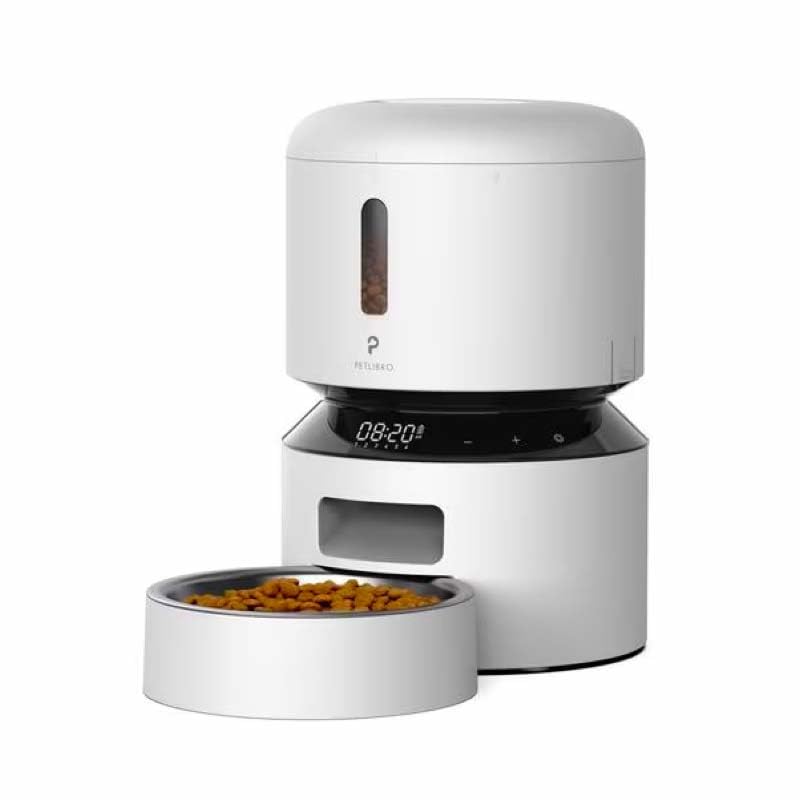
Image: Diagram illustrating the dual power supply system of the Petlibro Automatic Pet Feeder. It shows the USB-C adapter connected for primary power and the battery compartment for backup power. A note indicates that batteries are not included.
6. Arahan Operasi
Once assembled and powered, you can begin programming your feeder.
6.1 Mengisi Tangki Makanan
- Buka penutup tangki makanan.
- Pour dry pet food into the tank. Ensure the food is within the recommended size (5-15mm diameter).
- Close the lid securely to maintain freshness.
6.2 Setting Meal Schedules and Portions
The feeder allows you to schedule up to 6 meals per day, with 1 to 50 portions per meal.

Image: A cat eating from the Petlibro Automatic Pet Feeder, illustrating the feeder's function. Text overlays indicate "Portion: 1-50" and "Meals: 1-6", highlighting the customizable feeding schedule.
- Tetapkan Masa Semasa: Use the control panel buttons (e.g., "SET", "UP", "DOWN") to set the current time.
- Program Meal Times: Press the "MEAL" button to enter meal programming mode. Select the desired meal number (e.g., Meal 1) and set the feeding time.
- Tetapkan Bahagian: For each programmed meal, set the number of portions (1-50) using the "PORTION" or "UP/DOWN" buttons.
- Repeat for all meals: Program up to 6 meals as needed.
- Simpan Tetapan: Ensure all settings are saved according to the feeder's specific interface (usually by pressing "SET" or waiting for auto-save).
6.3 Pemakanan Manual
To dispense food instantly, press the manual feed button (often labeled "FEED" or a paw icon) on the control panel. Each press typically dispenses one portion.
7. Penyelenggaraan dan Pembersihan
Regular cleaning ensures hygiene and extends the life of your feeder.
- Cabut plag: Always unplug the feeder from the power outlet before cleaning.
- Buka: Remove the food bowl and food tank.
- Komponen Bersih: Wash the food bowl and food tank with mild soap and water. Rinse thoroughly and dry completely before reassembling.
- Lap Unit Utama: Lap unit utama dengan lembut, damp kain. Jangan rendam unit utama dalam air.
- Gantikan Bahan Pengering: Replace the desiccant bag every 15-30 days to maintain food freshness.
- Pasang semula: Ensure all parts are dry before reassembling the feeder.
8. Penyelesaian masalah
If you encounter issues with your feeder, refer to the following common problems and solutions:
| Masalah | Kemungkinan Punca | Penyelesaian |
|---|---|---|
| Pengumpan tidak dihidupkan. | No power connection; batteries depleted or incorrectly installed. | Check power adapter connection; replace batteries or ensure correct polarity. |
| Makanan tidak diedarkan. | Food tank empty; food jammed; dispenser blocked; incorrect schedule settings. | Refill food tank; clear any food jams; check dispenser for blockages; verify meal schedule and portion settings. |
| Food dispenses too much/too little. | Incorrect portion settings. | Adjust portion settings for each meal. |
| Paparan tidak berfungsi. | Isu kuasa; paparan rosak. | Check power supply; if problem persists, contact customer support. |
9. Spesifikasi
| Ciri | Perincian |
|---|---|
| Nama Produk | Petlibro Automatic Pet Feeder |
| Model | Pemakan Haiwan Peliharaan Automatik 3L |
| Kapasiti | 3 Liter |
| bahan | Food-grade ABS plastic |
| Bekalan Kuasa | USB-C adapter (5V/1A); 3 x D-cell batteries (backup, not included) |
| Makanan setiap Hari | Sehingga 6 hidangan |
| Bahagian setiap Hidangan | 1-50 portions (approx. 5-10g per portion, depending on food density) |
| Recommended Food Size | 5-15mm dry kibble |
| warna | putih |
10. Waranti dan Sokongan
Your Petlibro Automatic Pet Feeder comes with a standard manufacturer's warranty. For detailed warranty information, please refer to the warranty card included in your package or visit the official Petlibro webtapak.
If you have any questions, require technical support, or need assistance with your product, please contact Petlibro customer service. Contact details can typically be found on the product packaging, the official website, or by searching for "Petlibro customer support" online.