
1. Pengenalan
Terima kasih kerana membeliasing the BLOW BT910 Portable Bluetooth Speaker. This manual provides essential information for the safe and efficient operation of your device. Please read it thoroughly before use and keep it for future reference.
2. Maklumat Keselamatan
- Jangan dedahkan peranti kepada suhu yang melampau, cahaya matahari langsung atau kelembapan yang tinggi.
- Jauhkan pembesar suara daripada air dan cecair lain.
- Jangan cuba membuka atau membaiki peranti ini sendiri. Rujuk semua servis kepada kakitangan yang berkelayakan.
- Gunakan hanya kabel pengecasan dan penyesuai yang disediakan.
- Jauhkan daripada kanak-kanak.
- Elakkan mendengar berpanjangan pada kelantangan tinggi untuk mengelakkan kerosakan pendengaran.
3. Kandungan Pakej
Pastikan semua item ada dalam pakej:
- BLOW Bazooka 30-331 Speaker (Black)
- Kabel Pengecasan
- Kabel Audio
- Manual Pengguna
4. Produk Lebihview
Familiarize yourself with the components of your BLOW BT910 speaker.
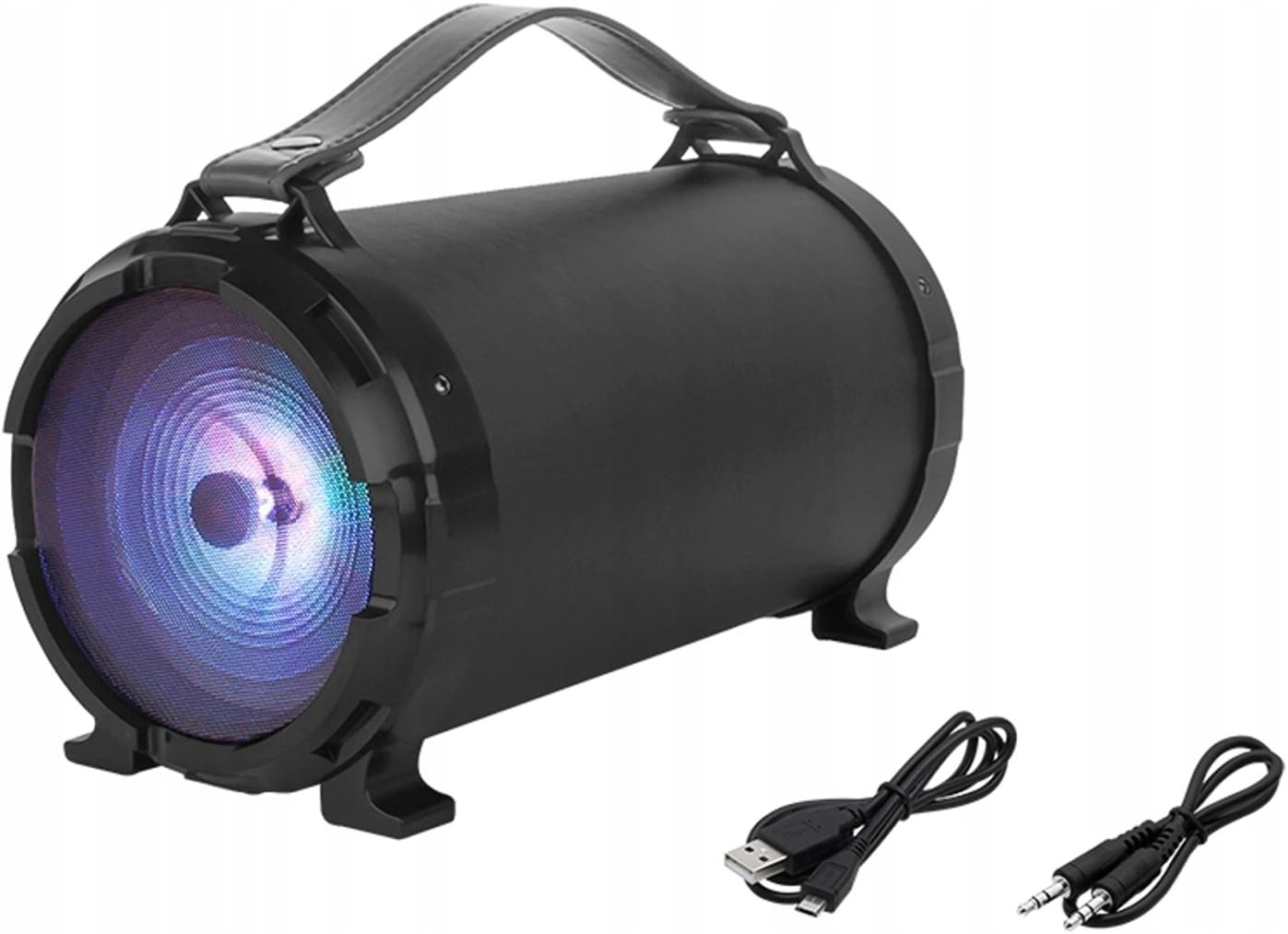
Imej 1: Depan view of the BLOW BT910 Portable Bluetooth Speaker, showing the main speaker grille and included charging and audio cables.

Imej 2: belakang view of the BLOW BT910 Portable Bluetooth Speaker, highlighting the BLOW brand logo.

Imej 3: The BLOW BT910 Portable Bluetooth Speaker shown within its retail packaging, displaying key features.

Imej 4: Diagram illustrating the dimensions of the BLOW BT910 Portable Bluetooth Speaker: 34cm length, 17cm width, and 18cm height.
Kawalan dan Pelabuhan:
- Butang Kuasa: Turns the speaker On/Off.
- Butang Mod (M): Switches between Bluetooth, FM Radio, USB, SD, and AUX modes.
- Butang Main/Jeda: Plays or pauses audio. Also answers/ends calls in Bluetooth mode.
- Naikkan Kelantangan (+)/Trek Seterusnya: Tekan pendek untuk kelantangan, tekan lama untuk trek seterusnya.
- Kelantangan Kurang (-)/Trek Sebelumnya: Tekan pendek untuk kelantangan turun, tekan lama untuk trek sebelumnya.
- Butang Lampu LED: Controls LED lighting modes.
- Port USB: Untuk main balik pemacu kilat USB.
- Slot Kad SD: Untuk main balik kad SD.
- Input AUX: Untuk menyambungkan peranti audio luaran melalui kabel audio 3.5mm.
- Input Mikrofon: For karaoke function.
- Port Pengecasan: Untuk mengecas bateri dalaman pembesar suara.
5. Persediaan
5.1 Mengecas Speaker
- Connect the charging cable to the speaker's charging port.
- Plug the other end of the charging cable into a compatible USB power adapter (not included) or a USB port.
- The LED indicator will show charging status. It will typically turn off or change color once fully charged.
5.2 Hidupkan/Mati Kuasa
- Untuk Menghidupkan: Press and hold the Power button for a few seconds until you hear an audible prompt or see the LED indicators light up.
- Untuk Mematikan: Press and hold the Power button again for a few seconds until you hear an audible prompt or the LED indicators turn off.
6. Arahan Operasi
6.1 Berpasangan Bluetooth
- Ensure the speaker is powered on and in Bluetooth mode (indicated by a flashing blue LED). If not, press the Mode button to switch to Bluetooth mode.
- Dayakan Bluetooth pada telefon pintar, tablet anda atau peranti lain yang didayakan Bluetooth.
- Cari untuk available Bluetooth devices and select "BT910" from the list.
- Sebaik sahaja dipasangkan, pembesar suara akan mengeluarkan pengesahan yang boleh didengar dan LED biru akan berhenti berkelip dan kekal padu.
- Anda kini boleh memainkan audio daripada peranti anda melalui pembesar suara.
Mod Radio 6.2 FM
- Tekan butang Mod untuk bertukar kepada mod Radio FM.
- Tekan butang Main/Jeda sekali untuk mengimbas dan menyimpan stesen FM yang tersedia secara automatik.
- Use the Next Track/Previous Track buttons to navigate between saved stations.
6.3 Main Semula USB/Kad SD
- Insert a USB flash drive or SD card (with MP3 files) ke dalam port/slot masing-masing.
- The speaker will automatically switch to USB or SD mode and begin playing music. If not, press the Mode button to select the correct mode.
- Gunakan butang Main/Jeda, Trek Seterusnya dan Trek Sebelumnya untuk mengawal main balik.
6.4 Mod Input AUX
- Connect one end of a 3.5mm audio cable (AUX cable) to the speaker's AUX input port.
- Connect the other end of the audio cable to the audio output jack of your external device.
- Press the Mode button to switch to AUX mode.
- Kawal main balik audio daripada peranti luaran anda.
6.5 Fungsi Karaoke
- Connect a microphone (not included) to the microphone input port.
- Adjust the microphone volume and echo effects using the dedicated controls on the speaker (if available).
- Play music through any of the available modes and sing along.
6.6 Kawalan Lampu LED
- Press the LED Light button to cycle through different lighting modes or to turn the lights off.
6.7 Kawalan Kelantangan dan Trek
- Kelantangan: Tekan sebentar butang '+'.
- Perlahankan suara: Tekan sebentar butang '-'.
- Lagu Seterusnya: Tekan lama butang '+'.
- Trek Sebelumnya: Tekan lama butang '-'.
6.8 Demonstrasi Video
No relevant product videos from the seller were found for the BLOW BT910 speaker (ASIN: B07FPH955W).
7. Penyelenggaraan
- Bersihkan pembesar suara dengan kain lembut dan kering. Jangan gunakan pembersih atau pelarut yang melelas.
- Simpan pembesar suara di tempat yang sejuk dan kering apabila tidak digunakan.
- Elakkan daripada menjatuhkan pembesar suara atau terkena impak yang kuat.
8. Penyelesaian masalah
| Masalah | Penyelesaian yang Mungkin |
|---|---|
| Speaker tidak dihidupkan. | Pastikan bateri dicas. Sambungkan pembesar suara ke sumber kuasa dan cuba lagi. |
| Tidak boleh berpasangan melalui Bluetooth. | Make sure the speaker is in Bluetooth pairing mode. Ensure your device's Bluetooth is on and within range. Forget previous pairings on your device and try again. |
| Tiada bunyi dari pembesar suara. | Periksa tahap kelantangan pada pembesar suara dan peranti anda yang disambungkan. Pastikan mod input yang betul dipilih. |
| Penerimaan radio FM kurang baik. | Extend the antenna (if available) or reposition the speaker for better signal. |
9. Spesifikasi
| Ciri | Perincian |
|---|---|
| Jenama | tiup |
| Nombor Model | IN-ACT-AKGBLOGLO0016 |
| Jenis Pembesar Suara | Mudah alih |
| Teknologi Ketersambungan | Tambahan, Bluetooth, USB |
| Kuasa Output Pembesar Suara Maksimum | 50 Watt |
| Mod Keluaran Audio | Stereo |
| Peranti Serasi | telefon bimbit |
| Konfigurasi Saluran Bunyi Sekeliling | 2.0 |
| warna | Pelbagai warna |
| Dimensi Produk | 10f. x 48an. x 50al. centimeters (2.79 x 24.64 x 16.51 cm; 2 kg) |
| Berat Barang | 2 Kilogram |
| Impedans | 4 ohm |
| Kalis air | palsu |
| Julat Maksimum | 10 Meter |
| Kaedah Kawalan | Butang Tekan, Sentuh |
| Teknologi Komunikasi Tanpa Wayar | Wi-Fi (Note: Bluetooth is the primary wireless audio connection) |
| Saiz Pembesar Suara | 5 Inci |
| Sumber Kuasa | Battery (1 Lithium Ion battery required) |
| Ciri Khas | Bass Boost, Bluetooth |
| Penggunaan yang Disyorkan | For smartphones or tablets |
10. Waranti dan Sokongan
This product comes with a standard return policy of 30 days for refund/replacement. For specific warranty details and support, please refer to the documentation included in your product packaging or contact the seller directly. The manufacturer is BLOW.