
pengenalan
This manual provides essential instructions for the setup, operation, and maintenance of your Easytry123 replacement remote control. This remote is designed to be compatible with various Mitsubishi air conditioner models, including MSZ-GC25VA, MSZ-GA25VA-A1, MSZ-GA35VA-A1, MSZ-FA35VA-E3, MSZ-FA35VA-A2, MSZ-FA35VA-E2, MSZ-FA25VA-A2, KM09D, KM09E, and KM09F. It functions as a direct replacement without requiring any programming.
Ciri-ciri Utama:
- Infrared (IR) replacement remote.
- Tiada persediaan atau pengaturcaraan diperlukan.
- Easy to use with familiar button layout.
Persediaan
Your Easytry123 replacement remote control requires two AAA batteries (not included) for operation. No programming or pairing is necessary; simply insert the batteries, and the remote will be ready to use with compatible Mitsubishi air conditioner units.
Pemasangan Bateri
- Cari petak bateri di belakang alat kawalan jauh.
- Luncurkan penutup petak bateri ke bawah dan keluarkannya.
- Masukkan dua bateri AAA baharu, pastikan terminal positif (+) dan negatif (-) sejajar dengan tanda di dalam petak.
- Gantikan penutup petak bateri dengan menggelongsorkannya semula ke tempatnya sehingga ia berbunyi dengan selamat.
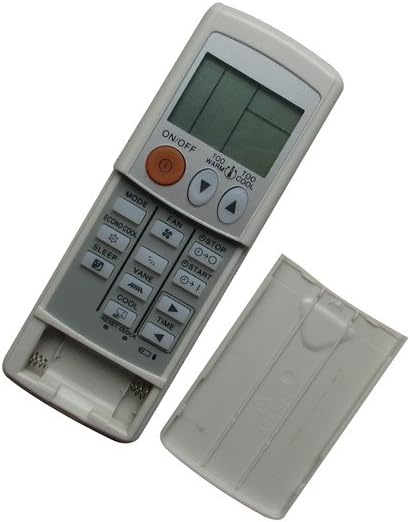
Image: The remote control with its battery cover removed, revealing the two AAA battery slots. This illustrates where to insert the batteries.
Arahan Operasi
To operate your air conditioner, point the remote control directly at the indoor unit's receiver. Ensure there are no obstructions between the remote and the air conditioner.

Image: The remote control with its battery cover securely in place, ready for normal operation. This shows the remote's complete appearance.
Fungsi biasa:
- Butang HIDUP/MATI: Tekan untuk menghidupkan atau mematikan unit penghawa dingin.
- Butang MOD: Cycles through operating modes such as Cool, Heat, Fan, Dry, and Auto.
- Butang KIPAS: Melaraskan kelajuan kipas (cth, Rendah, Sederhana, Tinggi, Auto).
- Temperature Adjustment Buttons (▲ / ▼): Meningkatkan atau mengurangkan tetapan suhu yang dikehendaki.
- Butang SLEEP: Activates or deactivates the sleep mode for comfortable nighttime operation.
- VANE Button: Melaraskan arah bilah aliran udara.
- TIME Buttons: Used for setting timer functions (e.g., ON/OFF timer).
- ECONO COOL Button: Mengaktifkan mod penyejukan penjimatan tenaga.
- TOO WARM / TOO COOL Buttons: Provides quick adjustments to temperature.
Penyelenggaraan
Proper care ensures the longevity and reliable performance of your remote control.
Pembersihan:
- Lap alat kawalan jauh dengan kain lembut dan kering.
- Untuk kotoran degil, ringankan dampen kain dengan air atau pembersih yang lembut dan tidak melelas.
- Do not use harsh chemicals, solvents, or abrasive cleaning pads, as these can damage the remote's surface or internal components.
Penggantian Bateri:
- Replace batteries when the remote's range decreases or if the air conditioner does not respond consistently.
- Sentiasa gantikan kedua-dua bateri pada masa yang sama dengan bateri AAA baharu.
- Tanggalkan bateri jika alat kawalan jauh tidak akan digunakan untuk tempoh yang lama untuk mengelakkan kebocoran.
Menyelesaikan masalah
Jika anda mengalami masalah dengan alat kawalan jauh anda, rujuk kepada penyelesaian biasa berikut:
- Jauh tidak bertindak balas:
- Periksa sama ada bateri dimasukkan dengan betul dengan polariti yang betul.
- Gantikan bateri lama dengan bateri AAA baharu.
- Ensure there is a clear line of sight between the remote and the air conditioner's receiver.
- Pastikan alat kawalan jauh dihalakan terus ke unit penghawa dingin.
- Penghawa dingin tidak bertindak balas terhadap arahan:
- Confirm that your air conditioner model is listed as compatible with this remote.
- Try operating the air conditioner manually from its control panel to ensure the unit itself is functioning correctly.
- Butang tidak berfungsi:
- Pastikan alat kawalan jauh bersih dan bebas daripada serpihan yang mungkin menghalang penekanan butang.
- Jika hanya butang tertentu yang tidak berfungsi, alat kawalan jauh mungkin rosak dan perlu diganti.
This remote control does not require programming. If the air conditioner does not respond after following these steps, the remote may be incompatible with your specific unit or faulty.
Spesifikasi
| Jenama | Easytry123 |
| Model | Easytry1642 |
| Teknologi Ketersambungan | Inframerah (IR) |
| Jenis Pengawal | Kawalan Butang |
| Ciri Khas | No Programming Required, Not Universal |
| Bateri Diperlukan | 2 x AAA (tidak termasuk) |
| bahan | Plastik ABS |
Waranti dan Sokongan
This product is a replacement remote control. For any issues or support inquiries, please contact the seller, Easytry123, directly through your purchase platform. Refer to your purchase details for information regarding return policies, which typically include a 30-day refund or replacement period.