
pengenalan
This manual provides detailed instructions for the setup, operation, and maintenance of your Zerone BN59-01179A Replacement Remote Control. Please read this manual carefully before using the product to ensure proper functionality and longevity.
Produk Selesaiview
The Zerone BN59-01179A is a universal replacement remote control designed for compatible Smart TVs. It offers a compact design and a comprehensive set of buttons for various functions.
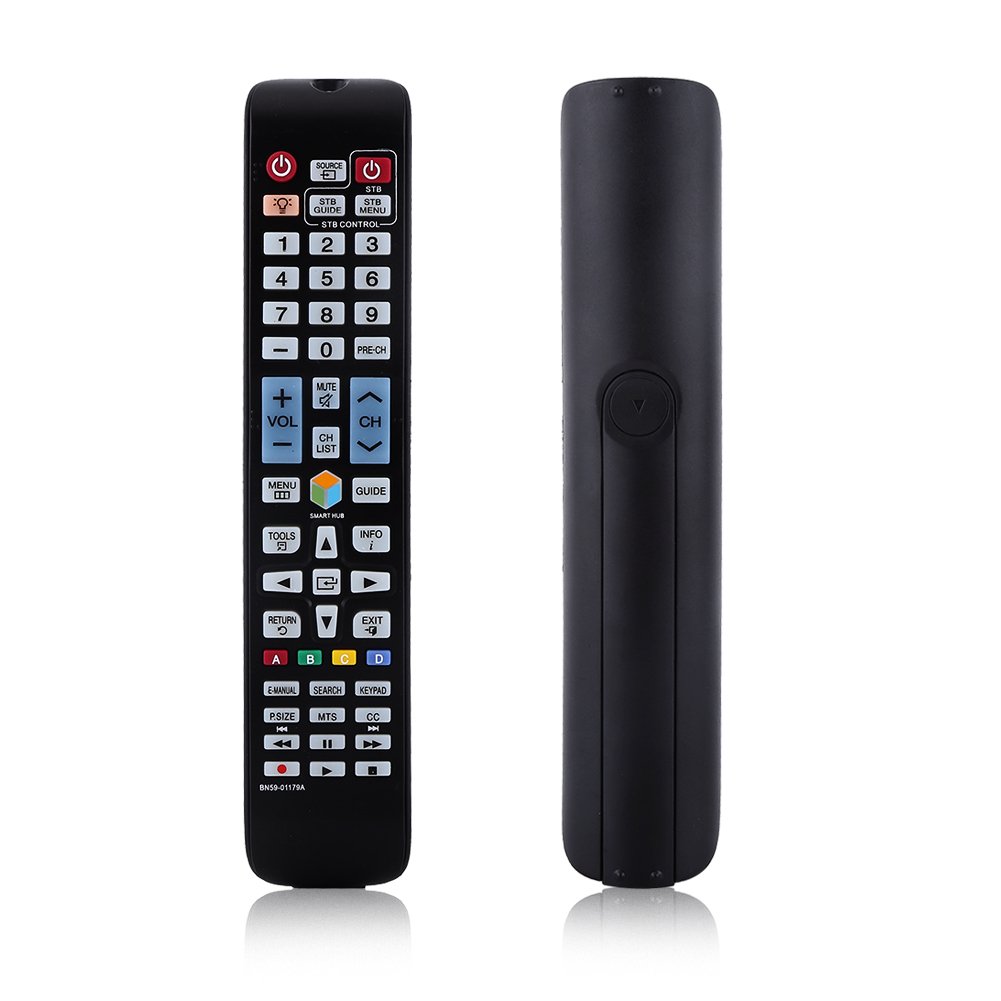
Imej: Depan view of the Zerone BN59-01179A remote control, showing its full layout and approximate dimensions (23cm length, 4.7cm width, 2cm thickness).
Persediaan
Pemasangan Bateri
- Cari petak bateri di belakang alat kawalan jauh.
- Luncurkan penutup bateri ke bawah atau tekan selak dan angkat untuk membuka.
- Masukkan dua (2) bateri AAA, pastikan terminal positif (+) dan negatif (-) sejajar dengan tanda di dalam petak.
- Gantikan penutup bateri dengan menggelongsorkannya semula ke kedudukannya sehingga ia berbunyi dengan selamat.
Nota: Batteries are not included with the remote control. Please use new AAA batteries for optimal performance.

Image: The back of the remote control with the battery cover removed, showing the empty battery compartment ready for two AAA batteries.
Arahan Operasi
This remote control is designed for immediate use with compatible TVs without requiring programming. Simply insert batteries and point the remote towards your television.
Fungsi Utama

Image: A hand holding the Zerone remote control, with inset close-ups highlighting the power/source buttons and the navigation/Smart Hub buttons.
- Kuasa (Butang Merah): Menghidupkan atau mematikan TV.
- Sumber: Memilih sumber input (HDMI, AV, dll.).
- STB/DTV: Switches between Set-Top Box and Digital TV modes.
- Butang Nombor (0-9): Pemilihan saluran langsung.
- PRA-CH: Kembali ke saluran sebelumnya.
- Kelantangan (+/-): Melaraskan tahap kelantangan.
- Redam: Membisukan atau menyahredamkan bunyi TV.
- Channel (CH Up/Down): Menukar saluran TV secara berurutan.
- SENARAI CH: Memaparkan senarai saluran.
- MENU: Mengakses menu utama TV.
- Hab Pintar: Membuka antara muka Smart Hub untuk apl dan perkhidmatan penstriman.
- PANDUAN: Memaparkan panduan program elektronik.
- MAKLUMAT: Shows information about the current program.
- ALAT: Accesses quick settings or contextual options.
- Butang Navigasi (Atas/Bawah/Kiri/Kanan/Masuk): Navigates through menus and selects options.
- KEMBALI: Kembali ke skrin atau menu sebelumnya.
- KELUAR: Keluar dari menu atau aplikasi semasa.
- Color Buttons (A, B, C, D): Functionality varies by TV model and application.
- E-MANUAL: Mengakses manual elektronik TV.
- CARIAN: Opens the search function.
- KEYPAD: Displays an on-screen keypad.
- P.SAIZ: Melaraskan saiz gambar/nisbah aspek.
- MTS: Multi-channel Television Sound (SAP).
- CC: Closed Captioning.
- Media Control Buttons (Play, Pause, Stop, Rewind, Fast Forward): Mengawal main balik media.
Penyelenggaraan
- Pembersihan: Gunakan kain lembut dan kering untuk membersihkan alat kawalan jauh. Jangan gunakan pembersih cecair atau bahan yang melelas.
- Penggantian Bateri: Gantikan bateri apabila tindak balas alat kawalan jauh menjadi lembap atau berhenti berfungsi. Sentiasa gantikan kedua-dua bateri pada masa yang sama dengan yang baharu.
- Storan: Jika alat kawalan jauh tidak akan digunakan untuk tempoh yang lama, keluarkan bateri untuk mengelakkan kebocoran dan kerosakan.
- Elakkan terdedah: Jauhkan alat kawalan jauh daripada cahaya matahari langsung, sumber haba dan kelembapan.
Menyelesaikan masalah
- Jauh tidak bertindak balas:
- Pastikan bateri dimasukkan dengan betul dengan polariti yang betul.
- Gantikan bateri lama dengan bateri AAA baharu.
- Check for any obstructions between the remote and the TV's infrared sensor.
- Pastikan alat kawalan jauh dihalakan terus ke TV.
- Julat terhad:
- Gantikan bateri.
- Ensure there are no strong light sources or electronic devices interfering with the signal.
- Butang khusus tidak berfungsi:
- Bersihkan alat kawalan jauh, terutamanya di sekeliling butang yang tidak bertindak balas, untuk mengeluarkan sebarang kotoran atau serpihan.
- If the issue persists after battery replacement and cleaning, the remote may be faulty.
Spesifikasi
| Ciri | Penerangan |
|---|---|
| Jenama | Zerone |
| Nama Model | Zerone32687x9gqs (BN59-01179A compatible) |
| Teknologi Ketersambungan | Inframerah |
| Peranti Serasi | Television (specifically for Samsung BN59-01179A compatible models) |
| Bilangan Maks Peranti yang Disokong | 8 (Universal functionality) |
| Kuantiti Butang | 12 (referring to main function groups, actual count is higher) |
| Jenis Pengawal | Kawalan Butang |
| Julat Maksimum | 8 Meter |
| Jenis Bateri | AAA |
| Bilangan Bateri | 2 bateri AAA diperlukan (tidak termasuk) |
| Ciri Khas | Universal replacement, no programming required |
Waranti dan Sokongan
Zerone provides a service guarantee for this product. If you encounter any questions or issues regarding your remote control, please contact the seller or manufacturer for assistance. They will provide follow-up services to address your concerns.
For specific warranty details and support contact information, please refer to your purchase documentation or the retailer's webtapak.