
pengenalan
Thank you for choosing the Cygnett FreePlay Bluetooth Earbuds. These truly wireless earbuds are designed to provide a seamless audio experience with comfort and convenience. This manual will guide you through the setup, operation, and maintenance of your new earbuds.
The FreePlay earbuds feature a secure fit with ultra-comfortable silicone ear tips, a lightweight design, and a 10-meter wireless range. They come with an integrated microphone and a portable charging case for extended use.
Kandungan Pakej
Sila pastikan semua item ada dalam pakej anda:
- Cygnett FreePlay Bluetooth Earbuds (Left and Right)
- Kes Pengecasan
- Kabel Pengecas USB Mikro
- Hujung Telinga Silikon (Kecil, Sederhana, Besar)
Produk Selesaiview
Familiarize yourself with the components of your Cygnett FreePlay Bluetooth Earbuds and how they fit.

Imej: A man wearing a Cygnett FreePlay earbud, demonstrating its discreet and secure fit.

Imej: A woman wearing a Cygnett FreePlay earbud, illustrating its comfortable placement for active use.

Imej: Close-up of a single Cygnett FreePlay earbud, showing the speaker mesh and silicone ear tip.
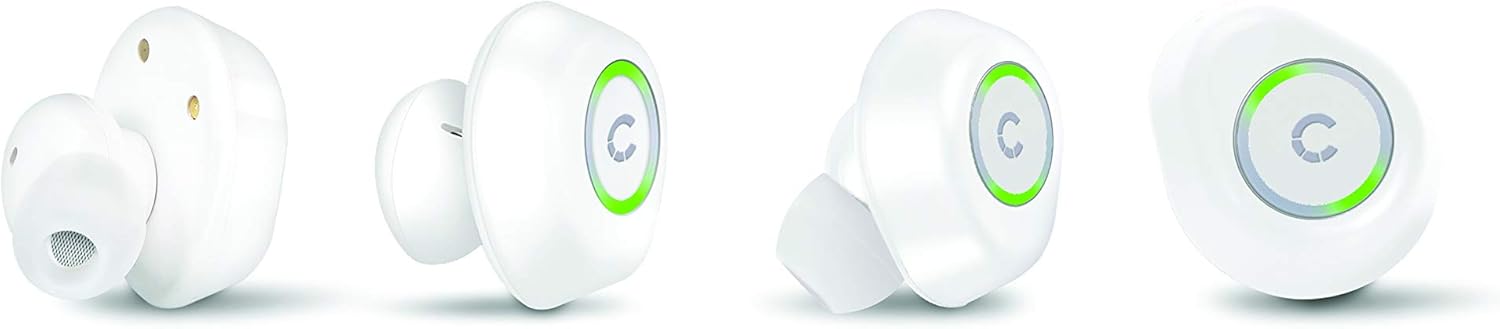
Imej: Various angles of the Cygnett FreePlay earbuds, highlighting their compact design and the illuminated 'C' logo.

Imej: The Cygnett FreePlay earbuds placed inside their open charging case, showing the charging contacts and the Cygnett branding.
Persediaan
1. Mengecas Fon Telinga dan Sarung
Sebelum penggunaan pertama, cas sepenuhnya fon telinga dan bekas pengecas.
- Letakkan fon telinga ke dalam bekas pengecasan. Pastikan mereka duduk dengan betul dalam slot masing-masing (L untuk kiri, R untuk kanan).
- Connect the Micro USB cable to the charging port on the case and the other end to a USB power source (e.g., computer, wall adapter).
- The indicator lights on the earbuds and/or case will show charging status.
- Once fully charged, disconnect the charging cable. The case provides approximately 6 hours of additional playback time for the earbuds.
2. Berpasangan Bluetooth
To connect your Cygnett FreePlay earbuds to your device:
- Ensure the earbuds are charged and removed from the charging case. They should automatically enter pairing mode, indicated by a flashing LED light (color/pattern may vary).
- Pada telefon pintar, tablet anda atau peranti berdaya Bluetooth lain, pergi ke tetapan Bluetooth.
- Hidupkan Bluetooth.
- Cari untuk available devices. You should see "Cygnett FreePlay" or a similar name appear in the list.
- Select "Cygnett FreePlay" to connect. Once connected, the earbud LED light will typically stop flashing or change to a solid color.
- The earbuds will automatically reconnect to the last paired device when removed from the case and within range.
Nota: Jika penggandingan gagal, matikan fon telinga, lumpuhkan Bluetooth pada peranti anda dan ulangi langkah-langkah tersebut.
Mengendalikan Fon Telinga
The Cygnett FreePlay earbuds feature a simple single-button control for managing calls and music playback.
Kawalan Muzik
- Main/Jeda: Press the button once on either earbud.
- Lagu Seterusnya: Double-press the button on the right earbud.
- Trek Sebelumnya: Double-press the button on the left earbud.
- Kelantangan: Triple-press the button on the right earbud.
- Perlahankan suara: Triple-press the button on the left earbud.
Kawalan Panggilan
- Jawab/Tamatkan Panggilan: Press the button once on either earbud.
- Tolak Panggilan: Press and hold the button for approximately 2 seconds on either earbud.
- Pembantu Suara: Press and hold the button for approximately 2 seconds (when not on a call) to activate your device's voice assistant (e.g., Siri, Google Assistant).
Hidupkan/Mati Kuasa
- Hidupkan kuasa: Remove earbuds from the charging case. They will power on automatically. Alternatively, press and hold the button on each earbud for 3 seconds.
- Matikan: Place earbuds back into the charging case. They will power off automatically. Alternatively, press and hold the button on each earbud for 5 seconds.
Penyelenggaraan
Proper care will extend the life of your Cygnett FreePlay earbuds.
- Pembersihan: Regularly clean the silicone ear tips with a soft, dry cloth. If necessary, use a slightly damp cloth with mild soap, then dry thoroughly. Do not use harsh chemicals or abrasive materials.
- Storan: Sentiasa simpan fon telinga di dalam bekas pengecasannya apabila tidak digunakan untuk melindunginya daripada habuk, kotoran dan kerosakan.
- Elakkan Kelembapan: Keep the earbuds and charging case away from water and excessive moisture. While designed for active lifestyles, they are not waterproof.
- Suhu: Avoid exposing the device to extreme temperatures (hot or cold) as this can shorten battery life and affect performance.
Menyelesaikan masalah
Jika anda menghadapi masalah dengan fon telinga anda, cuba penyelesaian berikut:
| Masalah | Penyelesaian |
|---|---|
| Fon telinga tidak berpasangan dengan peranti. |
|
| Tiada bunyi dari fon telinga. |
|
| Satu fon telinga tidak berfungsi. |
|
| Kes pengecas tidak dicas. |
|
Spesifikasi
| Nama Model | Cy2496Frepl |
| Nombor Model | CY2496FREPL |
| Jenama | Cygnett |
| Teknologi Ketersambungan | Tanpa wayar |
| Teknologi Komunikasi Tanpa Wayar | Bluetooth |
| Julat Tanpa Wayar | 10 meter |
| Faktor Bentuk | Dalam Telinga |
| bahan | silikon |
| warna | putih |
| Jenis Bateri | 1 Lithium metal (included) |
| Masa Berbual | 3 jam |
| Masa Tunggu Sedia | 100 jam |
| Additional Playback from Case | 6 jam |
| Jenis Kawalan | Kawalan Butang |
| Peranti Serasi | Telefon Pintar, Tablet |
| Komponen yang Disertakan | Kabel USB Mikro |
| Port Pengecasan | USB |
Waranti dan Sokongan
For warranty information and customer support, please refer to the documentation provided with your purchase or visit the official Cygnett webtapak.
If you require further assistance or have questions not covered in this manual, please contact Cygnett customer service.