
1. Pengenalan
Thank you for choosing the Teesa HYPERCARE T200 Cordless Beard Trimmer. This device is designed for precise beard trimming, contouring, and body hair styling. Please read this manual carefully before first use to ensure safe and optimal operation. Keep this manual for future reference.

Figure 1: Teesa HYPERCARE T200 Cordless Beard Trimmer with comb attachment.
2. Arahan Keselamatan
- Perkakas ini tidak dimaksudkan untuk digunakan oleh orang (termasuk kanak-kanak) yang kurang keupayaan fizikal, deria atau mental, atau kurang pengalaman dan pengetahuan, melainkan mereka telah diberi pengawasan atau arahan mengenai penggunaan perkakas oleh orang yang bertanggungjawab untuk keselamatan mereka.
- Kanak-kanak harus diawasi untuk memastikan bahawa mereka tidak bermain dengan perkakas.
- Jangan rendamkan perkakas dalam air atau cecair lain.
- Jangan gunakan perkakas ini jika bilahnya rosak atau patah, kerana ini boleh menyebabkan kecederaan.
- Hanya gunakan kabel USB yang disediakan untuk mengecas.
- Pastikan perkakas dimatikan sebelum pembersihan atau penyelenggaraan.
- Jauhkan perkakas daripada sumber haba dan cahaya matahari langsung.
3. Produk Lebihview
3.1 Komponen
- Trimmer unit with steel blades
- Adjustable comb attachment (9 settings)
- Kabel pengecas USB
- Berus pembersih
- Minyak pelincir
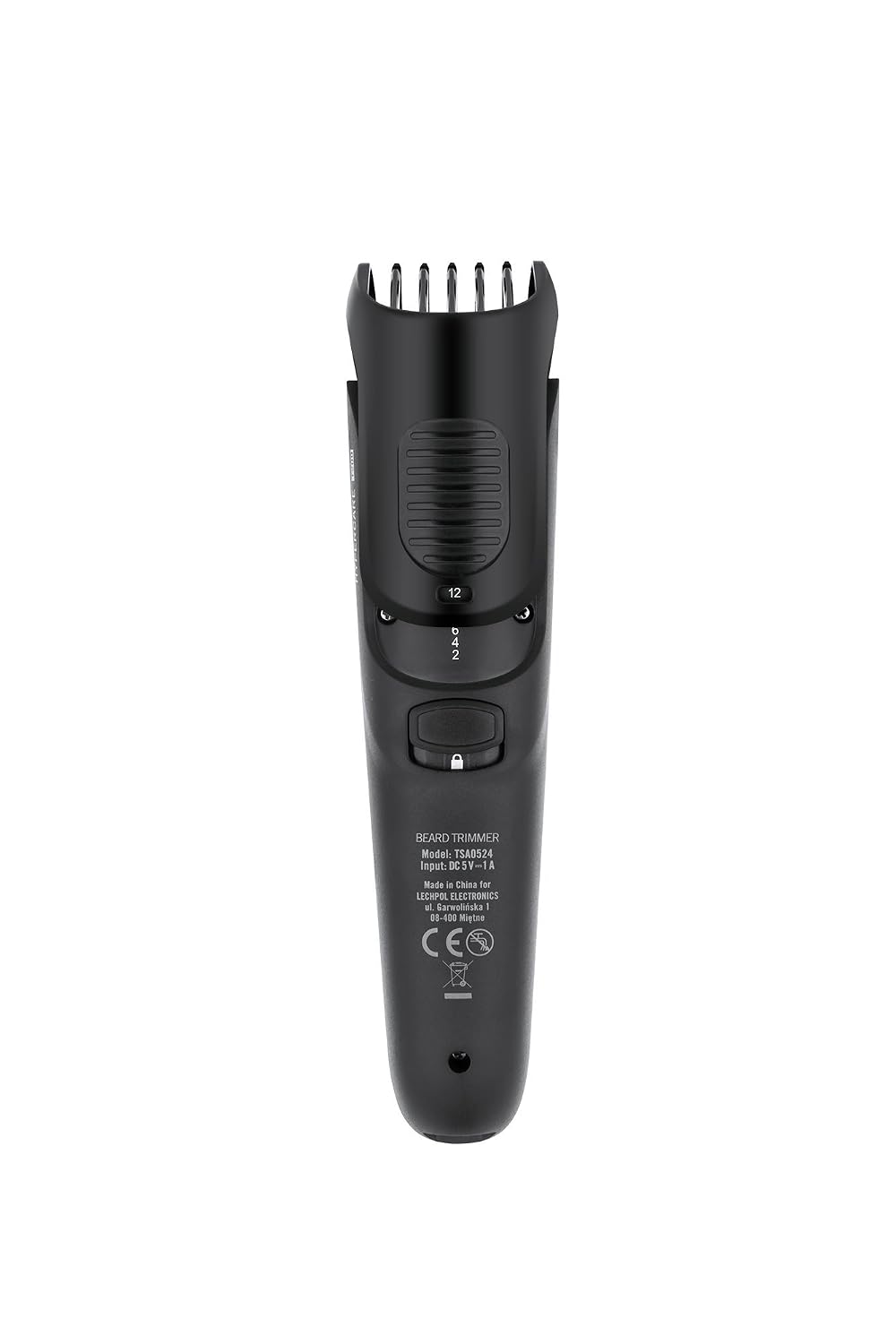
Rajah 2: Belakang view of the trimmer, highlighting the model number and length adjustment mechanism.

Figure 3: Included accessories: cleaning brush, lubricating oil, and USB charging cable.
4. Persediaan
4.1 Pengecasan Awal
- Sebelum penggunaan pertama, cas sepenuhnya trimmer.
- Sambungkan kabel pengecas USB ke port pengecasan pemangkas.
- Pasangkan hujung kabel USB yang satu lagi ke dalam penyesuai kuasa USB yang serasi (tidak disertakan) atau port USB komputer.
- The charging indicator light will illuminate. Allow the trimmer to charge for the recommended time (refer to specifications) until fully charged.
4.2 Memasang Alat Lekat Sikat
- Pastikan perapi dimatikan.
- Align the comb attachment with the trimmer head.
- Gently push the comb attachment onto the trimmer head until it clicks into place.

Figure 4: Trimmer with the comb attachment securely in place.
5. Arahan Operasi
5.1 Selecting Trimming Length
The Teesa HYPERCARE T200 features an adjustable comb attachment with 9 length settings (2, 4, 6, 8, 10, 12, 14, 16, 18 mm).
- With the comb attachment installed, locate the length adjustment dial on the back of the trimmer.
- Rotate the dial to select your desired trimming length. The selected length will be indicated on the trimmer body.
5.2 Pemangkasan
- Ensure your skin and hair are clean and dry.
- Press the power button to switch on the trimmer.
- Hold the trimmer with the blades flat against the skin.
- Move the trimmer slowly against the direction of hair growth for an even trim.
- For precise contouring or very short trimming, remove the comb attachment and use the bare blades carefully.
- After use, switch off the trimmer by pressing the power button.

Figure 5: Trimmer head with comb attachment removed, exposing the steel blades for closer trimming or detailing.
6. Penyelenggaraan
6.1 Membersihkan Pemangkas
- Switch off and unplug the trimmer from any charging source.
- Tanggalkan lampiran sisir.
- Use the provided cleaning brush to remove loose hairs from the blades and the inside of the trimmer head.
- The trimmer head can be rinsed under running water. Ensure the main body of the trimmer does not get wet.
- Benarkan semua bahagian kering sepenuhnya sebelum dipasang semula atau disimpan.
6.2 Melincirkan Bilah
Pelinciran yang kerap memastikan prestasi optimum dan memanjangkan jangka hayat bilah.
- Selepas membersihkan dan mengeringkan, sapukan 1-2 titis minyak pelincir yang disediakan pada bilah.
- Switch on the trimmer for a few seconds to distribute the oil evenly.
- Lap sebarang minyak yang berlebihan dengan kain lembut.
7. Penyelesaian masalah
| Masalah | Kemungkinan Punca | Penyelesaian |
|---|---|---|
| Trimmer tidak dihidupkan. | Bateri dinyahcas. | Cas trimmer sepenuhnya. |
| Trimmer menarik rambut atau memotong dengan teruk. | Bilah kusam atau tersumbat dengan rambut. | Clean the blades thoroughly. Lubricate the blades. If problem persists, blades may need replacement. |
| Comb attachment does not stay in place. | Tidak dilekatkan dengan betul. | Ensure the comb attachment is aligned and pushed until it clicks securely. |
8. Spesifikasi
| Ciri | Perincian |
|---|---|
| Nombor Model | TSA0524 |
| Jenama | Teesa |
| Sumber Kuasa | Bateri Litium-Ion Boleh Dicas semula |
| Mod Pengendalian | Cordless (charges via USB cable) |
| Bahan Bilah | Keluli |
| Tetapan Sisir | 9 (2, 4, 6, 8, 10, 12, 14, 16, 18 mm) |
| Dimensi Produk | 15.5 x 4.1 x 3.9 cm |
| Berat badan | 130 gram |
| Ciri Khas | Pengecasan USB |
9. Waranti dan Sokongan
For warranty information or technical support, please refer to the warranty card included with your product or contact Teesa customer service. Keep your proof of purchase for warranty claims.