
pengenalan
Thank you for choosing the PowerPac 12-Inch Table Fan, model PPTF303. This manual provides comprehensive instructions for the safe and efficient use of your new fan. Please read all instructions carefully before operating the appliance and retain this manual for future reference.
Arahan Keselamatan Penting
Untuk mengurangkan risiko kebakaran, kejutan elektrik atau kecederaan, sentiasa ikuti langkah berjaga-jaga keselamatan asas ini:
- Baca semua arahan sebelum menggunakan kipas ini.
- Pastikan bekalan kuasa voltage sepadan dengan label penarafan pada kipas.
- Sentiasa cabut plag kipas dari soket kuasa sebelum membersihkan, menservis atau mengalihkannya.
- Do not insert fingers or any objects through the grille when the fan is operating.
- Keep the fan away from water or other liquids. Do not operate in wet conditions.
- Jangan kendalikan kipas dengan kord atau palam yang rosak. Jika kord rosak, ia mesti digantikan oleh pengilang, ejen servisnya atau orang yang berkelayakan untuk mengelakkan bahaya.
- Perkakas ini tidak dimaksudkan untuk digunakan oleh orang (termasuk kanak-kanak) yang kurang keupayaan fizikal, deria atau mental, atau kurang pengalaman dan pengetahuan, melainkan mereka telah diberi pengawasan atau arahan mengenai penggunaan perkakas oleh orang yang bertanggungjawab untuk keselamatan mereka.
- Kanak-kanak harus diawasi untuk memastikan bahawa mereka tidak bermain dengan perkakas.
- Jangan gunakan kipas berhampiran langsir, tumbuhan atau objek lain yang boleh ditarik ke dalam bilah kipas.
- Letakkan kipas di atas permukaan yang stabil dan rata untuk mengelakkannya daripada terbalik.
- The fan is equipped with built-in thermal protection against overheating. If the fan overheats, it will automatically shut off. Unplug the fan and allow it to cool down before restarting.
Produk Selesaiview
Komponen
The PowerPac 12-Inch Table Fan PPTF303 includes the main fan unit with its base, grille, blades, motor housing, control panel, and power cord.
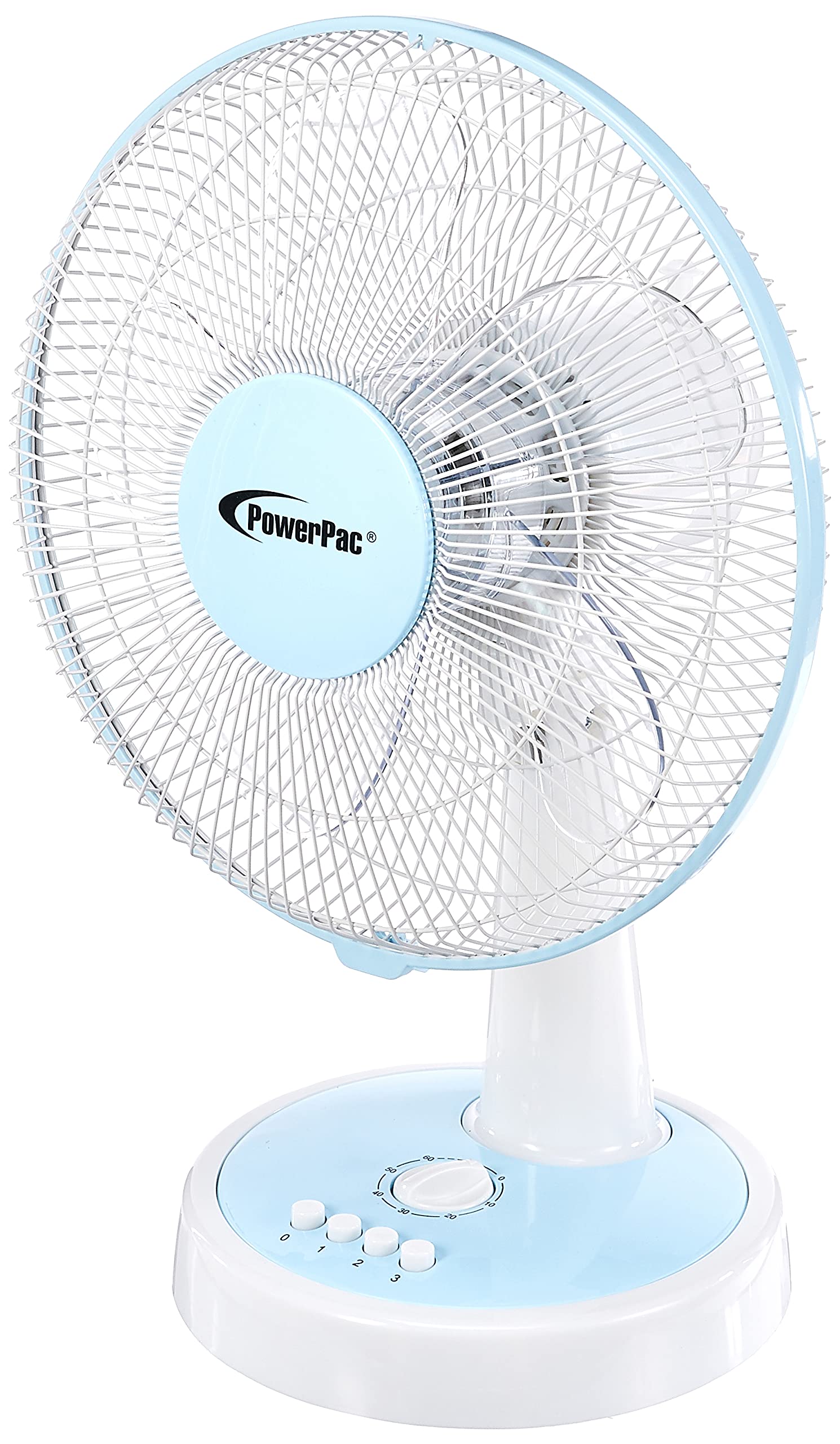
Rajah 1: Depan view of the PowerPac 12-Inch Table Fan PPTF303.
Ciri-ciri
- Tetapan Kelajuan 3: Choose from low, medium, or high airflow.
- Built-in Thermal Protection: Dimatikan secara automatik untuk mengelakkan terlalu panas.
- High Velocity Motor: Designed for maximum air circulation.
- Pengayun: Provides wide-area cooling.
- Fungsi Pemasa: Allows for timed operation.
Persediaan
The PowerPac 12-Inch Table Fan PPTF303 typically comes pre-assembled. Follow these steps for initial setup:
- Bongkar: Carefully remove the fan from its packaging. Retain packaging for storage or return if necessary.
- penempatan: Place the fan on a firm, level surface where it will not be easily knocked over. Ensure there is adequate space around the fan for proper air circulation and oscillation.
- Sambungan Kuasa: Insert the power plug into a suitable electrical outlet. Ensure the outlet voltage matches the fan's requirements.
Arahan Operasi
Your PowerPac Table Fan features a touch control method for easy operation.
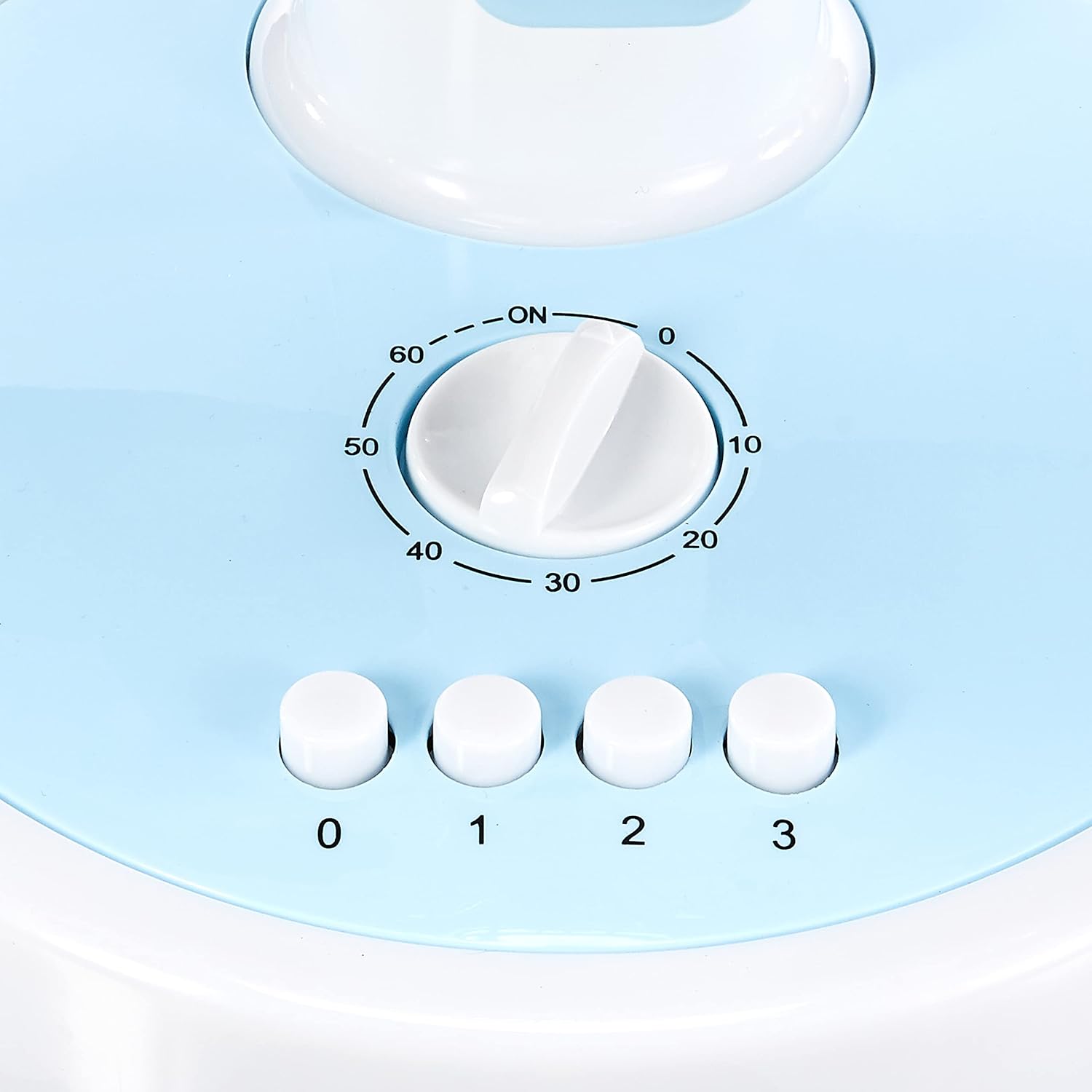
Figure 2: Close-up of the control panel with speed and timer settings.
- Hidupkan/Mati Kuasa: Press the '0' button to turn the fan off. To turn it on, select a speed setting (1, 2, or 3).
- Melaraskan Kelajuan Kipas:
- Press '1' for Low speed.
- Press '2' for Medium speed.
- Press '3' for High speed.
- Pengayun: To activate the oscillation feature, press the button located on the top of the motor housing. Press it again to stop oscillation.
- Fungsi Pemasa: The fan includes a timer dial, typically marked from 0 to 60 minutes. Turn the dial clockwise to set the desired operating time. The fan will automatically switch off once the set time has elapsed.
Penyelenggaraan
Penyelenggaraan tetap memastikan prestasi optimum dan jangka hayat kipas anda.
- Pembersihan:
- Sentiasa cabut plag kipas sebelum membersihkan.
- Gunakan yang lembut, damp kain untuk mengelap permukaan luar. Jangan gunakan pembersih atau pelarut yang melelas.
- To clean the fan blades, carefully remove the front grille (refer to specific instructions if provided with your model for grille removal). Wipe the blades with a damp cloth. Ensure all parts are dry before reassembling and operating.
- Storan: When not in use for extended periods, store the fan in its original packaging or a clean, dry place.
Menyelesaikan masalah
Jika anda menghadapi sebarang masalah dengan kipas anda, sila rujuk masalah dan penyelesaian biasa berikut:
| Masalah | Kemungkinan Punca | Penyelesaian |
|---|---|---|
| Kipas tidak dihidupkan. | No power supply; fan unplugged; thermal protection activated. | Check power cord connection; ensure outlet is functional; unplug and allow fan to cool for 30 minutes before restarting. |
| Aliran udara yang lemah. | Fan speed set too low; dirty blades/grille. | Increase fan speed; clean blades and grilles as per maintenance instructions. |
| Kipas membuat bunyi yang luar biasa. | Loose parts; obstruction in blades. | Unplug and check for any loose parts or obstructions. If noise persists, contact customer support. |
If the problem persists after attempting these solutions, please contact PowerPac customer support.
Spesifikasi
Key technical specifications for the PowerPac 12-Inch Table Fan PPTF303:
| Spesifikasi | Perincian |
|---|---|
| Jenama | PowerPac |
| Nama Model | PPTF303 |
| Reka Bentuk Kipas Elektrik | Kipas Meja |
| Saiz | 12 Inci |
| Bilangan Kelajuan | 3 |
| Sumber Kuasa | Elektrik Bertali |
| Wattage | 70 watt |
| Kaedah Kawalan | Sentuh |
| Ciri Khas | Timer, Oscillation, Thermal Protection |
| bahan | plastik |
| Negara Asal | China |

Figure 3: Approximate dimensions of the PowerPac 12-Inch Table Fan PPTF303.
Waranti dan Sokongan
The PowerPac 12-Inch Table Fan PPTF303 comes with a Waranti Pengeluar Tempatan (Singapura) 1 Tahun. Sila simpan bukti pembelian anda untuk tuntutan waranti.
For technical support, service, or warranty inquiries, please contact PowerPac customer service through their official webtapak atau peruncit tempat produk itu dibeli.