
1. Pengenalan
This manual provides instructions for the Easytry123 replacement infrared remote control, model Easytry0400. This remote is designed to function as a direct replacement for the original remote controls of Dynex DX-LCD37-09-02 and DX-LCD37-09-2 LCD LED HDTV television models. Please ensure your television model is listed for proper compatibility. This remote operates using infrared technology and requires 2 AAA batteries (not included).
2. Persediaan: Pemasangan Bateri
To begin using your Easytry123 replacement remote control, you must first install the batteries.
- Cari petak bateri di belakang alat kawalan jauh.
- Luncurkan penutup petak bateri ke bawah atau ke luar untuk membukanya.
- Insert two (2) AAA batteries, ensuring the positive (+) and negative (-) terminals align correctly with the markings inside the compartment. Incorrect battery orientation can prevent the remote from functioning.
- Luncurkan penutup petak bateri kembali ke tempatnya sehingga ia berbunyi dengan selamat.
Rajah 1: belakang view of the Easytry123 remote control with the battery compartment open, illustrating where to insert the two AAA batteries.
3. Arahan Operasi
Point the remote control directly towards the infrared receiver on your Dynex television. Ensure there are no obstructions between the remote and the TV.

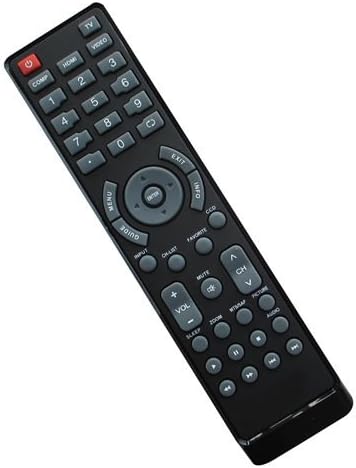
Rajah 2: Depan view of the Easytry123 remote control, displaying its button layout.
Fungsi Butang:
- POWER (Red button): Menghidupkan atau mematikan televisyen.
- COMP, HDMI, VIDEO, 1-9, 0: Number buttons for direct channel selection and input source selection.
- MENU: Mengakses menu utama televisyen.
- PANDUAN: Displays the electronic program guide (if supported by your TV and service).
- ARROW buttons (Up, Down, Left, Right): Menavigasi melalui menu dan pilihan.
- MASUK: Mengesahkan pilihan dalam menu.
- KELUAR: Keluar dari menu atau skrin semasa.
- MAKLUMAT: Memaparkan maklumat tentang program atau input semasa.
- DCC: Likely for Closed Captioning display.
- MASUKKAN: Cycles through available input sources (HDMI, Video, etc.).
- SENARAI CH: Memaparkan senarai saluran.
- MATI: Membisukan atau menyahredamkan audio televisyen.
- VOL +/-: Melaraskan tahap kelantangan.
- CH ^/v: Menukar saluran televisyen ke atas atau bawah.
- MTMAP, PICTURE, AUDIO: Likely dedicated buttons for picture modes, audio settings, or other TV features.
- ZOMAN: Melaraskan tahap zum skrin.
- TIDUR: Menetapkan pemasa tidur untuk televisyen.
- Playback Controls (Rewind, Play/Pause, Fast Forward, Stop, Record): For controlling connected media devices or TV's built-in media player.
Note: Some advanced functions or specific buttons may require your television to support those features. Refer to your television's original user manual for detailed information on its capabilities.
4. Penyelenggaraan
Penjagaan dan penyelenggaraan yang betul akan memanjangkan hayat alat kawalan jauh anda.
- Pembersihan: Use a soft, dry cloth to clean the remote control. For stubborn dirt, lightly dampen the cloth with water or a mild cleaning solution, then wipe dry immediately. Do not use abrasive cleaners or immerse the remote in liquids.
- Penggantian Bateri: Replace batteries when the remote's response becomes sluggish or stops working. Always replace both batteries at the same time with new AAA batteries. Do not mix old and new batteries, or different types of batteries.
- Storan: If the remote will not be used for an extended period, remove the batteries to prevent leakage, which can damage the remote.
5. Penyelesaian masalah
If you encounter issues with your remote control, try the following troubleshooting steps:
- Jauh tidak bertindak balas:
- Ensure the remote is pointed directly at the TV's infrared sensor.
- Check if there are any obstructions between the remote and the TV.
- Gantikan bateri dengan bateri AAA yang baru.
- Sahkan bahawa TV telah dihidupkan.
- Beberapa butang tidak berfungsi:
- This replacement remote is designed to replicate the original remote's functions. However, some specific or advanced features of your TV might not be fully supported if they differ significantly from the original remote's design.
- Ensure your TV model is indeed one of the compatible models (Dynex DX-LCD37-09-02 or DX-LCD37-09-2).
- Gangguan:
- Strong light sources, especially fluorescent lights or direct sunlight, can interfere with infrared signals. Try operating the remote in different lighting conditions.
Jika masalah berterusan selepas mencuba langkah ini, sila hubungi sokongan pelanggan.
6. Spesifikasi
| Nombor Model: | Easytry0400 |
| Jenama: | Easytry123 |
| Teknologi Ketersambungan: | Inframerah (IR) |
| Jenis Pengawal: | Kawalan Butang |
| Peranti Serasi: | Dynex DX-LCD37-09-02, Dynex DX-LCD37-09-2 LCD LED HDTVs |
| Bateri Diperlukan: | 2 x AAA (tidak termasuk) |
| Ciri Khas: | Ergonomic replacement design |
7. Sokongan Pelanggan
For any questions, concerns, or troubleshooting assistance not covered in this manual, please contact the seller or Easytry123 customer support through the platform where the product was purchased. Please have your product model number (Easytry0400) and purchase details ready when contacting support.