
pengenalan
This manual provides detailed instructions for the safe and effective use of your Aesfee LED Lighted Makeup Vanity Mirror. Please read this manual thoroughly before operating the device and retain it for future reference.
Ciri-ciri Produk
- Cermin Dua Sisi: Features 1x magnification for regular makeup application and 7x magnification for detailed tasks.
- Reka Bentuk Pusing 360°: Allows for easy rotation to switch between magnification levels and adjust viewsudut-sudut.
- Pencahayaan LED: Equipped with 21 energy-efficient LEDs providing natural daylight illumination.
- Skrin Sentuh Boleh Dimalapkan: Offers three adjustable brightness levels controlled by a sensitive touch sensor.
- Bateri boleh dicas semula: Built-in 2000mAh lithium battery provides extended cordless operation.
- Pengecasan USB: Conveniently recharges via a Micro USB port.
Persediaan
Mengecas Cermin
Before first use, fully charge the mirror. The mirror is powered by a built-in 2000mAh lithium battery.
- Locate the Micro USB charging port on the side of the mirror frame.
- Connect the provided USB cable to the mirror's charging port and to any standard DC 5V/1A power source (e.g., wall charger, power bank, laptop).
- The touch button will indicate the charging status: merah untuk mengecas, Biru for fully charged.
- A full charge typically takes 4-5 hours and provides approximately 280 minutes of working time at maximum brightness.

Arahan Operasi
Kuasa Hidup/Mati dan Pelarasan Kecerahan
The mirror features a multi-function touch screen button for controlling the LED lights.
- To turn the LED lights ON, lightly touch the bulb icon on the mirror surface.
- To adjust the brightness, touch the bulb icon repeatedly to cycle through the three brightness levels (Primary, Medium, Enhanced).
- To turn the LED lights DIMATIKAN, continue touching the bulb icon until the lights extinguish.


Using Magnification and Rotation
The mirror is double-sided and designed for versatile use.
- The 1x cermin provides a standard, true-to-life reflection suitable for general makeup application.
- The 7x magnified mirror allows for precise detailing, such as applying eyeliner, mascara, or plucking eyebrows.
- To switch between the 1x and 7x mirrors, simply rotate the mirror head 360 degrees. The sturdy metal rotating shaft ensures smooth and stable adjustment.
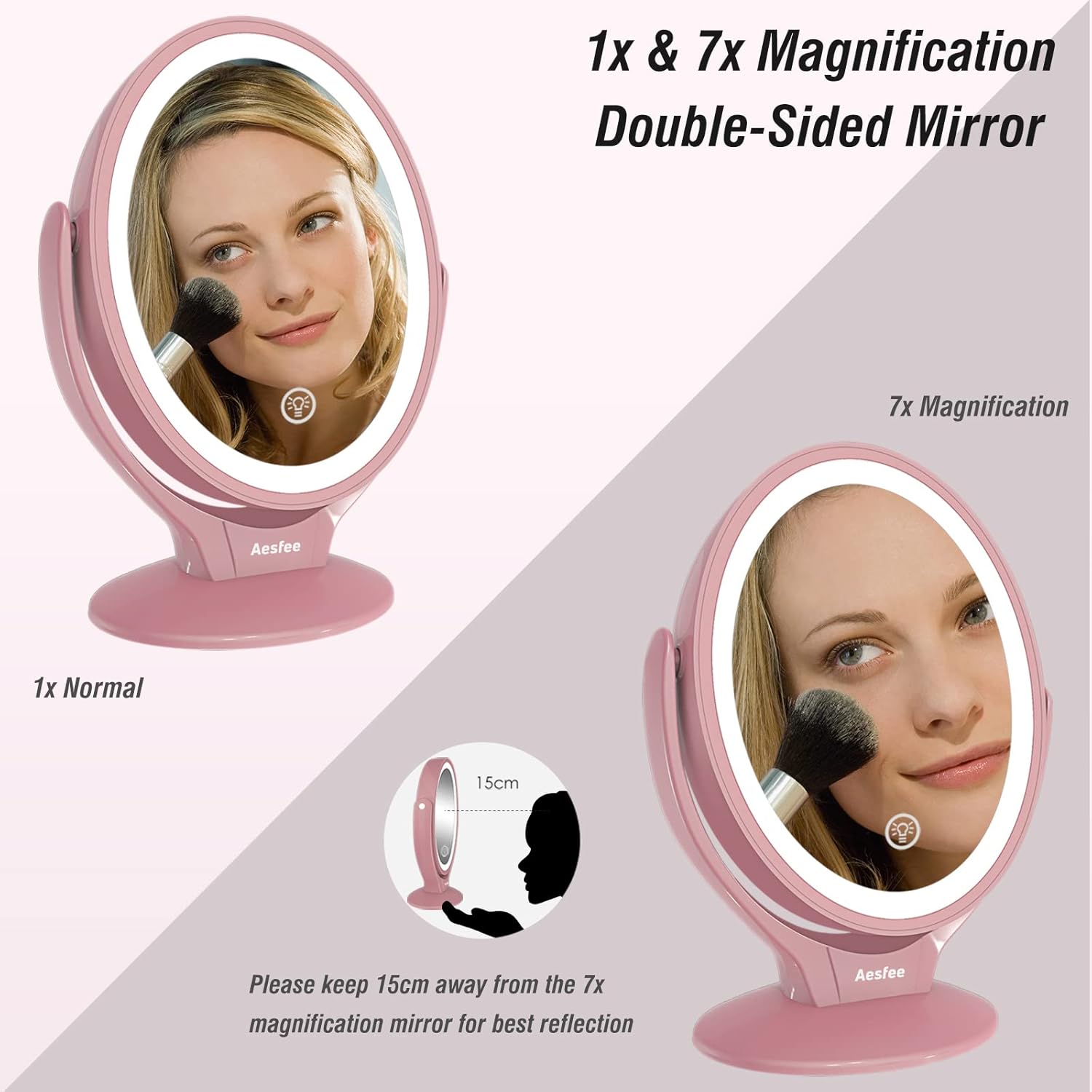

Important Usage Tip for 7x Magnification
When using the 7x magnifying mirror, it is crucial to maintain a distance of approximately 15 cm (6 inci) from the mirror for a clear and undistorted reflection. Moving too close or too far may result in a blurry image.
Penyelenggaraan
Pembersihan
- Pastikan cermin dimatikan dan dicabut plagnya sebelum membersihkannya.
- Wipe the mirror surface with a soft, lint-free cloth. For stubborn spots, a small amount of glass cleaner can be applied to the cloth (not directly to the mirror).
- Clean the mirror frame and base with a soft, damp kain. Elakkan pembersih atau pelarut yang melelas.
Penyimpanan
Store the mirror in a cool, dry place away from direct sunlight and excessive humidity. When traveling, consider using protective packaging to prevent scratches or damage.
Menyelesaikan masalah
| Masalah | Kemungkinan Punca | Penyelesaian |
|---|---|---|
| Lampu LED tidak menyala. | Bateri habis. | Charge the mirror using the provided USB cable. Ensure the charging indicator turns red. |
| Lampu malap atau berkelip-kelip. | Bateri rendah atau tetapan kecerahan yang salah. | Recharge the mirror. Tap the touch button to cycle through brightness levels. |
| 7x magnification appears blurry. | tak betul viewjarak. | Maintain a distance of approximately 15 cm (6 inches) from the 7x magnified mirror. |
| Touch button is unresponsive. | Gangguan perisian sementara atau bateri lemah. | Ensure the mirror is charged. Try restarting by fully discharging and then recharging. |
Spesifikasi
| Ciri | Perincian |
|---|---|
| Nombor Model | AF-802 |
| Pembesaran | 1x/7x |
| Kapasiti Bateri | Bateri Litium 2000mAh |
| Masa Mengecas | 4 - 5 jam |
| Running Time (Max Brightness) | Sehingga 280 minit |
| Input | DC 5V/1A |
| bahan | 60% Glass, 40% Plastic |
| Dimensi Produk | 8.86"L x 5.12"W (Mirror size: 5" wide x 6" high; 9" tall with base) |
| Berat Barang | 1.43 paun (650 Gram) |
| Ciri Khas | 2-Sided, 360 Degree Rotation, Adjustable Brightness, Lighted, Touch Sensor |

Waranti dan Sokongan
For warranty information or technical support, please refer to the product packaging or contact Aesfee customer service directly. Contact details are typically available on the manufacturer's official webtapak atau melalui peruncit anda.