
pengenalan
This manual provides detailed instructions for the installation, operation, and maintenance of your Westek TM1627LP Digital Plug-in Countdown Lighting Timer. Please read this manual thoroughly before using the device to ensure proper function and safety. Keep this manual for future reference.
Maklumat Keselamatan
- Untuk kegunaan dalaman sahaja. Jangan dedahkan kepada kelembapan atau suhu yang melampau.
- Do not exceed the maximum electrical rating of 15 Amps. Overloading the timer can cause damage or fire.
- Ensure the timer is securely plugged into a grounded electrical outlet.
- Jangan buka atau cuba membaiki pemasa. Rujuk semua servis kepada kakitangan yang berkelayakan.
- Jauhkan daripada kanak-kanak.
Produk Selesaiview
The Westek TM1627LP is a versatile digital timer designed to automate the control of your electrical devices. It features three grounded outlets, a clear digital display, and intuitive buttons for programming. Key functions include:
- Programmable up to 20 ON/OFF programs per week.
- Random function for enhanced security.
- Pelarasan Waktu Penjimatan Siang (DST).
- Dusk-to-Dawn operation.
- Countdown timer function.
- Internal battery backup to retain settings during power outages.
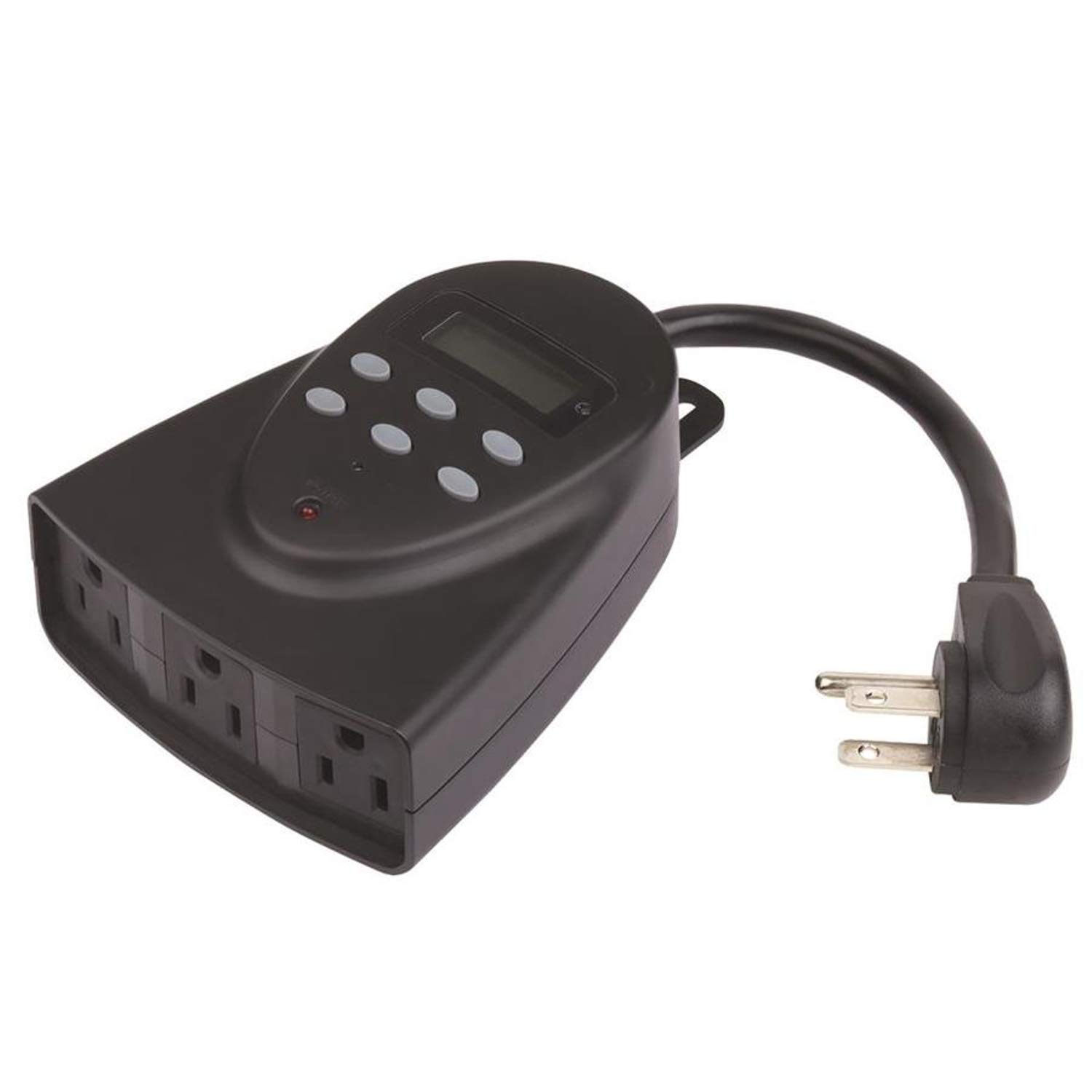
Imej ini menunjukkan bahagian hadapan view of the Westek TM1627LP digital timer. It features a large digital display at the top, several control buttons below it, and three grounded electrical outlets on the bottom face. The timer is designed to plug directly into a wall outlet.
Persediaan
1. Pengecasan Awal
Before first use, plug the timer into a live electrical outlet for at least 30 minutes to charge the internal battery backup. This ensures the display and settings are retained during power outages or when the timer is unplugged.
2. Menetapkan Waktu dan Hari Semasa
- Tekan ke JAM button. The display will show the current time.
- Gunakan JAM dan MINIT butang untuk melaraskan masa.
- Tekan ke HARI button to cycle through the days of the week until the correct day is displayed.
- Tekan JAM sekali lagi untuk menyimpan dan keluar.
3. Menyambungkan Peralatan
Plug your desired appliances into the three grounded outlets on the front of the timer. Ensure the total load does not exceed 15 Amps.
Arahan Operasi
Programming ON/OFF Schedules
- Tekan ke PROG butang. Paparan akan menunjukkan "1 HIDUP".
- Gunakan JAM, MINIT, dan HARI buttons to set the desired ON time and day(s) for the first program.
- Tekan PROG sekali lagi. Paparan akan menunjukkan "1 OFF".
- Gunakan JAM, MINIT, dan HARI buttons to set the desired OFF time and day(s) for the first program.
- Ulang langkah 1-4 untuk sehingga 20 program HIDUP/MATI.
- Tekan ke JAM butang untuk keluar dari mod pengaturcaraan.
Fungsi Countdown
- Tekan ke COUNTDOWN butang.
- Gunakan JAM dan MINIT butang untuk menetapkan tempoh kira detik yang diingini.
- Tekan COUNTDOWN again to start the countdown. The timer will turn OFF after the set duration.
Fungsi Rawak
Untuk mengaktifkan fungsi rawak, tekan butang RANDOM button. The timer will turn connected devices ON and OFF at random intervals around your programmed times, providing a lived-in appearance for security purposes. Press RANDOM sekali lagi untuk menyahaktifkan.
Waktu Jimat Siang (DST)
Tekan dan tahan butang DST button for 3 seconds to toggle Daylight Saving Time ON or OFF. The clock will adjust automatically by one hour.
Operasi Senja ke Subuh
The timer can be set to operate from dusk until dawn. Refer to the programming section for specific instructions on setting this mode, which typically involves selecting a specific program option or a dedicated button if available on your model (check the timer's face for a 'Dusk-to-Dawn' button or setting within the PROG menu).
Manual Override
Tekan ke HIDUP/MATI button to manually turn the connected devices ON or OFF, overriding any active programs. The timer will resume its programmed schedule at the next scheduled event.
Penyelenggaraan
The Westek TM1627LP timer requires minimal maintenance. To clean, wipe the exterior with a soft, dry cloth. Do not use abrasive cleaners or immerse the unit in water. There are no user-serviceable parts inside.
Menyelesaikan masalah
- Paparan kosong atau tidak responsif: Ensure the timer is plugged into a live outlet. Allow at least 30 minutes for the internal battery to charge. If the issue persists, try pressing the TETAP SEMULA button (usually a small recessed button requiring a paperclip).
- Timer not turning devices ON/OFF:
- Verify that the timer is receiving power from the wall outlet.
- Check that the connected device is properly plugged into the timer and is functional.
- Review your programmed ON/OFF times to ensure they are set correctly.
- Ensure the timer is not in manual override mode.
- Programs not saving: Ensure the internal battery backup is sufficiently charged. If programs are lost after a power outage, the battery may need more charging time.
Spesifikasi
- model:
- TM1627LP (Manufacturer Model: 864604)
- Penarafan Elektrik:
- 125V AC, 60Hz, 15A Resistive, 1875W
- Jenis Penyambung:
- Pasangkan
- Outlet:
- 3-way Grounded
- Dimensi Item (L x W x H):
- 6 x 6 x 2.5 inci
- Jenis Pemasangan:
- Pasang Pasang
- Jenis Penggerak:
- Butang Tekan
- Berat Barang:
- 0.4 paun
- UPC:
- 070686507636
Waranti dan Sokongan
For warranty information or technical support, please contact Westek customer service. Refer to the product packaging or the Westek webtapak untuk butiran hubungan semasa.