
1. Pengenalan
Thank you for choosing the Zerone LP-838 Small Power Amplifier. This manual provides essential information for the safe and efficient operation of your device. Please read these instructions thoroughly before use and retain them for future reference.
2. Produk Lebihview
2.1 Ciri-ciri Utama
- Reka bentuk padat dan mudah alih.
- RCA and 3.5mm audio input compatibility.
- High-power audio amplifier chip for 2.1 channel output.
- Adjustable Treble, Bass, and Volume controls.
- Durable all-aluminum alloy shell for electromagnetic interference reduction.
2.2 Pengenalan Komponen
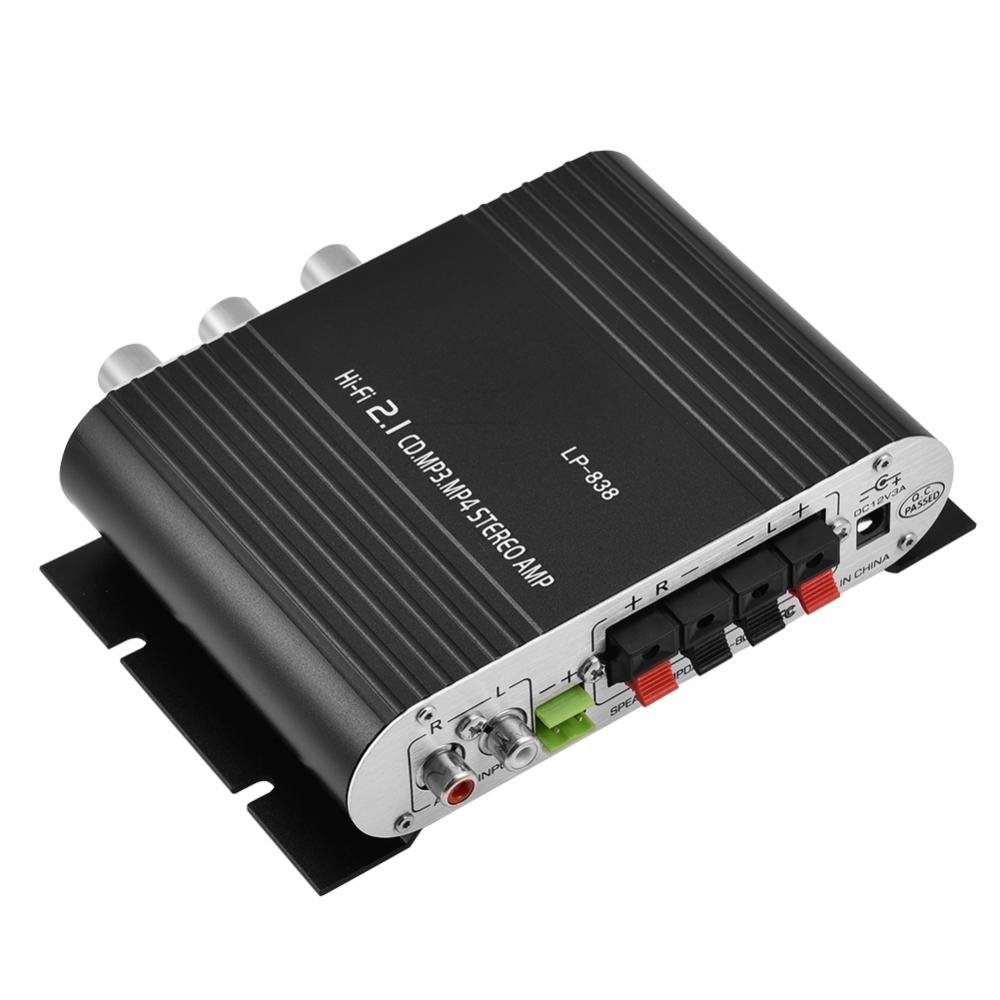
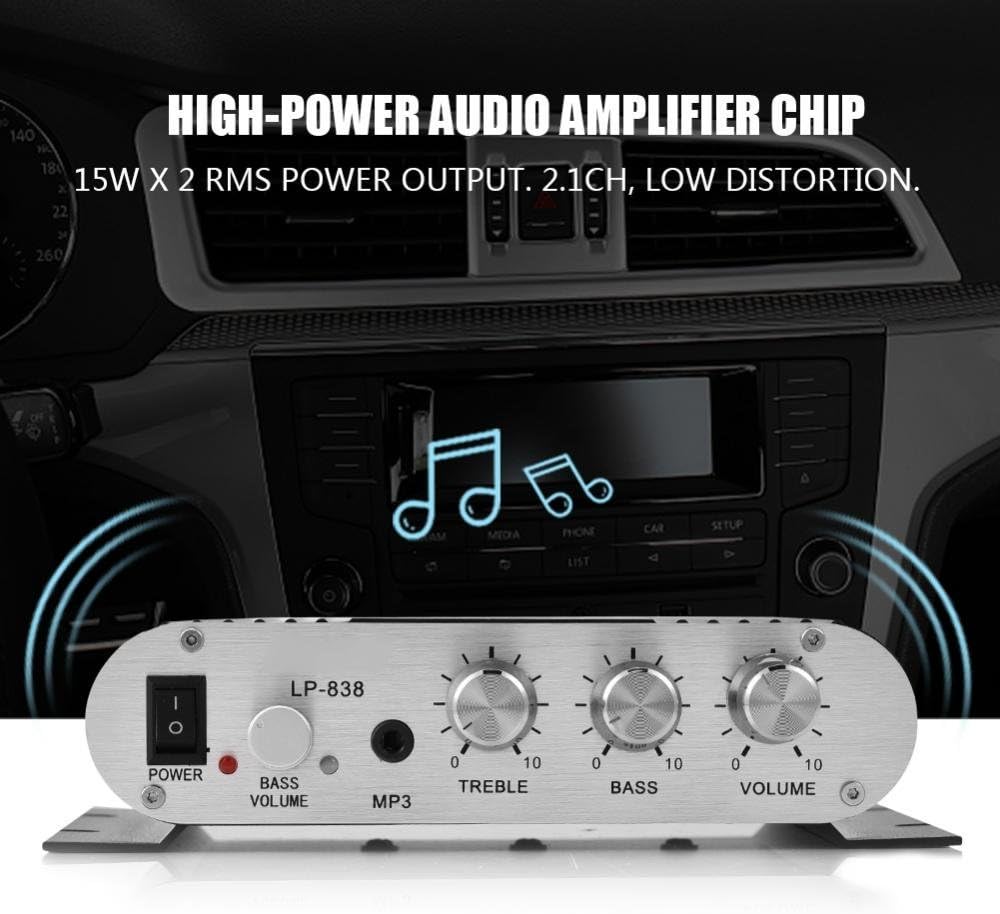
Figure 1: Front Panel Controls and Inputs
This image displays the front panel of the LP-838 amplifier. From left to right, it features a power switch, a bass volume knob, a 3.5mm MP3 input jack, and three rotary knobs for Treble, Bass, and Master Volume control. The unit also supports RCA audio input, as indicated by the text overlay.
Rajah 2: Sambungan Panel Belakang
This image shows the rear panel of the LP-838 amplifier. On the left are the RCA audio input jacks (red for right, white for left). In the center are the spring-clip speaker terminals for connecting left and right speakers. On the right is the DC 12V/3A power input jack and a 'Q.C. PASSED' stamp, indicating quality control.
Panel Depan:
- Suis kuasa: Togol amppengikat hidup/mati.
- BASS VOLUME Knob: Adjusts the bass level of the audio output.
- Input MP3: 3.5mm jack for connecting portable audio devices.
- Tombol TREBLE: Melaraskan tindak balas frekuensi tinggi.
- Tombol BASS: Melaraskan tindak balas frekuensi rendah.
- Tombol VOLUME: Mengawal volum keluaran keseluruhan.
Panel belakang:
- AUDIO INPUT (RCA): Red and white RCA jacks for connecting audio sources (e.g., DVD players, computers).
- SPEAKER OUTPUTS (+R -R +L -L): Spring-clip terminals for connecting passive speakers. Ensure correct polarity (+ to + and - to -).
- Input DC 12V/3A: Power input jack for connecting the external power adapter (not included).
3. Persediaan
- Sambungkan Pembesar Suara: Connect your passive speakers to the SPEAKER OUTPUT terminals on the rear panel. Ensure the positive (+) terminal of the amplifier connects to the positive (+) terminal of the speaker, and the negative (-) terminal of the amplifier connects to the negative (-) terminal of the speaker. The amplifier supports speakers with an impedance of 4-8 Ohms.
- Sambungkan Sumber Audio:
- For RCA input: Connect your audio source (e.g., CD player, TV, computer) to the RCA AUDIO INPUT jacks on the rear panel using an RCA cable.
- For 3.5mm input: Connect your portable audio device (e.g., smartphone, MP3 player) to the MP3 input jack on the front panel using a 3.5mm audio cable.
- Sambungkan Kuasa: Connect a compatible DC 12V/3A power adapter (not included) to the DC 12V/3A input jack on the rear panel. Plug the power adapter into a wall outlet.
Important: Ensure all connections are secure before powering on the amplebih hidup.
4. Arahan Operasi
- Hidupkan kuasa: Flip the POWER switch on the front panel to the 'ON' position. The power indicator light will illuminate.
- Pilih Input: The amplifier automatically uses the active input. If both RCA and 3.5mm inputs are connected, the 3.5mm input may take precedence.
- Laraskan Kelantangan: Start with the VOLUME knob set to a low level. Begin playing audio from your source, then slowly increase the VOLUME knob to your desired listening level.
- Laraskan Nada: Use the TREBLE and BASS knobs to fine-tune the high and low frequencies according to your preference. The BASS VOLUME knob provides additional control over the bass output.
- Matikan: When finished, turn the VOLUME knob down to its minimum setting, then flip the POWER switch to the 'OFF' position.
5. Penyelenggaraan
- Pembersihan: Gunakan kain lembut dan kering untuk membersihkan bahagian luar amppenghidrat. Jangan gunakan pembersih cecair atau pelarut.
- Pengudaraan: Memastikan ampPengudaraan diletakkan di kawasan yang mempunyai pengudaraan yang baik untuk mengelakkan terlalu panas. Jangan halang slot pengudaraan.
- Storan: When not in use for extended periods, disconnect the power adapter and store the amppengalir di tempat yang sejuk dan kering.
6. Penyelesaian masalah
| Masalah | Kemungkinan Punca | Penyelesaian |
|---|---|---|
| Tiada kuasa | Penyesuai kuasa tidak bersambung atau rosak; suis kuasa dimatikan. | Ensure power adapter is securely connected and functional. Flip power switch to ON. |
| Tiada keluaran bunyi | Incorrect audio input connection; speaker wires loose or incorrect polarity; volume too low; audio source issue. | Check audio input cables and connections. Verify speaker wire connections and polarity. Increase volume. Test audio source with another device. |
| Bunyi herot | Volume too high; incorrect tone settings; faulty audio source or cable. | Reduce volume. Adjust Treble and Bass knobs. Test with a different audio source or cable. |
| Bunyi dengung atau berdengung | Isu gelung pembumian; gangguan daripada elektronik lain; kabel yang rosak. | Pastikan semua komponen dibumikan dengan betul. Alihkan. amplifier away from other electronic devices. Try different audio cables. |
7. Spesifikasi
- Jenama: Zerone
- Nombor Model: Zeroneq8ae3d902g-02 (LP-838)
- Voltage: 14.4 Volt (Beroperasi)
- Bilangan Saluran: 2
- Impedans Pembesar Suara: 4-8 Ohm
- Jenis Pemasangan: Lekapan Permukaan
- Berat Barang: 7.8 auns
- ASIN: B07DM4QJGX
- UPC: 763741184919
- Tarikh Mula-mula Tersedia: 4 Julai 2019
8. Maklumat Waranti
For specific warranty terms and conditions, please refer to the documentation provided at the time of purchase or contact your retailer. Warranty coverage typically includes defects in materials and workmanship under normal use.
9. Sokongan
If you encounter issues that cannot be resolved using the troubleshooting guide, please contact the retailer or manufacturer for assistance. Provide your product model number (LP-838) and a detailed description of the problem when seeking support.