
pengenalan
The Honeywell CL151 Evaporative Air Cooler is designed to provide efficient and natural cooling in dry climates. Unlike traditional air conditioners, evaporative coolers use the natural process of water evaporation to cool the air, making them an energy-efficient alternative. This unit is suitable for cooling areas up to 16 square meters and features a 15-liter water tank. Please read this manual thoroughly before operating your new air cooler to ensure safe and optimal performance.
Maklumat Keselamatan Penting
Always follow basic safety precautions when using electrical appliances to reduce the risk of fire, electric shock, or injury. This appliance is for indoor use only. Do not use it near water or in excessively humid environments, as it is not recommended for such conditions.
- Pastikan bekalan kuasa sepadan dengan voltage dinyatakan pada perkakas.
- Jangan kendalikan unit dengan kord atau palam yang rosak.
- Keep the area around the cooler well-ventilated. This is crucial for effective evaporative cooling and to prevent excessive humidity buildup.
- Always unplug the unit before cleaning, servicing, or moving it.
- Jangan masukkan objek ke dalam lubang udara.
- Jauhkan kanak-kanak dan haiwan peliharaan dari unit semasa operasi.
- Letakkan unit pada permukaan yang stabil dan rata.
Produk Selesaiview
The Honeywell CL151 Evaporative Air Cooler is a compact, portable unit designed for personal cooling. It features a user-friendly control panel and comes with a remote control for convenient operation.
Unit utama

Rajah 1: Depan view of the Honeywell CL151 Evaporative Air Cooler, showing the air outlet and water level indicator.

Rajah 2: sebelah view of the cooler, highlighting its compact design and integrated handle for portability.
Panel Kawalan dan Alat Jauh

Rajah 3: Top-mounted control panel with buttons for power, fan speed, cooling, timer, and oscillation.
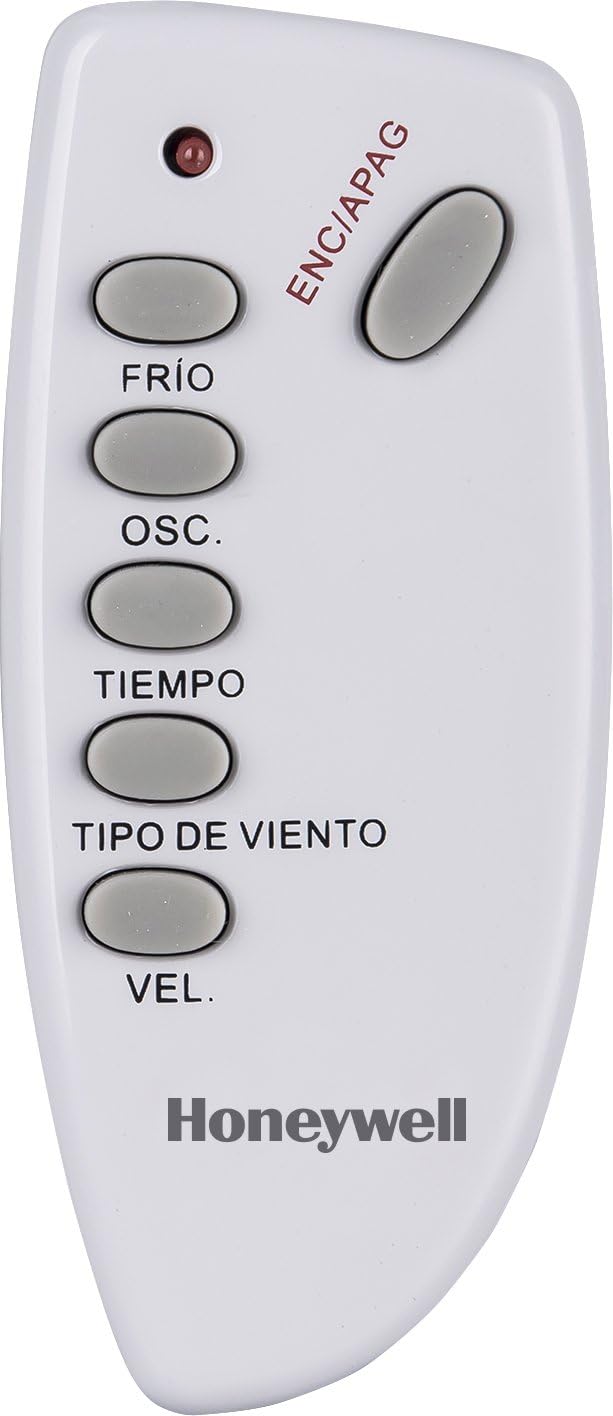
Rajah 4: Included remote control for convenient adjustment of settings from a distance.
Water Tank and Ice Compartment

Rajah 5: The cooler features a top compartment for adding ice to enhance cooling performance.
Persediaan
- Membongkar: Carefully remove the air cooler from its packaging. Retain all packaging materials for future storage or transport.
- penempatan: Position the air cooler on a firm, level surface in a well-ventilated area. For optimal performance, ensure there is an open window or door nearby to allow for cross-ventilation and prevent humidity buildup.
- Isi Tangki Air:
- Locate the water tank, typically at the bottom of the unit. The CL151 features a removable water tank for easy filling.
- Pull out the water tank and fill it with clean water up to the 'MAX' level indicator. Do not overfill.
- For enhanced cooling, you may add ice to the top ice compartment (refer to Figure 5).
- Securely close the water tank and push it back into the unit.
- Sambungan Kuasa: Palamkan kord kuasa ke salur keluar elektrik yang dibumikan.
Operasi
Operate your Honeywell CL151 using the control panel on top of the unit or the provided remote control.
- Hidupkan/Mati Kuasa: Tekan ke KUASA butang untuk menghidupkan atau mematikan unit.
- Fungsi penyejukan: After turning on, press the SEJUK button to activate the evaporative cooling function. Ensure the water tank is filled. The unit will alert you if the tank is empty.
- Kelajuan Kipas: Tekan ke FAN button to cycle through available fan speeds (Low, Medium, High). The CL151 offers 3 fan speeds.
- Ayunan (Ayunan): Tekan ke Swing button to activate or deactivate the automatic oscillation feature, which distributes cool air evenly across the room.
- Pemasa: Gunakan PEMASA button to set an auto-off timer. The CL151 features a timer function for up to 7 hours.
- Penggera Air Rendah: The unit is equipped with a low water alarm that will alert you when the water tank needs refilling.
Understanding Evaporative Cooling (General Explanation)
Video 1: Video ini memberikan gambaran umumview of how evaporative air coolers function, including water addition, cooling activation, energy efficiency, and the importance of ventilation. While featuring a different model (Symphony HiCool i), the principles apply to the Honeywell CL151.
Honeywell Evaporative Cooler Functionality (CS11XE Model)
Video 2: This video explains the functionality and benefits of a Honeywell evaporative air cooler (model CS11XE). It demonstrates the cooling process, the importance of cross-ventilation, powerful airflow, energy savings, the removable water tank, low water alarm, remote control, and mobility features, many of which are similar to the CL151 model.
Penyelenggaraan
Regular maintenance ensures the longevity and efficient operation of your air cooler.
- Membersihkan Tangki Air: Periodically remove and clean the water tank to prevent mold or mildew growth. Use a mild detergent and rinse thoroughly.
- Cleaning Cooling Pads (Honeycomb Panel): The cooling pads should be inspected and cleaned regularly. Refer to the specific instructions in your product's full manual for removal and cleaning procedures. Ensure they are completely dry before reinstallation.
- Pembersihan Luaran: Lap bahagian luar unit dengan lembut, damp kain. Jangan gunakan pembersih atau pelarut yang melelas.
- Storan: If storing the unit for an extended period, ensure the water tank is empty and dry, and the cooling pads are clean. Store in a cool, dry place.
Menyelesaikan masalah
If you encounter issues with your Honeywell CL151, refer to the following common problems and solutions:
| Masalah | Kemungkinan Punca | Penyelesaian |
|---|---|---|
| Unit tidak dihidupkan. | No power, loose plug, power outage. | Check power cord connection, ensure outlet is functional, check circuit breaker. |
| Air is not cooling effectively. | Empty water tank, cooling function not activated, poor ventilation, high humidity. | Fill water tank, press the COOL button, ensure an open window/door for cross-ventilation. Evaporative coolers are less effective in high humidity. |
| Bau yang tidak menyenangkan. | Stagnant water, dirty cooling pads. | Drain and clean the water tank, clean the cooling pads. Use fresh water. |
| Kebocoran air. | Overfilled water tank, unit not level, damaged tank. | Do not overfill the tank, ensure the unit is on a level surface. Inspect the tank for damage. |
| Ventilation flaps are loose or not moving. | Mechanical issue, wear and tear. | Handle the flaps gently. If they are damaged, contact customer support. |
If the problem persists after attempting these solutions, please contact Honeywell customer support.
Spesifikasi
- Nama Model: CL151
- Jenama: Honeywell
- Bahan: Plastik atau Logam
- Jenis Pemasangan: Freestanding
- Ciri Khas: Suitable for dry climates
- warna: putih
- Kawalan: Buttons and other physical controls (Remote control included)
- Penggunaan yang Disyorkan: Personal cooling in dry climates, both indoors and outdoors
- Faktor Bentuk: Menara
- Operasi: Manual
- Dimensi (Dalam x Lebar x Tinggi): 36.5 cm (D) x 38 cm (W) x 68 cm (H)
- Kapasiti Tangki Air: 15 Liter
- Kawasan Penyejukan: Sehingga 16 m²

Rajah 6: Diagram showing the dimensions of the Honeywell CL151 Evaporative Air Cooler.
Waranti dan Sokongan
Honeywell products are manufactured to the highest quality standards. For warranty information, technical support, or service inquiries, please refer to the warranty card included with your product or visit the official Honeywell Air Comfort webtapak.
Untuk maklumat lanjut, layari: HoneywellAirComfort.com