
Arctic-Pro 21599
Arctic-Pro Mini Desk Oscillating Tower Fan User Manual
Model: 21599
pengenalan
This manual provides important information regarding the safe operation, installation, and maintenance of your Arctic-Pro Mini Desk Oscillating Tower Fan. Please read this manual thoroughly before using the product and retain it for future reference.
The Arctic-Pro Mini Desk Oscillating Tower Fan is designed to provide personal cooling with its compact size and quiet operation. It features two speed settings and a 75-degree oscillation function for effective air circulation in small spaces such as offices, bedrooms, and cubicles.
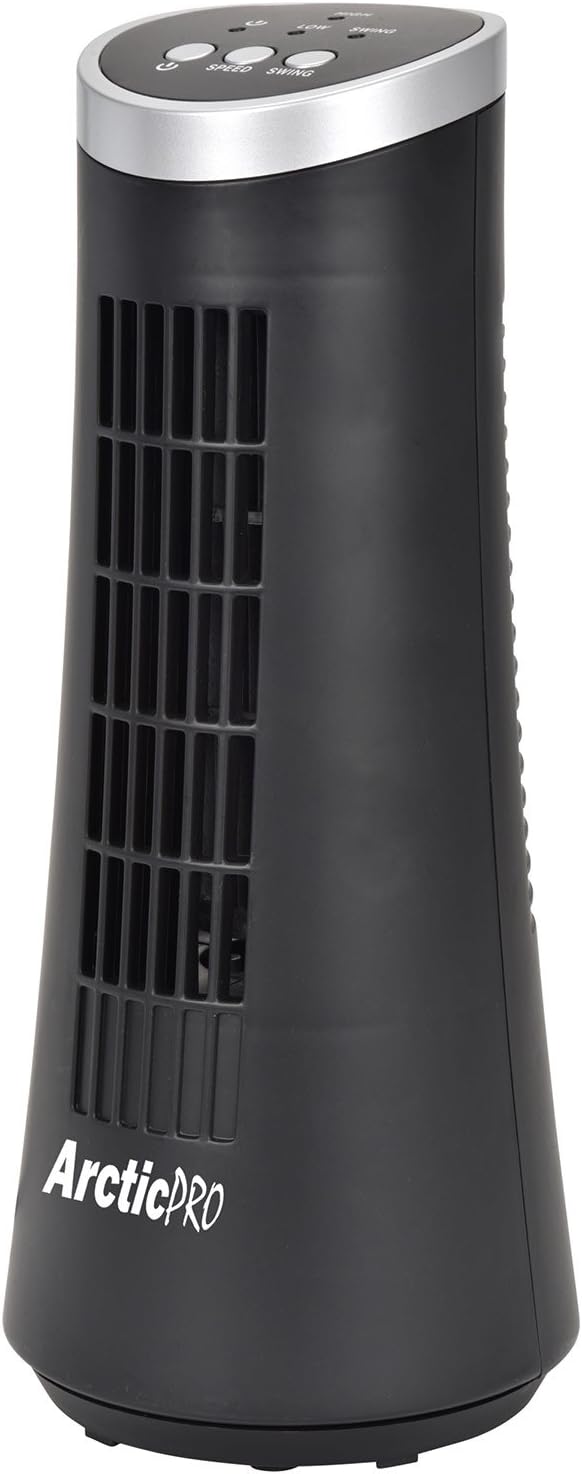
Figure 1: Arctic-Pro Mini Desk Oscillating Tower Fan, a compact black tower fan with a silver top panel.
Ciri dan Komponen Produk
Familiarize yourself with the key features and components of your fan for optimal use.
- Operasi Senyap Bisikan: Engineered to produce minimal operational noise, ensuring no distractions during work or sleep.
- Reka Bentuk Mudah Alih dan Padat: Features a convenient carrying handle for easy transport between rooms. Ideal for desks, nightstands, and small spaces. Dimensions: 5 x 12 inches.
- Tetapan Dua Kelajuan: Adjustable airflow from Low to High wind via electronic touch controls with LED indicators.
- 75-Degree Oscillation: Provides wide-angle air distribution and circulation to cool your entire area effectively.
- Electronic Touch Controls: Intuitive controls located on the top panel for power, speed, and oscillation.

Gambar 2: Lebihview of fan components, highlighting the user controls on top, the front grill, the handle on the back, and the oscillating base.
Persediaan
The Arctic-Pro Mini Desk Oscillating Tower Fan requires no assembly. Simply remove it from its packaging and place it on a stable, flat surface.
- Unpack the fan carefully from its box.
- Place the fan on a firm, level surface, ensuring adequate space around it for air circulation and oscillation.
- Plug the power cord into a standard electrical outlet (AC 120V, 60Hz).
Figure 3: The product packaging, indicating the fan is ready to use out of the box.
Arahan Operasi
The fan is operated using the touch controls located on the top panel.

Rajah 4: Terperinci view of the fan's touch control panel, showing buttons for On/Off, Speed (Low/High), and Oscillation (Swing).
- Hidupkan/Mati Kuasa: Tekan ke Butang kuasa to turn the fan on or off. An LED indicator will illuminate when the fan is on.
- Melaraskan Kelajuan: Tekan ke Butang kelajuan to cycle between Low and High speed settings. Corresponding LED indicators will show the selected speed.
- Kawalan Ayunan: Tekan ke Butang ayun to activate or deactivate the 75-degree oscillation function. When active, the fan will rotate from side to side to distribute air across a wider area.
Penyelenggaraan dan Penjagaan
Regular cleaning and proper care will ensure the longevity and efficient operation of your fan.
- Pembersihan:
- Sentiasa cabut plag kipas dari salur keluar kuasa sebelum membersihkan.
- Gunakan yang lembut, damp kain untuk mengelap permukaan luar kipas. Jangan gunakan pembersih atau pelarut yang melelas.
- To clean the fan grill, use a vacuum cleaner with a brush attachment to remove dust and debris. Do not attempt to disassemble the fan for cleaning.
- Storan:
- If storing the fan for an extended period, clean it thoroughly and place it back in its original packaging or a suitable box.
- Simpan kipas di tempat yang sejuk dan kering, jauh daripada cahaya matahari langsung dan suhu yang melampau.
Note: Do not immerse the fan in water or allow water to drip into the motor housing.
Menyelesaikan masalah
Jika anda menghadapi sebarang masalah dengan kipas anda, sila rujuk masalah dan penyelesaian biasa berikut:
| Masalah | Kemungkinan Punca | Penyelesaian |
|---|---|---|
| Kipas tidak dihidupkan. | Not plugged in; power outlet not working; fan switch off. | Ensure the power cord is securely plugged into a working electrical outlet. Press the Power button. Test the outlet with another device. |
| Aliran udara lemah atau tiada. | Fan speed set to low; air intake/output blocked; excessive dust buildup. | Increase the fan speed using the Speed button. Ensure nothing is obstructing the front grill or rear air intake. Clean the fan grill to remove dust. |
| Fan is not oscillating. | Fungsi ayunan dimatikan. | Press the Swing button to activate the oscillation function. |
| Bunyi luar biasa semasa operasi. | Fan not on a level surface; internal obstruction. | Place the fan on a stable, level surface. Unplug the fan and check for any visible obstructions in the grill. If the noise persists, discontinue use and contact customer support. |
Spesifikasi
| Atribut | Perincian |
|---|---|
| Jenama | Arctic-Pro |
| Nombor Model | 21599 |
| Dimensi Produk | 5"D x 5"W x 12"H (12.7 cm D x 12.7 cm W x 30.48 cm H) |
| warna | Hitam |
| Sumber Kuasa | Elektrik Bertali |
| Kaedah Kawalan | Sentuh |
| Ciri Khas | Oscillating, Portable, Ultra-Quiet Operation |
| Berat Barang | 2.45 paun (1.11 kg) |
| UPC | 815691021599 |

Figure 5: Dimensions of the fan, indicating a height of 12.5 inches (31.75 cm) and a base width of 5 inches (12.7 cm).
Maklumat Keselamatan Penting
Sila baca dan patuhi semua arahan keselamatan untuk mengelakkan kecederaan atau kerosakan.
- Jangan kendalikan mana-mana kipas dengan kord atau palam yang rosak. Buang kipas atau kembalikan ke kemudahan servis yang dibenarkan untuk pemeriksaan dan/atau pembaikan.
- Jangan gunakan tali di bawah permaidani. Jangan tutup tali dengan permaidani lempar, pelari, atau penutup yang serupa. Jangan laluan kord di bawah perabot atau peralatan. Susun kord jauh dari kawasan lalu lintas dan di mana ia tidak akan tersandung.
- To disconnect the fan, turn controls to OFF, then remove plug from outlet.
- Jangan masukkan atau biarkan jari atau objek asing memasuki sebarang bukaan pengudaraan atau ekzos kerana ia boleh menyebabkan kejutan elektrik atau kebakaran, atau merosakkan kipas.
- Jangan halang pengambilan udara atau ekzos dalam apa jua cara. Jangan gunakan pada permukaan lembut, seperti katil, di mana bukaan mungkin tersumbat.
- Kipas ini tidak dimaksudkan untuk digunakan dalam keadaan basah atau damp lokasi.
- Sentiasa letakkan kipas di atas permukaan yang stabil dan rata semasa operasi untuk mengelakkannya daripada terbalik.
- Pengawasan rapi diperlukan apabila sebarang perkakas digunakan oleh atau berhampiran kanak-kanak.
Sokongan Pelanggan
For any questions, concerns, or assistance with your Arctic-Pro Mini Desk Oscillating Tower Fan, please contact your retailer or the manufacturer's customer service. While specific warranty details are not provided in this manual, the product is backed by a 30-day full money-back guarantee from the point of purchase, as per product information.
Please retain your purchase receipt as proof of purchase for any support inquiries.
Ask a question about this manual
Ask about setup, troubleshooting, compatibility, parts, safety, or missing instructions. Manuals+ will review the question and use this page’s manual context to help answer it.