
1. Pengenalan
The Launch Creader 6011 is a versatile diagnostic tool designed for automotive enthusiasts and professional technicians. It offers comprehensive OBDII/EOBD diagnostic capabilities, alongside specialized functions for Anti-lock Braking System (ABS) and Supplemental Restraint System (SRS) diagnostics. This manual provides detailed instructions for the proper use, setup, and maintenance of your Creader 6011 device.
2. Produk Lebihview
The Creader 6011 features a large color display and an intuitive interface for easy navigation and data interpretation. Its robust design ensures durability for use in various automotive environments.

Rajah 2.1: The Launch Creader 6011 diagnostic scanner with its main menu displayed.

Rajah 2.2: Terperinci views of the Creader 6011, showing its various ports and control layout.
3. Spesifikasi
| Ciri | Spesifikasi |
|---|---|
| Skrin | 4.0" TFT 320*480 dpi |
| Voltage Julat | 9-18V |
| Suhu Operasi | 0 ℃ ~ 50 ℃ |
| Suhu Persekitaran | -20 ℃ ~ 70 ℃ |
| Dimensi | 195mm x 86mm x 32mm (7.6 "x 3.4" x 1.2 ") |
| Berat badan | 460g (1.01 lbs) |
| Sumber Kuasa | Elektrik Bertali (melalui port OBD II) |
| Nombor Model Item | Launch-IV06 |
| UPC | 680666198909 |
4. Persediaan
The Creader 6011 is designed for ease of use and requires no external power source or batteries. It draws power directly from the vehicle's OBD II port.
- Cari Pelabuhan OBD II: The OBD II port is typically located under the dashboard on the driver's side of the vehicle. Refer to your vehicle's owner's manual if you cannot find it.
- Sambungkan Pengimbas: Plug the diagnostic cable of the Creader 6011 into the vehicle's OBD II port. Ensure a secure connection.
- Hidupkan kuasa: Once connected, the scanner will automatically power on and display the main menu. If it does not power on, check the vehicle's ignition status and the connection.
5. Arahan Operasi
Navigate the menu using the directional buttons and confirm selections with the OK butang. The ESC butang kembali ke skrin sebelumnya.

Rajah 5.1: Key components and button functions of the Creader 6011.
5.1. Fungsi OBDII/EOBD Penuh
The Creader 6011 supports all 10 modes of OBDII/EOBD diagnostics:
- Baca Kod: Mendapatkan Kod Masalah Diagnostik (DTC) daripada komputer kenderaan.
- Padamkan Kod: Clears DTCs and turns off the Malfunction Indicator Lamp (MIL).
- Kesediaan Saya / M: Memeriksa kesediaan sistem pemantauan pelepasan.
- Aliran Data: Memaparkan parameter data langsung daripada sensor kenderaan.
- Bingkai pegun: Shows a snapshot of operating conditions at the time a fault occurred.
- Ujian Sensor O2: Mendapatkan semula keputusan ujian pemantauan sensor O2.
- Ujian Pemantauan Atas Papan: Mendapatkan keputusan untuk komponen dan sistem rangkaian kuasa berkaitan emisi.
- Ujian Sistem EVAP: Initiates a test of the Evaporative Emission System.
- Maklumat Kenderaan: Retrieves vehicle identification number (VIN), calibration ID, and calibration verification number (CVN).
- Ujian Komponen: Allows bi-directional control of certain components (if supported by vehicle).

Rajah 5.2: Example of the I/M Readiness screen, showing emission monitor status.
5.2. ABS and SRS System Diagnostic Functions
In addition to standard OBDII functions, the Creader 6011 provides specialized diagnostic capabilities for the Anti-lock Braking System (ABS) and Supplemental Restraint System (SRS).
- Read ABS/SRS DTCs: Retrieves specific trouble codes related to the ABS and SRS systems.
- Clear ABS/SRS DTCs: Erases fault codes from the ABS and SRS modules.
- Data Streams for ABS/SRS: Views live data parameters from ABS and SRS sensors, aiding in diagnosis.
6. Kemas kini Perisian
The Creader 6011 supports lifetime free online updates to ensure compatibility with new vehicle models and to receive software enhancements. Follow these steps to update your device:
- Muat turun Alat Kemas Kini: Visit the official LAUNCH webtapak (www.dbscar.com). Navigate to 'Products' > 'creader 4001~9081', find 'creader 6011', and download the update tool to your computer.
- Install Update Tool: Install the downloaded update tool software on your computer.
- Sambungkan Peranti: Connect your Creader 6011 to your computer using the provided USB data cable.
- Jalankan Alat Kemas Kini: Launch the update tool software. You will be prompted to enter the serial number and register code of your Creader 6011. These details will be displayed on the scanner's screen when it is connected to your PC.
- Mulakan Kemas Kini: Click the 'Update' button within the software. Ensure the device remains connected and your internet connection is stable throughout the update process.
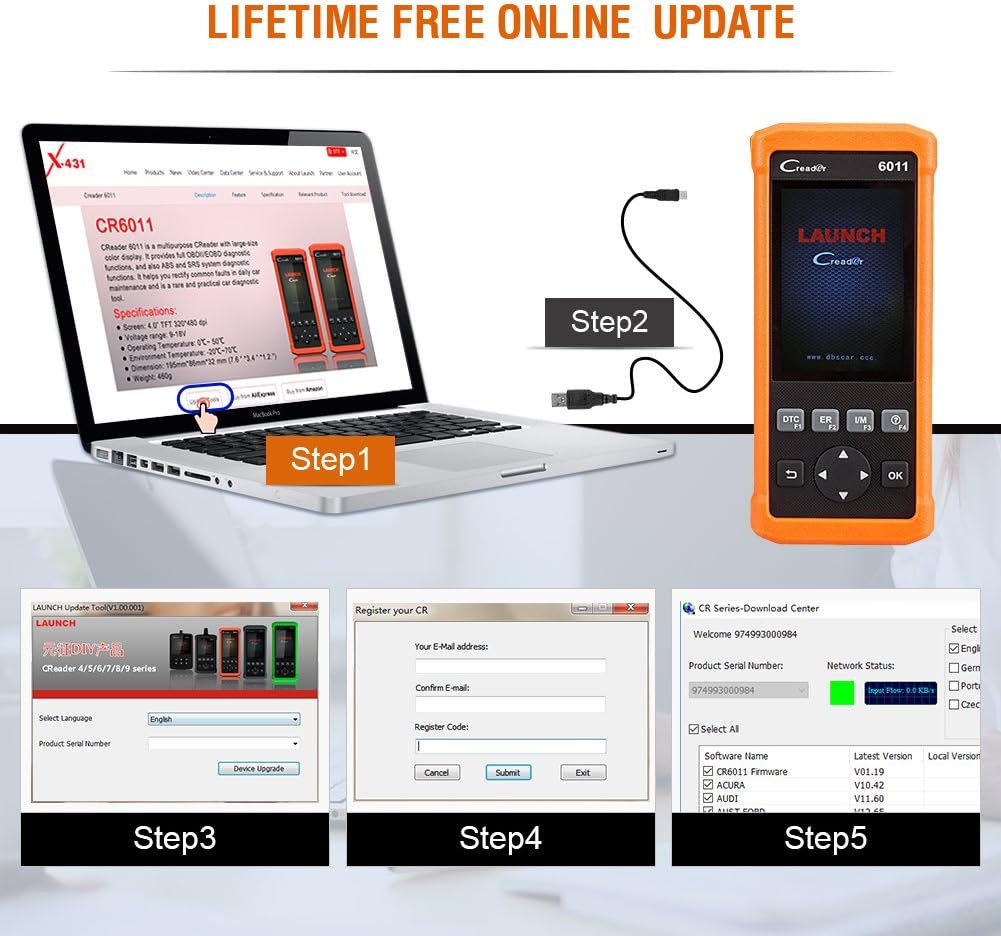
Rajah 6.1: Visual guide for the software update process.
7. Perlindungan Kenderaan
The Creader 6011 is compatible with most post-1996 vehicles (OBD II & CAN compliant), including domestic and imported 12V petrol vehicles. Below is a general list of supported car brands (2006-present):

Rajah 7.1: Partial list of car brands supported by the Creader 6011.
For a comprehensive and up-to-date list, please refer to the official LAUNCH website or the update tool software.
8. Penyelenggaraan
To ensure the longevity and optimal performance of your Creader 6011, follow these maintenance guidelines:
- Pembersihan: Gunakan kain lembut dan kering untuk membersihkan peranti. Elakkan menggunakan pembersih atau pelarut yang kasar.
- Storan: Simpan peranti dalam persekitaran yang kering dan sejuk, jauh dari cahaya matahari langsung dan suhu yang melampau.
- Penjagaan Kabel: Handle the diagnostic cable carefully. Avoid bending or twisting it excessively, which can damage internal wires.
- Kemas Kini Perisian: Regularly perform software updates as described in Section 6 to maintain compatibility and access new features.
9. Penyelesaian masalah
If you encounter issues with your Creader 6011, consider the following common troubleshooting steps:
- Peranti Tidak Dihidupkan: Ensure the diagnostic cable is securely connected to the vehicle's OBD II port. Verify the vehicle's ignition is on. Check for any blown fuses in the vehicle's OBD II circuit.
- Ralat Komunikasi: Confirm the vehicle is OBD II compliant. Check for a stable connection between the scanner and the vehicle. Try the scanner on a different OBD II compliant vehicle to rule out vehicle-specific issues.
- Skrin Terhenti/Tidak Responsif: Putuskan sambungan peranti daripada kenderaan dan sambungkannya semula. Jika masalah berterusan, lakukan kemas kini perisian.
- Kegagalan Kemas Kini: Ensure a stable internet connection during the update process. Verify the serial number and register code are entered correctly. Temporarily disable any firewall or antivirus software that might interfere with the update tool.
For persistent issues, contact LAUNCH technical support.
10. Kandungan Pakej
Upon opening your Launch Creader 6011 package, you should find the following items:
- 1x Launch CReader 6011 OBD2/EOBD Diagnostic Scanner
- 1x Kabel Data USB
- 1x Manual Pengguna (dokumen ini)
- 1x Carrying Pouch (may vary by region/package)

Rajah 10.1: The typical contents included in the Creader 6011 package.
11. Waranti dan Sokongan
The Launch Creader 6011 comes with a standard manufacturer's warranty. For specific warranty terms and conditions, please refer to the documentation included with your purchase or visit the official LAUNCH website. For technical support, product inquiries, or warranty claims, please contact LAUNCH customer service through their official channels.