
pengenalan
Thank you for choosing the Auna TT-30 BT Turntable. This manual provides essential information for the safe and efficient operation of your new device. Please read it thoroughly before use and keep it for future reference.
The Auna TT-30 BT is a belt-driven turntable designed for playing vinyl records, featuring an integrated Bluetooth receiver for wireless audio streaming from compatible devices.
Arahan Keselamatan
- Baca semua arahan dengan teliti sebelum mengendalikan peranti.
- Simpan manual untuk rujukan masa hadapan.
- Jangan dedahkan peranti kepada hujan atau lembapan untuk mengelakkan kebakaran atau kejutan elektrik.
- Pastikan pengudaraan yang betul. Jangan sekat sebarang bukaan pengudaraan.
- Letakkan peranti pada permukaan yang stabil dan rata.
- Gunakan hanya lampiran/aksesori yang ditentukan oleh pengilang.
- Cabut plag peranti semasa ribut petir atau apabila tidak digunakan untuk tempoh yang lama.
- Rujuk semua servis kepada kakitangan perkhidmatan yang berkelayakan.
Kandungan Pakej
Please check that all items listed below are present in the packaging:
- Auna TT-30 BT Turntable Unit
- Platter (Metal)
- Penutup Habuk
- Penyesuai Kuasa
- Arahan Pengendalian (manual ini)
Produk Selesaiview
The Auna TT-30 BT Turntable features a robust design with a metal platter for stable playback. Key components include the tonearm with cartridge and stylus, speed selector, cueing lever, and an integrated Bluetooth receiver.
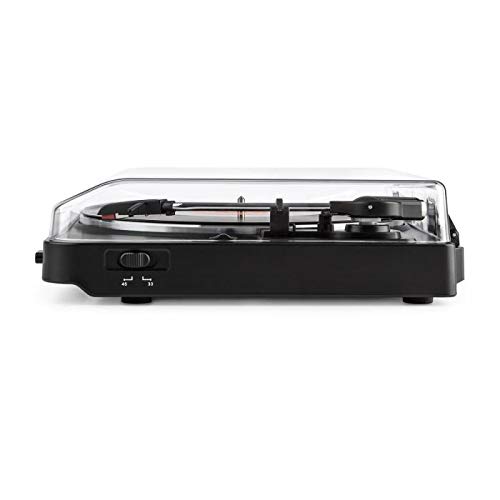
Image of the Auna TT-30 BT Turntable, showcasing reka bentuk dan komponennya.
Persediaan
1. penempatan
Place the turntable on a flat, stable, and vibration-free surface away from direct sunlight, heat sources, and strong magnetic fields. Ensure there is enough space around the unit for proper ventilation and operation of the dust cover.
2. Platter Assembly
- Carefully place the metal platter onto the center spindle.
- Locate the drive belt (usually pre-installed or found separately). Stretch the belt around the motor pulley and the inner rim of the platter.
- Place the felt mat (if included) on top of the platter.
3. Sambungan Kuasa
Connect the power adapter to the DC input on the rear of the turntable, then plug the adapter into a suitable wall outlet.
4. Stylus Protection
Remove the stylus protector from the cartridge before playing any records. Ensure the tonearm is properly balanced and the tracking force is set according to the cartridge manufacturer's recommendations (if adjustable).
Arahan Operasi
1. Rekod Memainkan
- Buka penutup habuk.
- Letakkan rekod di atas pinggan.
- Select the correct speed (33 1/3 or 45 RPM) using the speed selector switch. For 45 RPM records, place the 45 RPM adapter over the spindle if needed.
- Lepaskan kunci tonearm.
- Angkat lengan atas menggunakan tuil isyarat.
- Move the tonearm over the desired starting groove of the record.
- Gently lower the tonearm using the cueing lever. The stylus will make contact with the record, and playback will begin.
- At the end of the record, the turntable may feature an auto-stop function, which will stop the platter rotation. Lift the tonearm and return it to its rest, then engage the tonearm lock.
2. Bluetooth Playback (Receiving Audio)
The Auna TT-30 BT Turntable features an integrated Bluetooth receiver, allowing you to stream audio wirelessly from your smartphone, tablet, or other Bluetooth-enabled devices to the turntable's output (e.g., connected speakers).
- Pastikan meja putar dihidupkan.
- Activate Bluetooth on your external audio device (e.g., smartphone).
- Cari untuk available Bluetooth devices. The turntable should appear as "Auna TT-30 BT" or similar.
- Select the turntable from the list to pair. Once paired, audio from your device will be routed through the turntable's audio output.
Nota: The turntable acts as a Bluetooth receiver, meaning it receives audio from other devices. It does not transmit audio wirelessly to Bluetooth headphones or speakers.
Penyelenggaraan
1. Membersihkan Meja Putar
- Sentiasa cabut plag meja putar dari salur keluar kuasa sebelum membersihkan.
- Gunakan kain lembut dan kering untuk mengelap permukaan luar. Jangan gunakan pembersih atau pelarut yang melelas.
- For the dust cover, use a soft cloth and a mild, non-abrasive cleaner if necessary.
- Regularly dust the stylus with a soft brush, moving from back to front.
2. Penggantian Stilus
The stylus (needle) is a delicate component and will wear out over time, typically after 300-500 hours of playback. A worn stylus can damage your records and degrade sound quality. Consult your retailer or Auna support for information on replacement styli compatible with your TT-30 BT turntable.
Menyelesaikan masalah
| Masalah | Kemungkinan Punca | Penyelesaian |
|---|---|---|
| Tiada kuasa | Penyesuai kuasa tidak disambungkan; soket tidak aktif. | Semak sambungan kuasa; cuba outlet lain. |
| Tiada suara atau kelantangan rendah | Luaran amplifier/speakers not connected or turned on; volume too low; stylus dirty or damaged. | Ensure audio cables are connected; turn on amplifier/speakers and adjust volume; clean or replace stylus. |
| Melangkau atau bunyi herot | Record dirty or damaged; stylus dirty or worn; turntable not level; excessive vibration. | Clean record; clean or replace stylus; ensure turntable is on a level, stable surface; reduce vibrations. |
| Kegagalan berpasangan Bluetooth | Turntable not in pairing mode; device too far; interference. | Ensure turntable is discoverable; move device closer; restart both devices. |
Spesifikasi
| Jenama | Auna |
| Nombor Model | TTS10-2300-plat |
| Dimensi (L x W x H) | 45.5 x 43 x 16.5 cm |
| Berat badan | 3.7 kg |
| bahan | logam |
| Ciri Khas | Penerima Bluetooth Bersepadu |
| Jenis Penyambung | USB (for connectivity, not necessarily for audio output) |
Nota: Spesifikasi tertakluk kepada perubahan tanpa notis terlebih dahulu.
Waranti dan Sokongan
For warranty information, please refer to the warranty card included with your product or contact your retailer. For technical support or service inquiries, please visit the official Auna webtapak atau hubungi bahagian perkhidmatan pelanggan mereka. Simpan bukti pembelian anda untuk sebarang tuntutan waranti.
Auna Official Webtapak: www.auna.de (Cthamppautan, pautan sebenar mungkin berbeza mengikut wilayah)