
pengenalan
This manual provides essential instructions for the setup, operation, and maintenance of your Easytry123 Universal Remote Control, model Easytry0090. This remote is designed to control various AC/Air Conditioner units from brands such as BONGU, Xinghe, Hohong, Shuaikang, Toyo, Yangzi, Hampton-Bay, Shining, Trane, Yutu, and HOGEN. Please read this manual thoroughly before use to ensure proper functionality and to maximize the lifespan of your device.
Nota Penting: This is a replacement remote control. While it is designed to be compatible with many models, some advanced functions of your original unit may not be fully supported. Always verify compatibility with your specific AC unit model number.
Produk Selesaiview

Rajah 1: Depan View of the Remote Control. This image displays the front of the universal remote control, showing the LCD screen, power button, mode selection, temperature controls, fan speed, and other function buttons like Light, F.Cool, F.Heat, Time On, Time Off, Set, Clock, and Lock.

Rajah 2: Belakang View with Battery Compartment. This image shows the back of the remote control with the battery cover removed, revealing the empty battery compartment designed for two AAA batteries.
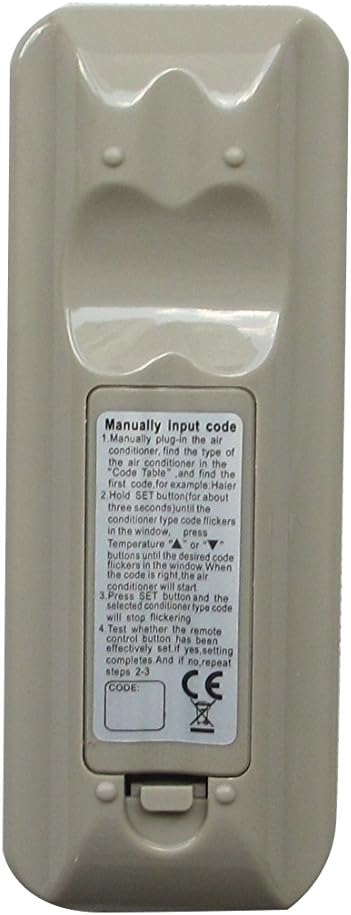
Rajah 3: Belakang View with Manual Code Input Instructions. This image displays the back of the remote control, featuring a label with detailed instructions for manually inputting the AC unit's code, including steps for finding the code, setting it, and confirming.
Persediaan
1. Pemasangan Bateri
Alat kawalan jauh memerlukan dua bateri AAA (tidak disertakan). Ikuti langkah berikut untuk memasangnya:
- Cari petak bateri di belakang alat kawalan jauh (rujuk Rajah 2).
- Luncurkan penutup bateri ke bawah untuk membukanya.
- Masukkan dua bateri AAA, pastikan terminal positif (+) dan negatif (-) sejajar dengan tanda di dalam petak.
- Luncurkan penutup bateri ke tempat semula sehingga ia berbunyi dengan selamat.
2. Persediaan Kod untuk Unit AC Anda
This universal remote requires a specific code to operate your air conditioner. The code can be set manually. Refer to the label on the back of the remote (Figure 3) for detailed instructions. A code table is typically provided with the remote or can be found online for compatible AC brands.
Manual Code Input Steps:
- Manually plug in the air conditioner. Find the type of the air conditioner in the Code Table and find the first code. For example: Haier.
- Pegang SET button for about three seconds until the conditioner type code flickers in the window.
- Tekan ke Suhu Naik (▲) atau Suhu Turun (▼) buttons until the desired code flickers in the window. When the code is right, the air conditioner will start.
- Tekan ke SET button and the selected code for the type code will stop flickering.
- Test operating the remote control. If it has been effectively set, press OK. If not, repeat steps 2-3.
Note: The code table is crucial for this step. If you do not have one, please contact the seller or search online for "Universal AC Remote Code List" for your specific remote model (K-1028E, as seen on the remote).
Arahan Operasi
Once the remote is set up with the correct code, you can use it to control your AC unit. Here are the primary functions:
- Butang HIDUP/MATI: Press to turn the AC unit on or off.
- Butang MOD: Berkitar melalui mod operasi seperti Sejuk, Panas, Kipas, Kering, Auto.
- Butang TEMP (▲ / ▼): Adjusts the desired temperature up or down.
- WIND (Fan Speed) Button: Melaraskan kelajuan kipas (cth, Rendah, Sederhana, Tinggi, Auto).
- M.SWING / A.SWING Buttons: Controls the horizontal and vertical swing of the air deflector.
- Butang CAHAYA: Turns the display light on the AC unit on or off (if supported).
- F.Cool / F.Heat Buttons: Activates Fast Cool or Fast Heat modes (if supported by AC unit).
- TIME ON / TIME OFF Buttons: Menetapkan pemasa untuk unit AC hidup atau mati secara automatik.
- Butang JAM: Menetapkan masa semasa pada paparan alat kawalan jauh.
- Butang Kunci: Locks the remote's settings to prevent accidental changes.
- Butang SET: Used for code setup and confirming settings.
- Butang OK: Mengesahkan pilihan atau tetapan.
Functionality may vary depending on the specific AC unit model and its compatibility with this universal remote.
Penyelenggaraan
Penyelenggaraan yang betul memastikan jangka hayat dan prestasi optimum alat kawalan jauh anda.
- Pembersihan: Lap alat kawalan jauh dengan kain lembut dan kering. Jangan gunakan pembersih cecair atau bahan yang melelas.
- Penggantian Bateri: Replace batteries when the remote's response becomes sluggish or the display dims. Always replace both batteries at the same time with new ones of the same type (AAA).
- Storan: Jika alat kawalan jauh tidak akan digunakan untuk tempoh yang lama, tanggalkan bateri untuk mengelakkan kebocoran dan kerosakan. Simpan di tempat yang sejuk dan kering.
- Elakkan Titisan: Lindungi alat kawalan jauh daripada renjatan fizikal dan jatuh, yang boleh merosakkan komponen dalaman.
Menyelesaikan masalah
| Masalah | Kemungkinan Punca | Penyelesaian |
|---|---|---|
| Jauh tidak bertindak balas. | Bateri mati atau tidak dipasang dengan betul. | Periksa polariti bateri. Gantikan dengan bateri AAA baharu. |
| Remote does not control AC unit. | Incorrect code set. Remote not compatible with AC unit. | Re-enter the correct code using the manual setup process. Verify AC unit model is listed as compatible. |
| Sesetengah fungsi tidak berfungsi. | Limited compatibility with specific AC unit features. | This is a universal remote; not all original functions may be supported. Use primary functions. |
| Paparan jauh malap atau kosong. | Kuasa bateri rendah. | Gantikan bateri. |
Spesifikasi
- model: Easytry0090
- Jenama: Easytry123
- Teknologi Ketersambungan: Inframerah
- Jenis Pengawal: Kawalan Butang
- warna: Kelabu
- Sumber Kuasa: 2 x Bateri AAA (tidak termasuk)
- Keserasian: Universal for various AC/Air Conditioner brands (BONGU, Xinghe, Hohong, Shuaikang, Toyo, Yangzi, Hampton-Bay, Shining, Trane, Yutu, HOGEN, etc.)
- Tarikh Mula-mula Tersedia: 16 Mei 2018
- Pengeluar: Easytry123
- Negara Asal: China
Waranti dan Sokongan
This product is a replacement item. Information regarding specific warranty terms is not provided in the product details. For any issues or support inquiries, please contact the seller directly through the platform where the purchase was made.
Penjual: Easytry123
Please note that this remote comes without a manual from the manufacturer, hence this comprehensive guide has been created to assist you.