
pengenalan
The Nitecore NU30 is a high-performance, lightweight rechargeable headlamp designed for various outdoor activities. It features a powerful primary white LED, high CRI auxiliary white LEDs for close-range illumination, and a red auxiliary LED for preserving night vision. With its integrated USB-C charging and durable construction, the NU30 provides reliable lighting for your adventures.

Imej: Depan view of the Nitecore NU30 headlamp with its adjustable headband.
Kandungan Pakej
Sila semak pakej untuk item berikut:
- Nitecore NU30 Headlamp
- Kabel Pengecasan USB-C ke USB-C
- ikat kepala
- Pelekat Nitecore
Produk Selesaiview
The Nitecore NU30 features a dual-button interface for intuitive control over its various light sources and brightness levels. The headlamp unit is attached to an adjustable, elastic headband for comfortable wear.

Image: Diagram illustrating the location of the Power Button and Mode Button on the Nitecore NU30 headlamp.
Kawalan:
- Butang Kuasa: Controls power on/off and brightness levels for the primary white light.
- Butang Mod: Switches between different light sources (primary white, auxiliary white, auxiliary red) and special modes.
Mengecas Headlamp
The NU30 headlamp is equipped with a built-in 1500mAh Li-ion battery and a USB-C charging port for convenient recharging. A power indicator will show the charging status.
- Cari port pengecasan USB-C di sisi kepalaamp.
- Connect the included USB-C to USB-C charging cable to the headlamp and a USB power source (e.g., wall adapter, power bank, computer).
- The power indicator will illuminate during charging.
- Charging is complete when the indicator light changes or turns off (refer to the power indicator section for details). A full charge typically takes approximately 2 hours.

Image: The Nitecore NU30 headlamp being charged via its USB-C port.
Arahan Operasi
The NU30 offers multiple light sources and modes for various lighting needs.

Image: Diagram illustrating the three distinct light sources available on the Nitecore NU30 headlamp.
Hidupkan/Mati Kuasa:
- Untuk Menghidupkan: Press and hold the Power Button for 1 second. The headlamp will turn on in the previously used primary white light mode.
- Untuk Mematikan: Apabila kepalaamp is on, long press either the Power Button or the Mode Button until the light turns off.
Switching Light Sources:
Apabila kepalaamp is on, short press the Mode Button to cycle through the light sources in the following order:
Primary White Light → Auxiliary White Light → Auxiliary Red Light → Primary White Light...
Adjusting Brightness (Primary White Light):
When the Primary White Light is active, short press the Power Button to cycle through brightness levels:
Low → Mid → High → Low...
Auxiliary White Light Modes:
When the Auxiliary White Light is active, short press the Power Button to cycle through:
Ultralow → Flood → Ultralow...

Image: Visual comparison demonstrating the wide and even illumination of the TrueVision+ flood beam.
Auxiliary Red Light Modes:
When the Auxiliary Red Light is active, short press the Power Button to cycle through:
Low → High → Slow Flashing → Low...
Special Modes (SOS / Beacon):
Apabila kepalaamp is off, press and hold the Mode Button for 1 second to directly access SOS mode. While in SOS mode, short press the Power Button to switch to Beacon mode. Short press the Power Button again to return to SOS. Long press either button to turn off.
Penunjuk Kuasa:
The power indicator light provides information on the remaining battery power. Refer to the product's specific indicator patterns for detailed battery status (e.g., flashes for remaining power, solid for charging, off for fully charged).
Penyelenggaraan
Proper maintenance ensures the longevity and optimal performance of your Nitecore NU30 headlamp.
- Pembersihan: Lap kepalaamp dengan lembut, damp kain. Elakkan menggunakan pembersih atau pelarut yang kasar.
- Storan: Simpan kepalaamp in a cool, dry place when not in use. Recharge the battery every 3 months to maintain battery health if stored for extended periods.
- Tahan Air: The NU30 is rated IP66, meaning it is protected against powerful water jets. Do not submerge the headlamp in water. Ensure the USB-C port cover is securely closed to maintain water resistance.
Menyelesaikan masalah
If you encounter issues with your NU30 headlamp, cuba penyelesaian berikut:
- Ketuaamp tidak dihidupkan: Pastikan bateri dicas. Sambungkan kepalaamp to a power source using the USB-C cable and check if the charging indicator activates.
- Output cahaya malap: Bateri mungkin lemah. Cas semula kepalaamp sepenuhnya.
- Pengecasan tidak berfungsi: Check the USB-C cable for damage and ensure the power source is functional. Try a different cable or power adapter.
- Butang tidak responsif: Pastikan headlamp is not in a locked mode (if applicable, refer to specific product features for lock-out functions). If issues persist, contact customer support.
Spesifikasi
Detailed technical specifications for the Nitecore NU30 headlamp:
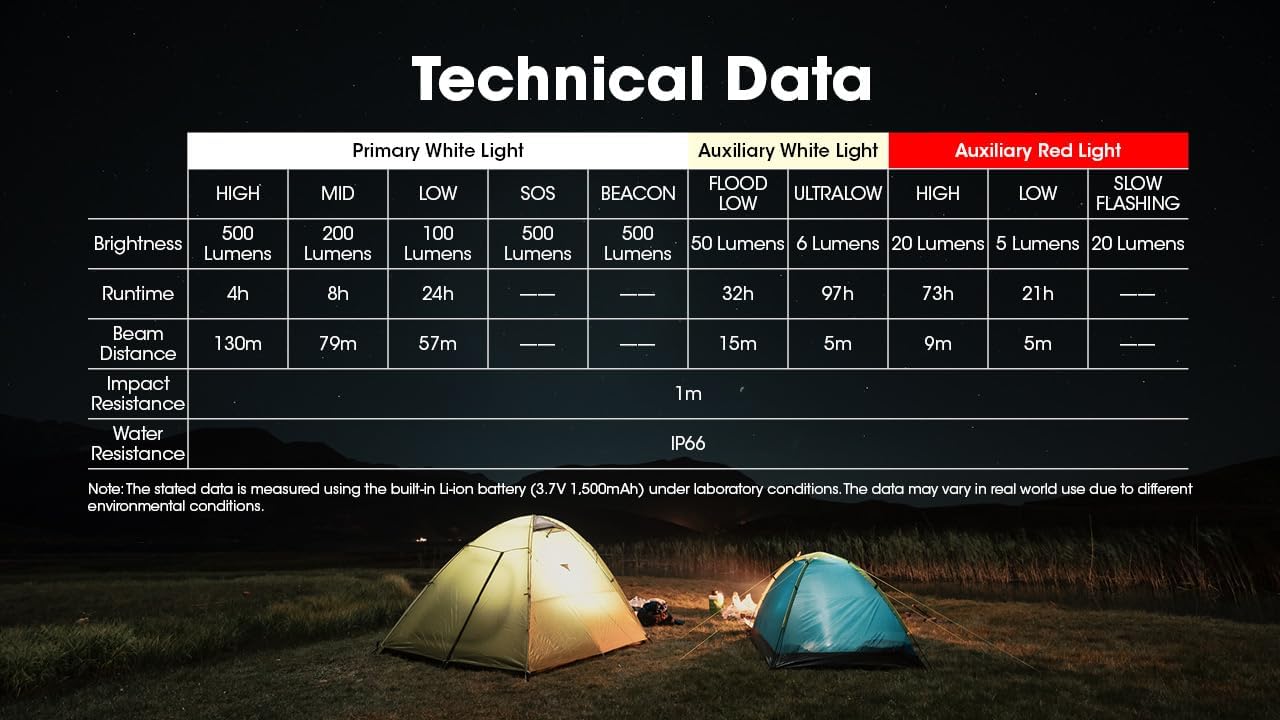
Image: Comprehensive table detailing the technical specifications of the Nitecore NU30 headlamp.
| Ciri | Perincian |
|---|---|
| Kecerahan Maks | 500 Lumen |
| Jarak Pancaran Maks | 130 meter (142 ela) |
| Jenis Bateri | Bateri Li-ion 1500mAh terbina dalam |
| Port Pengecasan | USB-C |
| Masa Jalanan Maks | Up to 97 hours (Ultralow Auxiliary White) |
| Rintangan Kesan | 1 meter |
| Tahan Air | IP66 |
| Berat badan | 90g (3.17 oz) |
| bahan | Durable PC Material |
Maklumat Keselamatan
Please read and follow these safety guidelines to prevent injury or damage to the headlamp:
- Do not shine the light directly into eyes, as this may cause temporary vision impairment.
- Jangan buka atau ubah suai kepalaamp, kerana ini boleh membatalkan jaminan dan menyebabkan kerosakan.
- Jauhkan daripada kanak-kanak.
- Elakkan daripada mendedahkan kepalaamp kepada suhu yang melampau atau cahaya matahari langsung untuk tempoh yang lama.
Waranti dan Sokongan
Nitecore products are backed by a warranty. For detailed warranty terms and conditions, please refer to the official Nitecore website or the warranty card included with your product. If you require technical support or have questions about your NU30 headlamp, please contact Nitecore customer service or your authorized dealer.
For more information, visit the official Nitecore webtapak: www.nitecore.com