
1. Produk Lebihview
The iBall Sound Clock is a multi-functional device designed to serve as a portable Bluetooth speaker, a digital clock, and an alarm. It offers various playback options and a built-in microphone for hands-free calling.
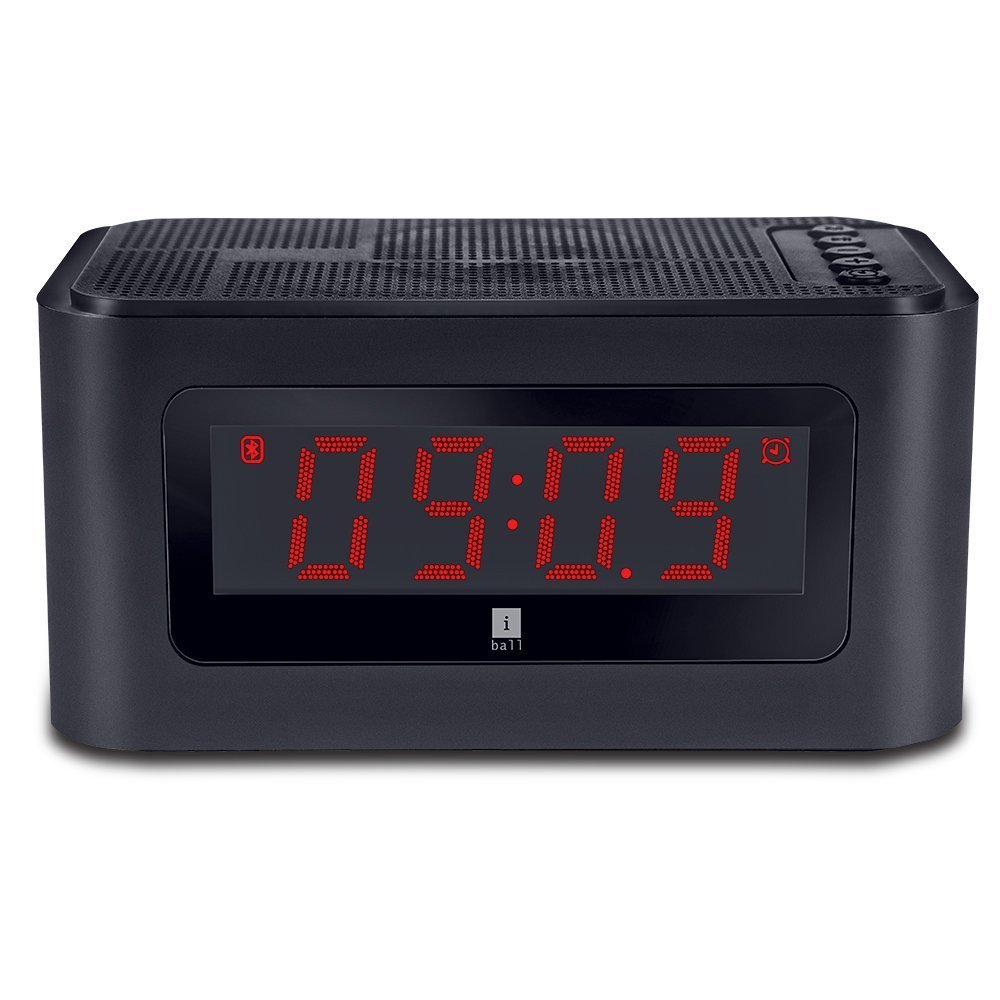
Rajah 1: Depan view of the iBall Sound Clock, displaying the digital clock and accessible control buttons on top.
Ciri-ciri Utama:
- Pembesar Suara Bluetooth Mudah Alih
- Digital Clock with Alarm Function
- Multiple Playback Options: Bluetooth (BT), USB, Micro SD, FM Radio, AUX
- Built-in Microphone for hands-free calling
- Large LED Screen for time, track, and volume display
2. Kandungan Pakej
Sila tandai kotak untuk item berikut:
- iBall Sound Clock Speaker
- Audio / Charging Cable
- Manual Pengguna
3. Reka Letak Peranti dan Kawalan
Familiarize yourself with the various parts and controls of your iBall Sound Clock.

Figure 2: Side panel of the iBall Sound Clock, detailing the connectivity ports and power switch.
Kawalan Panel Atas:
- Butang Mod: Press to switch between Bluetooth, FM Radio, USB, Micro SD, and AUX modes.
- Butang Main/Jeda: Press to play or pause audio. In Bluetooth mode, press to answer/end calls.
- Butang Kelantangan Kurang / Trek Sebelumnya: Press briefly for previous track. Press and hold to decrease volume.
- Butang Naikkan Kelantangan / Trek Seterusnya: Press briefly for next track. Press and hold to increase volume.
- Alarm Set Button: Press to enter alarm setting mode.
Side Panel Ports and Switch:
- Port Pengecasan USB Mikro: Untuk mengecas peranti.
- Port USB: Untuk memainkan audio daripada pemacu kilat USB.
- Slot Kad Mikro SD: Untuk memainkan audio daripada kad Micro SD.
- Input AUX: Untuk menyambungkan peranti audio luaran melalui kabel audio 3.5mm.
- Suis ON / OFF: Untuk menghidupkan atau mematikan peranti.
Paparan Hadapan:
- Paparan Digital LED: Shows current time, selected mode (BT, FM, AUX, TF, USB), track number, and volume level.
4. Panduan Persediaan
4.1. Mengecas Peranti
Before first use, fully charge the iBall Sound Clock. Connect the supplied audio/charging cable to the Micro USB charging port on the device and the other end to a USB power adapter (not included) or a computer's USB port.
- The LED display may indicate charging status.
- Cas penuh biasanya mengambil masa beberapa jam.
- Nota: The device uses a Lithium Polymer battery.
4.2. Menghidupkan/Mematikan
Cari HIDUP/MATI switch on the side panel. Slide the switch to the 'ON' position to power on the device. Slide it to the 'OFF' position to power off.
4.3. Menetapkan Jam
- Pastikan peranti dihidupkan.
- Tekan ke Mod button repeatedly until the clock display is active (if not already).
- Tekan dan tahan butang Set Penggera butang untuk memasuki mod tetapan masa. Digit jam akan berkelip.
- Gunakan Jilid Naik / Laluan Seterusnya dan Kelantangan Turun / Trek Sebelumnya butang untuk melaraskan jam.
- Tekan ke Set Penggera butang sekali lagi untuk mengesahkan jam dan beralih ke tetapan minit. Digit minit akan berkelip.
- Gunakan Jilid Naik / Laluan Seterusnya dan Kelantangan Turun / Trek Sebelumnya butang untuk melaraskan minit.
- Tekan ke Set Penggera butang sekali lagi untuk menjimatkan masa dan keluar dari mod tetapan.
5. Arahan Operasi
5.1. Mod Bluetooth
- Power on the iBall Sound Clock. It will automatically enter Bluetooth pairing mode, indicated by a flashing 'BT' icon on the display.
- Pada peranti mudah alih anda, dayakan Bluetooth dan cari peranti yang tersedia.
- Select "iBall Sound Clock" from the list of devices.
- Once paired, the 'BT' icon will stop flashing, and you will hear a confirmation tone.
- You can now play audio from your mobile device through the speaker.
- Untuk menjawab panggilan masuk, tekan Main/Jeda button. Press again to end the call.
5.2. Mod Radio FM
- Tekan ke Mod butang berulang kali sehingga 'FM' muncul pada paparan.
- Tekan dan tahan butang Main/Jeda button to automatically scan and save available FM radio stations. The speaker will cycle through frequencies and store stations with strong signals.
- Setelah pengimbasan selesai, gunakan Jilid Naik / Laluan Seterusnya dan Kelantangan Turun / Trek Sebelumnya butang untuk menavigasi antara stesen yang disimpan.
5.3. USB / Micro SD Card Mode
- Insert a USB flash drive into the USB port or a Micro SD card into the Micro SD card slot.
- The device will automatically detect the storage and switch to USB or Micro SD mode, indicated by 'USB' or 'TF' (for Micro SD) on the display.
- Audio playback will begin automatically. Use the Main/Jeda, Jilid Naik / Laluan Seterusnya, dan Kelantangan Turun / Trek Sebelumnya butang untuk mengawal main balik.

Figure 3: The iBall Sound Clock demonstrating its multiple playback options, including USB and Micro SD card inputs.
5.4. Mod AUX
- Connect one end of the supplied audio cable to the AUX input port on the iBall Sound Clock and the other end to the audio output jack of your external device (e.g., smartphone, MP3 player).
- Tekan ke Mod butang berulang kali sehingga 'AUX' muncul pada paparan.
- Control audio playback from your external device. The speaker's volume controls will still function.
5.5. Menetapkan Penggera
- Pastikan peranti dihidupkan.
- Tekan ke Set Penggera button to enter alarm setting mode. The alarm hour digits will flash.
- Gunakan Jilid Naik / Laluan Seterusnya dan Kelantangan Turun / Trek Sebelumnya butang untuk melaraskan jam penggera.
- Tekan ke Set Penggera button again to confirm the hour and move to minute setting. The alarm minute digits will flash.
- Gunakan Jilid Naik / Laluan Seterusnya dan Kelantangan Turun / Trek Sebelumnya butang untuk melaraskan minit penggera.
- Tekan ke Set Penggera button once more to save the alarm time. An alarm icon will appear on the display, indicating the alarm is active.
- To disable the alarm, press the Set Penggera button again until the alarm icon disappears.
- When the alarm sounds, press any button to snooze or turn off the alarm.
6. Penyelenggaraan
- Pembersihan: Use a soft, dry cloth to clean the surface of the device. Do not use liquid cleaners or abrasive materials.
- Storan: Apabila tidak digunakan untuk tempoh yang lama, simpan peranti di tempat yang sejuk dan kering jauh dari cahaya matahari langsung dan suhu yang melampau.
- Penjagaan Bateri: Untuk memanjangkan hayat bateri, elakkan daripada menyahcas sepenuhnya bateri dengan kerap. Cas peranti dengan kerap, walaupun tidak digunakan secara aktif.
- Pendedahan Air: Peranti ini tidak kalis air. Elakkan pendedahan kepada air atau kelembapan yang tinggi.
7. Penyelesaian masalah
| Masalah | Kemungkinan Punca | Penyelesaian |
|---|---|---|
| Peranti tidak dihidupkan. | Bateri dinyahcas. | Connect the device to a power source using the charging cable and allow it to charge. |
| Tiada bunyi dari pembesar suara. | Kelantangan terlalu rendah atau diredam. Mod yang dipilih salah. | Increase the volume. Ensure the correct playback mode (BT, FM, USB, SD, AUX) is selected. Check source device volume. |
| Gandingan Bluetooth gagal. | Device is not in pairing mode. Source device Bluetooth is off. Too far from source device. | Ensure the speaker is in Bluetooth mode and flashing 'BT'. Turn Bluetooth off and on again on your source device. Move the devices closer. |
| Penerimaan radio FM kurang baik. | Isyarat lemah. | Move the speaker to a location with better reception. Re-scan for stations. |
| Penggera tidak berbunyi. | Alarm is not set or is disabled. Volume is too low. | Verify the alarm time is set and the alarm icon is visible on the display. Increase the volume. |
8. Spesifikasi
| Jenama | iBall |
| Model | sound clock |
| Teknologi Ketersambungan | AUX, Bluetooth, USB, wireless |
| Ciri Khas | Built-in Microphone, Radio, SD Card |
| Sumber Kuasa | Dikuasakan Bateri |
| Jenis Bateri | Polimer Litium (1 termasuk) |
| Jenis Paparan | LED digital |
| Berat Barang | 34 g |
| bahan | plastik |
| warna | Hitam |
9. Waranti dan Sokongan
For warranty information and technical support, please refer to the warranty card included in your package or contact iBall customer service directly. Keep your purchase receipt for warranty claims.
Manufacturer: iBall