
1. Pengenalan
This manual provides essential information for the safe and efficient use of your ZTE Trek 2 HD K88 Tablet. The ZTE Trek 2 HD K88 is an 8-inch tablet featuring an HD display, an Octa-core processor, 2GB RAM, 16GB internal storage (expandable), and a 4600mAh battery. It operates on Android 6.0 Marshmallow and supports Wi-Fi and 4G-LTE connectivity.
Please read this manual thoroughly before operating your device to ensure proper functionality and to understand its features.

Imej 1.1: Belakang view of the ZTE Trek 2 HD K88 Tablet, showing the AT&T logo and product labels.
2. Persediaan
2.1. Mengecas Bateri
Before first use, fully charge the tablet's battery. Connect the included power adapter to the tablet's charging port and then to a power outlet. The battery indicator on the screen will show charging status.
- Use only the power adapter provided with your device.
- A full charge can take several hours.
2.2. Menghidupkan/Mematikan
- Untuk Menghidupkan: Press and hold the Power button until the ZTE logo appears.
- Untuk Mematikan: Tekan dan tahan butang Kuasa sehingga menu pilihan kuasa muncul, kemudian pilih "Matikan".
2.3. Persediaan Awal
Upon first power-on, follow the on-screen prompts to configure basic settings:
- Pilih bahasa pilihan anda.
- Sambung ke rangkaian Wi-Fi.
- Log masuk dengan akaun Google anda atau buat yang baharu.
- Review dan terima terma dan syarat.
2.4. Memasukkan Kad MicroSD (Pilihan)
The tablet supports expandable memory up to 128GB via a microSD card. Locate the microSD card slot, typically on the side of the device. Carefully insert the card with the gold contacts facing down until it clicks into place.

Imej 2.1: Sisi view of the ZTE Trek 2 HD K88 Tablet, illustrating its thin design. The microSD slot is typically located on one of the side edges.
3. Arahan Operasi
3.1. Navigasi Asas
The ZTE Trek 2 HD K88 features a responsive touchscreen. Use the following gestures:
- Ketik: Untuk memilih item atau membuka aplikasi.
- Sentuh dan Tahan: Untuk mengakses menu kontekstual atau mengalihkan item.
- Leret: Untuk menatal melalui skrin atau senarai.
- Cubit: To zoom in or out on content like photos or web muka surat.
3.2. Home Screen and Apps
The home screen displays your favorite apps, widgets, and notifications. Swipe left or right to access additional home screens. Tap the "Apps" icon to view semua aplikasi yang dipasang.

Imej 3.1: Depan view of the ZTE Trek 2 HD K88 Tablet with the display active, showing the Android home screen with various application icons.
3.3. Menyambung ke Wi-Fi
- Pergi ke tetapan > Wi-Fi.
- Togol Wi-Fi On.
- Pilih rangkaian yang anda inginkan daripada senarai.
- Masukkan kata laluan jika digesa, kemudian ketik Sambung.
3.4. Menggunakan Kamera
The tablet is equipped with 5 MP front and rear cameras. Open the Camera app to capture photos and videos.
- Ketik butang pengatup untuk mengambil foto.
- Bertukar antara kamera hadapan dan belakang menggunakan ikon togol kamera.
- Explore various modes and settings within the camera app.
3.5. Ciri Audio
The ZTE Trek 2 HD K88 features Dolby Audio powered dual front-facing speakers for an enhanced audio experience. Adjust volume using the physical volume buttons on the side of the tablet or through the on-screen volume controls.
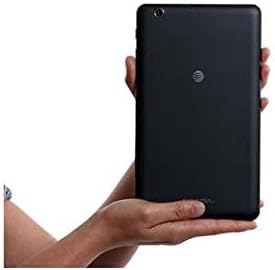
Image 3.2: The ZTE Trek 2 HD K88 Tablet held horizontally in two hands, demonstrating its comfortable and portable 8-inch form factor.
4. Penyelenggaraan
4.1. Membersihkan Peranti
To clean your tablet, use a soft, lint-free cloth. For stubborn marks, slightly dampen the cloth with water. Avoid using harsh chemicals, abrasive cleaners, or aerosol sprays, as these can damage the screen and finish.
4.2. Kemas Kini Perisian
Periodically check for software updates to ensure your tablet has the latest features and security patches. Go to tetapan > Mengenai tablet > Kemas kini sistem.
4.3. Pengurusan Storan
Regularly manage your tablet's storage to maintain optimal performance. Delete unnecessary files, nyahpasang apl yang tidak digunakan dan alihkan media besar files to a microSD card or cloud storage. Go to tetapan > Storan & USB kepada view penggunaan storan.
4.4. Penjagaan Bateri
Untuk memanjangkan hayat bateri:
- Elakkan suhu yang melampau.
- Jangan biarkan bateri habis sepenuhnya dengan kerap.
- Cabut plag pengecas setelah bateri penuh.
- Adjust screen brightness and disable unused features like Wi-Fi or Bluetooth when not needed.
5. Penyelesaian masalah
5.1. Isu dan Penyelesaian Biasa
| Isu | Penyelesaian |
|---|---|
| Tablet tidak boleh dihidupkan | Pastikan bateri dicas. Tekan dan tahan butang Kuasa selama sekurang-kurangnya 10-15 saat untuk memaksa mulakan semula. |
| Isu sambungan Wi-Fi | Restart the tablet and your Wi-Fi router. Forget the network in Wi-Fi settings and reconnect. |
| Apl ranap atau beku | Close and reopen the app. Clear the app's cache (Settings > Apps > [App Name] > Storage > Clear cache). Restart the tablet. |
| Prestasi perlahan | Close unused apps. Clear cache. Free up storage space. Restart the tablet. |
5.2. Tetapan Semula Kilang
If issues persist, a factory reset may resolve them. This will erase all data on your tablet, so back up important information first. Go to tetapan > Sandarkan & tetapkan semula > Tetapan semula data kilang.
6. Spesifikasi
| Ciri | Perincian |
|---|---|
| Jenama | ZTE |
| Nama Model | K88 |
| Sistem Operasi | Android 6.0 Marshmallow |
| Saiz Skrin | 8 Inci |
| Resolusi Paparan | 1280 x 800 (HD) |
| Pemproses | Qualcomm Snapdragon 617 Octa-core (1.5 GHz) |
| Memori RAM | 2 GB |
| Kapasiti Storan | 16 GB (expandable up to 128 GB with microSD) |
| Kamera Belakang | 5 MP |
| Kamera Depan | 5 MP |
| Kapasiti Bateri | 4600 mAh (up to 10 hours average life) |
| Ketersambungan | Wi-Fi (802.11n), 4G-LTE (AT&T) |
| Audio | Dolby Audio, Dual Front-Facing Speakers |
| Berat badan | 1.3 paun |
| Termasuk Aksesori | Penyesuai kuasa |
7. Waranti dan Sokongan
7.1. Maklumat Waranti
This ZTE Trek 2 HD K88 Tablet comes with a 90-day limited warranty. Please refer to your purchase documentation for specific terms and conditions regarding warranty claims.
7.2. Sokongan Pelanggan
For further assistance, technical support, or warranty inquiries, please contact the retailer or ZTE customer service. You may also visit the official ZTE support webtapak untuk Soalan Lazim dan sumber tambahan.