
1. Pengenalan
This manual provides essential information for setting up, operating, maintaining, and troubleshooting your Casper F600.7200-4L45T-G 15.6-inch laptop. Please read this manual thoroughly before using your device to ensure proper function and longevity.
The Casper F600.7200-4L45T-G laptop is equipped with an Intel Core i5-7200U processor, NVIDIA GeForce 940MX graphics, 4GB DDR4 RAM, and a 500GB HDD, running on Windows 10. It is designed for general computing tasks, offering a balance of performance and portability.

2. Kandungan Pakej
Sahkan bahawa semua item yang disenaraikan di bawah disertakan dalam pakej produk anda:
- Casper F600.7200-4L45T-G Laptop
- Penyesuai Pengecasan
- Kabel Kuasa
3. Persediaan
3.1. Hidupkan Kuasa Awal
- Buka bungkusan komputer riba dan semua aksesori dari kotak.
- Connect the charging adapter to the laptop's power input port.
- Palamkan kabel kuasa ke salur keluar dinding.
- Buka penutup komputer riba dan tekan butang kuasa, biasanya terletak di atas papan kekunci atau di sisi.
- Ikut arahan pada skrin untuk melengkapkan persediaan awal Windows 10.
3.2. Menyambungkan Penyesuai Kuasa
The power adapter connects to the dedicated power input port on the side of the laptop. Ensure the connection is secure to provide stable power and charge the battery.

4. Mengendalikan Komputer Riba Anda
4.1. Papan Kekunci dan Pad Sentuh
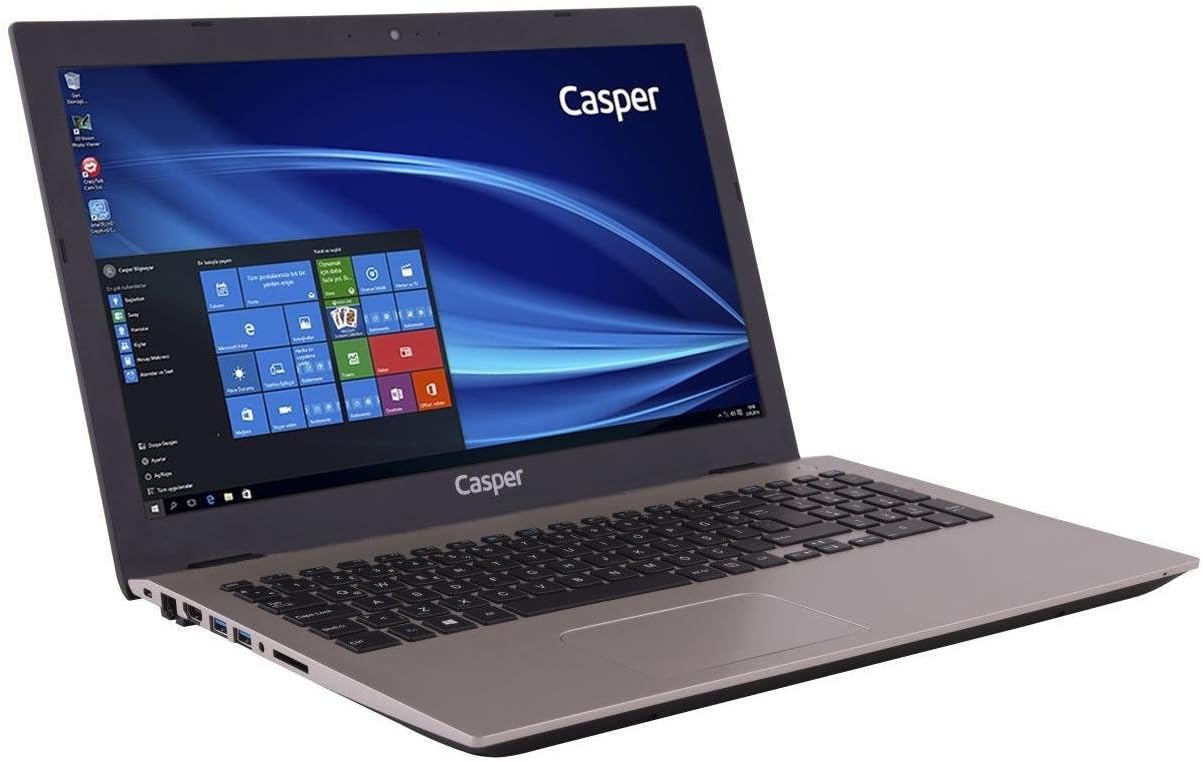
The laptop features a full-sized keyboard and an R-type touchpad for navigation. The touchpad supports multi-touch gestures for enhanced control within Windows 10.
- papan kekunci: Standard QWERTY layout with function keys (Fn) for brightness, volume, and other system controls.
- Pad sentuh: Use single-finger taps for left-click, two-finger taps for right-click, and two-finger scrolling for navigation.

4.2. Pelabuhan dan Sambungan
The laptop provides various ports for connecting external devices and peripherals.
- Port Sebelah Kiri: Includes the power input, USB 2.0 ports, and an optical drive bay (note: this model does not include an optical drive).
- Port Sebelah Kanan: Features USB 3.0 ports, an HDMI output, an Ethernet port, and audio jacks.

4.3. Paparan
The 15.6-inch HD LED display offers a resolution of 1366 x 768 pixels. Adjust brightness using the function keys on the keyboard.
5. Penyelenggaraan
5.1. Pembersihan
- Gunakan kain lembut dan tidak berbulu untuk membersihkan skrin dan permukaan luar.
- Untuk tanda degil, sedikit dampbersihkan kain dengan air atau pencuci yang selamat untuk skrin.
- Elakkan menyembur cecair terus ke atas komputer riba.
- Bersihkan papan kekunci dan pad sentuh secara berkala untuk mengelakkan pengumpulan habuk.
5.2. Penjagaan Bateri
- Untuk memaksimumkan hayat bateri, elakkan daripada kerap mencas sepenuhnya bateri.
- Simpan komputer riba di tempat yang sejuk dan kering apabila tidak digunakan untuk tempoh yang lama.
- If storing for a long time, ensure the battery is charged to about 50%.
6. Penyelesaian masalah
Bahagian ini menangani isu biasa yang mungkin anda hadapi dengan komputer riba anda.
- Komputer riba tidak dihidupkan:
Pastikan penyesuai kuasa disambungkan dengan selamat pada komputer riba dan soket kuasa yang berfungsi. Periksa sama ada soket kuasa berfungsi. Cuba penyesuai kuasa yang lain jika ada. - Skrin kosong:
Check if the laptop is powered on. Adjust screen brightness using the function keys. Connect an external monitor to check if the display output is working. - Keyboard or touchpad not responding:
Restart the laptop. Ensure no external devices are interfering. Check device manager for driver issues in Windows. - Prestasi perlahan:
Close unnecessary applications. Check for background updates. Ensure sufficient free space on the hard drive. Run a virus scan. - Bateri tidak dicas:
Verify the power adapter connection. Check the charging indicator light. If the issue persists, the battery or adapter may require service.
7. Spesifikasi Teknikal
| Ciri | Spesifikasi |
|---|---|
| Jenama | Casper |
| Nombor Model | F600.7200-4L45T-G |
| Dimensi Produk | 3.83 x 2.55 x 2.1 cm; 2.82 Kilogram |
| warna | emas |
| Saiz Skrin | 15.6 Inci |
| Resolusi Skrin | 1366 x 768 |
| Jenama Pemproses | Intel |
| Jenis Pemproses | Teras i5-7200U |
| Kelajuan Pemproses | 3.1 GHz (Max Turbo) |
| Bilangan Pemproses | 2 |
| Saiz RAM | 4 GB |
| Teknologi Memori | DDR4 SDRAM |
| Saiz Pemacu Keras | 500 GB |
| Penerangan Cakera Keras | HDD |
| Pemproses bersama Grafik | NVIDIA GeForce 940MX |
| Graphics Card Memory Size | 2 GB |
| Jenis Kesambungan | Bluetooth |
| Jenis Wayarles | Bluetooth |
| Port USB 2.0 | 1 |
| Port USB 3.0 | 2 |
| Port HDMI | 1 |
| Jenis Pemacu Optik | Tidak |
| Sistem Operasi | Windows 10 |
| Purata Hayat Bateri | 8 Jam |
| Berat Barang | 2.82 Kilogram |
8. Maklumat Waranti dan Sokongan
For warranty details and technical support, please refer to the documentation provided with your purchase or visit the official Casper webtapak. Simpan bukti pembelian anda untuk tuntutan waranti.
If you encounter issues not covered in this manual, contact Casper customer support for assistance.