
AUNA 00819885021020US
Manual Pengguna AUNA Roadie KIDS Boombox
Model: 00819885021020US
pengenalan
The AUNA Roadie KIDS Boombox is a versatile and portable audio system designed for children, offering multiple playback options including CD, Bluetooth, USB, and AM/FM radio. It features integrated multi-color LED lights that synchronize with the music, enhancing the listening experience. This manual provides detailed instructions for the safe and effective use of your boombox.
Arahan Keselamatan Penting
Sila baca dan fahami semua arahan keselamatan sebelum menggunakan produk ini. Simpan manual ini untuk rujukan masa hadapan.
- Jangan dedahkan unit kepada hujan atau lembapan untuk mengelakkan kebakaran atau kejutan elektrik.
- Jangan sekat sebarang bukaan pengudaraan. Pasang mengikut arahan pengilang.
- Jangan pasang berhampiran mana-mana sumber haba seperti radiator, daftar haba, dapur, atau radas lain (termasuk amppenghidup) yang menghasilkan haba.
- Lindungi kord kuasa daripada berjalan atau tersepit, terutamanya pada palam, bekas kemudahan dan tempat keluar dari radas.
- Hanya gunakan lampiran/aksesori yang ditentukan oleh pengilang.
- Cabut plag radas ini semasa ribut petir atau apabila tidak digunakan untuk jangka masa yang lama.
- Rujuk semua perkhidmatan kepada pegawai perkhidmatan yang berkelayakan. Servis diperlukan apabila alat telah rosak dengan cara apa pun.
Kandungan Pakej
Pastikan semua barang ada semasa membuka bungkusan:
- 1 x AUNA Roadie KIDS Boombox
- 1 x Kabel Kuasa AC
- 1 x User Manual (English, German, French)
Produk Selesaiview
Familiarize yourself with the various parts and controls of your AUNA Roadie KIDS Boombox.

Rajah 1: Depan view of the AUNA Roadie KIDS Boombox, showcasing the main unit with illuminated speakers and central display.
Panel Hadapan dan Paparan

Rajah 2: Terperinci view of the boombox's front, highlighting the digital display, USB port, and power/FM ST indicators.
- Paparan Digital: Menunjukkan nombor trek, frekuensi radio dan mod.
- Port USB: Untuk menyambungkan pemacu kilat USB untuk main balik MP3/WMA.
- Power/FM ST Indicators: Lights indicating power status and FM stereo reception.
- Lampu LED: Multi-color LEDs integrated into the speaker grilles, changing with the music.
Top Panel and CD Compartment

Figure 3: The top-loading CD compartment, shown open for disc insertion.
- Ruang CD: Top-loading tray for Audio CDs, CD-R, CD-RW, and MP3-CDs.
- Butang Kawalan: Play/Pause, Stop, Skip/Search (forward/backward), Program, Repeat, Mode.
Side and Rear Panels

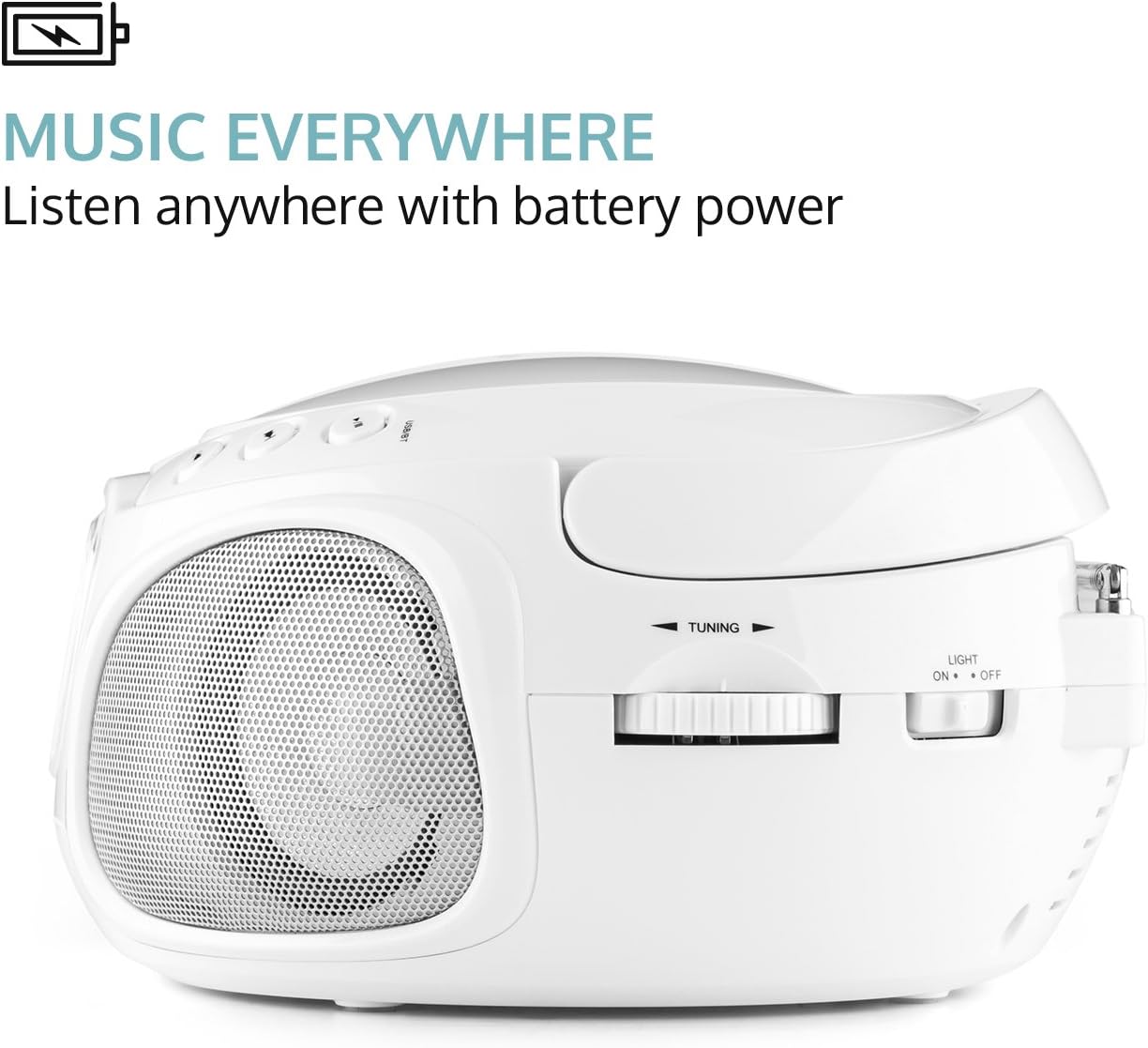
Rajah 4: Sisi view illustrating the volume control knob and the function selector switch.
- Tombol Kelantangan: Analog control for adjusting audio output level.
- Suis Fungsi: Selects between AM, FM, CD/USB, Bluetooth, and AUX modes.
- Suis Lampu: On/Off switch for the LED lights.
Rajah 5: Belakang view displaying the extendable antenna, AUX input, headphone output, and AC power input.
- Antena Boleh Dipanjangkan: Untuk penerimaan radio yang lebih baik.
- Input AUX (3.5mm): Untuk menyambungkan peranti audio luaran.
- Output Fon Kepala (3.5mm): Untuk mendengar secara peribadi.
- Input Kuasa AC: For connecting the included power cable.
- Petak Bateri: Located on the bottom, for 6 x C-type batteries (not included).
Persediaan
Powering the Boombox
The AUNA Roadie KIDS Boombox can be powered by either AC power or batteries.
AC Power (Recommended for stationary use)
- Ensure the boombox is switched off.
- Insert the included AC power cable into the AC power input jack on the rear of the boombox.
- Plug the other end of the power cable into a standard 110-120V ~ / 50-60Hz wall outlet.
Battery Power (For portable use)
- Ensure the boombox is switched off and disconnected from AC power.
- Cari petak bateri di bahagian bawah unit.
- Buka penutup petak bateri.
- Insert 6 x C-type batteries (not included), ensuring correct polarity (+/-) as indicated inside the compartment.
- Tutup penutup petak bateri dengan selamat.
Nota: Tanggalkan bateri jika unit ini tidak akan digunakan untuk tempoh yang lama bagi mengelakkan kebocoran dan kerosakan.
Arahan Operasi
Operasi Am
- Hidupkan/Mati Kuasa: Use the on/off switch located on the left outer side of the unit.
- Pemilihan Mod: Use the function switch on the side to select desired mode (AM, FM, CD/USB, BT/AUX).
- Pelarasan Kelantangan: Rotate the analog volume knob on the side to increase or decrease the sound level.
- Lampu LED: Use the "Light On/Off" switch on the rear to control the multi-color LED lights.
Main semula CD
- Switch the function selector to "CD/USB" mode.
- Buka penutup petak CD di bahagian atas unit.
- Place an Audio CD, CD-R, CD-RW, or MP3-CD onto the spindle with the label side facing up.
- Tutup penutup petak CD. Paparan akan menunjukkan jumlah bilangan trek.
- Tekan ke MAIN/JEDA butang untuk memulakan main balik.
- Gunakan Langkau / CARI buttons to navigate between tracks. Hold to fast forward/rewind.
- Tekan ke BERHENTI butang untuk menghentikan main balik.
- Main Semula Program: Tekan ke PROGRAM button to create a playlist of up to 20 tracks for CDs or 99 tracks for MP3-CDs.
- Repeat Functions: Tekan ke ULIKAN button to cycle through repeat modes (repeat one, repeat all, repeat folder for MP3-CDs).
- Random Playback: Tekan ke RANDOM button for shuffled playback.
Kesambungan Bluetooth
Stream music wirelessly from your smartphone or tablet.
- Switch the function selector to "BT/AUX" mode. The unit will enter Bluetooth pairing mode, indicated by a flashing Bluetooth icon on the display.
- Pada peranti berdaya Bluetooth anda, dayakan Bluetooth dan cari peranti yang tersedia.
- Select "AUNA Roadie" from the list of devices.
- Once paired, the Bluetooth icon will stop flashing, and you can play music from your device through the boombox.
Main Balik USB

Figure 6: USB port with a flash drive inserted, ready for media playback.
The boombox supports MP3 and WMA file types from USB flash drives.
- Switch the function selector to "CD/USB" mode.
- Masukkan pemacu kilat USB ke dalam port USB di panel hadapan.
- The unit will automatically detect and begin playing supported audio files.
- Gunakan MAIN/JEDA, BERHENTI, dan Langkau / CARI butang untuk kawalan.
Operasi Radio (AM/FM)
- Switch the function selector to "AM" or "FM" mode.
- Extend the telescopic antenna on the rear of the unit for optimal FM reception. For AM, rotate the unit for best reception.
- Gunakan MENALA knob on the side to manually tune to your desired radio station.
Input AUX
Sambungkan peranti audio luaran menggunakan kabel audio 3.5mm (tidak disertakan).
- Switch the function selector to "BT/AUX" mode.
- Connect one end of a 3.5mm audio cable to the AUX input jack on the rear of the boombox.
- Connect the other end to the headphone jack or audio output of your external device (e.g., MP3 player, smartphone).
- Audio from the external device will now play through the boombox speakers. Control playback from your external device.
Output Fon Kepala
For private listening, connect headphones to the 3.5mm headphone output jack on the rear of the unit. The speakers will automatically mute when headphones are connected.
Penyelenggaraan
- Pembersihan: Gunakan kain lembut dan kering untuk membersihkan bahagian luar unit. Jangan gunakan pembersih atau pelarut yang melelas.
- Penjagaan Kanta CD: If the CD player experiences reading errors, use a commercially available CD lens cleaner disc to clean the lens.
- Storan: When not in use for extended periods, store the boombox in a cool, dry place, away from direct sunlight and extreme temperatures. Remove batteries if storing for a long time.
Menyelesaikan masalah
| Masalah | Kemungkinan Punca | Penyelesaian |
|---|---|---|
| Tiada kuasa | Power cable not connected; Batteries depleted or incorrectly inserted; Power switch off. | Ensure AC cable is securely plugged in; Replace batteries or check polarity; Turn the power switch to "On". |
| Tiada bunyi | Volume too low; Headphones connected; Incorrect mode selected; Mute function active on connected Bluetooth device. | Increase volume; Disconnect headphones; Select the correct mode (CD, BT, USB, AM, FM, AUX); Check volume/mute on connected device. |
| CD tidak dimainkan/langkau | CD dirty or scratched; CD inserted incorrectly; Unsupported CD format. | Clean CD with a soft cloth; Insert CD with label side up; Ensure CD is Audio CD, CD-R, CD-RW, or MP3-CD. |
| Bluetooth tidak berpasangan | Boombox not in pairing mode; Bluetooth disabled on device; Device too far from boombox. | Ensure boombox is in "BT/AUX" mode; Enable Bluetooth on your device; Move device closer to the boombox (within 10 meters). |
| Penerimaan radio yang lemah | Antena tidak dilanjutkan; Isyarat lemah. | Fully extend the telescopic antenna; Try repositioning the unit for better reception. |
Spesifikasi
| Jenama | AUNA |
| Model | 00819885021020AS |
| Dimensi (W x H x D) | 9.4 x 5.1 x 7.9 inci (lebih kurang) |
| Berat badan | 3.4 paun (lebih kurang) |
| Bekalan Kuasa (AC) | 110-120 V ~ / 50-60 Hz |
| Bekalan Kuasa (Bateri) | 6 x C-type batteries (9 V DC, not included) |
| Output Speaker | 2 x 1.5 W |
| Compatible CD Formats | Audio CD, CD-R, CD-RW, MP3-CDs |
| USB yang disokong File Jenis | MP3, WMA |
| Versi Bluetooth | 2.1 + EDR |
| Bluetooth Profiles | A2DP, AVRCP |
| Ketersambungan | Bluetooth, Auxiliary (3.5mm), USB, AM/FM Radio |
Waranti dan Sokongan
For warranty information or technical support, please refer to the contact details provided with your purchase or visit the official AUNA website. This product includes a user manual in English, German, and French.
Ask a question about this manual
Ask about setup, troubleshooting, compatibility, parts, safety, or missing instructions. Manuals+ will review the question and use this page’s manual context to help answer it.