
1. Pengenalan
The Vonyx VMM-F701 is a versatile 7-channel mixer designed for various audio applications, including live performances and studio recording. It features multiple input options, an integrated effect processor, USB playback, and +48V phantom power for condenser microphones. This manual provides essential information for the safe and effective use of your VMM-F701 mixer.
2. Arahan Keselamatan
- Always read these instructions carefully before using the device. Keep this manual for future reference.
- Pastikan bekalan kuasa sepadan dengan voltage ditunjukkan pada peranti.
- Jangan dedahkan peranti kepada hujan atau lembapan.
- Putuskan sambungan kord kuasa semasa ribut petir atau apabila tidak digunakan untuk tempoh yang lama.
- To reduce the risk of electric shock, do not remove the cover. There are no user-serviceable parts inside. Refer all servicing to qualified service personnel.
3. Produk Lebihview
The Vonyx VMM-F701 mixer offers a comprehensive set of features for audio mixing. It includes 5 mono microphone/line inputs (XLR/6.3mm Jack combo), 1 stereo line input (6.3mm Jack), and an integrated USB player. Each channel provides Hi, Mid, and Low equalization controls, along with FX, Pan, and AUX adjustments. The mixer also features a built-in effect processor with delay and repeat functions, +48V phantom power for condenser microphones, a balanced stereo main output, and a headphone output.
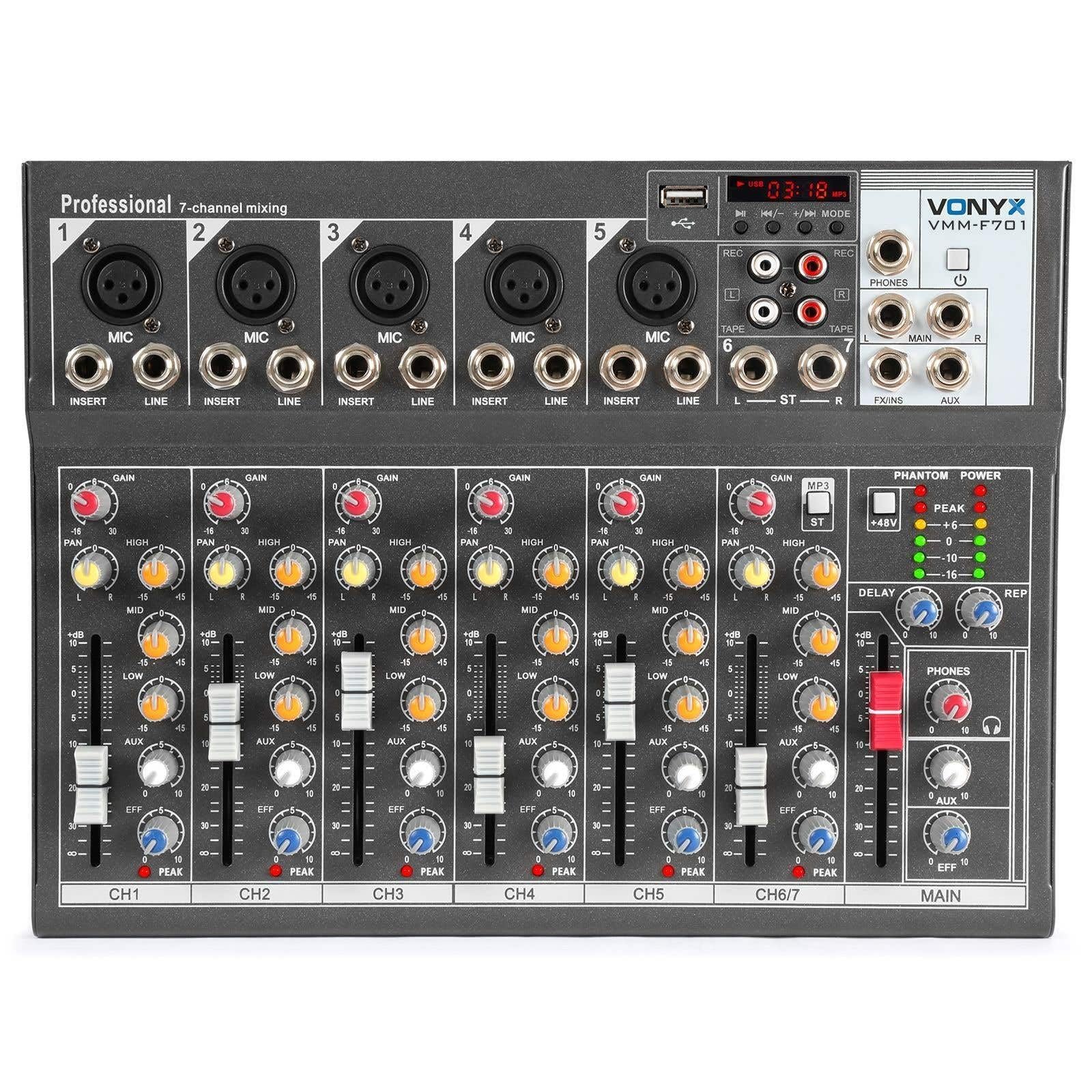
Keseluruhannya view of the Vonyx VMM-F701 7-channel mixer, showcasinreka bentuk padat dan susun atur kawalannya.

Atas ke bawah view of the Vonyx VMM-F701 mixer, highlighting the input channels, faders, and equalization knobs.

Close-up of the USB input and media player controls on the Vonyx VMM-F701 mixer, with a USB drive inserted.

Rear panel of the Vonyx VMM-F701 mixer, showing the power input and USB port for external power.
4. Persediaan
- Sambungan Kuasa: Connect the mixer to a 230Vac/50Hz power source using the provided power cable. The mixer can also be powered via USB (5V/1A) for certain functions.
- Sambungan Input:
- For microphones, use XLR or 6.3mm jack cables to connect to channels 1-5. Activate +48V phantom power for condenser microphones.
- For line-level instruments or devices, use 6.3mm jack cables to connect to channels 1-5 (line inputs) or the stereo line input (channels 6/7).
- Sambungan Keluaran: Sambungkan pembesar suara utama anda atau amplifier to the balanced stereo main output (6.3mm Jack).
- Fon kepala: Connect headphones to the dedicated headphone output for monitoring.

Terperinci view of the mains power input and a wiring diagram for microphone/line inputs on the Vonyx VMM-F701 mixer.
5. Arahan Operasi
- Kawalan Keuntungan: Adjust the input sensitivity for each channel using the GAIN knob.
- Penyamaan (EQ): Use the HI, MID, and LOW knobs to adjust the treble, midrange, and bass frequencies for each channel.
- Kawalan Kuali: Adjust the stereo positioning of each channel using the PAN knob.
- Hantar FX: Use the FX knob to send a portion of the channel's signal to the internal effect processor.
- Hantar AUX: Use the AUX knob to send a portion of the channel's signal to an external effect unit or monitor mix (via FX Send/Return).
- Faders saluran: Adjust the volume level for each individual channel.
- Main Fader: Kawal jumlah output keseluruhan pengadun.
- Effect Processor: Adjust the DELAY and REP (Repeat) knobs to control the characteristics of the built-in delay effect.
- Pemain USB: Masukkan pemacu USB ke dalam port USB untuk memainkan audio files. Use the media player controls (play/pause, skip, mode) to navigate and control playback.
- Kuasa Hantu: Press the +48V PHANTOM POWER button to supply power to condenser microphones. Ensure microphones are connected before activating.
6. Penyelenggaraan
- Pembersihan: Use a soft, dry cloth to clean the mixer's surface. Avoid liquid cleaners or solvents.
- Storan: Simpan pengadun di tempat yang sejuk dan kering jauh dari cahaya matahari langsung dan suhu yang melampau.
- Pengudaraan: Pastikan pengudaraan yang betul di sekeliling pengadun untuk mengelakkan terlalu panas.
7. Penyelesaian masalah
| Masalah | Kemungkinan Punca | Penyelesaian |
|---|---|---|
| Tiada keluaran bunyi | Power off; cables disconnected; faders down; incorrect input selection. | Check power connection; ensure all cables are securely connected; raise channel and main faders; verify correct input source. |
| Bunyi herot | Gain input terlalu tinggi; tahap output terlalu tinggi; kabel rosak. | Reduce GAIN knob; lower main fader; try a different cable. |
| Mikrofon tidak berfungsi | Phantom power off (for condenser mics); mic not connected; faulty mic. | Activate +48V PHANTOM POWER; check mic connection; test with another microphone. |
| USB player not working | USB drive not recognized; unsupported file format. | Ensure USB drive is properly inserted; try a different USB drive; check file formats (e.g., MP3). |
8. Spesifikasi
| Ciri | Spesifikasi |
|---|---|
| Nombor Model | VMM-F701 |
| Bilangan Saluran | 7 |
| Julat Kekerapan | 20 Hz - 20 kHz |
| THD (Herohan Harmoni Keseluruhan) | <0.01% |
| Nisbah Isyarat-ke-Bunyi | >110dB |
| Tahap Keluaran | ±1V |
| Sensitiviti Input Garis | ±150mV |
| Sensitiviti Input Mikrofon | ±1.5mV |
| Sambungan Voltage | 230Vac / 50Hz (USB 5V/1A) |
| Dimensi (L x W x H) | 230 x 312 x 45 mm (9.06 x 12.28 x 1.77 inci) |
| Berat badan | 2.25 kg (4.96 lbs) |
| Teknologi Ketersambungan | USB |
| Input Audio | XLR, 1/4 inch (6.3 mm) jack |
| Jenis Penyambung Output | TRS 1/4" (balanced) |
9. Waranti dan Sokongan
Waranti: This product comes with a 2-year warranty on spare parts. For warranty claims, please retain your proof of purchase.
Sokongan: For technical assistance, troubleshooting, or service inquiries, please contact your local Vonyx dealer or visit the official Vonyx webtapak untuk sumber sokongan.