
pengenalan
Welcome to the user manual for your Mustool G600 Digital Portable Microscope. This guide provides detailed instructions to help you set up, operate, and maintain your device, ensuring optimal performance and longevity. Please read this manual thoroughly before using the microscope.
Produk Selesaiview
The Mustool G600 is a versatile digital portable microscope designed for detailed observation of tiny objects. It features a high-definition display and adjustable magnification, making it suitable for various applications.
Ciri-ciri Utama
- 4.3-inch HD LCD display for clear viewing.
- HD 3.6MP CCD sensor for high-resolution imaging.
- Adjustable magnification from 1x to 600x.
- Eight high-brightness LEDs for optimal illumination.
- Support for Micro SD card up to 64GB (not included) for storage.
- Built-in Li-ion battery providing approximately 6 hours of continuous working time.
- Auto turn-off function for power saving.
- Object distance: 15mm to infinity.
- Sokongan berbilang bahasa.
Komponen

Figure 1: Mustool G600 Digital Portable Microscope in operation, showing a circuit board under its lens and the magnified image on the display.
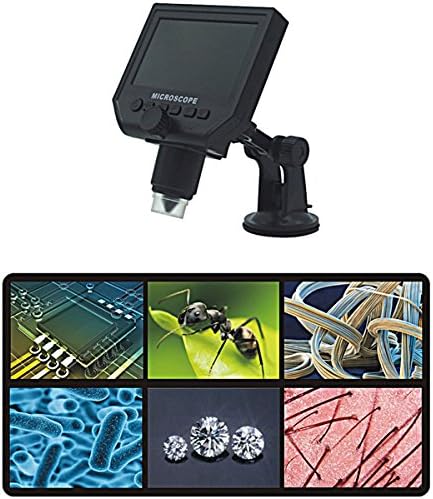
Figure 2: The Mustool G600 Digital Portable Microscope detached from its stand, showcasing the device's compact design and the adjustable stand.

Figure 3: The Mustool G600 Digital Portable Microscope display, illustrating various magnified views such as circuit components, an ant, textile fibers, bacteria, diamonds, and hair strands.

Rajah 4: Depan view of the Mustool G600 Digital Portable Microscope mounted on its suction cup stand, highlighting the 4.3-inch LCD screen and control buttons.

Rajah 5: Sisi view of the Mustool G600 Digital Portable Microscope, illustrating the adjustable arm of the stand and the microscope's lens assembly.

Rajah 6: Belakang view of the Mustool G600 Digital Portable Microscope, showing the various ports for power, data, and Micro SD card insertion.
Kandungan Pakej
Sila sahkan bahawa semua item yang disenaraikan di bawah disertakan dalam pakej anda. Jika ada item yang hilang atau rosak, sila hubungi sokongan pelanggan.
- 1 x Mustool G600 LCD Digital Microscope
- 1 x EU Plug Power supply (Note: Adapter may vary by region)
- 1 x Data line (USB cable)
- 1 x Multi-functional support (Stand)
- 1 x User’s manual (This document)
Persediaan
Mengecas Bateri
Before first use, fully charge the microscope's built-in Li-ion battery.
- Connect the provided power supply to the microscope's charging port.
- Palamkan bekalan kuasa ke soket elektrik standard.
- Lampu penunjuk pengecasan akan menyala. Setelah dicas sepenuhnya, lampu mungkin bertukar warna atau mati.
- A full charge provides approximately 6 hours of continuous operation.
Memasang Stand
The multi-functional support allows for stable positioning of the microscope.
- Attach the microscope unit to the adjustable arm of the stand. Ensure it is securely fastened.
- Place the suction cup base on a clean, flat, non-porous surface. Press down firmly on the suction cup lever to secure the stand.
- Adjust the arm and microscope angle as needed for your viewsubjek.
Memasukkan Kad Mikro SD (Pilihan)
To save images and videos, insert a Micro SD card (up to 64GB, not included).
- Locate the Micro SD card slot on the side or back of the microscope unit.
- Gently insert the Micro SD card with the gold contacts facing down (or as indicated by the slot diagram) until it clicks into place.
- Untuk mengalih keluar, tolak kad masuk semula dengan perlahan sehingga ia keluar.
Arahan Operasi
Menghidupkan/Mematikan
Tekan dan tahan butang kuasa button (usually marked with a power symbol) for a few seconds to turn the microscope on or off. The LCD screen will illuminate.
Melaraskan Pembesaran dan Fokus
The microscope offers 1x to 600x continuous magnification.
- Place the object you wish to observe directly under the microscope lens.
- Putarkan yang besar Tombol Fokus (typically located on the side of the microscope body) to bring the image into sharp focus on the LCD screen.
- Adjust the distance between the lens and the object (object distance: 15mm to infinity) using the stand's adjustment mechanisms to achieve the desired magnification and clarity.
Melaraskan Kecerahan LED
The microscope is equipped with 8 adjustable high-brightness LEDs.
Cari Kawalan Kecerahan LED (often a small knob or button) on the microscope body. Rotate or press it to increase or decrease the illumination on your subject.
Menangkap Imej dan Video
To capture still images or record videos, ensure a Micro SD card is inserted.
- manakala viewing your subject, press the Mod button to switch between photo mode, video mode, and playback mode.
- Dalam mod foto, tekan butang OK/Tangkap butang untuk mengambil gambar.
- In video mode, press the OK/Tangkap button to start recording. Press it again to stop recording.
- Ditangkap files disimpan ke kad Micro SD.
Navigasi Menu
Gunakan Menu button to access settings and options.
Gunakan Atas/Bawah or Kiri/Kanan arrow buttons to navigate through menu options.
Tekan ke OK butang untuk mengesahkan pilihan.
Common settings include resolution (1080P, 720P, VGA), language, date/time, and auto-off timer.
Penyelenggaraan
Pembersihan
To ensure clear viewing and extend the life of your microscope:
- Gently wipe the LCD screen with a soft, lint-free cloth. For stubborn smudges, slightly dampen kain dengan air atau pembersih skrin.
- Use a soft brush or air blower to remove dust from the lens. For smudges on the lens, use a specialized lens cleaning solution and cloth.
- Clean the microscope body with a dry or slightly damp kain. Jangan gunakan pembersih atau pelarut yang melelas.
Penyimpanan
When not in use, store the microscope in a cool, dry place, away from direct sunlight and extreme temperatures.
Keep the lens covered to prevent dust accumulation.
Penjagaan Bateri
Untuk memanjangkan hayat bateri:
- Elakkan menyahcas sepenuhnya bateri dengan kerap.
- Jika menyimpan untuk tempoh yang lama, cas bateri kepada kapasiti kira-kira 50%.
- Recharge the battery every few months if not in use to prevent deep discharge.
Menyelesaikan masalah
| Masalah | Kemungkinan Punca | Penyelesaian |
|---|---|---|
| Microscope does not turn on. | Bateri habis. | Cas bateri menggunakan bekalan kuasa yang disediakan. |
| Imej kabur. | Incorrect focus or object distance. | Adjust the focus knob and/or the distance between the lens and the object. |
| Screen is too dark/bright. | LED brightness not adjusted. | Adjust the LED brightness control. |
| Tidak boleh menyimpan imej/video. | Tiada kad Micro SD dimasukkan atau kad penuh/rosak. | Insert a Micro SD card, ensure it has sufficient space, or try formatting the card (this will erase all data). |
| Microscope turns off automatically. | Auto turn-off function is enabled or battery is low. | Charge the battery. Check menu settings to adjust or disable the auto turn-off timer. |
Jika masalah berterusan selepas mencuba penyelesaian ini, sila hubungi sokongan pelanggan.
Spesifikasi
| Ciri | Perincian |
|---|---|
| Model | Mustool G600 |
| Paparan | Paparan LCD HD 4.3 inci |
| Piksel | HD 3.6MP CCD |
| Resolusi | 1080P, 720P, VGA |
| Pembesaran | 1-600x (Continuous) |
| Jarak Objek | 15mm - infinity |
| Sumber Cahaya | 8 Adjustable High Brightness LEDs |
| Sokongan Storan | Micro SD card up to 64GB (Not included) |
| Sumber Kuasa | Bateri Li-ion terbina dalam |
| Hayat Bateri | Approx. 6 hours continuous working |
| Automatikan | ya |
| Sokongan Bahasa | English, Spanish, Russian, Korean, Japanese, Thai, Hebrew, Portuguese, German, French, Italian, Turkish, Czech, Chinese |
| bahan | Glass/Glass-like (Lens), Other components as per design |
| warna | Hitam |
| UPC | 783050248461 |
Waranti dan Sokongan
The Mustool G600 Digital Portable Microscope comes with a standard manufacturer's warranty. Please refer to the warranty card included in your package for specific terms and conditions.
For technical support, troubleshooting assistance beyond this manual, or warranty claims, please contact Mustool customer service through the retailer where you purchased the product or visit the official Mustool webtapak.
Please have your product model (G600) and purchase information ready when contacting support.