
Saitake BT 7002
Manual Pengguna Kayu Ria Telefon Pintar Saitake BT 7002
Model: BT 7002 | Brand: Saitake
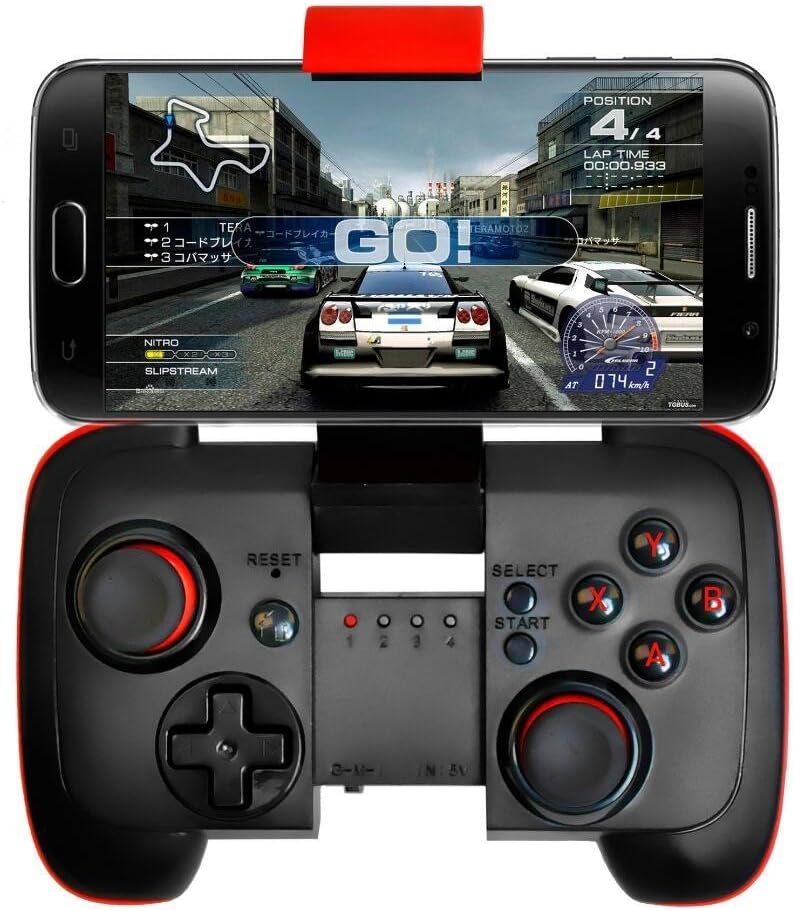
1. Pengenalan
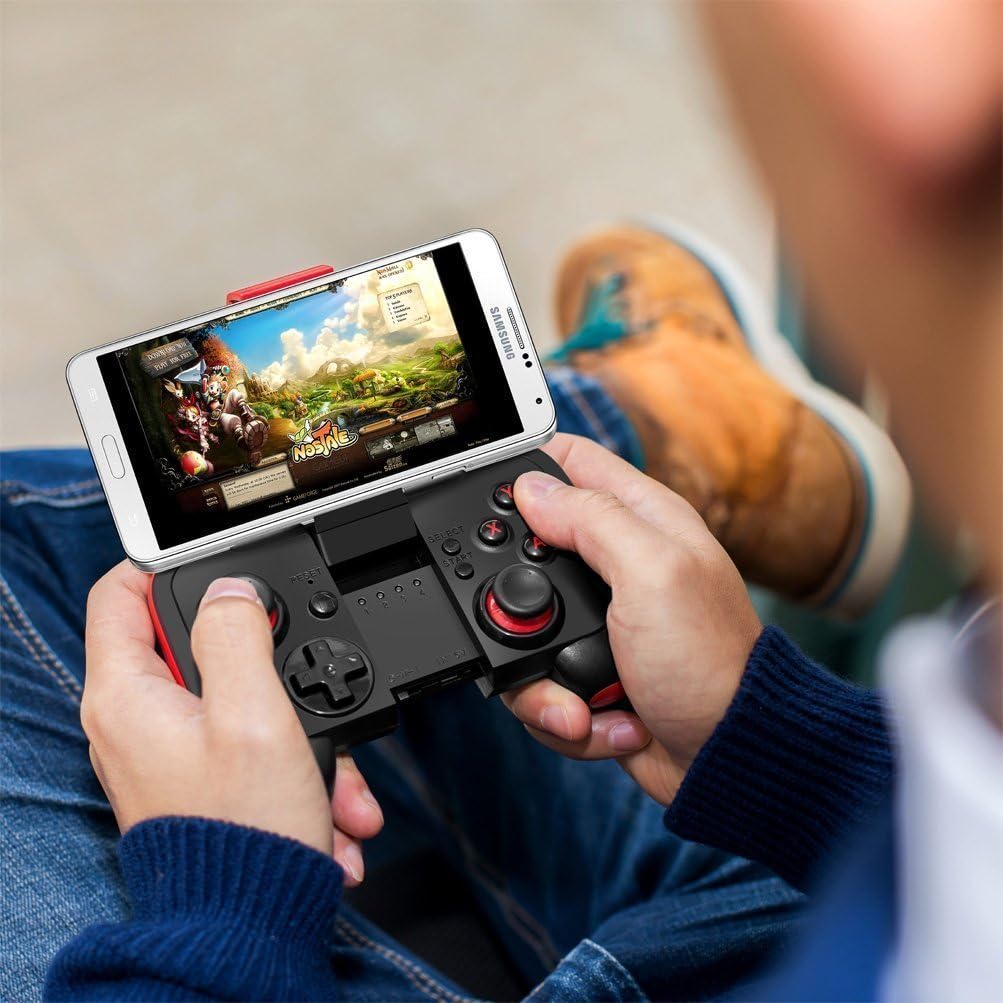
Thank you for choosing the Saitake BT 7002 Smartphone Joystick. This device is designed to enhance your mobile gaming experience by providing precise control and comfortable ergonomics. It connects wirelessly via Bluetooth to your Android smartphone or tablet, offering a seamless gaming experience.
2. Persediaan dan Sambungan
2.1 First-Time Connection
- Ensure the joystick is powered off.
- Tekan dan tahan butang RUMAH button for 5 seconds until the gamepad indicator light begins to flash rapidly (approximately 4 flashes per second). This indicates pairing mode.
- On your Android device, activate Bluetooth and search for available devices.
- Select the gamepad when it appears in your device list to connect.
2.2 Subsequent Connections
- Ensure the joystick is powered off.
- Tekan dan tahan butang RUMAH button for 3 seconds until the gamepad indicator light flashes slowly (approximately 2 flashes per second).
- The device will automatically connect to the last paired Android device.

Nota: The Saitake BT 7002 requires Bluetooth 2.0 or higher on your Android device. It does not require a driver for installation when connecting and playing. This controller is designed exclusively for Android devices and is not compatible with iOS or PC systems.
3. Mod Operasi
The Saitake BT 7002 features different operating modes to optimize compatibility with various applications:
- Mod G: Designed for general Android gaming.
- Mod M: Optimized for Multimedia control.
- I Mode: Intended for specific iOS compatibility (though general product description states no iOS support, this mode might be for specific, limited scenarios or older models. For best results, use with Android as specified).
The controller supports wireless transmission via Bluetooth 2.1, allowing for an operating range of 6-8 meters.
3.1 Matikan Kuasa Automatik
To conserve battery life, the controller will automatically power off if it is not used for 5 minutes.
4. Ciri-ciri Utama
- Reka Bentuk Mudah Alih: Pocket-sized for easy transport during travel.
- Bateri Terbina dalam: Features a 300mA built-in lithium battery, providing approximately 5-8 hours of continuous play.
- Adjustable Phone Mount: Accommodates smartphones up to 3.0 inches (7.5 cm) wide, supporting phones with screens smaller than 5.9 inches (15 cm).
- Keserasian Luas: Connects wirelessly to any Android mobile phone, tablet, or VR headset running Android 3.2 or above with Bluetooth 2.0 or higher.
- Driver-Free: No additional drivers are needed for installation.
- Julat Tanpa Wayar: Offers a wireless transmission range of 6-8 meters.
5. Penyelenggaraan
5.1 Mengecas Bateri
When the battery is low, the indicator light may flash or the controller may stop responding. Connect the joystick to a USB power source using a compatible charging cable (not specified if included, typically micro-USB). The indicator light will show charging status and turn off when fully charged.
5.2 Pembersihan dan Penyimpanan
- Wipe the controller with a soft, dry cloth. Do not use harsh chemicals or abrasive cleaners.
- Avoid exposing the controller to extreme temperatures, direct sunlight, or high humidity.
- Simpan pengawal di tempat yang sejuk dan kering apabila tidak digunakan.
6. Penyelesaian masalah
6.1 Controller Not Turning On or Responding
- Ensure the battery is charged. Connect the controller to a power source and allow it to charge for at least 30 minutes before attempting to power it on again.
- If the controller still does not respond, try pressing the TETAP SEMULA button (usually a small pinhole button, refer to diagram if available on product).
6.2 Isu Sambungan
- Make sure Bluetooth is enabled on your Android device.
- Ensure the controller is in pairing mode (rapid flashing for first-time connection, slow flashing for subsequent connections).
- Lupakan peranti dalam tetapan Bluetooth telefon anda dan cuba berpasangan semula.
- Ensure your Android device's operating system is Android 3.2 or above and has Bluetooth 2.0 or higher.
- Remember, this controller is not compatible with iOS or PC systems.
6.3 Games Not Recognizing Controller
- Verify that the game you are playing supports external game controllers. Not all mobile games have controller support.
- Check the game's settings for controller configuration options.
- Ensure the controller is in the correct operating mode (G Mode for most games).
7. Spesifikasi
| Model | BT 7002 |
| Ketersambungan | Bluetooth 2.1 |
| Jenis Bateri | 1 Lithium Ion (Built-in 300mA) |
| Hayat Bateri | Approx. 5-8 hours (continuous play) |
| Julat Operasi | 6-8 meter |
| Lebar Telefon yang Serasi | Sehingga 3.0 inci (7.5 cm) |
| Supported Phone Screen Size | Below 5.9 inches (15 cm) |
| Dimensi Pakej | 16.6 x 13.4 x 7 cm |
| Berat badan | 125 g |
8. Maklumat Waranti
Sila rujuk kepada pegawai pengilang website or the product packaging for detailed warranty information. Keep your purchase receipt as proof of purchase for any warranty claims.
9. Sokongan Pelanggan
For technical assistance, troubleshooting, or product inquiries, please contact Saitake customer support through their official webtapak atau maklumat hubungan yang diberikan bersama pembungkusan produk anda.
Ask a question about this manual
Ask about setup, troubleshooting, compatibility, parts, safety, or missing instructions. Manuals+ will review the question and use this page’s manual context to help answer it.