
1. Sistem Selesaiview
This manual provides instructions for the SANNCE 16-channel 8MP NVR Wireless WiFi Security Camera System. This system is designed for comprehensive surveillance, offering high-resolution video recording and remote monitoring capabilities.
Ciri-ciri Utama:
- 16-Channel 8MP NVR: Supports up to 16 cameras with 8-megapixel resolution for clear video.
- Wireless WiFi Connectivity: Utilizes 2.4/5.8GHz dual-band WiFi for stable and long-distance connections up to 985ft in open environments.
- H.264+ Video Coding: Advanced compression technology to optimize storage space while maintaining video quality.
- IP66 Outdoor Cameras: Weatherproof cameras suitable for various environmental conditions (-20℃ to 60℃).
- Penglihatan Malam: Features up to 98ft IR night vision and 33ft full-color night vision for 24/7 monitoring.
- Human Motion Detection & Two-Way Talk: Enhanced security with intelligent detection and audio communication.
- Storan Boleh Dikembangkan: Supports up to 8TB local HDD storage and cloud storage options.
- Integrasi Pintar: Compatible with Alexa for voice control.
2. Persediaan Sistem
The SANNCE security system is designed for quick and easy plug-and-play installation. Follow these steps for initial setup.
2.1 Unpacking and Initial Connection
- Carefully unpack all components: NVR, cameras, power adapters, and accessories.
- Sambungkan NVR ke monitor menggunakan kabel HDMI atau VGA.
- Sambungkan NVR ke sumber kuasa menggunakan penyesuai kuasa yang disediakan.
- Connect the cameras to their respective power sources. The cameras will automatically pair with the NVR.
- Connect the NVR to your router via an Ethernet cable for network access and remote viewing.

Gambar 2.1: Lebihview of system installation, WiFi connection, and remote access via mobile application.
2.2 Konfigurasi Rangkaian
Once the NVR is connected to your router, access the NVR's interface on the connected monitor to configure network settings. Ensure DHCP is enabled on your router or assign a static IP address to the NVR if required by your network setup.
2.3 Persediaan Aplikasi Mudah Alih
- Download the SANNCE mobile application from your device's app store.
- Daftar akaun dan log masuk.
- Add your NVR to the app by scanning the QR code displayed on the NVR's interface or by manually entering its ID.
- Setelah ditambah, anda boleh view suapan langsung, rakaman main balik dan menerima makluman dari jauh.

Rajah 2.2: Alat Kawalan Jauh viewing of camera feeds on various devices.
3. Operasi Sistem
This section details the various operational modes and features of your SANNCE security system.
3.1 Mod Rakaman
The system offers flexible recording options:
- Rakaman Berterusan: Merekod 24/7 tanpa gangguan.
- Rakaman Pengesanan Gerak: Merakam hanya apabila gerakan dikesan.
- Pengesanan Pergerakan Manusia: Advanced detection specifically for human shapes, reducing false alarms.
- Rakaman Berjadual: Tetapkan masa tertentu untuk rakaman.
- Alarm Triggered Recording: Records when an alarm event (e.g., motion, human detection) is triggered.

Figure 3.1: Intelligent human detection feature and various recording options.
3.2 Penglihatan Malam
The cameras are equipped with advanced night vision technology to ensure clear surveillance in low-light conditions.
- Penglihatan Malam IR: Provides black and white video up to 98 feet in complete darkness.
- Penglihatan Malam Warna Penuh: Offers color video up to 33 feet in low-light conditions, enhancing detail and identification.

Figure 3.2: Demonstration of full-color night vision capability.
3.3 Audio Dua Hala
Utilize the built-in microphone and speaker on the cameras for two-way communication. This feature allows you to speak to individuals near the camera and hear their responses through the mobile app or NVR interface.

Figure 3.3: System features including two-way audio.

Gambar 3.4: Cthampkomunikasi audio dua hala.
3.4 Remote Monitoring and Alerts
Stay informed with real-time notifications and remote access:
- Mobile App Notifications: Receive instant alerts on your smartphone when motion or human detection is triggered.
- Makluman E-mel: Configure the system to send email notifications with snapshots of events.
- Integrasi Alexa: Use voice commands with Alexa-enabled devices to view suapan kamera.

Figure 3.5: Notifications for intelligent people detection.

Figure 3.6: Seamless integration with Alexa for voice control.
4. Penyelenggaraan
Penyelenggaraan tetap memastikan prestasi optimum dan jangka hayat sistem keselamatan anda.
4.1 Pembersihan Kamera
- Bersihkan kanta kamera secara berkala dengan lembut, damp kain untuk menanggalkan habuk, kotoran atau bintik air yang boleh menghalang view.
- Avoid using harsh chemicals or abrasive materials that could damage the lens coating.
4.2 NVR and Storage Management
- Ensure the NVR is placed in a well-ventilated area to prevent overheating.
- Regularly check the hard drive status through the NVR interface to ensure it is functioning correctly.
- Manage storage space by configuring recording settings or backing up important footage to external storage or cloud services.
4.3 Kemas Kini Perisian Tegar
Check the SANNCE official website or the mobile application periodically for firmware updates. Keeping your system's firmware updated ensures access to the latest features, security patches, and performance improvements.
5. Penyelesaian masalah
Bahagian ini menangani isu biasa yang mungkin anda hadapi dan menyediakan penyelesaian.
5.1 Tiada Paparan Video
- Semak Kuasa: Ensure the NVR and all cameras are properly connected to power outlets and are turned on.
- Sambungan Monitor: Verify the HDMI/VGA cable connection between the NVR and your monitor.
- Berpasangan Kamera: Confirm that cameras are successfully paired with the NVR. Refer to the setup section for pairing instructions if needed.
5.2 Poor Wireless Connection
- Kekuatan Isyarat: Check the wireless signal strength of the cameras in the NVR interface.
- Halangan: Reduce obstacles (thick walls, metal structures) between cameras and the NVR.
- Jarak: Ensure cameras are within the effective wireless range (up to 985ft in open environments).
- Gangguan: Minimize interference from other wireless devices. The system supports dual-band WiFi (2.4/5.8GHz) which can help.
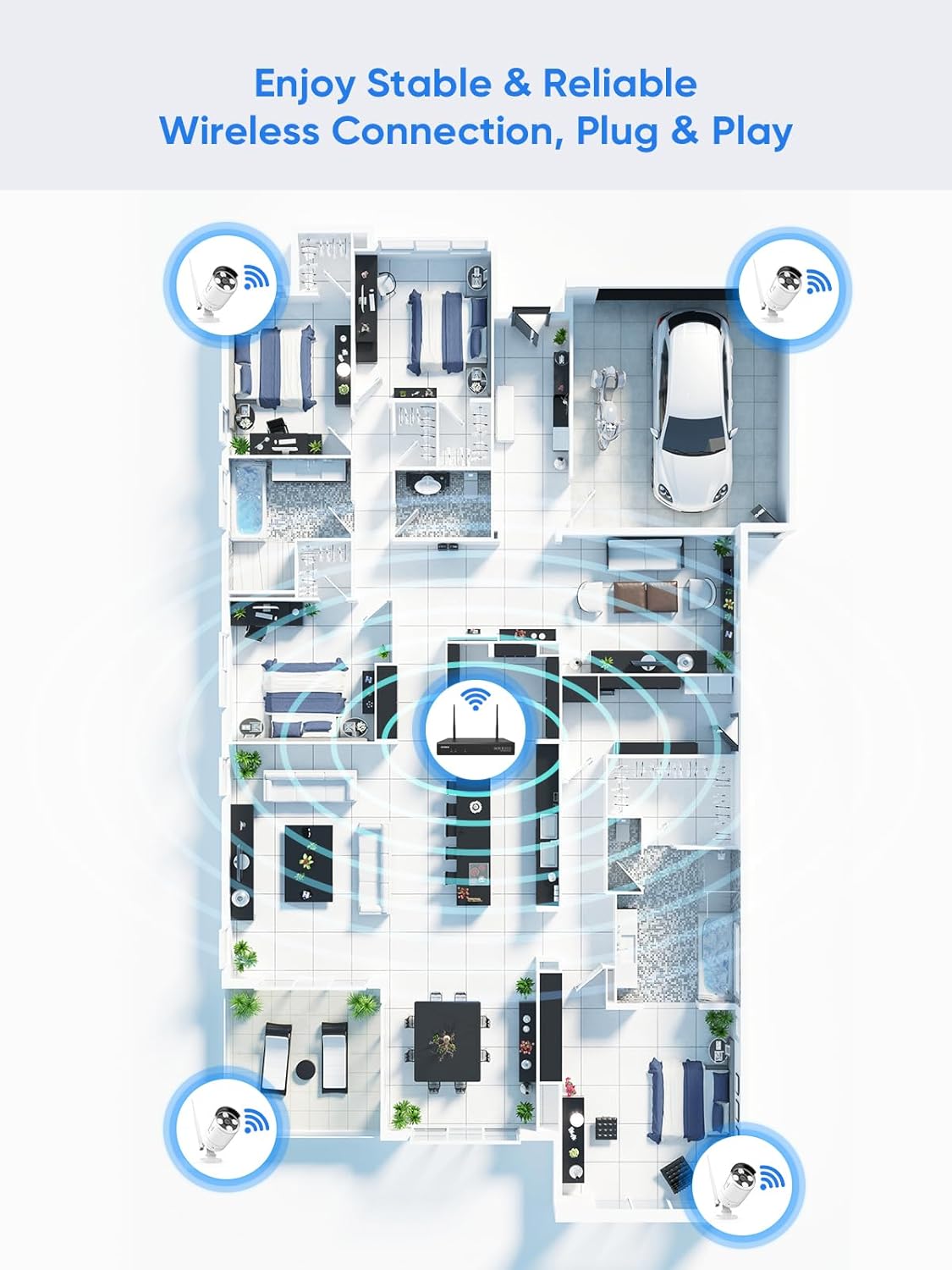
Figure 5.1: Wireless coverage and connection stability.
5.3 Isu Rakaman
- Pemacu Keras: Verify the hard drive is installed correctly and is not full. Format the HDD if necessary (this will erase all data).
- Jadual Rakaman: Check your recording schedule and motion detection settings to ensure they are configured as desired.
- Kepekaan Pergerakan: Adjust motion detection sensitivity if recordings are too frequent or not frequent enough.
5.4 Remote Access Problems
- Sambungan Internet: Ensure both your NVR and mobile device have a stable internet connection.
- NVR Network Settings: Confirm the NVR's network settings are correct and it has access to the internet.
- Log Masuk Apl: Verify you are logged into the SANNCE app with the correct account.
6. Spesifikasi
| Ciri | Perincian |
|---|---|
| Nombor Model | 4335041969 |
| Jenama | SANNCE |
| Teknologi Ketersambungan | HDMI, USB, VGA, Wireless WiFi (2.4/5.8GHz) |
| Peranti Serasi | Kamera |
| Kapasiti Penyimpanan Memori | Up to 8 TB (HDD) |
| Saiz Cakera Keras | 8 TB (Maximum Supported) |
| Penarafan IP | IP66 (Outdoor Cameras) |
| Suhu Operasi | -20 ℃ hingga 60 ℃ |
| Dimensi Pakej | 13.78 x 11.42 x 3.19 inci |
| Berat Barang | 3.14 paun |
| Tarikh Mula-mula Tersedia | 11 Disember 2017 |
7. Waranti dan Sokongan
7.1 Polisi Pemulangan
Produk ini tertakluk kepada polisi pemulangan 30 hari dari tarikh pembelian. Sila rujuk garis panduan pemulangan khusus peruncit anda untuk maklumat terperinci.
7.2 Waranti Pengeluar
SANNCE provides a limited warranty for this product against defects in materials and workmanship. For specific warranty terms, duration, and conditions, please refer to the warranty card included with your product or visit the official SANNCE webtapak.
7.3 Sokongan Pelanggan
If you encounter any issues or have questions regarding the installation, operation, or maintenance of your SANNCE security system, please contact SANNCE customer support for assistance. You can typically find contact information on the SANNCE official webtapak atau dalam pembungkusan produk.
Untuk maklumat lanjut, lawati SANNCE Store.