
1. Pengenalan
Welcome to the Osaki OS-Pro Alpina Massage Chair user manual. This guide provides essential information for the safe and effective operation, maintenance, and troubleshooting of your new massage chair. The Osaki OS-Pro Alpina combines advanced massage technologies to deliver a comprehensive and relaxing experience.
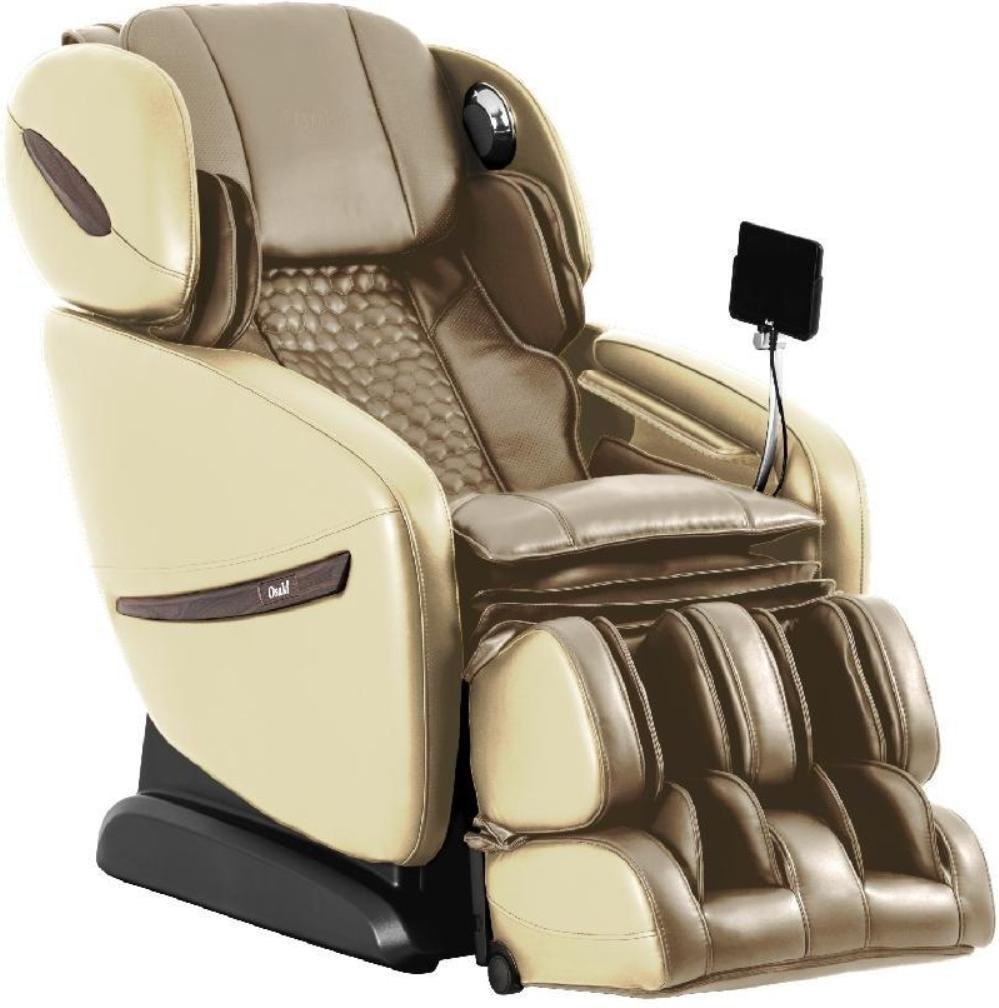
Image: The Osaki OS-Pro Alpina Massage Chair, featuring its ergonomic design and integrated remote control.
2. Persediaan dan Pemasangan
2.1 Membongkar
- Carefully remove all packaging materials from the chair and its components.
- Pastikan semua bahagian yang disenaraikan dalam senarai pembungkusan ada.
- Retain packaging for future transport or service needs.
2.2 Penempatan
- Place the massage chair on a flat, stable surface.
- Ensure adequate clearance around the chair for reclining and leg rest extension (approximately 10 inches from a wall for zero gravity recline).
- Avoid placing the chair in direct sunlight or near heat sources.
2.3 Sambungan Kuasa
- Connect the power cord securely to the chair's power inlet.
- Pasangkan kord kuasa ke soket elektrik yang dibumikan (120V AC, 60Hz).
- Jangan gunakan kord sambungan atau penyesuai.
3. Arahan Operasi
3.1 Hidupkan/Mati Kuasa
- Press the power button on the remote control to turn the chair on.
- Press the power button again to turn the chair off.
3.2 Body Scan
Upon starting any preset program, the chair will perform an automatic body scan. This scan maps the key areas of your neck and back to customize the massage experience. The scanning technology also detects your shoulder height, which can be adjusted within 10 seconds after the scan if a different starting point is desired.
3.3 Using the Touch Screen Remote Controller
The Osaki OS-Pro Alpina features an intuitive touch screen remote controller.
- Navigasi: Use the touch screen to browse through massage programs, styles, and settings.
- Pemilihan Program: Select from 12 unique auto-programs.
- Kawalan manual: Adjust massage intensity, speed, and roller positions manually.
- Recline Control: Adjust the chair's recline angle, including Zero Gravity positions.
4. Massage Programs and Styles
The Osaki OS-Pro Alpina offers a variety of pre-set massage programs and manual massage styles to cater to your preferences.

Imej: Selesaiview of the 13 pre-set massage programs available on the Osaki OS-Pro Alpina.
4.1 Program Pratetap
- Umum: Combination of all massage styles.
- Tisu Dalam: Deep kneading massage with some tapping.
- Pemulihan: Focuses on the waist and hip area, applying kneading and tapping massage.
- Bangun: Combination of multiple tapping and knocking massages to stimulate the back.
- sedang tidur: Gentle tapping and some kneading.
- Healthy Regimen: Combination of all massage styles focusing primarily in the waist, hips, and thigh area.
- Regangan: Stretches the back, legs, and arms by inflating airbags that grab the ankles and pull.
- Older Vitality: Complete back massage using soft kneading and soft tapping.
- Man Health: Lower back massage with a soft kneading and strong tapping.
- Woman Beauty: Lower back massage with kneading, rolling, and shiatsu massage.
- Kidney Vigor: Uses all massage techniques in the lower back region.
- Spleen Digest: Targets the spleen and digestive area with specific massage techniques.
- Ache Sensor: Detects the ache point of the user's body and focuses on those points.
4.2 Massage Styles (6 Styles)
The chair offers 6 core massage styles that can be manually selected or are integrated into the auto-programs. These typically include kneading, tapping, shiatsu, rolling, knocking, and combination.
5. Ciri-ciri Utama
5.1 SL Track Roller Design
The Osaki OS-Pro Alpina integrates both S-track and L-track systems. This combined design allows the massage rollers to follow the natural curvature of your spine (S-track) and extend further down to the glutes and hamstrings (L-track), providing a comprehensive and consistent massage from your neck to your upper thighs.

Image: Visual representation of the S+L Track system, highlighting its extended massage coverage.

Imej: Terperinci view of the S+L track and body scanning technology, ensuring precise massage application.
5.2 AirBag Massage
The chair incorporates multiple airbags strategically placed throughout the chair to provide compression massage. These airbags inflate and deflate to gently squeeze and release various body parts, promoting circulation and muscle relaxation.
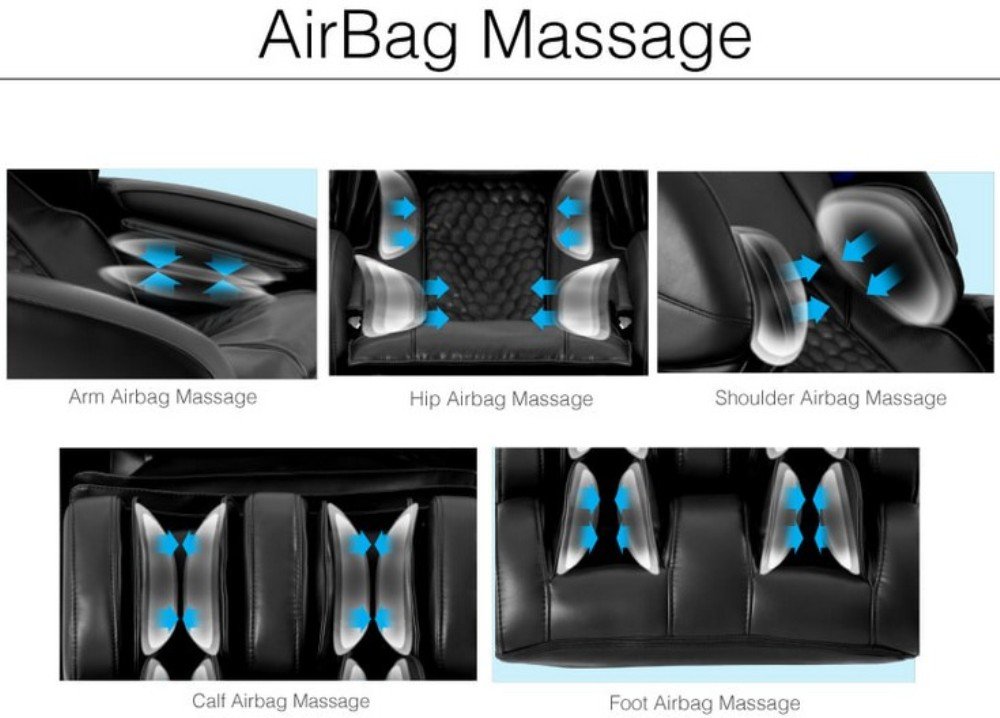
Image: Illustration of the airbag massage system, detailing coverage for arms, hips, shoulders, calves, and feet.
- Arm Airbag Massage: Gentle compression for forearms and hands.
- Hip Airbag Massage: Squeezing action for the hips and lower back.
- Shoulder Airbag Massage: Compression for the shoulders.
- Urut Beg Udara Anak Lembu: Rhythmic compression for the calves.
- Foot Airbag Massage: Compression for the feet.
5.3 Kedudukan Sifar Graviti
Inspired by NASA technology, the Zero Gravity position elevates your legs above your heart, distributing your body weight evenly and reducing pressure on the spine. This position enhances the intensity and effectiveness of the massage by allowing your body to sink deeper into the chair's rollers. The chair offers multiple stages of Zero Gravity recline.

Image: The Osaki OS-Pro Alpina in its Zero Gravity recline, designed for optimal relaxation and massage intensity.
5.4 Bluetooth Connection for Speaker
The Osaki Alpina is equipped with integrated Bluetooth speakers located in the headrest. You can connect your smartphone or other Bluetooth-enabled devices to stream music or take phone calls directly through the chair's high-quality speakers.

Image: Bluetooth speaker integration in the headrest for an immersive audio experience during massage.
- Berpasangan: Enable Bluetooth on your device and select "Osaki Alpina" from the available devices.
- Kualiti Audio: Speakers are positioned for optimal listening experience, reducing external noise.
- Pencahayaan LED: Circular LED lights around the speaker casing illuminate with a relaxing blue color.
5.5 Heat Therapy and Seat Vibration
The chair includes heat therapy functions, typically located in the lumbar area, to soothe muscles and enhance relaxation. Seat vibration further aids in muscle relief and comfort.
5.6 Ache Sensor Feature
The Ache Sensor feature utilizes finger sensors to detect specific "ache points" on the user's body. Once identified, the massage program can focus on these areas to provide targeted relief.

Image: The Ache Sensor feature, demonstrating how it identifies and targets areas of discomfort for personalized massage.
6. Penyelenggaraan
6.1 Pembersihan
- Luaran: Lap permukaan kerusi dengan lembut, damp kain. Jangan gunakan pembersih atau pelarut yang melelas.
- Fabric/Upholstery: For specific stains, use a mild soap solution and a soft cloth, then wipe dry. Test on an inconspicuous area first.
- Kawalan Jauh: Wipe with a dry, soft cloth. Keep liquids away from the remote.
6.2 Penyimpanan
- If storing for an extended period, unplug the chair and cover it to protect from dust.
- Simpan di tempat yang sejuk dan kering jauh dari cahaya matahari langsung.
6.3 Pemeriksaan Berkala
- Periksa kord kuasa secara berkala untuk sebarang kerosakan.
- Pastikan semua sambungan selamat.
7. Penyelesaian masalah
| Masalah | Kemungkinan Punca | Penyelesaian |
|---|---|---|
| Kerusi tidak boleh dihidupkan. | Power cord not connected; Power outlet not working; Chair's main power switch off. | Ensure power cord is securely plugged in; Test outlet with another device; Check the main power switch on the chair. |
| Massage rollers are not moving. | Program not selected; Body scan failed; Safety feature activated. | Select a massage program; Ensure you are seated correctly for the body scan; Check for obstructions. |
| Airbags are not inflating. | Airbag function not activated in program; Air hose disconnected. | Ensure airbag massage is selected in the program or manually activated; Contact customer support if issue persists. |
| Pembesar suara Bluetooth tidak bersambung. | Bluetooth on device is off; Chair's Bluetooth is off; Device is too far. | Ensure Bluetooth is enabled on your device; Check chair's Bluetooth settings via remote; Move device closer to the chair. |
| Bunyi luar biasa semasa operasi. | Normal operational sounds; Loose component; Obstruction. | Some mechanical sounds are normal; Inspect for loose parts or obstructions; If noise is excessive or unusual, discontinue use and contact support. |
If you encounter any issues not listed here or if the suggested solutions do not resolve the problem, please contact Osaki customer support.
8. Spesifikasi
| Ciri | Perincian |
|---|---|
| Nombor Model | OS-Pro Alpina |
| Dimensi Produk (D x W x H) | 100"D x 50"W x 100"H (100 x 50 x 100 inci) |
| Berat Barang | 120 paun |
| Cadangan Berat Maksimum | 240 paun |
| Bekalan Kuasa | Is Electric: Yes (Standard household outlet, typically 120V AC, 60Hz) |
| Jenis Trek | SL Track Roller Design |
| Kaedah Kawalan | Touch Screen Controller (Remote Included) |
| Ketersambungan | Bluetooth Connection for Speaker |
| Program Urut | 13 Unique Auto-programs |
| Gaya Urut | 6 Massage Styles |
| Ciri-ciri Tambahan | AirBag Massage, Heat Therapy, Seat Vibration, Zero Gravity, Ache Sensor |
| Jenis Bahan | akasia |
| Isi Bahan | buih |
| Penggunaan Luar Dalaman | Dalaman |
| UPC | 857700007705 |
9. Waranti & Sokongan
9.1 Maklumat Waranti
Osaki products typically come with a manufacturer's warranty covering defects in materials and workmanship. Please refer to the warranty card included with your purchase or visit the official Osaki website for detailed warranty terms and conditions specific to the OS-Pro Alpina model. Keep your proof of purchase for warranty claims.
9.2 Sokongan Pelanggan
For technical assistance, troubleshooting, parts, or warranty service, please contact Osaki customer support.
- Sokongan dalam talian: Visit the official Osaki webtapak untuk Soalan Lazim, sumber sokongan dan borang hubungan.
- Sokongan Telefon: Refer to your product documentation or the Osaki webtapak untuk nombor telefon perkhidmatan pelanggan terkini.
- When contacting support, please have your model number (OS-Pro Alpina) and proof of purchase readily available.