
1. Pengenalan
This manual provides essential information for the safe and efficient operation of your InFocus IN3148HD 1080p 5000 Lumen Professional Projector. Please read these instructions thoroughly before using the projector and retain them for future reference. The InFocus IN3148HD is designed for professional environments, offering high brightness, full HD resolution, and versatile connectivity for various presentation needs.

Rajah 1: Depan view of the InFocus IN3148HD Projector.
2. Ciri-ciri Utama
The InFocus IN3148HD projector offers a range of features designed for high-performance presentations:
- 1080p (1920 x 1080) Native Resolution: Delivers crisp, high-definition images.
- Kecerahan 5000 Lumen: Ensures clear visibility in well-lit rooms.
- Zum Optik 1.5x: Provides flexibility in projector placement and image sizing.
- Sokongan 3D: Compatible with Blu-ray and other 3D content sources.
- Pembesar Suara 10W: Integrated audio for presentations.
- Pelbagai Pilihan Kesambungan: Includes two HDMI 1.4 ports, VGA, and more.
- Pemantauan Rangkaian: Allows for remote management and control.
Video 1: Tamatview of the InFocus IN3148HD projector's features and capabilities.
3. Persediaan dan Pemasangan
3.1 Membongkar
Carefully remove the projector and all accessories from the packaging. Verify that all components listed in the packing list are present and undamaged. Keep the original packaging for future transport or storage.
3.2 Penempatan
Position the projector on a stable, flat surface or mount it securely. Ensure adequate ventilation around the unit to prevent overheating. Consider the throw distance and screen size for optimal image quality. The projector supports both tabletop and ceiling mount installations.

Figure 2: Projector dimensions for installation planning.
4. Ketersambungan
The IN3148HD offers a variety of input and output ports for connecting to different devices.
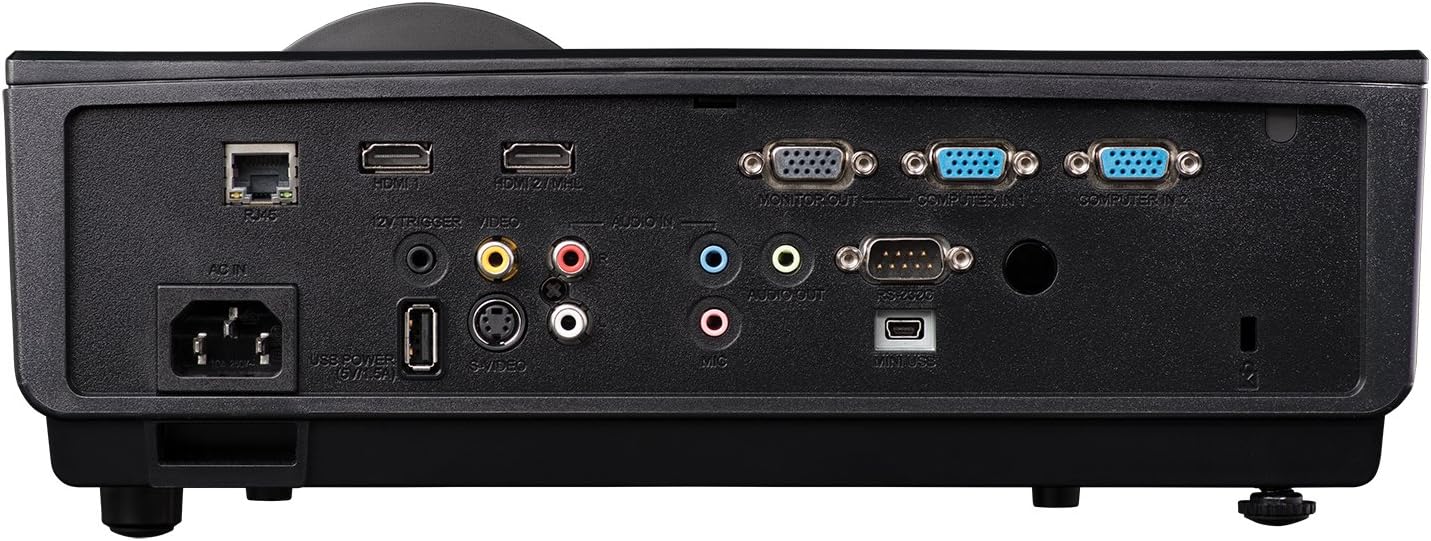
Figure 3: Rear panel showing available connection ports.
- HDMI (x2): For digital video and audio input from computers, Blu-ray players, and other HDMI-enabled devices.
- VGA (x2): For analog video input from computers.
- USB: Untuk perkhidmatan atau kemas kini perisian tegar.
- Rangkaian (RJ45): Untuk kawalan dan pemantauan rangkaian.
- Audio Masuk/Keluar: 3.5mm jacks for external audio sources or output to external speakers.
- Video (RCA): For composite video input.
5. Operasi
5.1 Hidupkan/Mati Kuasa
- Hidupkan kuasa: Connect the power cord and press the power button on the projector or remote control. The power indicator light will turn blue.
- Matikan: Tekan butang kuasa dua kali. Projektor akan memasuki kitaran penyejukan sebelum dimatikan sepenuhnya.
5.2 Melaraskan Imej
- Fokus: Putar cincin fokus pada lensa sehingga imej tajam.
- Zum: Laraskan gelang zum pada kanta untuk menukar saiz imej.
- Pembetulan Keystone: Use the keystone correction function in the OSD (On-Screen Display) menu to correct trapezoidal image distortion.
6. 3D Functionality
The InFocus IN3148HD projector supports 3D content from compatible sources, such as Blu-ray players. To experience 3D, you will need active 3D glasses (sold separately) and a 3D-enabled source device.
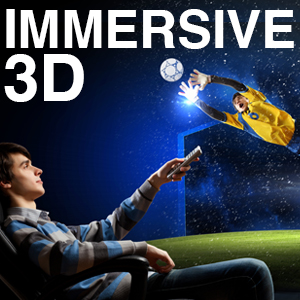
Figure 4: Visual representation of 3D content viewing.
7. Penyelenggaraan
Penyelenggaraan berkala memastikan prestasi optimum dan memanjangkan jangka hayat projektor anda.
- Lamp Penggantian: Lamp has a limited lifespan. Refer to the OSD menu for lamp hour information. Replace the lamp when its brightness significantly decreases or when the lamp indicator light illuminates. Always use genuine InFocus replacement lamps.
- Pembersihan Penapis: Clean the air filter regularly to prevent dust buildup, which can affect cooling and image quality. Refer to the full user manual for specific instructions on accessing and cleaning the filter.
- Pembersihan Kanta: Use a soft, lint-free cloth and a specialized lens cleaning solution to gently clean the projector lens. Avoid abrasive materials.
8. Penyelesaian masalah
If you encounter issues with your projector, consult the table below for common problems and solutions.
| Masalah | Kemungkinan Punca | Penyelesaian |
|---|---|---|
| Tiada imej dipaparkan | Power cable disconnected, input source not selected, lamp kegagalan. | Check power connection, select correct input source, replace lamp jika perlu. |
| Imej kabur | Lens out of focus, incorrect throw distance. | Laraskan gelang fokus, letakkan semula projektor. |
| Tiada audio | Volume too low, audio cable disconnected, incorrect audio source. | Increase volume, check audio cable connections, select correct audio input. |
| Projektor terlalu panas | Blocked ventilation, dirty air filter. | Ensure clear ventilation, clean air filter. |
9. Spesifikasi
Detailed technical specifications for the InFocus IN3148HD projector.
| Ciri | Spesifikasi |
|---|---|
| Jenama | InFokus |
| Nama Model | IN3148HD |
| Resolusi Paparan | 1920 x 1080 (1080p) |
| Kecerahan | 5000 Lumens (ANSI) |
| Nisbah Kontras | 1000:1 |
| Jenis Paparan | DLP |
| Teknologi Ketersambungan | HDMI, USB, VGA |
| Ciri Khas | Penstriman 3D |
| Lamp Wattage | 310 Watt |
| Hayat Operasi Sumber Cahaya | 4500 Jam |
| Berat Barang | 4.47 Kilogram |
10. Waranti dan Sokongan
For warranty information, technical support, or service inquiries, please refer to the warranty card included with your product or visit the official InFocus webtapak. Simpan resit pembelian anda sebagai bukti pembelian untuk tuntutan waranti.